Which email clients show a countdown timer
By Danish Mohammed, founder. 8 min read
Almost every email client will display a countdown timer, because a timer is an image and every client displays images. What varies is narrower than “support”: when the client asks for the image, how long it reuses the copy it got, and how many frames of an animated GIF it will play. The rest of this page is what each client’s own documentation says on those three points.
The three variables that decide what a recipient sees
A countdown timer in email is a GIF rendered by a server at the moment the image is requested. There is no JavaScript in an email, so nothing on the recipient’s machine counts anything down. The server works out the remaining time, draws it into the pixels, and sends back a file. Everything that can go wrong sits in the gap between that request and the human looking at the screen.
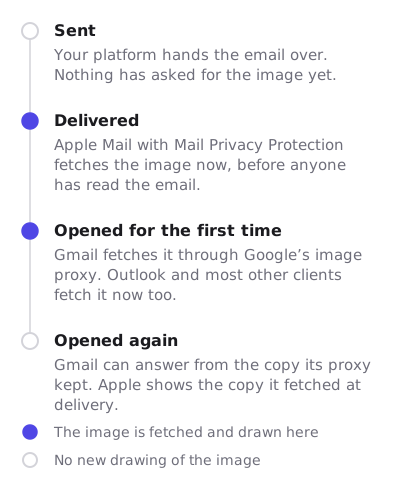
Fetch moment. Some clients ask for the image when a person opens the message. Apple Mail with Mail Privacy Protection asks for it when the message arrives, before anyone has touched it. Apple states that Protect Mail Activity “downloads remote content in the background by default”, regardless of whether the recipient engages with the message. A timer fetched at delivery shows the time remaining at delivery.
Reuse window. Once a client or its proxy holds a copy, it may serve that copy again instead of asking for a fresh one. Gmail serves images through Google’s proxy: “When your users open email messages, Gmail uses Google’s secure proxy servers to serve images that might be included in these messages.” A second open inside the reuse window can show the first open’s numbers.
Frames played. Classic Outlook on Windows parses HTML with the Word engine, documented by Microsoft since Outlook 2007. Microsoft’s own support page states the consequence in one line: “If only the first frame of the animation appears, you have animations, or animated GIFs, disabled.” For any Windows reader with animations off, frame one is the whole timer.
The client table
| Client | When the image is fetched | How long a copy is reused | Animated GIF | What a recipient sees |
|---|---|---|---|---|
| Outlook 2007, 2010, 2013 (Windows) | On open | Local profile cache | No animation | Frame one only. Microsoft’s own Outlook 2007 rendering document lists “Animated GIF images. Only a static representation of the GIF image shows.” Klaviyo and MailerLite name all three versions. |
| Outlook 2016 to 2024 and Microsoft 365, classic (Windows) | On open | Local profile cache | Depends on a setting | For Microsoft 365, Microsoft documents a “Play animated GIFs” checkbox under File, Options, Advanced before version 2008, and the Windows accessibility setting “Show animations in Windows” from 2008 onward. Its page does not cover the perpetual 2016 to 2024 builds, and reports differ on whether the checkbox exists there. With animations off, frame one only. |
| New Outlook for Windows | On open | Reported to resume from a cached frame | Yes | An unresolved Microsoft Q&A thread from 7 May 2025 reports a timer GIF restarting “from a specific cached frame” on each new open, on new Outlook 1.2025.319.100 and classic 2502. |
| Outlook on the web | On open | Browser HTTP cache | Yes | The same Q&A thread reports the incorrect time in the web client as well as the desktop client. |
| Outlook for Mac | On open | Local cache | Yes | No Microsoft documentation found that addresses GIF animation in Outlook for Mac specifically. |
| Outlook for iOS and Android | On open | App cache | Yes | The reporter in the Microsoft Q&A thread states that mobile Outlook showed the correct time while desktop and web did not. |
| Gmail on the web | On first open, through Google’s proxy | Not published by Google | Yes | Google documents the proxy, not a cache lifetime. Vendors report stale timers on later opens: MotionMail’s own help centre says Gmail “downloads this ‘old’ image instead of loading the timer new”. |
| Gmail app on iOS and Android | On open, through the same proxy | Not published by Google | Yes | Same proxy behaviour as the web client. |
| Apple Mail with Mail Privacy Protection | At delivery, in the background, through two relays | Third-party testing reports two to three days | Yes | The countdown animates from the time remaining at delivery. Dotdigital warns that an open-time countdown can show Apple Mail users the wrong time. |
| Apple Mail with Mail Privacy Protection turned off | On open | Local cache | Yes | Apple notes that disabling Protect Mail Activity still masks the IP address through the same two-relay design. |
| Yahoo Mail and AOL Mail | Not documented by the client | Not documented | Not documented | I found no vendor documentation. See the note below. |
| Thunderbird | Not documented for this case | Not documented | Not documented | I found no vendor documentation. |
| Samsung Mail | Not documented for this case | Not documented | Not documented | I found no vendor documentation. |
This table is compiled from the clients’ own documentation and public reports. When I have dated screenshots from real inboxes, they will go here and this line will say so.
Outlook is the case your design has to survive
Everything about the way EmailTimer.App builds a GIF follows from the Outlook row. The renderer treats frame one as the deliverable rather than as a lead-in. Frame one is a complete, full-canvas image with the live numbers for the moment of the fetch already painted into it, never a placeholder and never a blank plate. Frames two onward redraw only the rectangle the digits occupy, over a fixed colour table, which is what keeps the file small enough to send.
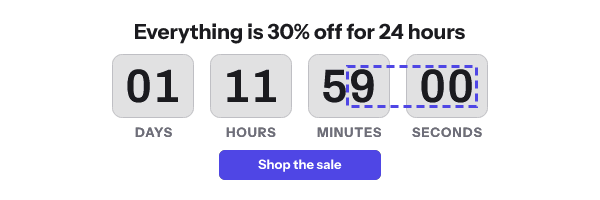
A timer in an Outlook-heavy list is a still photograph of a number. It can be the right number. It cannot tick. Design the block so that a static reading of it makes sense, and put the cut-off in text next to the image so the message survives a reader who never loads images at all.
Version-by-version detail, including the setting that controls animation and the 2025 regression report, is on countdown timers in Outlook.
Apple Mail moves the clock backwards
Apple’s published design routes remote content “through two separate relays operated by different entities”, and downloads it in the background whether or not the recipient engages with the message. For a countdown that means the render happens close to delivery. A recipient who opens eighteen hours later sees an animation built eighteen hours earlier.
A fixed deadline survives this intact, because the deadline did not move. If the sale ends at 23:59 UTC on Friday and the image was drawn on Thursday at noon, the numbers say thirty-five hours and change, and that was true when they were drawn. A timer that is supposed to start when the recipient opens does not survive it, because Apple’s prefetch is the first fetch, and the countdown starts then.
The mechanics of Apple’s cache, including what is documented and what is only reported, are in Apple MPP and the shared image cache.
Gmail is accurate on the first open
Google documents the proxy and does not publish a cache lifetime. What is reported consistently by vendors, including in their own troubleshooting articles, is that the first open renders correctly and a later open can replay the earlier picture. FreshInbox’s 2021 testing found that Gmail honours cache expiry headers where Apple Mail does not. That is the part of this a vendor can act on. The headers EmailTimer.App sends on a live timer state zero seconds of private freshness and thirty seconds of shared-cache life, with revalidation required.
The full treatment, including why a cache-busting parameter cannot help after a message has been sent, is on countdown timers in Gmail.
The clients nobody documents
Three rows in the table above say the same thing: no documentation found. Yahoo, AOL, Thunderbird and Samsung Mail publish nothing about how they fetch or reuse remote images in a message, and no vendor in this category has published a dated test of them either. Pages that claim a confident answer for these clients are not citing anything.
I would rather leave the cell empty than fill it. When I have dated screenshots from real inboxes, they will go here with the date on them.
What to do about it
These are steps you can take inside your ESP this afternoon, in the order they pay off.
- Write the deadline in body text, next to the image. “Ends 23:59 UTC on Friday 25 September” costs you one line and covers every failure in the table: images off, first frame only, stale copy, blocked proxy. Do this even if you do nothing else on this list.
- Prefer a fixed deadline for a broadcast. Set an absolute instant with an explicit time zone. It is the only model in which a delivery-time fetch and an open-time fetch produce the same correct answer.
- For a triggered flow, compute the deadline in the flow and sign it into an address per recipient. In a cart recovery or trial expiry sequence, calculate the expiry from the trigger event, generate an image address carrying it through the API, and hold that address in a profile field. Do not ask the image to work out when the recipient first looked, and do not add the timestamp to the address as a merge tag, because the address is signed and the tag breaks it.
- Set the expired image before you send, not after. A reader who opens after the cut-off should see a closed-sale graphic. A counter frozen on zero looks like a bug and reads as one.
- Set width and height on the image tag. Classic Outlook lays the message out with the Word engine and will not guess well. Explicit dimensions also stop the layout jumping while the image loads on a phone.
- Check what your own list is made of before you optimise anything. If seventy percent of your opens come from Apple Mail, the frame count is irrelevant and the fixed deadline is everything. If most of your readers are on classic Outlook, frame one is your whole design.
Questions and answers
Does a countdown timer work in Outlook?
It displays in every version of Outlook, and in classic Outlook on Windows it usually displays as a single static frame rather than an animation. Microsoft documents the setting that controls this and the behaviour when it is off.
Which client is the worst case for a timer?
Apple Mail with Mail Privacy Protection, because the fetch happens at delivery and the copy is reused for days, so a relative countdown is measured from the wrong starting point. A fixed deadline is unaffected.
Do I need a different timer for each client?
No. One image URL serves all of them, and the server decides what to draw. What changes per client is how much of the animation gets played and how old the copy is.
Has EmailTimer.App tested these clients itself?
Not yet. Every row above is sourced to the client’s own documentation or to a public report, and the sources are listed on this page. Dated screenshots from real inboxes will be published here when I have them.
Where do I see what my own template will render?
The publish step in the editor shows the four cases that matter side by side before a template goes out, and each of the timer types carries a note on which clients degrade it. Plans and limits are on pricing.
Sources
- The animated graphic in my e-mail message doesn't work (Microsoft Support)
- Word 2007 HTML and CSS Rendering Capabilities in Outlook 2007 (Part 1 of 2)
- Why animated gif countdown timers aren't showing correct time in Outlook Email Client (Microsoft Q&A)
- Mail Privacy Protection and Privacy (Apple Legal)
- Use Mail Privacy Protection on iPhone (Apple Support)
- Set up an image URL proxy allowlist (Google Workspace Admin Help)
- A Technical Take on iOS15 Mail Privacy Protection (FreshInbox, 29 July 2021)
- Add a countdown timer to an email campaign (Dotdigital Marketing Help Centre)
- How to use a countdown timer (MailerLite Help)
- How to add a countdown timer to an email (Klaviyo Help Center)