Holiday and seasonal campaigns
Holiday emails built around the shipping deadline nobody can move
At Christmas your deadline is not a marketing decision, it is a carrier cut-off. That makes it the most believable urgency you will ever have, and the easiest thing in the world to put in an email.
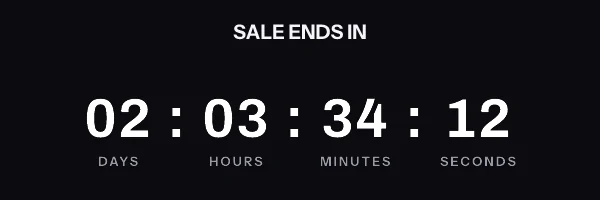
A holiday and seasonal campaigns email with a live countdown in it. The timer is a real render from EmailTimer.App.
What creates the urgency
Order inside this window or it does not arrive in time. Nothing you say can change that.
The timing model for this campaign is tiered shipping cut-offs. You choose it once, when you build the image, and the engine works out the rest for every subscriber who opens.
Compare the timing modelsHow we would set this one up
- Timer style
- Blocks with a delivery badge beside them
- The deadline
- The carrier cut-off, for example 2026-12-18T17:00:00Z
- What goes in the image
-
- Where they are, so the promise is about their delivery rather than a general one
- The countdown to guaranteed arrival
- The tier discount, if you are running one
- When it expires
- Becomes "ground has closed, upgrade to two day" so the email keeps selling.
What to get right in a holiday countdown
-
Run the tiers as one sequence: ground, then express, then gift cards. Each expired graphic becomes the next offer, so a single template carries you through the last fortnight.
-
Put the delivery promise in the image next to the clock. "Arrives before the 25th" and "6 hours left" mean far more together than apart.
-
Test the template before the last week of November, while there is still time to change it and nothing is at stake.
The holiday countdown timer snippet
One image tag, wrapped in a link. Drop it into an HTML block in your campaign builder. The merge tags below are the generic form. The exact syntax for Shopify Email and Salesforce Marketing Cloud is on each platform's own page, and the integration pages cover the rest.
This campaign needs one image address for the whole send. A carrier cut-off is a fixed instant, so one signed address serves the whole send, including the switch to the express graphic when ground closes.
Notice where the merge tags are. They are in the link and the alt text, and never inside the image address itself. The address is signed, and the signature covers all of it, so a tag your platform fills in afterwards breaks the signature and every subscriber quietly gets the fallback graphic instead of the timer.
<a href="https://yourstore.com/offer?code={{ coupon_code }}" target="_blank" rel="noopener">
  <img src="https://img.emailtimer.app/i/k7mQ2pXd.gif?w=w_8ha3fq&v=3&sig=YOUR_SIGNATURE" alt="{{ first_name }}, your offer ends tonight" width="600" height="200" border="0" style="display:block; width:100%; max-width:600px; height:auto; border:0;" />
</a>
What each inbox does with a holiday countdown
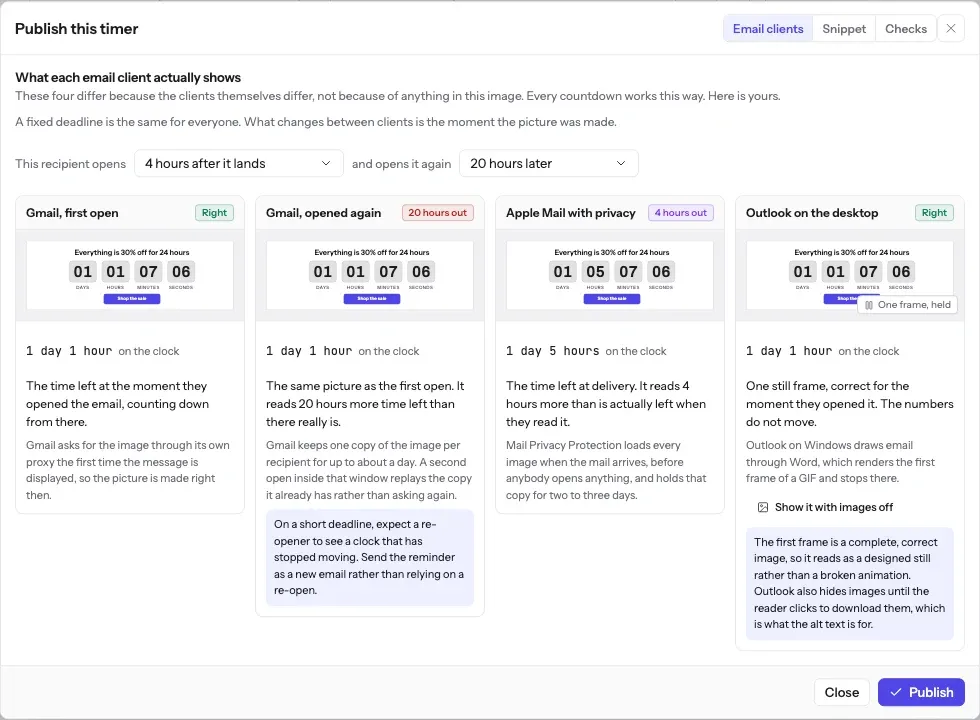
Peak season is when volume is highest and patience is lowest. When much of a list opens at once, opens of the same image address in the same second share one render, and a request the image service cannot answer in time gets a grey "image unavailable" card rather than a broken image.
The full account of what each client does, including how long Apple Mail holds a pre-fetched image and why Outlook on Windows never animates, is in Countdown timers in Apple Mail. The timing model this campaign uses is one of six, compared side by side in email countdown timer types.
What each client is documented to do
The Apple and Gmail rows rest on Apple's and Google's published documentation and on third-party testing. Neither company publishes a cache lifetime: Apple documents the prefetch, Google documents the proxy, and the two to three days is FreshInbox's 2021 testing. The Outlook and Yahoo rows are what we expect those clients to do, with no vendor document behind them. No row comes from a test by us yet, and we will publish dated screenshots when we have them. Sources: Apple on Mail Privacy Protection, Google on the Gmail image proxy, FreshInbox on Mail Privacy Protection image caching.
The playbook
One season, several deadlines
A holiday season is a run of deadlines rather than one. In a retail calendar the shipping cut-offs above come after Black Friday, and Black Friday countdown timers takes that weekend phase by phase: the teaser, the live sale and the final hours, each with its own clock.
Not every deadline in December is a sale. A trial or a membership that ends on a date your billing system already holds is a different kind of clock, set per subscriber rather than per season, and countdown timers for trials and renewals covers it.
Every cut-off in the sequence is a fixed instant, so the free countdown timer generator can make each one without an account, up to 90 days ahead. A timer from the free generator works for 500 opens without an account, and for 1,000 once you sign in and claim it. Build them in an account when you want each expired image to become the next offer, or when a send is larger than that.
Before you send
Questions about holiday and seasonal campaigns
Including the parts that do not work perfectly, because you will find those out either way.
How do I handle several shipping cut-offs in one campaign?
One image per cut-off tier, each with its own deadline, or one image whose deadline is the next cut-off for that customer's region. The second is better if you hold the region on your list, because the shopper sees the date that applies to them rather than a table they have to read.
What happens the moment ground shipping closes?
The image becomes the express upgrade graphic. The email keeps selling instead of advertising a service you can no longer deliver, which matters in December when a send goes out at 6am and the cut-off passes at 5pm.
Is a fixed carrier cut-off safe against Apple Mail caching?
Yes. It is a fixed timestamp, so a pre-fetched image still counts toward the real cut-off. Holiday campaigns are the second best case for accuracy after a flash sale.
December volume is much higher than normal. What happens if I go over my plan?
Nothing stops. Images keep rendering for the whole send. You get an email at 80 percent of your monthly opens and again at 100 percent, and past 110 percent new renders carry a small watermark until you move up a plan. A campaign in flight is never held hostage over a billing threshold, which is exactly the wrong month to discover otherwise.
Campaigns that pair with a holiday countdown
Put a holiday countdown in your next send
Free for 5,000 opens a month, $19 for 250,000, and no developer needed at any point.