
Custom fonts in email that show up in every inbox
Custom fonts in email usually fail: Gmail and Outlook on Windows ignore web fonts and swap in a system face. EmailTimer.app draws the font into the image instead, so your brand face reaches every inbox. Upload your own files on Starter and above, or pick from about 1,900 catalogue families.
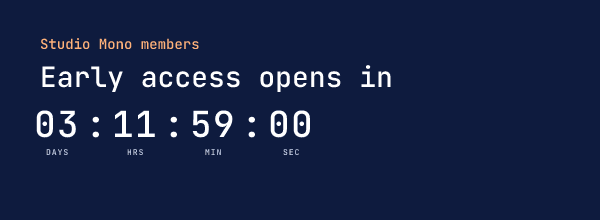
Why custom fonts in email fall back, and how an image fixes it
A web font in an email is a request: the HTML names the font and asks the mail app to load it. Apple Mail and iOS Mail do. Gmail, in the browser and in its apps, and Outlook on Windows do not, so the reader gets Arial, Helvetica or Times instead, and a headline written for your brand face wraps, shifts and loses its character. That is why most email guides tell you to pick a safe fallback stack and hope.
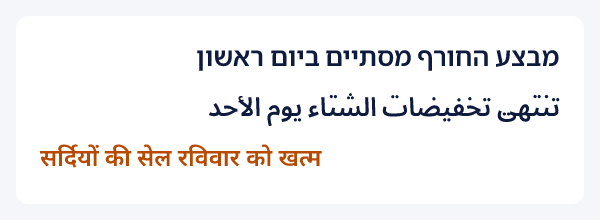
An image does not ask the mail app for anything. EmailTimer.app draws the text when the image is requested, with the font file on our side, and sends pixels. A countdown, a personalized headline or a coupon line looks the same in Gmail, Outlook, Yahoo and Apple Mail, because the face is already in the picture. It also works for scripts the reader's device has no font for: the image below has Hebrew, Arabic and Hindi in it, and the reader needs none of those fonts.
Three ways to bring your brand fonts in
Upload your own files. On Starter and above, the Fonts screen takes TTF, OTF, WOFF and WOFF2 files, 2 MB each and up to 50 per workspace. Each file is checked by parsing it and drawing a sample line, so a broken or unsupported file is refused when you upload it, with a reason, rather than being swapped for another face in a sent email. Your fonts are kept to your workspace.
Pick from the catalogue. About 1,900 freely licensed families, searchable by name, by category such as serif or mono, and by script such as Devanagari or Arabic. They work in text layers, timer digits and labels, charts and calendars, and they are free to use in commercial email.
Save a brand kit. A kit holds your fonts and your colours, each with a role. Apply it in the editor and the whole template takes it in one step. Agencies keep one kit per client; a brand with a sale look and an everyday look keeps two.
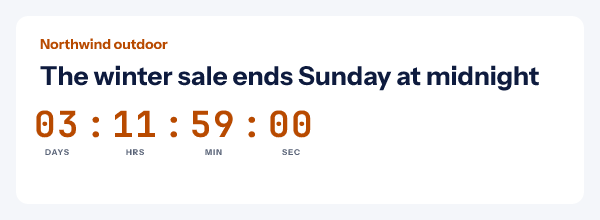
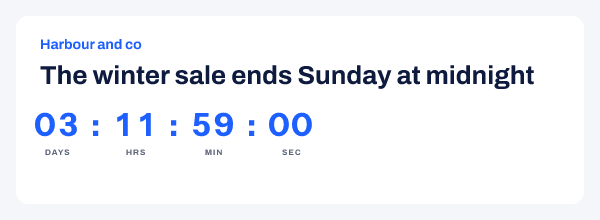
How to use custom fonts in email images
- Open Fonts in the dashboard. On Starter and above, upload your brand font as a TTF, OTF, WOFF or WOFF2 file of up to 2 MB, and tick the box that confirms your licence covers email images.
- Check the sample line. Each upload is checked by drawing a line with it, and the row shows that line in your font. A file the renderer cannot draw is refused at upload, not on send day.
- Make a brand kit. On the same screen, save your fonts and your colours with their roles, such as headline, digits and accent. A workspace holds up to 50 kits.
- Apply it in the editor. In the canvas panel, apply the kit and every layer takes its fonts and colours in one step you can undo. Font pickers list "Your fonts" first, then the catalogue.
- Publish and send. Publishing checks that every font the template names can be drawn. The image then carries your font to every inbox.
The fonts reference covers the font pickers, what publishing checks and the fonts in a Photoshop import. A design that already exists as artwork can come in through a Photoshop import, with the digits set in a catalogue face.
Where brand fonts matter most
- Countdown timers, where the digit face is half the look. Pick any family for the digits and another for the labels, on any of the timer styles.
- Personalized headlines such as a first name or a points balance, which a platform's live text would show in Arial for most of your list. See personalized images.
- Agency work, where each client has a brand book. One kit per client keeps every template on brand.
- Non-Latin lists, where the reader's device may not carry a face for the script at all.
Which plan it is on
Uploads, the font catalogue and brand kits are on Starter ($24 a month) and above, as the pricing page lists: up to 50 font files of 2 MB each per workspace. Free draws with the bundled fonts: Archivo, Instrument Sans and JetBrains Mono.
Compare the plansWorks with your email platform
The font travels inside the image, so nothing about it depends on the platform. These guides show where the image goes in each one.
What it does not do
- Text in an image is not live text: it cannot be selected, translated by the mail app or read by a screen reader except through alt text. Keep body copy in your email platform.
- Uploads must be static faces of up to 2 MB (4 MB once unpacked). A variable font file is refused; upload each weight you use.
- Your licence has to cover email images. The upload asks you to confirm it, and the check is yours to make.
- The editor preview draws three faces; other families show in the published image. Open the image address to see the face as readers will.
- The first image drawn with a catalogue family the renderer has not loaded yet waits up to two seconds for it, and if it is not ready, that one image is drawn in the default face and refreshed soon after.
Frequently asked questions
Can you use custom fonts in email?
In live HTML text, only partly: Apple Mail and iOS Mail load web fonts, while Gmail and Outlook on Windows ignore them and show a fallback font. In an image, always: EmailTimer.app draws your font into the pixels when the image is made, so every inbox shows the same face.
Which font files can I upload?
TTF, OTF, WOFF and WOFF2, up to 2 MB each and 50 per workspace, on Starter and above. WOFF and WOFF2 files are unpacked to the face the renderer draws. The face has to be a static one; a variable font file is refused, so upload the weights you use as separate files.
How many fonts are in the catalogue?
About 1,900 freely licensed families on Starter and above, which you can search by name, category or script in any font picker. A family is loaded the first time a template draws with it, and stays loaded after that.
What is a brand kit?
A saved set of fonts and colours with roles, kept on the Fonts screen. Applying a kit to a template sets the fonts and colours of every layer in one step. Kits are on Starter and above, up to 50 per workspace.
Do I need a licence to upload a font?
Yes. The upload asks you to confirm that your licence covers use in email images. Desktop and web licences do not always include that, so check with the foundry if you are unsure. Catalogue families are free to use in commercial email.
Will the text in the image be readable by screen readers?
Only through its alt text. Text drawn into an image is pixels, so write alt text that says what the image says, and keep the body of your email as live text in your platform.
What happens if I delete a font a live image uses?
The delete is refused while any published version uses the font, and the message names the templates. A published image never loses its face.
Related features
- Countdown Timers Eight styles, six ways to set a deadline.
- Personalized Images Names and codes drawn in at open.
- Dynamic Content Rules that change the image per reader.
- Photoshop Import Upload a .psd, keep your own artwork.
- Click Tracking and A/B Tests Clicks, stats and split tests per image.
Try it on the campaign you are building this week
The free plan covers 5,000 opens a month, and Starter is $24 for 250,000.