
A barcode in email that each customer scans at the till
To put a barcode in email, add a barcode layer to an image. It draws a Code 128 or EAN-13 barcode from a value you type or from a field such as a coupon code or member number, so each recipient's email carries the code that belongs to them. The bars are drawn into your design when the email is opened, on every plan.
How a barcode in email works
In store, a code someone has to read aloud is slower than one the till can scan. A barcode layer turns the value into bars inside your email image, so the customer opens the email at the counter and holds up their phone.
The engine encodes the value itself. Code 128 switches to its compact digit set for runs of numbers and uses its full set for everything else, then adds the checksum. EAN-13 adds the check digit to twelve digits, or checks the one you give. The bars are drawn as sharp vectors at the size of the box, with the value printed underneath unless you turn that off.
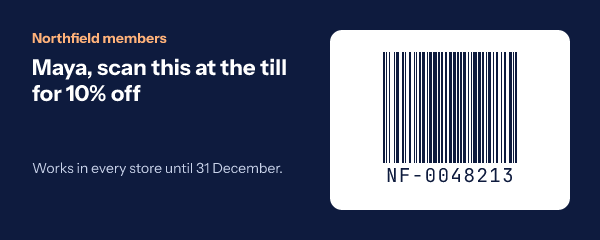
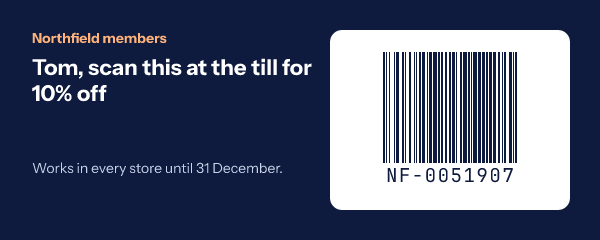
When the value is a field, one template serves a whole list. Maya's email draws NF-0048213 and Tom's draws NF-0051907, from the member number already in your platform. If a recipient has no number, the field's fallback decides: hide the barcode, or show a line telling them where to find it.
How to add a barcode to an email
-
Step 1
Add a barcode layer
In the editor, choose Barcode from the Add grid. Put it on a light card so the bars have a quiet margin around them.
-
Step 2
Choose Code 128 or EAN-13
Code 128 for coupon codes and member numbers with letters in them; EAN-13 for a product's retail code.
-
Step 3
Set the value
Type one code for everyone, or insert a field such as a coupon code. The Checks tab tells you before publish if a typed value cannot be encoded.
-
Step 4
Publish and test a scan
Copy the snippet for your platform from the publish dialog, send yourself a test and scan it on a till before the campaign goes out.
Barcode email examples
Both are renders from the engine, in brand navy on white.
A reserved item, by its product code
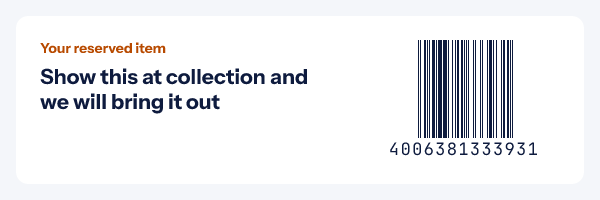
Click and collect, or a hold at the counter. The EAN-13 is the code already printed on the box, so staff scan the email and the shelf with the same gun.
One coupon, two ways in
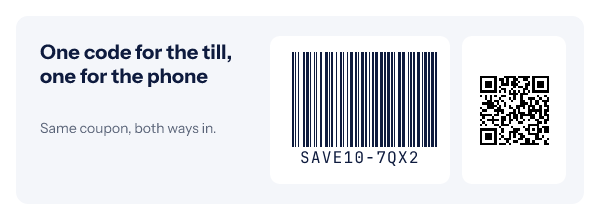
A barcode for the till and a QR code for the phone camera, from the same coupon. Read how to issue them in unique coupon codes.
Which plan includes barcodes
Every plan, Free included, for a barcode that is the same for everyone who gets the link, such as one store-wide coupon. A code per recipient needs a signed image address per recipient, which comes from a recipient list or the API on Growth ($54 a month) and Agency.
Compare the plansWorks with your email platform
A barcode is an ordinary image tag. These guides show where it goes in each platform and how a coupon or member field is written there.
What a barcode in email cannot do
- Two symbologies. Code 128 and EAN-13 only: no UPC-A, Code 39, PDF417 or Data Matrix. For a 2D code, use a QR code.
- Code 128 takes printable ASCII. Accented letters and emoji cannot be encoded, so such a value draws nothing.
- It does not issue codes. The codes come from your coupon system or platform; the image only draws them.
- Images must load. A reader with images turned off sees your alt text, so print the code in the email's text too when it matters.
- Some scanners cannot read screens. That is the scanner, not the barcode; test before a launch.
Barcode in email questions
Which barcode types are supported?
Code 128, which carries letters, digits and punctuation and is what most loyalty cards and coupon systems print, and EAN-13, the 13 digit retail product code. QR codes are a separate layer for codes a phone camera reads.
Can every recipient get their own barcode?
Yes. The value can be a field, such as a coupon code or a member number from the contact record, so each person’s image encodes their own code. That needs a signed image address per recipient, from a recipient list or the API on Growth and Agency.
Will a till scanner read it from a phone screen?
Most modern imaging scanners read a barcode from a screen. Older laser scanners often cannot read any screen, whoever drew the code. Test with the scanners in your stores before a campaign, and print the value under the bars so staff can type it in when a scan fails.
What if a value cannot be encoded?
Nothing is drawn for that barcode, rather than a code that scans as the wrong number. Code 128 takes printable ASCII; EAN-13 takes 12 digits, to which the check digit is added, or 13 with a correct check digit. The Checks tab warns before publish when a typed value is wrong, and a field’s fallback or hide setting decides what a recipient with no code sees.
Can I change the colours?
Yes, the bars and the background each take a colour. Keep strong contrast, dark bars on a light ground, because scanners read contrast, not colour.
Which plan do I need?
Barcodes are on every plan, Free included, for a code that is the same for everyone who gets the link. A different code per recipient needs Growth or Agency.
More you can draw into an email
- QR Codes A scannable code for each person.
- Maps A map with your marker on it.
- Calendars A month with your dates marked.
Barcodes fit the back in stock and birthday emails. The merge tag reference shows how a coupon field reaches the image, and everything else an image can carry is in personalized images for email.
Every feature on one pageMake the email the coupon
Add a barcode layer, point it at your coupon field, paste one image. Free for 5,000 opens a month.