
Salesforce Marketing Cloud in practice
SFMC countdown timer per subscriber, with AMPscript
By Danish Mohammed, founder. , updated 9 min read
To give every Salesforce Marketing Cloud subscriber their own countdown, sign one image address per subscriber before the send, store it in a column on the sendable data extension, and let AMPscript read that column whole into the image source. AMPscript personalizes the link and the alt text around the image. It never builds or edits the address itself, because every parameter in it is signed.
That is the whole method. The rest of this page is where each piece lives, what goes wrong in a real Marketing Cloud account, and how to check it before a send. If you are choosing a vendor for a whole programme rather than setting up one send, choosing a dynamic image and countdown timer vendor for an enterprise email programme covers what security, finance and the CRM lead each ask about.
Does Salesforce Marketing Cloud have its own countdown timer
No. Salesforce documents twenty content block types for Content Builder in Create Content Blocks, covering layout, text, image, button, dynamic content, Einstein selection, social follow, reference blocks, image carousel, live image and the interactive email form. There is no countdown or timer block among them.
The Trailblazer Community has asked the question directly since at least 2019, in a thread titled Countdown timer on Marketing Cloud, and the accepted answer points outside Salesforce. The block you use instead is documented in the same Content Builder list, in one line: “HTML Content allows you to paste in HTML or upload HTML in Content Builder.”
Journey Builder does not change this. A journey sends an email built in Content Builder, so it inherits the same blocks, and a timer arrives the same way in a triggered send as in a batch one.
One address for the send, or one per subscriber
Most Marketing Cloud timers need no per-subscriber work at all. A seasonal sale, a holiday campaign cut-off or a product launch counts every reader to the same instant. One signed address covers the send, on every plan including the free one, and each reader still sees the time left at the moment their mail client fetches the picture.
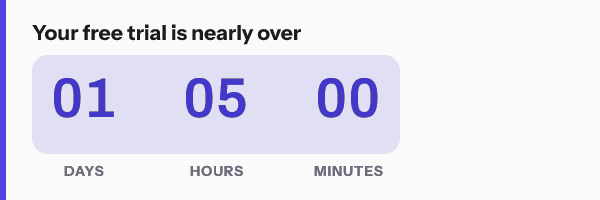
Per subscriber is for the deadline that belongs to the person: a trial that ends three days after that person signed up, a renewal date, a quote that expires on the date sales promised it. Those are the trial and renewal sends, and they are where an enterprise team usually starts asking.

| What differs per subscriber | Where it lives | What Marketing Cloud does with it |
|---|---|---|
| The deadline | Behind the recipient token in the signed address, fixed before the send | Nothing. It sends the address as stored |
| A name drawn inside the image | Behind the same token | Nothing. The image service reads it at the open |
| The link and the alt text | Your data extension or AMPscript | Fills them in at send, as with any link |
| The address itself | A column such as et_image_url on the sendable data extension |
Reads it whole into src |
Where AMPscript may touch the snippet
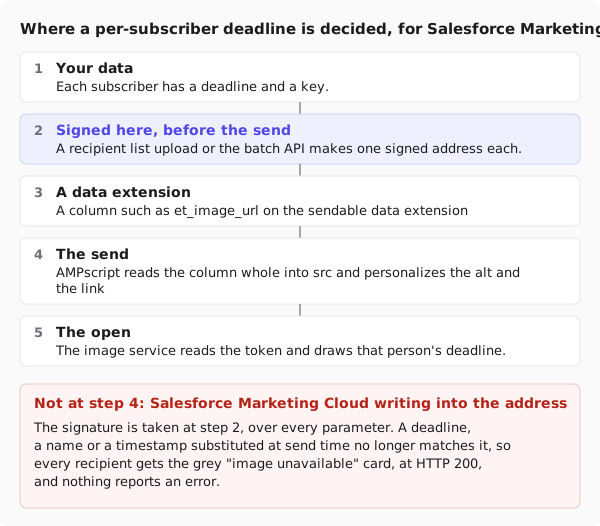
The dividing line is the signature. Every image address here carries an HMAC-SHA256 signature over its path and every query parameter except the signature itself. If Marketing Cloud writes a deadline, a subscriber key or a name into part of the address during the send, the signature no longer matches the text. The image service does not error. It answers HTTP 200 with a grey “image unavailable” card, for every subscriber in the send, and nothing anywhere reports a failure.
So AMPscript gets the link and the alt text, freely, and the address only as a whole value it did not change.
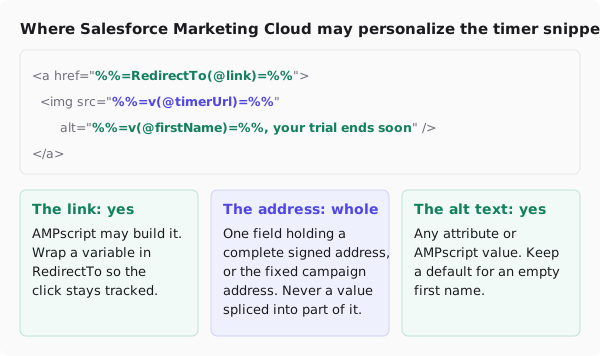
Here is the pattern in full, for an HTML content block:
%%[
SET @timerUrl = AttributeValue("et_image_url")
IF Empty(@timerUrl) THEN
  SET @timerUrl = "https://img.emailtimer.app/i/k7mQ2pXd.gif?w=w_8ha3fq&v=3&sig=YOUR_SIGNATURE"
ENDIF
SET @firstName = AttributeValue("FirstName")
IF Empty(@firstName) THEN
  SET @firstName = "Hi"
ENDIF
SET @link = "https://yourapp.com/upgrade"
]%%
<a href="%%=RedirectTo(@link)=%%" target="_blank">
  <img src="%%=v(@timerUrl)=%%" alt="%%=v(@firstName)=%%, your trial ends soon" width="600" height="200" border="0" style="display:block; width:100%; max-width:600px; height:auto; border:0;" />
</a>
Three details in it are Salesforce’s, not ours.
AttributeValue rather than a bare attribute. Salesforce’s reference for AttributeValue() says it returns an empty value when the attribute is missing, where a direct reference to a column the audience does not have can stop the send. Paired with Empty(), a subscriber with no address falls back to the campaign address instead of a blank src.
RedirectTo on a variable link. Salesforce’s RedirectTo() reference says to use it in the href of an <a> tag when the link is an attribute or a variable and should stay tracked. The timer’s image address is not a link, so it never goes through RedirectTo.
Lookup when the addresses sit in their own data extension. If a separate team owns the sendable data extension, keep the addresses in one of your own and fetch them by subscriber key. Lookup() takes the data extension name, the column to return, the column to search and the value to match, and returns the first match, so key it on something unique:
SET @timerUrl = Lookup("ET_Timer_URLs", "url", "SubscriberKey", _subscriberkey)
_subscriberkey is in Salesforce’s own list of personalization strings: “The unique identifier for the subscriber, if you use the subscriber key feature”.
Why AMPscript cannot sign the address itself
It is the obvious shortcut: build the address in AMPscript from the subscriber’s own date, then sign it. Two things stop it. Salesforce’s AMPscript reference lists hash functions such as SHA256() and symmetric encryption, and no HMAC function. And even if it had one, signing inside Content Builder means pasting the workspace’s signing secret into an email that every Content Builder user can open. Signing stays outside Marketing Cloud, before the send.
Filling the data extension
The signed addresses come from one of two places, both on the Growth and Agency plans.
A recipient list upload. Export a CSV with a column called external_id holding the subscriber key, a deadline column, and any values you want drawn into the picture, such as first_name. A deadline needs a full timestamp with a zone, such as 2026-10-01T17:00:00Z: the importer refuses a date with no time zone rather than guess one, and says which row. A file can hold up to 500,000 rows and 64 columns. Then download the addresses: one row per subscriber with the token, the external id and the signed address.

The REST API. A team that already writes the data extension from an upstream system can mint the addresses there instead. The batch endpoint takes up to 10,000 recipients per call and allows 600 calls a minute per key. The API reference has the request.
Import the CSV into the data extension, matched on subscriber key. Give the address column a Text type long enough for the longest address in the file, and check the file before importing it: a truncated address fails the signature exactly as an altered one does.
The recipient token is the only personal thing in the address. The deadline and the name stay with the recipient list, and the image service reads them at the open. That fits the one instruction in Salesforce’s HTML guidance that shapes all of this: “Do not include personally identifiable information data, such as email address, in email links.” If you mint through the API with merge values passed as parameters instead of a token, those values are in the address in plain text, so prefer the token for anything personal.
Where the snippet goes in Content Builder
Drop an HTML content block into the template and paste the snippet into it. For a template coded end to end, Salesforce’s HTML paste guidance says to “Enter or paste your HTML directly into the editor window on the left side of the screen”.
The dashboard writes the Marketing Cloud form for you. Choose Salesforce Marketing Cloud on the publish screen and pick a different image for each recipient, and the snippet’s src becomes %%et_image_url%%, a plain personalization string for the column.

Personalization strings take the double percent form. Salesforce’s personalization strings article tells you to “Include the two sets of double percent symbols”, and its list of available strings gives %%firstname%% and %%emailaddr%%. Note the missing underscore, which catches anyone who assumes %%first_name%%. Strings are case-insensitive, and an unpopulated one “will appear blank in the email”, which is why the AMPscript above supplies defaults.
What breaks in journeys and automations
A journey runs for quarters. The email inside it is authored once, and a fixed deadline in that email is wrong the day after the offer closes. For a lifecycle journey, prefer an address minted per subscriber, or a window counted from the send, over a calendar date.
The second problem is a data problem, which in Marketing Cloud is usually the real one. An address column has to be populated on every sendable data extension the journey can draw from, including the ones another team maintains. With AttributeValue() and a fallback, a missing value degrades to the campaign timer instead of an empty image. Without it, check for nulls before the send rather than after.
Third, a QA pass is not free. Salesforce states that “A test send counts as a send in the application and against the threshold you purchased”.
What your subscribers will see
Marketing Cloud sends the bytes. After that the rendering belongs to the mail client, and in an enterprise list that client skews to Outlook on Windows. Classic Outlook shows the first frame of an animated GIF, so frame one of every render here is a complete, correct countdown. Apple Mail with Mail Privacy Protection fetches images around delivery, which fixes the number at delivery rather than at the open. Gmail fetches through its proxy, which can hand back a copy it already holds on a second open.
That is documented client behaviour rather than a render photographed in each inbox; the Outlook page goes version by version. For a corporate audience, choose a days-and-hours display and write the deadline in body text beside the image. AMPscript can print the same date there, from the same data extension, as plain text.
Test before you send
Use Subscriber Preview and Test Send, which Salesforce describes as “a rendering of an email as viewed by a recipient”. Select a subscriber from the sendable data extension so the AMPscript resolves against a real row, then send to your own inbox. The step-by-step version says to “Enter up to five email addresses to send a test email to in Recipient”.
“Selecting a subscriber for preview does not send them an email”, so previewing against a real customer record is safe. Preview two subscribers with different deadlines and check the numbers differ, then one with an empty address column to see the fallback. Send one test to Outlook and one to Gmail.
Questions and answers
Can Salesforce Marketing Cloud show a countdown timer per subscriber?
Yes, with an image address signed per subscriber before the send. Store it in a data extension column, read it whole with AttributeValue() or Lookup(), and put that value in the image src. Content Builder has no timer block of its own.
Can AMPscript add the subscriber’s deadline to the image URL?
No. Every parameter in the address is signed, so a value AMPscript writes in during the send breaks the signature and every subscriber gets the fallback card. The deadline goes into the address when it is signed, outside Marketing Cloud.
Which Content Builder block should the timer go in?
The HTML content block, which Salesforce documents as the place to paste or upload HTML. A fully coded template takes the same snippet through the HTML paste editor.
Is any subscriber data exposed in the image URL?
Not when the address carries a recipient token, which is what a recipient list upload produces. The deadline and any name stay with the list and are read at the open. Merge values passed as API parameters do travel in the address, in plain text.
What happens if a subscriber’s address column is empty?
With the AMPscript above, that subscriber gets the campaign timer. With a bare %%et_image_url%%, the src is empty and no image renders. Per-subscriber addresses need Growth or Agency, which pricing compares.
Sources
- Create Content Blocks (Salesforce Help)
- Build an Email from HTML with Content Builder Tools (Salesforce Help)
- Personalization Strings (Salesforce Help)
- Personalization Strings in Email Studio (Salesforce Help)
- Lookup() (AMPscript for Marketing Cloud, Salesforce Developers)
- AttributeValue() (AMPscript for Marketing Cloud, Salesforce Developers)
- RedirectTo() (AMPscript for Marketing Cloud, Salesforce Developers)
- EncryptSymmetric() and the other encryption functions (AMPscript for Marketing Cloud, Salesforce Developers)
- Subscriber Preview and Test Send (Salesforce Help)
- Perform a Subscriber Preview and Test Send (Salesforce Help)
- Countdown timer on Marketing Cloud (Trailblazer Community, 1 July 2019)