Countdown timers in Apple Mail, with Mail Privacy Protection
By Danish Mohammed, founder. 7 min read
With Protect Mail Activity switched on, Apple Mail fetches the images in a message when the message arrives, whether or not anybody opens it. A countdown timer is drawn at the moment it is fetched, so an Apple Mail reader sees the time that was left at delivery. A fixed deadline stays correct about when the offer ends. A countdown that is meant to start when the reader opens the email starts at delivery instead, and nothing a sender does changes that.
What Apple documents
Apple’s legal page on Mail Privacy Protection says that when a message is received, Protect Mail Activity “downloads remote content in the background by default”, instead of downloading it only when the email is opened. It adds that this happens regardless of whether the reader engages with the email.
Apple’s guide for Mail on the Mac puts the timing in one line: “remote content is privately downloaded in the background when you receive a message (instead of when you view it)”. The iPhone guide adds that the feature “prevents senders from seeing if you’ve opened the email message they sent you”.
The same legal page describes where the fetch comes from. Mail routes remote content “through two separate relays operated by different entities”. The second relay knows the content but not the reader’s IP address, and gives the sender “a generalized identity” instead. The iPhone guide says the feature stops senders working out the reader’s “exact location”. A request for a timer image therefore arrives from a relay address, not from the reader’s own network.
The setting is Protect Mail Activity. On an iPhone it sits under Settings, Apps, Mail, Privacy Protection. On a Mac it is under Mail, Settings, Privacy. It belongs to the reader, and a sender cannot change it.
Apple publishes no cache lifetime, no cache key and nothing about whether the relay honours Cache-Control. Everything below the next heading is third-party testing, and it is labelled as such.
What testing found in 2021
The most specific public account is FreshInbox’s “A Technical Take on iOS15 Mail Privacy Protection”, from 29 July 2021. It was run on the iOS 15 beta, and its author asked readers to take it “with a grain of salt”. These are the findings that bear on a timer.
Downloads were not instant. The client took “anywhere from several minutes usually around 20 minutes to more than 8 hours to begin downloading images in the background”. The device “tends to hold off” when it is not on power or not on Wi-Fi. A commenter reported near-immediate downloads on push accounts such as iCloud and Exchange, and the author added that to the article. The same commenter saw fetch accounts, such as Gmail or IMAP, load nothing into the proxy until the message was opened.
Messages in the Junk folder had no images downloaded. If the Mail app was killed rather than sent to the background, nothing loaded either.
Once downloaded, images were cached. The article’s subheading gives two to three days, and says opening the email “does not entail a load from the server”.
Citing another tester, Brian Sisolak, it reports that the caching “does not respect the ‘Cache-Control’ headers that specify when a cached image should expire”, where Gmail, in the same comparison, honours them.
And one image used across several emails, or across accounts on the same client, “is only fetched once”.
That is five years old and was run on a beta. I have not re-tested it, and no timer has yet been watched rendering in a real Apple Mail inbox for this site. Treat every figure in this section as a report, not a measurement.
What that does to each type of timer
| Timer type | What the delivery fetch does | Result for an Apple Mail reader |
|---|---|---|
| A date and time | Draws the time left at delivery | Correct about the cut-off. The number is older than it looks |
| A date from your list | Draws that person’s time left at delivery | Correct about the cut-off |
| A countdown that starts at send | Counts from the signed send time | Correct. Delivery changes nothing |
| A countdown that starts on first open | Records the delivery fetch as the start | Starts at delivery, not at reading |
| Time since a moment | Draws the time elapsed at delivery | Correct about the start |
| The same time every week or month | Finds the next occurrence after delivery | Can point at an occurrence that passed while the copy was kept |
The first-open row has a second layer. The start instant is recorded against the image address. A campaign snippet is one address for the whole list, so the clock starts at the first fetch of that address by anybody. On a list with Apple Mail readers, that first fetch can be a relay acting at delivery. A clock per person needs an address per person, from a recipient list or the API on Growth or Agency. Timer types sets out all six side by side.
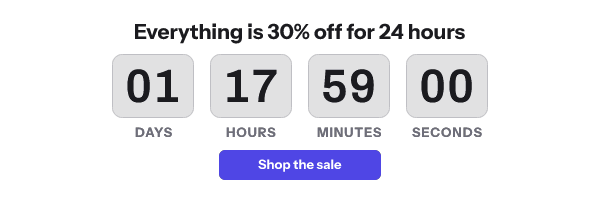
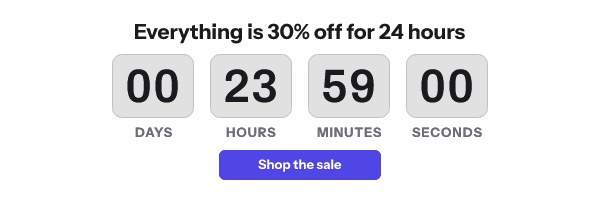
Klaviyo’s help centre gives the general version. “Countdown timers may not render correctly in Apple Mail. This is because Apple Mail generally pre-loads emails before they are opened, which can cause a countdown timer to display an incorrect time when a recipient opens it.” Dotdigital goes further and does “not recommend showing a countdown timer in emails when Apple Mail Privacy Protection is in use”. Its reason is that the timer starts at delivery. That is sound for a clock that starts on open. For a fixed deadline it is broader than the evidence, because the cut-off the image refers to has not moved.
What the image service sends
A live countdown from EmailTimer.App is 30 frames by default, one a second, and frame one is a complete picture with the numbers for that fetch drawn in. Its Cache-Control header includes s-maxage=30, which asks a shared cache to check back within 30 seconds.
Going by the 2021 report, Apple’s cache does not act on that, and nobody has published a header that shortens the copy an Apple Mail reader sees. The useful lever is the timer type, not the header.
A template rule that reads the reader’s country is unreliable here for a related reason. It reads the country of the relay’s address, and FreshInbox, citing Apple’s notes, says only that those addresses “may be associated with a user’s general region”. Personal values belong on a recipient’s row, where they do not depend on the request.
Seeing it before you send
The publish screen draws an “Apple Mail with privacy” preview beside Gmail and Outlook. Its note reads “Apple loads the image when the mail arrives, before anybody opens it, so the countdown shows the time left at delivery.” You pick how long after delivery the reader opens the message, from five minutes to three days, and the preview draws what that reader would see.

After the send, the Usage screen breaks image fetches down by client family, with Apple Mail as its own bucket. Client detection reads the fetching user agent, which a proxy can rewrite, so the screen calls the split an estimate. A fetch from Apple’s relay counts as an open whether or not a person read the message, as how opens are counted explains.
What to do about it
- Use a fixed deadline for a broadcast. It is the type an early fetch cannot make wrong.
- Write the cut-off in body text beside the image, with the time zone. It survives an old copy and a reader with images switched off.
- Use a countdown that starts at send, not on first open, when the list skews to Apple Mail. The send time is signed into the address, so delivery does not move it. That needs an address minted through the API, on Growth or Agency.
- Set the expired frame before the send. A reader opening two days later is the likeliest person to meet a finished countdown, and an image saying the offer has closed is a better answer than zeros.
- Give each recipient their own address when a deadline is personal. One kept copy then affects one person rather than everybody who shares the address. Per-recipient addresses are on Growth and Agency.
The broader picture across clients is on the email client support page, and the post on Apple’s shared image cache goes further into the cache key. What the renderer guarantees about frame one is on features.
Questions and answers
Why does my countdown show the wrong time on an iPhone?
With Protect Mail Activity on, Apple Mail fetched the image when the message arrived. The countdown shows the time left at that moment, which is older than the moment the reader opened it.
How long does Apple Mail keep a timer image?
Apple does not say. Testing published in 2021 reported two to three days, and I have not re-tested it.
Can I force Apple Mail to fetch a fresh countdown?
Not with headers, according to that testing. The reliable answer is a timer type that is correct at any fetch, such as a fixed deadline or a countdown that starts at send.
Does Apple Mail Privacy Protection count as an open?
It counts as an image fetch, and fetches are what plans measure. The fetch happens whether or not anybody reads the message.
Should I stop using countdown timers for Apple Mail readers?
Only the kind that starts on first open. A fixed deadline, with the cut-off also written in text, stays correct about the offer however early the image was fetched.
Sources
- Mail Privacy Protection and Privacy (Apple Legal)
- Protect email privacy in Mail on Mac (Apple Support)
- Use Mail Privacy Protection on iPhone (Apple Support)
- A Technical Take on iOS15 Mail Privacy Protection (FreshInbox, 29 July 2021)
- How to add a countdown timer to an email (Klaviyo Help Center)
- Email privacy protection guidance (Dotdigital Personalization Help Center)
Related
Put a countdown in the campaign you are writing now
The free plan covers 5,000 opens a month with no card. Starter is $19 a month for 250,000.