Countdown timers in Gmail, and what the proxy does to them
By Danish Mohammed, founder. 7 min read
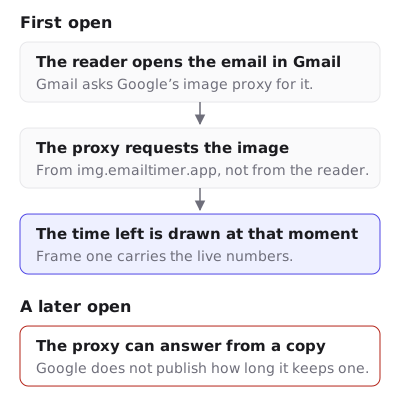
Yes. Gmail plays an animated countdown GIF, and it fetches the image at the moment a recipient first opens the message, so the first open shows the correct remaining time. The complication is the second open, because Gmail does not fetch your image directly and does not fetch it again for every view.
What Google documents
Google’s Workspace admin documentation states the mechanism in one sentence: “When your users open email messages, Gmail uses Google’s secure proxy servers to serve images that might be included in these messages.” The proxy exists so that a sender never learns the recipient’s IP address and so that image-based vulnerabilities cannot reach the client directly. The URLs it produces are the googleusercontent.com addresses you see if you inspect a Gmail message.
Two things follow from that, and only one of them is in the documentation.
The fetch happens at open, not at delivery. This is the opposite of Apple Mail, and it is the reason Gmail is the friendliest major client for a countdown. A recipient who opens on Thursday morning triggers a request on Thursday morning, and the server draws Thursday morning’s numbers.
Google does not publish how long the proxy keeps a copy. There is no official cache lifetime, no purge endpoint, and no documented rule for when a second open produces a second request. Anyone quoting you a figure is quoting a vendor’s observation, not Google.
What vendors report about later opens
The reports are consistent and they come from the vendors’ own help desks rather than from their marketing pages. MotionMail’s support article “My timer isn’t showing the correct time in Gmail” says that Gmail “downloads this ‘old’ image instead of loading the timer new”, so “some gmail.com users will see an older countdown clock instead of loading a brand new one, as intended”.

Klaviyo’s help centre, writing about third-party timers generally, warns that “countdown timers may not render correctly in Apple Mail” and separately notes that earlier Outlook versions show only the first frame. A 2022 thread in Klaviyo’s community records the symptom marketers report, which is not a frozen timer but an inconsistent one: “customers have fed back saying that they are receiving different times when they open the email”. Klaviyo’s own answer in that thread is blunt about the limits of the image approach: “When using these as image blocks however, the countdown timer will not be exact.”
FreshInbox’s 2021 technical testing of Apple Mail includes a useful aside about Gmail. Apple’s caching, it reports, “does not respect the ‘Cache-Control’ headers that specify when a cached image should expire”, where Gmail honours it. That is the one lever a timer vendor has in Gmail, and it is why the response headers matter.
What EmailTimer.App sends on a live timer
A live timer response from the image service carries this:
Cache-Control: public, max-age=0, s-maxage=30, no-transform, must-revalidate
ETag: "<sha256 of the exact bytes>"
Expires: <now>
Each part is doing a job.
max-age=0 binds the private cache, which is the recipient’s own browser or app. Shared-cache directives alone leave every browser-based client to invent its own freshness heuristic, and “how long may this be reused” is the entire product.
s-maxage=30 is what the proxy reads. Thirty seconds rather than sixty halves the worst drift a reader can see, and it is affordable because a repeat render inside the same second comes out of a cache rather than the renderer.
must-revalidate forbids serving the copy once it is stale without checking back. The strong ETag makes that check cheap: the renderer is deterministic, so identical inputs produce byte-identical output, and a revalidation that matches costs a 304 rather than a fresh image.
no-transform is the underrated one. Image-optimising proxies and some corporate mail gateways re-encode images in transit. A countdown converted to a still WebP, or stripped to its first frame, is a broken timer that nothing in the sending system would ever report.
How often Gmail’s proxy revalidates against those headers, I cannot tell you. I have not measured it in a real Gmail account and Google does not document it. What the headers do is ask for the shortest reuse window that is honest, in the one client that third-party testing reports reads them.
Why cache busting does not save you
The standard web answer to a stale image is to change the URL. In email that answer does not apply.
The URL is fixed when the message is composed. Once your ESP has handed the message to the receiving server, the src attribute is frozen in a copy of the message sitting in someone’s mailbox. You can put a random string, a send timestamp or a recipient identifier in the URL, and all of those change the URL per send or per recipient. None of them change the URL between the first and the second open of the same message, which is the exact case a stale timer comes from.
There is a real benefit to a per-recipient URL, and it is a different benefit. If every recipient shares one image URL, then any cache keyed by URL holds one copy for all of them. If every recipient has their own URL, a cache entry can only ever affect that recipient. EmailTimer.App signs a per-recipient URL for this reason, among others. It bounds the damage. It does not refresh anything.
The workable levers, in order of effect, are the headers above, a shorter reuse window, and a deadline model that is immune to the fetch moment. That last one is the important one, and it is a choice you make when you build the template rather than a setting you flip afterwards.
Gmail’s own quirks worth knowing
The proxy identifies itself. Fetches arrive with GoogleImageProxy in the user agent, which is how the analytics in EmailTimer.App separates Gmail opens from Apple relay fetches and Outlook opens. If you are reading raw logs on your own infrastructure, that token is what to look for.
Users can turn images off. Gmail offers “Ask before displaying external images”. For those recipients no image loads at all until they click, so the alt text and the adjacent line of body copy are the whole timer. Write them as if they were.
Gmail compose will not accept pasted HTML. If you are sending a one-off message from the Gmail interface rather than from an ESP, there is no code block to paste a snippet into. The route is to insert the image by URL instead.
A workspace admin can allowlist URLs past the proxy. Google’s documentation covers an image URL proxy allowlist for internal URLs. It applies to messages inside a Workspace domain, not to your marketing list, so treat it as an internal-comms tool rather than a deliverability trick.
What to do about it
- Put the cut-off in text beside the image. One line, with the time zone spelled out. It covers images-off recipients and every stale-copy case at once.
- Choose a fixed deadline for broadcasts. With an absolute instant, a stale copy is still arithmetically correct about when the sale ends. It is only the animation’s starting point that is old.
- For a flow, give each recipient their own signed image address. Generate it through the API from the deadline your flow computed, and hold it in a profile field, which Klaviyo, Braze and Customer.io can each do. A timestamp your ESP writes into the address as a merge tag breaks the signature instead. The deadline is then fixed per recipient rather than inferred at fetch time.
- Do not add a cache-busting parameter and call the problem solved. It changes nothing between two opens of one message. Spend the effort on the deadline model instead.
- Send yourself a real test and open it twice. Open the message, wait ten minutes, open it again in the same account, and note both numbers. That single check tells you more about your own list than any vendor compatibility table, this one included.
- If a timer is already stuck, work the tree. Why your email timer is stuck separates a cache effect from a wrong deadline in about two minutes.
- Keep the GIF small. Gmail accepts a large file. Mobile readers on poor connections still see a partially painted image, and a heavy image ratio is a standard input to spam filtering. A 600 by 200 timer should be well under 400 KB.
Sending from a Gmail account, rather than to Gmail readers, is a different job. The compose window takes no pasted HTML, so putting a countdown timer in a Gmail message works from the image address on its own, with a free timer made on the same page.
Questions and answers
Does Gmail support animated GIFs?
Yes. Gmail plays animated GIFs in the web client and in the iOS and Android apps, so a countdown animates rather than sitting on one frame. The Gmail app is covered beside the other phone apps in countdown timers on phones.
Why does my Gmail timer show a different time than my colleague’s?
Because the image was fetched at each person’s first open, and those were different moments. The numbers disagree because the clocks were read at different times, not because either one is wrong.
How long does Gmail cache a timer image?
Google does not publish a figure. Vendors report that a later open can replay the earlier copy, and EmailTimer.App asks shared caches to treat a live timer as stale after thirty seconds.
Can I force Gmail to refresh the image?
Not after the message is sent. The URL is fixed in the delivered copy, so nothing you change afterwards is visible to that message.
Is Gmail or Apple Mail the bigger problem?
Apple Mail, by a wide margin, because it fetches at delivery rather than at open. The comparison across every client is in the email client table, and the Outlook case is on countdown timers in Outlook.
Which plan do I need for per-recipient URLs?
Every plan signs a per-recipient URL, because it is how the renderer works rather than an upgrade. The view allowances are on pricing.
Sources
- Set up an image URL proxy allowlist (Google Workspace Admin Help)
- A Technical Take on iOS15 Mail Privacy Protection (FreshInbox, 29 July 2021)
- My timer isn't showing the correct time in Gmail (MotionMail Help), read on 17 September 2026
- Countdown timer displaying wrong/different times for customers (Klaviyo Community, 12 January 2022)
- How to add a countdown timer to an email (Klaviyo Help Center)
Related
Put a countdown in the campaign you are writing now
The free plan covers 5,000 opens a month with no card. Starter is $19 a month for 250,000.