What caches your email images, and when
By Danish Mohammed, founder. , updated 10 min read
An image in an email is not fetched by the person reading it. It is fetched by whatever sits between them and you: Google’s proxy, an Apple relay, Microsoft’s image service, a corporate gateway, or several of those in a row. Each one decides when the request happens and whether it happens again.
For a photograph of a jumper this is invisible. For a countdown timer it is the entire product, because a timer is a picture of the exact moment it was drawn.
This is a per-provider account of what each intermediary is documented to do. Where a company publishes something, it is quoted. Where nobody publishes anything, this page says so rather than filling the gap with a number.
The one number nobody publishes
Start with the thing that gets repeated most and sourced least: cache duration.
Google publishes no cache lifetime for its image proxy. Not in the Workspace admin documentation, not in the Gmail help centre, not anywhere. Apple publishes no cache lifetime for Mail Privacy Protection either. Every “Gmail caches images for X hours” you have read traces back to somebody’s test on an unrecorded day. So does every “Apple holds them for Y days”.
There is one figure worth knowing, and it must be labelled correctly. FreshInbox’s July 2021 technical testing of iOS 15 reports that “Images are cached for 2-3 days”. That is a third-party testing report about one client at one point in time. It is the best public evidence available, and it is not documentation.
Design for the mechanism, not the duration. The mechanism is published. The duration is not, and it can change without anyone telling you.
Provider by provider
Google’s image proxy
Google states the mechanism directly in its Workspace admin documentation: “When your users open email messages, Gmail uses Google’s secure proxy servers to serve images that might be included in these messages.” The stated purpose is to protect “against image-based security vulnerabilities”.
Two consequences follow from that sentence, and both are documented.
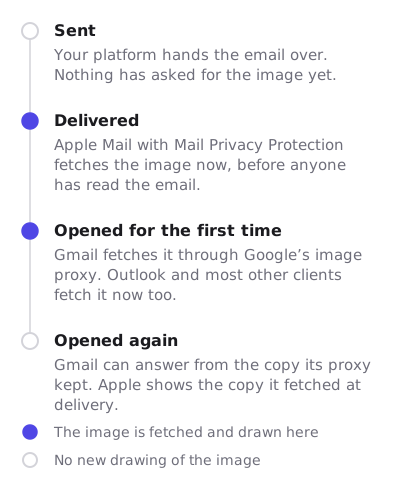
The fetch happens at the open. Gmail is not a prefetching client in the Apple sense. The first person to display the message causes the request, which means the first open of a timer is live.
The proxy is a real intermediary with real side effects. Google says “Because of the image proxy, links to images that are dependent on internal IPs and sometimes cookies are broken”, and offers administrators an “Image URL proxy allowlist” to exempt internal URLs. It adds that “Disabling the image proxy is not recommended”.
What Google does not say is how long a proxied copy survives. The observable consequence is documented by other vendors instead. MotionMail’s own support article tells its customers that Google “have a server that downloads the images from links in emails, and stores them at Google”. The consequence, in the same article: “When you view an email from gmail.com or the Gmail mobile app, it downloads this ‘old’ image instead of loading the timer new.” It concludes that “some gmail.com users will see an older countdown clock instead of loading a brand new one, as intended”.
Stripo documents the same behaviour from a different angle. After its timer allowance runs out and a one-pixel image is served, it warns: “Even after purchasing extra timer views, the timer will NOT work in already opened emails.” It describes the caching as “controlled entirely by Gmail and cannot be influenced or overridden by us”.
What it means for a timer. First open live, later opens possibly stale, no window you can plan around. A per-recipient URL keeps one person’s cached copy from becoming everyone’s.
Apple Mail Privacy Protection
Apple changes the question from how long to when.
Apple’s own privacy page describes Protect Mail Activity as a feature that “downloads remote content in the background by default”. The same page explains that Protect Mail Activity “routes all remote content downloaded by Mail through two separate relays operated by different entities. The first knows your IP address, but not any third-party Mail content you receive. The second knows the remote Mail content you receive, but not your IP address”, instead giving the destination a generalised identity.
So the request arrives without a human involved and without a usable IP address. The picture is drawn for a moment that is close to delivery rather than close to reading.
FreshInbox’s testing fills in the timing that Apple does not publish. It reports that it takes the client “anywhere from several minutes usually around 20 minutes to more than 8 hours to begin downloading images in the background”. It adds that “the device tends to hold off on downloading images in the background if the device is not connected to a power source or not on Wifi”. One finding matters most for a broadcast: “If you have the same image across multiple emails (and emails across accounts on the same email client), the image is only fetched once.”
That last sentence is the one almost nobody states correctly, and it is covered in full in Apple MPP and the shared image cache.
What it means for a timer. The clock reflects the prefetch, not the read. A fixed deadline stays arithmetically correct regardless, because the deadline did not move. A relative countdown does not.
Outlook.com
Microsoft documents a proxy for its consumer mail service in similar terms: “Outlook.com helps protect your data by loading external images using an image proxy.” The user-facing settings are named “Always use the Outlook service to load images” and “Don’t use the Outlook service to load images”. Microsoft warns that declining means “your personal data might be at risk”.
Microsoft publishes no cache lifetime for that proxy, and the page says nothing about storage at all.
Separately, on the desktop side, Microsoft documents that “Microsoft Outlook is configured by default to block automatic picture downloads from the Internet”. The Trust Center option is named “Don’t download pictures automatically in HTML e-mail messages or RSS items”. One of the stated reasons is to help you avoid tracking pixels, which is what a remote timer image looks like from the client’s point of view.
There is also a live rendering question in the Outlook family that reads as a caching problem. An unresolved thread on Microsoft’s Q&A site of 7 May 2025 reports a timer GIF starting “from a specific cached frame” on each open, showing an incorrect time. The reporter puts it on the desktop application and the web version, with mobile Outlook unaffected. Microsoft’s answer in the thread was to update Outlook and sync the Windows clock. Neither addresses a cached copy.
What it means for a timer. Assume the image may not load at all on the desktop client, and assume the first frame may be all that renders. Treat the 2025 report as an open risk rather than a solved one. Countdown timers in Outlook has the version table, and Outlook started resuming timers from a cached frame reads the report in full.
Corporate proxies and gateways
The least documented layer, because it is not one vendor.
A secure web gateway inspecting outbound traffic, or an enterprise mail hygiene product rewriting URLs, can sit between the mail client and your image host. None of them publishes a cache policy, because the policy is whatever that company’s administrator configured.
Three behaviours show up often enough to design around. A gateway may block a domain it has not categorised, which hits brand-new white-label image hosts hardest. It may cache aggressively for bandwidth reasons, which produces the same stale-copy symptom as a public proxy. And it may strip query strings or rewrite URLs, which breaks cache-busting schemes that depend on a changing parameter.
What it means for a timer. Keep the URL shape simple, keep the response an image with the right content type, and never depend on cookies, a referrer header or an internal IP. Google says outright that its proxy breaks the last two.
The table
| Intermediary | When the fetch happens | Published cache lifetime | Animation | What a timer actually shows |
|---|---|---|---|---|
| Google image proxy, Gmail web and apps | At the open, per Google’s documentation | None published by Google | Plays | First open live. A later open may be served from the copy Google holds |
| Apple Mail Privacy Protection | In the background around delivery, per Apple | None published by Apple. FreshInbox’s 2021 testing reports 2 to 3 days | Plays | Time remaining as of the background fetch. A fixed deadline stays correct |
| Outlook.com image proxy | At the open, when the proxy setting is on | None published by Microsoft | Plays | Live at the open, with no documented window for re-opens |
| Outlook on Windows, classic | At the open, and blocked by default until allowed | Not published | First frame only | The still first frame, drawn for the fetch. See the 2025 Q&A report |
| Corporate gateway or proxy | Whenever the gateway decides | Never published. It is a local configuration | Depends on the client behind it | Anything from live to blocked. Test on the affected network |
Every row above rests on the linked documentation or, where labelled, on third-party testing. None of it comes from an inbox test run here. When that test exists, this page will carry its date.
What follows for a campaign
Use a fixed deadline for a broadcast. An absolute instant survives every row in the table. If the image was drawn eight hours before the recipient read it, “ends 23:59 UTC Friday” is still true. “14 hours left” is not. Timer types sets out which of the six deadline models count toward an instant and which count from an event.
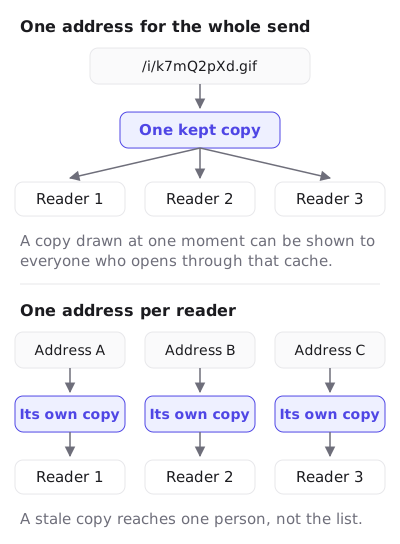
Use a per-recipient URL. One shared image URL across a send invites a shared cached copy, which is exactly what FreshInbox observed on Apple’s client and what MotionMail suggests working around with a per-user parameter. A unique URL per recipient makes each cache entry personal.
Keep the recipient identifier opaque. A per-recipient URL should not carry an email address. An opaque token does the cache-separation job without putting personal data into a URL that a proxy will log. How a subscriber’s own values reach the image without a merge tag inside the address is in merge tags.
Set the expired image before the send. Every stale-copy path in this article ends the same way: somebody sees an old picture. If the old picture says the sale has closed, that is a fine outcome. If it says 00:00:00, it looks broken.
Design frame one as a finished image. The Outlook rows in the table need it, and it costs nothing in the clients that animate.
Do not build a cache-busting scheme you cannot verify. Adding a random query parameter changes the URL, which changes the cache key. It does not change what a proxy did with the copy it already has, and a gateway that strips query strings undoes it silently.
How EmailTimer.App is built around this
A timer whose deadline differs per recipient gets one image URL per recipient, carrying an opaque token rather than an address, so one person’s cached copy is one person’s. A timer with one deadline for the whole send uses one URL for everybody, and the time left is still worked out at each fetch.
The image is rendered when the inbox fetches it, not when you publish. The digits are drawn once and reused, so a prefetching client that is waiting on the response is not waiting on text being drawn.
Frame one of every GIF is a complete full-canvas image with the live numbers painted in, so the Outlook rows in the table degrade to a correct still rather than a placeholder. Whether the GIF loops or holds its final frame is set per template, and for a countdown hold is the better choice, because the last number stays on screen rather than jumping back to the opening one.
Every request returns HTTP 200 and a valid image, degraded to a fallback if anything upstream fails, because a delivered email cannot be recalled.
The editor preview calls the same renderer that serves the inbox, and the publish dialog shows the prefetch case, the proxy case and the first-frame case before you send. How it works walks through the request path step by step, and the features page lists what the renderer guarantees.
Questions and answers
How long does Gmail cache an email image?
Google does not publish a figure. Its documentation describes the proxy and its purpose and stops there. Plan for a re-open to be served from Google’s copy, and keep the deadline true in text.
How long does Apple Mail cache an image?
Apple does not publish a figure either. FreshInbox’s 2021 testing reports two to three days, which is a third-party test rather than a policy. Apple does document that remote content is downloaded in the background by default.
Does cache busting fix this?
A changing URL creates a new cache key, so a fresh request happens for that URL. It does nothing about the copy already sitting in a proxy for the old URL, and some gateways strip query parameters. Treat it as a tool with limits rather than a fix.
Why does my timer show a different time to two people on the same list?
Because the fetch happened at different moments for each of them, and possibly through different intermediaries. That is normal and expected. Why your timer shows the wrong time covers the time-zone half of the same question.
Does an Apple prefetch count as an open?
It counts as an image fetch, which is what every vendor in this category meters. Budget for it on any list with a meaningful Apple Mail share, because those fetches happen whether or not a human reads the message.
Which client is the hardest for timers?
Classic Outlook on Windows, because it draws one frame and blocks images by default. Apple Mail is the one that most changes what the number means, because the picture is made before anyone looks.
Next: Apple MPP and the shared image cache for the mechanism in detail, countdown timers in Gmail for the proxy case, and the full client table.
Sources
- Set up an image URL proxy allowlist (Google Workspace Admin Help)
- Show images in Gmail (Google Help)
- Mail Privacy Protection (Apple legal)
- Protect email privacy in Mail on Mac (Apple Support)
- A Technical Take on iOS15 Mail Privacy Protection (FreshInbox, 29 July 2021)
- External image protection in Outlook.com (Microsoft Support)
- Block or unblock automatic picture downloads in email messages (Microsoft Support)
- The animated graphic in my e-mail message doesn't work (Microsoft Support)
- Why animated gif countdown timers aren't showing correct time in Outlook Email Client (Microsoft Q&A, 7 May 2025)
- My timer isn't showing the correct time in Gmail (MotionMail support), read on 17 September 2026
- What do you mean by timer block monthly opens? (Stripo Support), read on 17 September 2026
Related
Put a countdown in the campaign you are writing now
The free plan covers 5,000 opens a month with no card. Starter is $19 a month for 250,000.