How Apple's image cache freezes a countdown
By Danish Mohammed, founder. 8 min read
Apple Mail asks for your timer image when the message arrives, not when the recipient reads it, and it holds the answer for days. The cache is keyed by the image URL, so one URL shared across a list can be satisfied by one fetch. Testing reports that the cache does not act on the expiry headers you send. A fixed deadline survives all of this intact. A countdown that is supposed to start when someone opens does not, and no vendor setting changes that.
What Apple publishes
Apple’s own legal page on Mail Privacy Protection describes two properties that matter to anyone rendering an image at request time.
The first is when the fetch happens. Protect Mail Activity “downloads remote content in the background by default”, regardless of whether the recipient engages with the message. There is no open event in this picture. The request arrives because a message was delivered.
The second is where the fetch comes from. Protect Mail Activity “routes all remote content downloaded by Mail through two separate relays operated by different entities. The first knows your IP address, but not any third-party Mail content you receive. The second knows the remote Mail content you receive, but not your IP address”, and gives the destination a generalised identity instead. No single party can connect a person to the content they received.
Apple’s user-facing documentation adds the intent in plainer language: Mail Privacy Protection “hides your IP address so senders can’t link it to your other online activity or determine your exact location”, and prevents senders from seeing whether a message was opened.
The wider per-provider picture, including Outlook and corporate proxies, is in how email image caching works.
That is the whole of what Apple states. Apple does not publish a cache lifetime, a cache key, a revalidation policy or a purge mechanism. Everything below this line comes from third-party testing or from vendor documentation, and it is labelled as such.
What testing has reported
The most specific public technical account is FreshInbox’s “A Technical Take on iOS15 Mail Privacy Protection”, published on 29 July 2021. Three findings from it bear directly on timers.
Images are cached for two to three days once fetched.
The cache is effectively keyed by URL rather than by message. In its words, “If you have the same image across multiple emails (and emails across accounts on the same email client), the image is only fetched once.” One image reused in several campaigns is fetched once and served from the cache thereafter.
The caching “does not respect the ‘Cache-Control’ headers that specify when a cached image should expire”, where Gmail, in the same test, honours it.
That last point removes the only lever a vendor normally has. In Gmail, a short shared-cache lifetime and a revalidation requirement are meaningful instructions. In Apple Mail, as reported, they are ignored. There is no header you can send that shortens the window.
Two caveats. This testing is from 2021 and Apple has shipped several major releases since. I have not re-tested it, and I can find nobody who has in public. The finding about caching across accounts describes accounts on the same client, which is a shared cache on one person’s device, not a global cache shared between strangers. The stronger claim gets made anyway. I have found no evidence for it, so it is not repeated here.
Why the cache key is the interesting part
If the cache is keyed by URL, then the URL decides how much of your list one stale copy can affect.
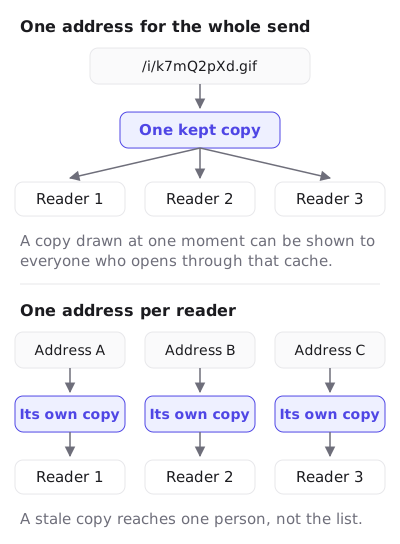
Send every recipient the same image URL, which is what a fixed-date timer from a generator tool typically produces, and every cache in the chain has one entry to fill. The first fetch decides the picture, and any later fetch that finds that entry can be served from it. That is the worst arrangement available: one render, reused widely, growing older.
Send every recipient their own URL and the arithmetic changes. A cache entry belongs to one recipient, so a stale copy affects one person’s view of one message. EmailTimer.App signs a per-recipient URL for several reasons, and this is one of them. The image service also refuses to vary a render on anything that is not in the signed URL, which is what makes the URL a complete cache key rather than an approximate one.
This does not make Apple Mail fresh. Nothing makes Apple Mail fresh. It bounds the blast radius, which is a smaller claim and a true one.
What the fetch moment does to each timer model
Under a delivery-time fetch the models come apart, and the one you pick decides whether the campaign is accurate.
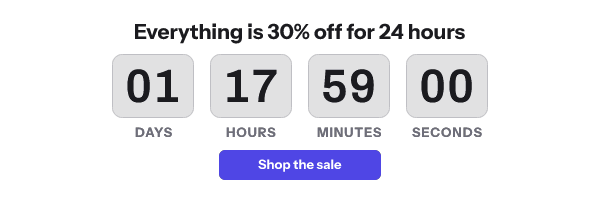
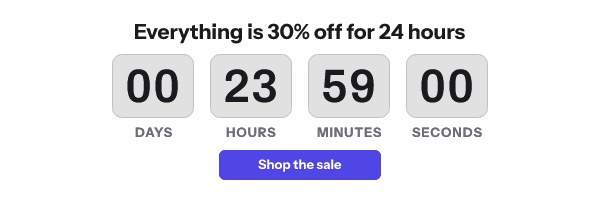
Fixed deadline. Survives. The deadline did not move because Apple fetched early. A message delivered Thursday at noon with a Friday 23:59 UTC cut-off renders “35 hours 59 minutes”, and that was true when it was drawn. A reader who opens on Friday morning sees an animation that began from a number twenty-two hours old, and the cut-off it refers to is still Friday 23:59. This is the model to use for a broadcast, and it is why the recommendation to pair a timer with a written deadline is not a hedge but the actual fix.
Per-recipient deadline. Survives, for the same reason. The deadline is an absolute instant for that recipient, computed from the trigger event before an image address was signed for them, and looked up from their recipient token at render time. The fetch moment changes the starting number and not the truth of it.
Evergreen from send. Survives. The send timestamp is signed into the URL when the address is generated, so the deadline is fixed before the message leaves.
Evergreen from first open. Does not survive, and cannot. The mechanism has to record the first fetch of a given URL and count from there. In EmailTimer.App that is a single atomic write in Redis against the hash of the URL, so the first writer wins and two simultaneous fetches can never disagree. Under Mail Privacy Protection the first fetch is Apple’s prefetch at delivery, so the countdown starts at delivery. For a 48-hour evergreen on a message a recipient opens three days later, the timer has already run out. Dotdigital states the same conclusion as a recommendation: “We therefore do not recommend showing a countdown timer in emails when Apple Mail Privacy Protection is in use”, and its marketing help centre adds that with an open-time countdown “Apple mail users might see the wrong time on the timer”.
Count-up. Survives in the same sense as a fixed deadline, because it measures from a fixed past instant.
I disagree with Dotdigital in one respect. The advice is sound for open-time timers and too broad for fixed-deadline ones, where the render is correct about the thing the copy promises. The right move is to pick the model that is immune rather than to drop the timer.
What Apple’s design means for personalization generally
Because the request arrives from an Apple relay, nothing about the reader’s network is available at render time. The IP belongs to a relay by design, so geolocation on the fetch is geolocation of a data centre. Device hints are similarly unreliable. Any personalization that depends on inferring something at fetch time degrades to a guess in Apple Mail. Carry the value on a recipient list instead, from data you already hold, so it reaches the render through the recipient token in an address signed for that person.
Klaviyo’s help centre puts the timer half of this plainly for its own users: “Countdown timers may not render correctly in Apple Mail. This is because Apple Mail generally pre-loads emails before they are opened, which can cause a countdown timer to display an incorrect time when a recipient opens it.”
What to do about it
- Use a fixed absolute deadline for any broadcast to a consumer list. Apple Mail is a large share of consumer opens and this is the one model that is correct under a prefetch.
- Write the cut-off in body text next to the image, with the zone. This is the fix that works when the image is old, when images are off, and when only one frame renders.
- Never use evergreen-from-first-open on an Apple-heavy list. Use evergreen-from-send instead, with the send timestamp passed by your ESP, or compute a per-recipient deadline in the flow.
- Give every recipient their own image URL. It stops one cached render from serving many people. Most ESPs can append a recipient identifier from a merge tag.
- Configure the expired image before you send. Apple readers opening two days later are the most likely people to meet a finished countdown, and a closed-sale graphic is a better answer than zeros.
- Do not spend engineering effort on cache headers for Apple. As reported, they are ignored. Spend it on the deadline model, which you control.
- Read the Outlook case separately. Outlook’s cache behaves differently again, and a 2025 report on Microsoft’s Q&A site of it resuming from a cached frame is covered in the Outlook countdown timer regression.
- Segment if the stakes justify it. If your ESP can identify Apple Mail opens, a variant without a live counter and with a bold written deadline is a legitimate option for that segment. It is more work than most campaigns need and it is the correct answer for a high-value launch.
Questions and answers
Does Apple Mail break countdown timers?
It moves the render to delivery time and reuses it for days, which breaks any timer that counts from the moment of opening. A fixed-deadline timer is still correct about the cut-off.
How long does Apple cache a timer image?
Apple does not publish a figure. Third-party testing from 2021 reports two to three days, and I have not re-tested that.
Will shorter cache headers help in Apple Mail?
The same testing reports that Apple’s cache does not act on Cache-Control, so no. Gmail is documented to honour expiry, which is why the headers matter there.
Does one recipient’s cached image get shown to other recipients?
I have found no evidence for that and I am not claiming it. What is reported is a cache keyed by URL that spans messages and accounts on one client, which is a reason to give every recipient a distinct URL.
Which timer should I use for an Apple-heavy list?
A fixed deadline, or a per-recipient deadline computed in your flow and signed into an image address made for each recipient. The full comparison is in timer types, and the per-client picture is on email clients. What the renderer guarantees is listed on features.
Sources
- Mail Privacy Protection and Privacy (Apple Legal)
- Use Mail Privacy Protection on iPhone (Apple Support)
- A Technical Take on iOS15 Mail Privacy Protection (FreshInbox, 29 July 2021)
- Email privacy protection guidance (Dotdigital Personalization Help Center)
- Add a countdown timer to an email campaign (Dotdigital Marketing Help Centre)
- How to add a countdown timer to an email (Klaviyo Help Center)
Related
Put a countdown in the campaign you are writing now
The free plan covers 5,000 opens a month with no card. Starter is $19 a month for 250,000.