Black Friday countdown timers, phase by phase
By Danish Mohammed, founder. , updated 7 min read
Black Friday 2026 falls on 27 November and Cyber Monday on 30 November, which is one weekend carrying three different jobs for a countdown timer. Each job wants a different configuration, and one published template can serve all three if the expired state hands off to the next phase.
The three phases
| Phase | Timer mode | Deadline | Style and size | What the expired state becomes | Snippet mode |
|---|---|---|---|---|---|
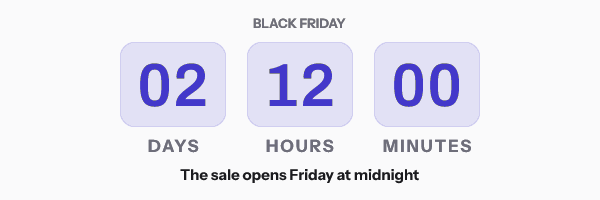
| Pre-sale teaser | Fixed deadline | The sale opening instant, for example 2026-11-27T00:00:00-05:00 | Ring or bold blocks at 600x300, days and hours, no seconds | “The sale is live, shop now” | Campaign, one address for the whole send |
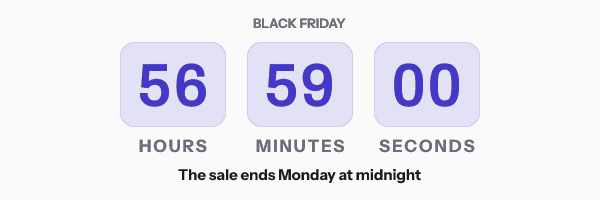
| Live sale | Fixed deadline | The sale closing instant, for example 2026-11-30T23:59:59-05:00 | Digital numerals at 600x200, hours, minutes and seconds | “Extended through Cyber Monday” or the closed-sale graphic | Campaign |
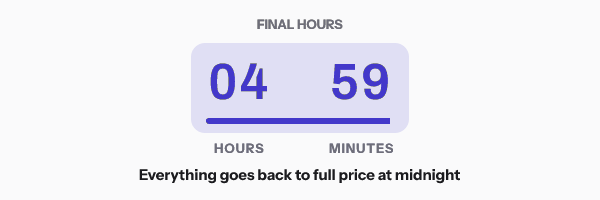
| Final hours | Fixed deadline | The same closing instant | Digital or bar at 600x200, hours and minutes, high contrast | The closed-sale graphic | Campaign |
Every row says fixed deadline, and that is deliberate. A sale weekend has one opening instant and one closing instant for the whole list, which makes it the friendliest timing model there is. It is also the only model that no caching behaviour can damage, for a reason covered below.
Pre-sale teaser
The teaser is counting to an opening rather than a closing, so seconds are noise. Days and hours read better and they survive a still frame, which matters because an image fetched at delivery and read a day later still shows a plausible number of days.
Set the expired state to the sale-is-live graphic before the teaser goes out. That single setting means the teaser keeps working after the sale opens, and nobody who opens late lands on a countdown to something that already happened.
Live sale
Seconds earn their place here, because the recipient is reading in the window where the number is moving and the animation is the point. The default GIF is 30 frames at one frame per second and holds its last frame rather than looping, which is 30 seconds of visible movement without a file a mail client will refuse.
Final hours
The last send of the weekend is where the clock does the most work and where the design should be plainest. Hours and minutes, high contrast, and the deadline written in words next to the image. That written line survives blocked images, a still frame in Outlook, and a stale cached copy, all three at once.
Build any of the three without an account in the countdown timer generator. A timer from the free generator works for 500 opens without an account, and for 1,000 once you sign in and claim it, so for a Black Friday list, build the one you send in an account.
The send-time playbook
- Early November. Build and publish the templates while nothing is at stake. Send yourself a test to an Apple Mail account, a Gmail account and an Outlook account, and look at all three.
- Ten to fourteen days out. Teaser one, counting in days. This is the send that sets the date in people’s heads.
- Three to five days out. Teaser two, with the early-access or VIP variant if you run one. A conditional rule draws the early-access layer only for recipients whose merge value says it applies.
- Sale opening, within the hour. The launch send. The teaser’s image has already flipped to the live graphic on its own, so this send is the announcement rather than the correction.
- Saturday morning. The mid-sale send, counting to the closing instant.
- Cyber Monday morning. The second-wind send. Reset nothing; the deadline has not moved.
- Cyber Monday, six to eight hours out. The final-hours send. This is the one where a live clock beats a written date.
- After close. Send nothing. Every image you already sent is now showing the closed-sale graphic, which is the whole reason you set it.
Why a fixed deadline survives the weekend
Apple’s privacy page states that “Protect Mail Activity downloads remote content in the background by default”, regardless of whether the recipient engages with the email. FreshInbox’s 2021 analysis reports that the downloaded images are then held for two to three days. Klaviyo’s help centre says that Apple Mail “generally pre-loads emails before they are opened, which can cause a countdown timer to display an incorrect time when a recipient opens it”.
For a Black Friday send, none of that changes the answer. The image counts toward a real timestamp, so a frame drawn at delivery on Wednesday is still counting to 23:59 on Monday. What a cache costs you is precision in the last few hours, not correctness, which is an argument for sending the final-hours email close to the deadline rather than early.
Outlook is a separate matter. Microsoft’s own Word engine documentation lists “Animated GIF images. Only a static representation of the GIF image shows” among the features it does not support, and Dotdigital says the same of Outlook “2013 or older”. Frame one of every EmailTimer.App GIF is a finished picture with the live numbers already painted in, so those recipients get a correct still countdown. Version by version detail is on the email client table.
Keeping the deadline honest
The FTC’s September 2022 staff report names a “Baseless Countdown Timer” as a deceptive design practice, defined as “showing a fake countdown clock that just goes away or resets when it times out”. A Black Friday clock is the easiest kind to keep on the right side of that line, because the sale really does end.
Two things put you on the wrong side. Extending a sale after advertising a hard close teaches your list that the next close is negotiable. And a “final hours” clock in a send where the offer continues on Tuesday is the practice the report describes, whatever the subject line says. What EU and UK consumer law say about a false deadline is quoted beside the FTC’s on fake countdown timers.
How to set it up
- Open the gallery and pick a design, or start a canvas at 600x200 or 600x300.
- Select the timer layer, set the mode to fixed, and enter the deadline with an explicit IANA timezone. For a US sale that is usually America/New_York rather than UTC.
- Set the units the phase needs. Turn seconds off for the teaser and on for the final-hours send.
- Set the style, the digit font and the colourway in the right-hand panel. Unit labels are editable and ship in 44 languages.
- Open Expiration State and upload the graphic for the next phase. This is the field that turns three sends into one template.
- Add a conditional rule if you run tiers. A rule shows, hides, swaps or recolours a layer based on a merge value, a country or a date.
- Publish and read the readiness checks, which report the image size, the frame count and the version going live.
- Copy the snippet for your platform. Klaviyo, Mailchimp, Shopify Email and the rest of the directory each get their own merge-tag syntax in the link and the alt text.
- Check your plan headroom before the weekend. Every image fetch is an open, and Black Friday is when a year’s traffic arrives in four days.
The six timing models are compared in timer types, and the snippet anatomy is in the HTML guide.
Questions and answers
What happens if I go over my plan during the weekend?
Nothing stops rendering. You get an email at 80 percent of your monthly opens and again at 100 percent, and past 110 percent new renders carry a small corner watermark until you move up a plan. The tiers are on pricing.
Should the timer show seconds?
Only in the sends where the reader is inside the final hours. On a teaser sent ten days out, a seconds field is movement without meaning, and it reads badly as a frozen frame in Outlook.
Can I run different deadlines for VIP and general access?
Yes, through two published templates or through a conditional rule that swaps the layer set by a merge value. A genuinely per-person deadline needs one signed address per recipient, which is a Growth or Agency feature.
Do I need to send a separate “sale is live” email?
Usually yes, because the flipping image is a safety net rather than a replacement for an announcement. What it buys you is that the teaser stops lying the moment the sale opens, with no second send required.
When does this need to be built by?
Build and test in early November. The weekend itself is the worst possible time to discover that your builder rewrote the image tag, and the fix takes minutes in October and hours in November.
Sources
- Mail Privacy Protection and Privacy (Apple Legal)
- A Technical Take on iOS15 Mail Privacy Protection (FreshInbox, 29 July 2021)
- How to add a countdown timer to an email (Klaviyo Help Center)
- Add a countdown timer to an email campaign (Dotdigital Marketing Help Centre)
- Bringing Dark Patterns to Light (FTC Staff Report, September 2022)
- Word 2007 HTML and CSS Rendering Capabilities in Outlook 2007 (Part 1 of 2)
Related
Put a countdown in the campaign you are writing now
The free plan covers 5,000 opens a month with no card. Starter is $19 a month for 250,000.