Generate email countdown timers from your own code
By Danish Mohammed, founder. 6 min read
The EmailTimer.App API does not draw timers when you call it. It mints image addresses. A timer is drawn later, when a mail client fetches the address, and that is what lets it count to the right second in a message opened days after it was sent. The API is included on Growth at $49 a month and Agency at $149, as pricing sets out. A key from a Free or Starter workspace is refused with HTTP 402 and a sentence naming the plan it needs.
Two hosts, and what each one takes
Calls go to https://api.emailtimer.app/api/v1/workspaces/{workspaceId}, with a key. Images come from https://img.emailtimer.app/i/{publicId}.gif, with no key at all, because the request arrives from a stranger’s mail client rather than from your server.
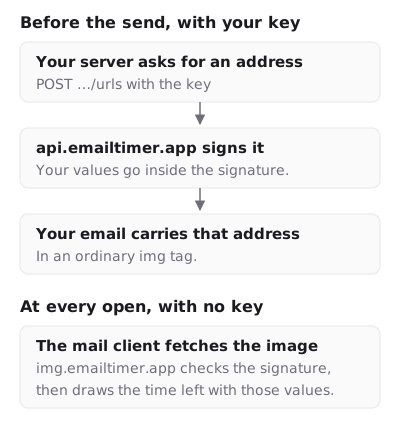
What makes an image address safe to hand out is its signature. Every parameter in it is covered by an HMAC-SHA256 signature made with your workspace’s own secret. Change a character and the image service no longer recognises the address. It still answers HTTP 200 with a valid picture, a grey “image unavailable” card, because a delivered email cannot be recalled and a broken-image icon would sit in it for good.
A template is designed and published first, in the editor or through the template endpoints. Publishing adds an immutable version. An address minted against version 3 renders version 3 for as long as it exists, whatever you publish afterwards.
Check the key
Create a key under API keys in the dashboard. It is shown once. A key carries read, write or both, and minting an address needs only read, because it changes nothing in the workspace.

curl https://api.emailtimer.app/api/v1/workspaces/$WORKSPACE_ID/ping \
  -H "Authorization: Bearer $EMAILTIMER_API_KEY"
The workspace in the path can be its id or its public id. The answer names both, plus the key’s prefix, mode and scopes:
{
  "ok": true,
  "version": "1.0.0",
  "workspace": { "id": "5b1e9c62-3f0a-4d8e-9a71-2c4b6d8f0e13", "publicId": "w_8ha3fq" },
  "key": {
    "id": "c07d2a4e-81b9-4f3c-a6d5-9e2f1b7c4a80",
    "prefix": "et_live_9fK2mQ4x",
    "mode": "live",
    "scopes": ["read"]
  }
}
Every id in the examples on this page is made up. A key that points at another workspace gets a 404 rather than a 403, so the answer never confirms that somebody else’s workspace exists.
Mint one address
curl https://api.emailtimer.app/api/v1/workspaces/$WORKSPACE_ID/urls \
  -H "Authorization: Bearer $EMAILTIMER_API_KEY" \
  -H "Content-Type: application/json" \
  -d '{ "templatePublicId": "k7mQ2pXd", "format": "gif" }'
{
  "url": "https://img.emailtimer.app/i/k7mQ2pXd.gif?w=w_8ha3fq&v=3&sig=YOUR_SIGNATURE",
  "templateId": "e4a81f37-6c2d-4b90-8f15-3d7a9c2e6b04",
  "publicId": "k7mQ2pXd",
  "version": 3
}
The signature above is made up too. Name the template by templateId or by templatePublicId, never both. Leave out version and you get the version currently published. A template that has never been published is refused with 409 and template_not_published. format is gif for a timer and png for a still personalized image.
Parameters come out in a fixed order with the signature last, so the same inputs produce the same string, and a diff of two exports is readable. Two things outside the request also feed the string: the workspace’s signing secret, and whether the workspace is over its plan when you mint.
Values that change per recipient
The request can carry a params object of string values, and each one is signed into the address. This is how a template set to a date from your list gets its own deadline without a recipient list, and how a countdown that starts at send gets its sent time.
Five names belong to the address itself and are refused with reserved_param: w, v, r, wm and sig. Values must be strings. Anything you put in params is readable by whoever sees the address, including a mail provider’s logs and whoever the message is forwarded to. Dates are fine there. Names and email addresses belong in a recipient list, where the address carries only a token.
A transactional example
Take an order confirmation carrying a discount that expires 48 hours after the order. The deadline exists in your system before the email does, so the timer should count to exactly that.
- Publish a template whose timer counts to “A date from your list”.
- When the order is placed, compute the expiry in your own code.
- Mint an address with that expiry as
deadline, in ISO 8601 withZor an offset. - Put the returned
urlin thesrcof the image in the email your code sends.
curl https://api.emailtimer.app/api/v1/workspaces/$WORKSPACE_ID/urls \
  -H "Authorization: Bearer $EMAILTIMER_API_KEY" \
  -H "Content-Type: application/json" \
  -d '{
    "templatePublicId": "k7mQ2pXd",
    "params": { "deadline": "2026-11-29T14:05:00Z" }
  }'
Every fetch of that address counts to 14:05 UTC on 29 November, including Apple Mail’s fetch at delivery. A timestamp written without an offset is read in the template’s time zone.
For a flat window from the send, use a template that counts to “A countdown that starts at send”, and sign in the send moment instead:
{ "templatePublicId": "k7mQ2pXd", "params": { "sent": "2026-11-27T09:00:00Z" } }
Mint the address at send time, in the same code that sends the message. Minted once and reused, sent becomes a fixed date.
Many addresses in one call
POST /urls/batch takes an items array of up to 10,000 of the same objects and answers with count and a urls array in the same order. It is all or nothing. One bad item refuses the whole call, because a partly minted campaign would send some recipients no image. A malformed item is named in the refusal, as in items[3]. A batch over the ceiling is refused with 413 and batch_too_large.
The batch route allows 600 requests a minute per key, against 60 on most routes. Every response carries RateLimit-Limit, RateLimit-Remaining, RateLimit-Reset and RateLimit-Policy, and a 429 adds Retry-After. Splitting a list, handling a refused item and importing the result into an email platform are in minting URLs in bulk.
A whole recipient list instead
For lists already held as a spreadsheet, a recipient list avoids building items by hand:
POST /recipient-setswith aname, which answers with the set’sid.POST /recipient-sets/{setId}/uploadwith the CSV as the body andContent-Type: text/csv.POST /recipient-sets/{setId}/urlswith the template, which streams a CSV back.
The upload is read in the background, up to 500,000 rows and 200 MB. Columns named email, external_id, deadline and token are recipient fields, and every other column becomes a merge value. A file with a few bad rows reports them by line, with the reason. The export’s columns are token,email,external_id,url, and a key without write access gets the file without email.
Each exported address carries the recipient’s token as r and no personal data. The image service looks the rest up from the token when the image is fetched.
Errors
Every error from the API is application/problem+json with a machine-readable code and a sentence a person can act on. The error table, every endpoint and the OpenAPI document at /api/v1/openapi.json are in the API reference.
The image host is the exception. It never returns an error status. A bad signature, a template that no longer exists or an overloaded service all get HTTP 200 and the “image unavailable” card. Test an address by opening it in a browser before a send, not by watching for errors after one. What a timer shows when it is not counting down separates that card from the two pictures you control.
What an address can never hold
An email platform’s merge tag. It fails silently, which is what makes it expensive. The signature is computed over the literal text of the tag, the platform replaces the tag with a value at send time, and the signature stops matching for every recipient at once.
Anything that varies per recipient has to be in the address before it is signed, through params or a recipient token. A merge tag can still sit in the link around the image and in its alt text, because neither is signed. The HTML for an email countdown timer shows the markup attribute by attribute.
Questions and answers
Which plan includes the API?
Growth at $49 a month and Agency at $149. Free and Starter keys are refused with 402. The editor, the snippet and the campaign address work on every plan without it.
Does calling the API count against my opens?
No. Opens are image fetches. Minting an address costs nothing until a mail client fetches it, and how opens are counted sets out exactly which fetches count.
Can I pass a merge tag in params?
The call accepts it, and the image breaks for every recipient of that send. Mint one address per recipient with the real value instead.
How do I send an address through SendGrid or another transactional service?
Mint the address in the code that builds the message, then insert the returned url into the image src as ordinary template data. The whole signed address is the value, so the service’s substitution drops in a finished address rather than editing part of one. The SendGrid page covers pasting a snippet into its editor.
Can a timer from the API be edited after the send?
No. The address pins a published version, so a later publish does not reach it, and every value in params is fixed by the signature. Settle the deadline before you mint.
Related
Put a countdown in the campaign you are writing now
The free plan covers 5,000 opens a month with no card. Starter is $19 a month for 250,000.