Personalized images that render at open
By Danish Mohammed, founder. , updated 7 min read
A personalized image is generated at the moment a recipient’s mail client asks for it, with that person’s own values drawn into the pixels rather than laid over the top in HTML. EmailTimer.App renders these on the same engine that renders its countdown timers, so a name, a voucher code and a live deadline can arrive as one picture on one plan. The free plan covers 5,000 opens a month and carries no watermark.
What “renders at open” actually means
Nothing is baked at send time. The email carries an image address, the recipient’s client requests that address when the message is displayed, and the renderer composes the picture in that request.
Drawing at the request is what makes a countdown possible at all, and it is the same mechanism that lets an image reflect a value you uploaded minutes before the send. It also means the picture is subject to whatever the mailbox does between the send and the read. Apple’s privacy page states that “Protect Mail Activity downloads remote content in the background by default”, regardless of engagement, so for those recipients the fetch happens at delivery. Google Workspace documents that “Gmail uses Google’s secure proxy servers to serve images”. Neither of those changes a name or a price, which do not move. They matter for a clock, and the email client table covers what each one does.
What a merge value can change
| What you want to change | How it is done | Example |
|---|---|---|
| Text in the picture | A text layer bound to a variable | A greeting with the subscriber’s first name |
| Which picture appears | An image layer whose source is chosen from your uploaded assets | A product shot that matches the category they browsed |
| A colour | A rule that swaps a colour by value | A loyalty tier drawn in its own brand colour |
| Whether a layer appears at all | A rule that shows or hides a layer | An early-access pass that only VIPs see |
| A whole layer set | A named variant, selected by rule or by a parameter | A different composition per market |
| A scannable code | A QR layer whose payload comes from a variable | A per-person claim link |
| A measured value | A progress bar or a star rating driven by a number | Points to the next reward, or an average review score |
| A live deadline | A timer layer | Hours left in the offer |
Rules are an ordered list, each reading IF <variable, country, device or date> <is, is not, greater than, less than, contains, empty or not empty> <value> and then acting. Values pass through transforms before they are drawn: date and number formatting, currency, upper, lower and title case, truncation with an ellipsis, simple arithmetic, and string concatenation.
Every variable is declared with a type and a fallback behaviour, so a missing value can draw a default, hide its layer, or hide the whole personalization group it belongs to. That declaration is the difference between a template that degrades and one that ships a gap where a name should be.
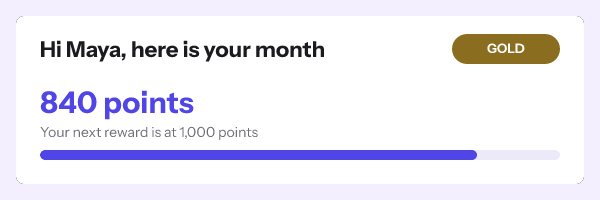
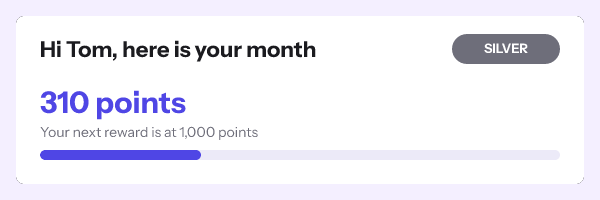
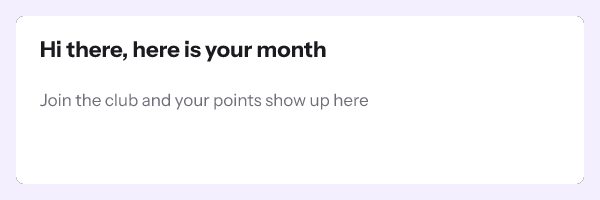
Country and device conditions are marked best-effort in the editor. An image proxy sits between you and the reader on several major clients, so the signal is not reliable. The editor says so on the screen where you set the rule, rather than in a footnote.
The opaque token, so no name travels in the address
A personalized image needs the recipient’s values at request time, and the obvious way to supply them is to put them in the address. That means an email address or a name sitting in plain text in a URL, in a message, in a proxy log, and in whatever forwards it.
The alternative here is a recipient set. Upload a CSV of up to 500,000 rows, and the job parses and validates it with a per-row error report, so a file with three bad dates in 40,000 lines tells you which three. Each row gets an opaque token. The address then carries r=tok_… and nothing else about the person, and the renderer looks the values up server-side.
Tokens are available on every plan that includes recipient sets from the first day, and the documentation states the trade-off plainly rather than burying it. The full parameter reference is in the merge tags documentation.
One plan for timers and images
This category has historically sold the clock and the picture as two subscriptions. A marketer who wants a flash sale deadline and the subscriber’s first name and a voucher code in the same image was paying twice for one idea.
Here the prices are published in dollars and rupees, with no sales call. Free covers 5,000 opens a month. Starter is $19 or Rs 1,599 for 250,000. Growth is $49 or Rs 3,999 for 1,000,000 and adds the API and per-recipient addresses. Agency is $149 for 5,000,000 and adds white-label image domains. Going over does not break a campaign: warnings arrive at 80 and 100 percent of the allowance, and past 110 percent new renders carry a small corner watermark. The current figures are on pricing.
For context on what the rest of the market publishes. NiftyImages, read on 23 September 2026, prices Starter, Growth and Scale against a slider of opens a month: Starter is $59 monthly for 25,000 opens a month, or $564 a year, rising to $549 monthly at 500,000. Its developer API sits on an Enterprise tier priced as a custom annual quote with no published number. The rest of this paragraph was checked on 17 September 2026. Zembula’s pricing page is headed “BUILT FOR THE ENTERPRISE” and quotes “$0.07 per 1,000 emails sent annually (paid annually)”, gated on “Sending 1+ billion emails annually”. Movable Ink publishes no pricing at all; its pricing path returns a 404, and every call to action on the product pages is a demo request or a contact form. Each of the three has a page of its own here: NiftyImages, Zembula and Movable Ink.
Those are three different businesses, and two of them are aimed at buyers this product is not aimed at. The comparable number is the one at the bottom of the range, which is where the gap sits.
What this does not do
Personalized images here are composed from values you supply and assets you have uploaded. There is no arbitrary external fetch at render time, which is a deliberate security position rather than a roadmap gap. Live weather, live maps, live stock feeds and live social counts are separate enterprise modules sold by other vendors, and they are not in this product today. The live data page says exactly what the honest version of that looks like.
There is also no SOC 2 report and no ISO 27001 certificate, and the security page lists what the product actually does instead, in enough detail to be checked.
How to set it up
- Open the gallery and pick a design, or start a blank canvas at 600x200, 600x300 or 300x250.
- Add your layers. Background, text, image, shape, QR code, progress bar, star rating and timer are all available.
- Declare a variable for each value you want to change per recipient, with its type and its fallback behaviour.
- Add conditional rules for anything that should appear only sometimes, and name a variant if a whole layer set changes.
- Preview with sample values. The editor preview calls the same renderer that serves the inbox, so what you approve is what gets sent.
- Publish. The readiness checks report the image size, the frame count and the version going live, and a publish that cannot render is refused rather than shipped.
- Copy the snippet for your platform, or upload a recipient set and export one signed address per row for a genuinely per-person image.
- Paste into an HTML block in your builder, send a seed email, and view the source to confirm the address is unchanged.
Try a timer without an account in the countdown timer generator. The per-platform syntax is in the merge tag guide, and the batch endpoint is in the API reference.
Questions and answers
How is this different from a merge tag in the email body?
A merge tag in body text is plain text styled by HTML and CSS, which mail clients render inconsistently and which cannot sit inside a designed composition. A value drawn into an image is pixels, so it looks identical in every client and it can be positioned, styled and masked like any other element.
Can I put a name and a countdown in the same picture?
Yes, and that is the reason this product exists as one product. A template with a timer layer and text layers renders as an animated GIF carrying both.
Does personalizing an image slow the email down?
The digits and the fixed artwork of a timer are drawn once and reused, so an open copies those pieces into the frames rather than drawing every letter again. There is no render time measured in production to quote yet, so this page does not quote one. The image service also answers every request with a valid picture rather than an error, so a slow dependency degrades to a fallback rather than to a broken image icon.
Do I need a developer for this?
Not for a whole-send image or for a CSV-driven one, both of which are editor and upload work. You need code only if you want to mint addresses from your own systems, which is what the API is for.
What happens to a recipient whose data is missing?
The variable’s fallback decides: a default value, a hidden layer, or a hidden group. Set it while you are building rather than after somebody reports a gap.
Sources
- Pricing (NiftyImages), read on 23 September 2026
- Personalized Images for Email (NiftyImages), read on 23 September 2026
- Zembula's pricing (Zembula), read on 23 September 2026
- Studio (Movable Ink), read on 23 September 2026
- Mail Privacy Protection and Privacy (Apple Legal)
- Set up an image URL proxy allowlist (Google Workspace Admin Help)