Notes on email clients, caching and timers
By Danish Mohammed, founder. 1 min read
Most posts here take one question about how a countdown image behaves once it leaves the sender, and answer it from the documentation the client or the vendor publishes, with the sources listed at the foot. For the whole subject on one page, start with the complete guide to countdown timers in email. The posts go further into one part of it each.
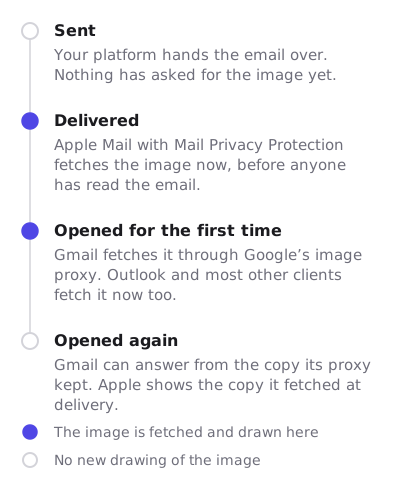
When the image is fetched, and who keeps a copy
What caches your email images, and when goes intermediary by intermediary: Google’s image proxy, Apple Mail Privacy Protection, Outlook.com and corporate gateways, and what each one publishes about when it fetches and how long it keeps the result.
How Apple’s image cache freezes a countdown stays with Apple. It separates what Apple states from what only third-party testing reports, and works through which deadline models survive a copy fetched at delivery.
What a client does to the animation
Why your timer stops after a minute collects the frame caps vendors document, explains why every timer has one, and says how to choose a display that still reads correctly when the frames run out.
Outlook started resuming timers from a cached frame reads a Microsoft Q&A report of timers restarting from a stale frame, why the fixes suggested in that thread did not help, and what does.
Why the product is built this way
Why I built EmailTimer.App is the short version of the two decisions everything else follows from: the countdown and the personalized image drawn by one engine on one plan, and the caching behaviour stated on the site rather than left for a campaign to discover.
The references the posts lean on are timer types, for each deadline model, and merge tags, for getting a subscriber’s own values into an image.