
Real time email personalization from your own live data
Real time email personalization means an email's content is filled in when it is opened, not when it is sent. EmailTimer.app images look their values up at each open, in a data store you keep or from your own web endpoint, so an update after the send reaches emails already delivered.
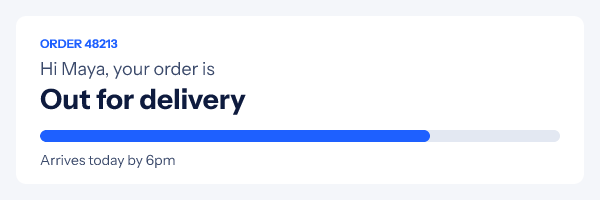
What real time email personalization means here
A merge tag is filled in once, when your platform sends the email. If the order ships an hour later, the email still says it is being packed. Real time personalization moves that moment to the open: the image in the email is an address, and every time an inbox fetches it, EmailTimer.app looks the values up again and draws the picture with what is true now.
The values come from one of two places you control. A data store is a table in your workspace, filled from the dashboard, a CSV file or your own code. A web source is your own HTTPS endpoint, called when the image is opened. Either way, the values arrive as fields, so they work anywhere a merge value does: in text, in a progress bar, in a QR code, or in a rule that hides a layer when a number falls under a threshold.
For the background, the guide to real time personalization covers when a live value is worth it and when a value from the send is enough.
One template, a different row for each open
Both images below are the same template. Each draws the row its key points to, so updating a row changes what the next open shows.
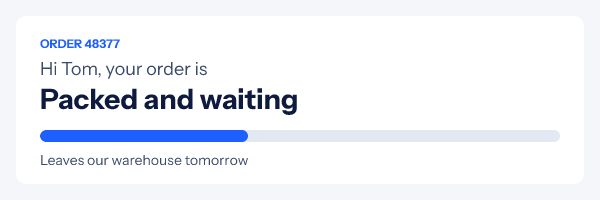
Data stores and web sources side by side
| Data store | Web source | |
|---|---|---|
| Where the data lives | A table in your workspace | Your own HTTPS endpoint, returning JSON |
| How it is filled | Dashboard, CSV import up to 8 MB, or the store's API key (600 calls a minute) | Your system answers each call |
| How a row is chosen | By a key from the link, such as an order number | A field from the link in the query string |
| Freshness | Read at each fetch | Kept from 60 seconds to a day, as you set |
| Plans | Every plan, with row limits | Growth and Agency |
How to set it up
- Make a data store. Open Data in the dashboard and create a store: a table with a key column and up to 30 columns of values, such as status, eta and progress.
- Fill it. Type rows in the dashboard, import a CSV of up to 8 MB, or keep it current from your own systems with the store's API key.
- Connect the template. In the editor, add a data field that reads a column of the store, looked up by a key such as the order number, and give it a fallback for a missing row.
- Draw the values. Use the field in a text layer, a progress bar, a rule or anything else that takes a value. The editor preview shows each field's fallback.
- Publish and send. Publish and paste the snippet. Each open looks the row up again, so a row you change after the send shows in the next fresh fetch.
To keep a store current from code, call PUT /v1/stores/{store}/rows/{key} with
the row's values, and DELETE to remove one. A web source can hold one secret header, sealed when you
save it and never shown again, for an endpoint that needs a token.
Where live data earns its place
- Order and delivery status in a confirmation email that is still right the next day, as in the order card above.
- Stock and seats left for a back in stock or event email, with a rule that hides the line when it stops being useful.
- Points, balances and progress from your loyalty system, drawn as a progress bar.
- Today's offer in a broadcast: one fixed key for the whole campaign, and a row you change each morning.
- Prices and availability that your catalogue already serves as JSON, through a web source.
Weather and maps are their own layers with their own data, covered on the weather widget and maps pages.
Which plan it is on
Data stores are on every plan: Free has 1 store of 200 rows, Starter ($24 a month) 3 stores and 2,000 rows, Growth ($54) 10 stores and 20,000 rows, and Agency ($164) 25 stores and 100,000 rows. Web sources are on Growth (5) and Agency (20). A different row for each subscriber needs a key in each subscriber's link, from a recipient list or the API, which are Growth and Agency too.
Compare the plansWorks with your email platform
Paste the image into any platform that sends HTML email. These guides show the merge tags and the steps for each one.
What it does not do
- A web source must be HTTPS and return JSON. The image waits 1.5 seconds and reads up to 256 KB, then uses the fallback.
- Answers are kept for between 60 seconds and a day, so a value is as fresh as the cache time you set, not newer.
- An image layer cannot load a picture from an arbitrary web address. Pictures come from your own uploads.
- There is no Google Sheets or Excel connector. Import a CSV, or point a web source at an endpoint that returns JSON.
- Gmail and Apple Mail keep their own copy of an image, so their readers see the values from that copy's fetch.
- A row per subscriber needs the key in each link: from a recipient list or the API on Growth, or one fixed key for a whole campaign on any plan.
Frequently asked questions
What is real time email personalization?
It is content in an email that is filled in when the email is opened rather than when it is sent. In EmailTimer.app an image looks up its values at open, from a data store you keep or from a web endpoint of yours, so a change you make after the send reaches emails already in inboxes.
What is a data store?
A table that lives in your EmailTimer.app workspace. Each row has a key and up to 30 columns. You fill it in the dashboard, from a CSV file, or through its own API, and an image looks a row up by its key each time it is opened.
Can an image read my own API?
Yes, on Growth and Agency. A web source is an HTTPS endpoint that returns JSON. The image calls it at open with a field from the link in the query, one secret header if you need it, and keeps the answer for between 60 seconds and a day, as you choose.
How many rows can a data store hold?
Free has 1 store and 200 rows, Starter 3 stores and 2,000 rows, Growth 10 stores and 20,000 rows, and Agency 25 stores and 100,000 rows. A key is up to 128 characters and a cell up to 1,000.
What happens if the data is missing or the endpoint is slow?
The field falls back. Every data field has a fallback value, and a missing row, a failed call or an answer that takes longer than 1.5 seconds draws that fallback instead of an error.
Does this work with Gmail and Apple Mail caching?
The lookup happens whenever the image is fetched. Gmail keeps its copy for about a day per recipient and Apple Mail fetches at delivery, so those readers see the values from that fetch, not from every glance at the email.
Related features
- Dynamic Content Rules that change the image per reader.
- Personalized Images Names and codes drawn in at open.
- Update After Send Change an image that is already delivered.
- Weather Widget The forecast for where each reader is.
- Charts Seven chart kinds from your numbers.
- Progress Bars Points, goals and steps drawn as a bar.
Try it on the campaign you are building this week
The free plan covers 5,000 opens a month, and Starter is $24 for 250,000.