Birthday and anniversary emails
Birthday emails that feel personal and still get redeemed
Birthday emails get opened. What they often do not get is redeemed, because a gift with no end date is a gift with no urgency. A week on the clock, drawn into the greeting itself, fixes that without making the email feel like a sale.
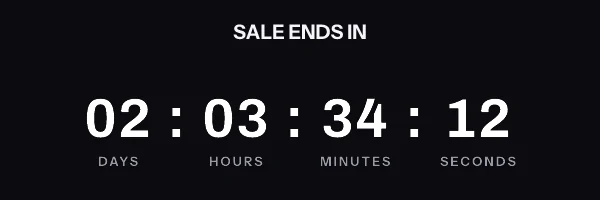
A birthday and anniversary email with a live countdown in it. The timer is a real render from EmailTimer.App.
What creates the urgency
A gift that is theirs, for a week, and then it is not.
The timing model for this campaign is a window that starts on their date. You choose it once, when you build the image, and the engine works out the rest for every subscriber who opens.
Compare the timing modelsHow we would set this one up
- Timer style
- Quiet text on a card, so the clock does not shout over the greeting
- The deadline
- Their birthday plus seven days
- What goes in the image
-
- A greeting with their name in it, drawn rather than merged into a subject line
- Their loyalty balance or the value of the gift
- Seven days counting down to claim it
- When it expires
- Becomes your standard rewards banner once the week is up.
What to get right in a birthday countdown
-
Give them a week, not a day. A birthday is a busy day and the point is that they use the gift, not that they use it immediately.
-
Draw the balance or the gift value into the image beside the countdown, so the value and the deadline arrive together.
-
Keep the colours warm and the timer quiet. This is the one campaign where the clock should be the second thing they notice.
The birthday countdown timer snippet
One image tag, wrapped in a link. Drop it into an HTML block in your campaign builder. The merge tags below are the generic form. The exact syntax for Klaviyo and Mailchimp is on each platform's own page, and the integration pages cover the rest.
This campaign needs one image address per subscriber. The window starts on each subscriber's own date, so every recipient has a different deadline and needs their own signed address. Growth plan or above.
Notice where the merge tags are. They are in the link and the alt text, and never inside the image address itself. The address is signed, and the signature covers all of it, so a tag your platform fills in afterwards breaks the signature and every subscriber quietly gets the fallback graphic instead of the timer.
<a href="https://yourstore.com/offer?code={{ coupon_code }}" target="_blank" rel="noopener">
  <img src="{{ et_image_url }}" alt="{{ first_name }}, your offer ends tonight" width="600" height="200" border="0" style="display:block; width:100%; max-width:600px; height:auto; border:0;" />
</a>
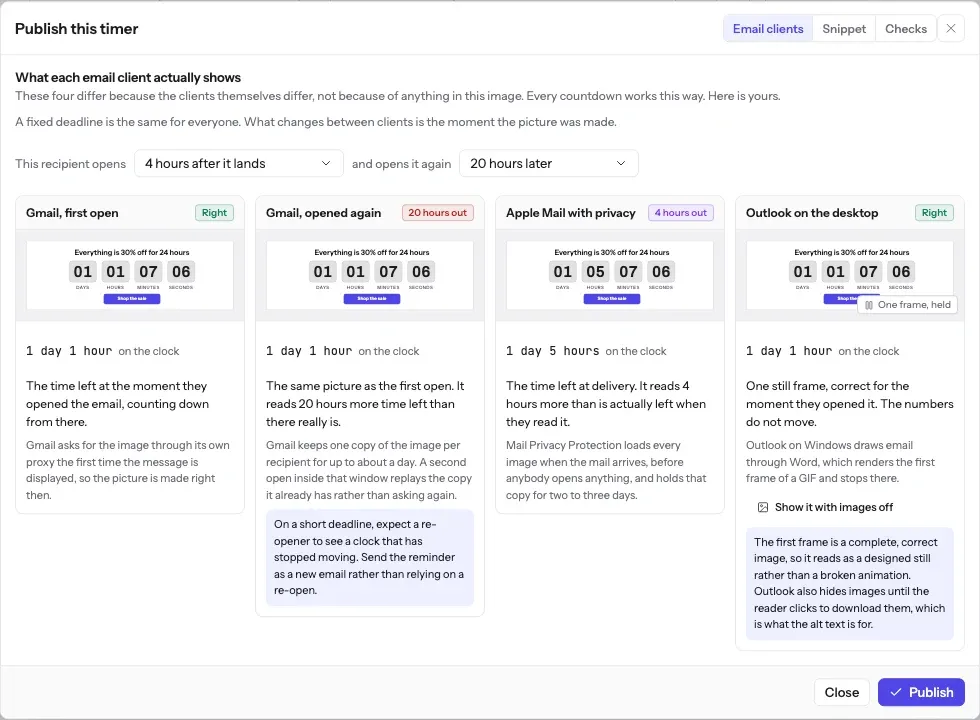
What each inbox does with a birthday countdown
Birthday emails are individual automated sends, so pass the calculated expiry as an ISO timestamp from your flow. A seven day window is long enough that no caching behaviour changes what the subscriber sees in any meaningful way.
The full account of what each client does, including how long Apple Mail holds a pre-fetched image and why Outlook on Windows never animates, is in Countdown timers in Apple Mail. The timing model this campaign uses is one of six, compared side by side in email countdown timer types.
What each client is documented to do
The Apple and Gmail rows rest on Apple's and Google's published documentation and on third-party testing. Neither company publishes a cache lifetime: Apple documents the prefetch, Google documents the proxy, and the two to three days is FreshInbox's 2021 testing. The Outlook and Yahoo rows are what we expect those clients to do, with no vendor document behind them. No row comes from a test by us yet, and we will publish dated screenshots when we have them. Sources: Apple on Mail Privacy Protection, Google on the Gmail image proxy, FreshInbox on Mail Privacy Protection image caching.
The playbook
The greeting is a personalized image
The name, the gift and the clock in a birthday email are one render, drawn for each subscriber, which makes this campaign a personalized image as much as a countdown. Personalized images covers what can be drawn into the pixels and what a proxy cache does to it. Images with a subscriber's name in them covers the greeting itself: the names that break a layout, and what a subscriber with no first name on file sees.
The free countdown timer generator cannot draw a name or start a window on each person's own date, because it makes one fixed deadline with no merge tags. Use it to choose a style, then build the birthday image in an account.
Before you send
Questions about birthday and anniversary emails
Including the parts that do not work perfectly, because you will find those out either way.
How does the window start on each person's own birthday?
The deadline is their date plus seven days, held on their row in a recipient list. Each recipient gets their own signed address, carried in a contact field, so the snippet is the same for everybody and the deadline differs. The date cannot travel as a merge tag inside the address, because the address is signed.
Is a seven day window long enough to survive image caching?
Comfortably. Testing reports Apple Mail holds the copy for two to three days, and Google does not publish how long its proxy keeps one, so a cached re-open is a few days behind at worst. Against a seven day window that is a figure the reader can still act on. This is the argument for a week rather than a 48 hour gift: the shorter the window, the more a cache costs you.
What if somebody has no birthday on file?
Do not send them this email. If the deadline value is missing the image still renders, because the render service never returns a broken image, but it falls back rather than counting down to anything meaningful. Segment on the field being present.
Can the gift amount and their name be in the same image as the timer?
Yes, and that is the point of doing it as one image. Name, reward and countdown are three layers of one render, so there is one thing to check before you send and one thing that can go wrong.
Campaigns that pair with a birthday countdown
Read before you build it
Put a birthday countdown in your next send
Free for 5,000 opens a month, $19 for 250,000, and no developer needed at any point.