Images with your subscriber's name in them
By Danish Mohammed, founder. 6 min read
Putting a subscriber’s name into an image means drawing it into the pixels at the moment their client fetches the picture, so it sits inside the composition rather than above it in HTML. It looks the same in every mail client, because there is no CSS involved for the client to disagree about. The difficulty sits elsewhere. It is the third of your list whose name is missing, twenty characters long, or typed in capitals.
Why draw the name instead of merging it into text
A merge tag in body text is plain text styled by HTML and CSS, and every client applies that differently. Web fonts fail in the Word engine. Coloured text can invert in dark mode. A greeting that has to sit over a photograph cannot be done with HTML at all in a way that survives Outlook.
Drawn into the image, the name is pixels. It can be positioned, kerned, masked, set in a brand face and placed over artwork, and it arrives identical everywhere. It is also readable by nobody with images turned off, which is why the alt text matters as much as the design does.
The names that break a layout
| Problem | What you see without handling | What to configure |
|---|---|---|
| No name on the profile | A visible gap where the greeting was | A fallback: a default value, a hidden layer, or a hidden group |
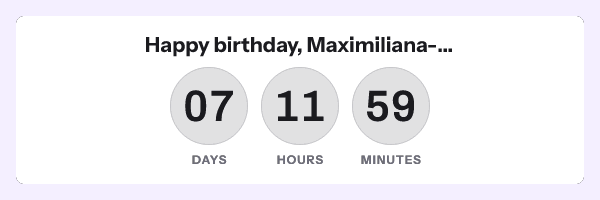
| A very long name | Overflow past the canvas edge, or a shrunk line that looks wrong | The truncate transform, with an ellipsis, plus a layer width |
| All capitals, or all lower case | “Hi SARAH” or “hi sarah” | The title case transform |
| A name with an accent or a non-Latin script | A tofu box if the font lacks the glyph | A digit and text font that covers the script you send to |
| A right-to-left script | Text running the wrong way against the layout | The RTL layout support on the text layer |
| A name that is actually an email address | “Hi sarah.k@example.com” in 40 point type | A rule that hides the layer when the value contains an at sign |
The last row is not hypothetical. Signup forms without a name field leave the local part of an email address in the first-name column on a surprising number of lists.
Every variable in an EmailTimer.App template is declared with a type and a fallback behaviour, which is where the first row is handled. Transforms run before the value is drawn, which covers case, truncation and formatting. A conditional rule reads a value and then shows, hides, swaps or recolours, which covers the rest.
The fallback also belongs on your platform
Set it in both places, because they catch different failures. The template fallback handles a value that arrives empty. The platform fallback handles a merge tag in the link or the alt text, which your platform substitutes rather than the renderer.
Klaviyo documents {{ first_name|title|default:'there' }}, which applies both the case transform and the fallback in one tag. Mailchimp’s example is that “when you use ‘Hello *|FNAME|*,’ subscribed contacts whose first names are not in your audience will see ‘Hello Friend’”, set as a default merge value in audience settings. Customer.io documents the same filter, in the form {{ customer.plan_name | default:"custom" | capitalize }}. GetResponse takes the fallback as a second backticked argument. ActiveCampaign sets a default on the custom field, and notes that its tags do not work in the text-only builder.
The full per-platform table, including the field that carries a signed address, is on the merge tag guide.
Birthdays, which are a deadline problem
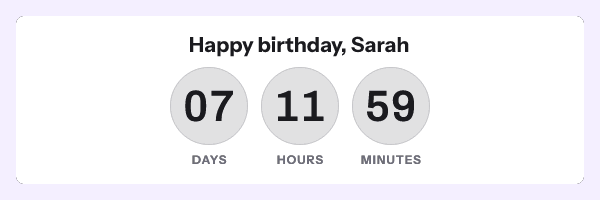
A birthday image is a name image with a clock attached, and the clock is what makes it harder. The window starts on each subscriber’s own date, so every recipient has a different deadline, and each deadline has to reach the image through an address signed for that recipient.
That means one signed address per recipient: either POST /urls/batch at up to 10,000 per call, or a recipient set uploaded as a CSV with one address exported per row. The address goes into a contact field and the image src is that field’s merge tag. Both need Growth or Agency, and pricing has the tiers.
Give the gift a week rather than a day. A birthday is a busy day, and the point is that the reward gets used rather than that it gets used immediately. A seven-day window is also comfortably longer than any caching behaviour. FreshInbox’s 2021 analysis reports Apple Mail holding images for two to three days, so a stale copy is still showing a figure the reader can act on. A 48-hour gift does not have that margin.
If the field is missing, do not send the email. The image still renders, because the service never returns a broken picture, but a birthday greeting counting down to nothing is worse than silence. Segment on the field being present.
How to set it up
- Open the gallery, pick a design and open it in the editor.
- Add a text layer for the greeting and position it. Set the layer width so the text has a boundary to respect.
- Declare the name variable with type text, a default value, and a fallback behaviour of your choosing.
- Add the title case transform, and the truncate transform with a character limit that fits the layer.
- Add a rule to hide the layer if the value is empty or contains an at sign.
- For a birthday, add a timer layer set to per-recipient deadline, and set the unit labels. They are editable and ship in 44 languages.
- Open Expiration State and set what renders once the window closes, so an old greeting becomes your standard banner rather than a dead clock.
- Preview with the worst name on your list rather than a short one. The editor preview calls the same renderer that serves the inbox.
- Publish, then take the campaign snippet for a whole-send image, or mint one address per recipient for a birthday window.
The parameter reference is in the merge tags documentation, the batch endpoint is in the API reference, and the Klaviyo page shows where the HTML block sits in that builder. You can try the timer half without an account in the countdown timer generator.
Questions and answers
Does the name have to be in the image address?
No, and it should not be. Either it is fixed at publish for a whole-send image, or it travels as an opaque recipient token whose values are looked up server-side, so no name appears in a URL.
What happens to a subscriber with no first name?
Whatever the variable’s fallback says. Drawing a default like “there” is the safest choice for a greeting, and hiding the layer is better when the name sits inside a sentence that would read oddly without it.
Can I use a brand font?
Yes. Fonts upload as assets and are embedded when the template is published, so the rendered image uses your face rather than a substitute. Check that it carries the glyphs for every script on your list.
Why is a name in an image better than in the subject line?
They do different jobs, and the image version survives where the text version does not. A drawn name keeps its typography in every client, including the ones that ignore web fonts and the ones that invert colours in dark mode.
How long should a birthday reward last?
Seven days is the workable answer. It respects that the day itself is busy, and it leaves enough margin that a cached image from two days earlier still shows something actionable.
Sources
- How to add a first name to an email, SMS, or push message (Klaviyo Help Center)
- Getting Started with Merge Tags (Mailchimp)
- Personalize messages with liquid (Customer.io Docs)
- How to personalize my emails? (GetResponse Help)
- Personalization Tags overview (ActiveCampaign Help)
- A Technical Take on iOS15 Mail Privacy Protection (FreshInbox, 29 July 2021)
Related
Put a countdown in the campaign you are writing now
The free plan covers 5,000 opens a month with no card. Starter is $19 a month for 250,000.