The six kinds of email countdown timer
By Danish Mohammed, founder. 8 min read
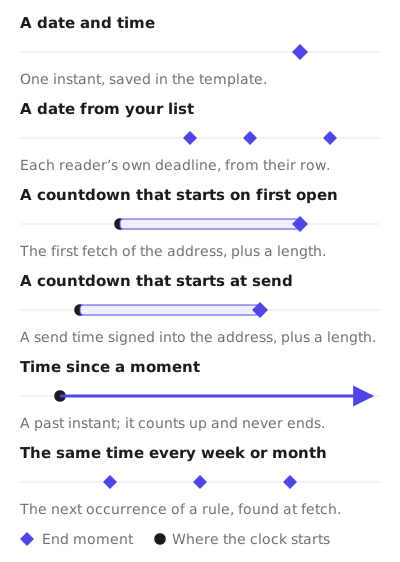
A countdown in an email is an image that is drawn when a mail client asks for it. What it counts to is a template setting with six values. They differ in where the end moment comes from: the template, a row in your recipient list, the send, or the first time the image was fetched. That origin decides what a mail client’s caching does to the number.
Where each end moment comes from
The editor calls the setting “Counts to”, and the first column uses its words.

| In the editor | Where the end moment comes from | Plan it works on | What an early fetch does |
|---|---|---|---|
| A date and time | One instant saved in the template | Every plan | Nothing. The cut-off is still right |
| A date from your list | Each recipient’s own deadline, looked up from their token | Growth or Agency | Nothing to the deadline |
| A countdown that starts on first open | The first fetch of that image address, plus a length | Every plan, one clock per address | Starts the clock at that fetch |
| A countdown that starts at send | A send time signed into the address, plus a length | Growth or Agency | Nothing. The send is already in the past |
| Time since a moment | A past instant saved in the template | Every plan | Nothing. It never ends |
| The same time every week or month | The next occurrence of a rule, found at fetch | Every plan | A kept copy can point at a passed occurrence |
The plan column is about what each type needs in the image address. Two of them need a value that differs per recipient or per send, and only a recipient list or the API can put that value there. Both are on Growth at $49 a month and Agency at $149. The tiers are on pricing.
A date and time
This is the fixed deadline. You pick a date, a time and an IANA time zone such as Europe/London, and every recipient counts to that one instant. Once it passes, every fetch gets the expired frame. The editor’s “When it expires” section offers all zeros or an image of your own.
Nothing a mail client does can make a fixed deadline wrong about the cut-off. If a client fetched the image an hour early, the number it shows was true an hour ago, and the sale still ends when it said. For a broadcast to a whole list, this is the type to start from.
Publishing refuses a fixed deadline that has already passed, with the sentence “Set a deadline in the future and publish again.”
A date from your list
Each recipient has their own end moment. It comes from a deadline column in a recipient list you upload as a CSV, written as an ISO timestamp with Z or an offset, such as 2026-12-01T09:00:00Z. The image address then carries that person’s token and nothing else personal. When the image is fetched, the image service looks the deadline up from the token.
The API can also sign a deadline value straight into an address you mint from your own code. That puts the date in the address in plain sight, which is fine for a deadline and wrong for a name or an email address.
What does not work is an email platform’s merge tag inside the image address. The signature covers every parameter in the address. The platform fills the tag in after signing, the signature no longer matches, and every recipient in the send gets a grey “image unavailable” card instead of a timer.
The editor shows a Fallback date for this mode, and the renderer ignores it. It reads only the recipient’s own deadline, so a recipient whose row has none gets the template’s fallback image rather than the date in that field.
A countdown that starts on first open
You set a length, such as 48 hours. The first time an image address is fetched, the image service records that instant, and every later fetch of the same address counts the length forward from it. The record is a single atomic write, so two fetches arriving together cannot disagree about when the clock started. It is kept for the length of the countdown plus 30 days, and never longer than a year.
Who shares that clock depends on what “an address” means. A campaign snippet is one address shared by the whole send. So one campaign address is one shared clock, and it starts at the first fetch by anybody on the list. A clock that starts separately for each person needs a separate address for each person, which means a recipient list or the batch API on Growth or Agency.
When it starts depends on what “open” means. Apple documents that Protect Mail Activity “downloads remote content in the background by default”, and it does so when a message arrives. For an Apple Mail reader the first fetch is delivery, so the clock starts before anybody has read the email. Klaviyo’s help centre says the same of countdown timers in general. Apple Mail, it says, “generally pre-loads emails before they are opened, which can cause a countdown timer to display an incorrect time when a recipient opens it”. Countdown timers in Apple Mail goes through it in full.
A countdown that starts at send
You set a length again, but the clock runs from a send time instead of a fetch. The send time travels in the image address as sent, inside the signature, so it is fixed when the address is made. Every fetch of that address, early or late, in any client, counts to the same end.
That makes it the evergreen type that Apple Mail cannot move. The cost is in where sent comes from. The publish screen mints a campaign address with no send time in it, and a template in this mode with no send time renders the fallback image. You mint the address through the countdown timer API as part of building the send, with sent in the request’s parameters. The API is on Growth and Agency.
Time since a moment
A count-up timer counts forward from an instant in the past that you set in the template, under “Started”. It has no end and no expired state. It suits a membership anniversary or a streak, where the number growing is the point.
Because it measures from a fixed past instant, a copy fetched early shows a smaller number than a fresh one would. It is never wrong about the start.
The same time every week or month
A recurring timer counts to the next occurrence of a rule: a day of the week, or a day of the month from 1 to 31, at a time of day, in a time zone. At each fetch the renderer finds the first occurrence strictly after that moment. A month without the chosen day uses its last day, so a rule on the 31st lands on 28 February in 2027. Across a daylight saving change, consecutive weekly occurrences are 167, 168 or 169 hours apart, because the rule is a wall-clock time.
The risk is a kept copy. An image fetched on Saturday and shown again on Monday still points at Sunday. Recurring countdown timers covers that, and where the FTC draws the line on a countdown that resets.
Which one for which campaign
| Campaign | Type | Why |
|---|---|---|
| Black Friday sale to the whole list | A date and time | One real cut-off, and no cache can make it wrong |
| Webinar starting at 16:00 UTC | A date and time | The start is one instant for everybody |
| Welcome offer valid 48 hours from the email | A countdown that starts at send | Same end for every fetch, Apple Mail included |
| Welcome offer where the reading moment is the point | A countdown that starts on first open | Accept that Apple Mail starts it at delivery |
| Cart recovery with an expiry your store already knows | A date from your list | The deadline exists in your data before the send |
| Trial ending on a date stored per account | A date from your list | Each account has its own date |
| Weekly newsletter with a Sunday order cut-off | The same time every week or month | Rolls forward with nobody editing the template |
| Loyalty anniversary | Time since a moment | Counts up from the join date and never expires |
Three rows depend on Growth or Agency. If the plan you are on cannot mint per-recipient addresses, the fixed deadline and the recurring rule cover most broadcast work on their own.
Time zones, and the override
Every wall-clock time is read in the template’s time zone. A tz value can override it, but only when it is inside the signed address or stored on a recipient’s row, never as a merge tag. It has to be a location such as Asia/Kolkata. An abbreviation such as EST is ignored, because it does not follow daylight saving. A usable override changes the instant for a recurring rule and for any time written without an offset. A timestamp that carries its own offset ignores it.
The template side of all six is documented for implementers in timer types, and the evergreen guide goes further into the two length-based types.
Questions and answers
Which timer type is the most accurate?
A date and time. It counts to a real instant, so a copy fetched early or kept by a mail client is still correct about when the offer ends.
Is an evergreen timer the same as a per-recipient timer?
Not by default. A countdown that starts on first open keeps one clock per image address, and a campaign snippet is one address for the whole list. A separate clock per person needs one address per person, which is on Growth and Agency.
Can my email platform fill in the deadline in the image link?
No. The signature covers every parameter in the address, so a value filled in after signing breaks the image for the whole send. Deadlines per recipient go in a recipient list or are signed in through the API.
Why does my evergreen timer show less time on an iPhone?
Apple Mail with Protect Mail Activity fetches the image when the message arrives. For a countdown that starts on first open, that fetch starts the clock, so the reader sees time measured from delivery.
Can I try these without paying?
Yes. The fixed deadline, first open, count-up and recurring types all publish on the free plan, which includes 5,000 image opens a month. The evergreen timer generator page shows how to see a first-open timer before you sign up.
Sources
Related
Put a countdown in the campaign you are writing now
The free plan covers 5,000 opens a month with no card. Starter is $19 a month for 250,000.