Timers that reset on a schedule
By Danish Mohammed, founder. 6 min read
A recurring countdown timer counts to the next occurrence of a schedule rather than to a single date. A newsletter that goes out every Thursday can therefore carry a clock to Sunday’s order cut-off, with nobody editing the template. EmailTimer.App computes the next occurrence at the moment the image is fetched, from a weekly or monthly rule with a wall-clock time and a named timezone. The catch is legal rather than technical, and the FTC wrote it down in 2022.
How the next occurrence is computed
A recurring rule has three parts: a unit, a target, and a wall-clock time in an IANA timezone. A weekly rule takes a day of the week from 0 for Sunday through 6 for Saturday. A monthly rule takes a day of the month from 1 to 31.
At fetch time the renderer finds the first occurrence strictly after the current instant and counts to that. Three details in that calculation decide the answer:
- The rule is a wall-clock promise. “Every Sunday at 09:00 in New York” means 09:00 local, so consecutive occurrences are 167, 168 or 169 real hours apart across a daylight saving change rather than a flat seven times 24.
- A day of the month that a month does not have is clamped to that month’s last day. A rule set to the 31st fires on 28 February in 2027 and on 29 February in 2028.
- An occurrence that falls in the ambiguous hour of a clock change resolves to the earlier offset, so it fires once rather than twice.
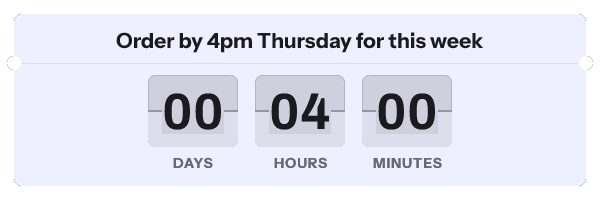
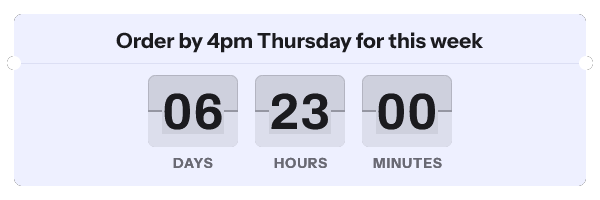
A recipient timezone override in the address is honoured here rather than ignored, and for a recurring rule that changes the answer: “Sunday at 09:00” is then resolved in the recipient’s zone, so they count to a different instant from everybody else. Leave the override off a recurring template unless that is what you want.
Where the FTC drew the line
The Federal Trade Commission published its staff report Bringing Dark Patterns to Light in September 2022. Its appendix taxonomy names a practice under the heading URGENCY:
Baseless Countdown Timer. Creating pressure to buy immediately by showing a fake countdown clock that just goes away or resets when it times out.
A second entry in the same section names the “False Limited Time Message”. The report describes it as saying an offer is good only for a limited time “without a deadline or with a meaningless deadline that just resets when reached”. The report’s body records that workshop panelists discussed “countdown timers on offers that are not actually time-limited”. The FTC’s own press release names one tactic in the same terms. It describes “countdown timers designed to make consumers believe they only have a limited time to purchase a product or service when the offer is not actually time-limited”.
Read the qualifiers, because they are doing the work. Every single entry is conditioned on falsity: fake, baseless, not actually time-limited, meaningless. A clock that resets is not what the report condemns. A clock that resets while the offer behind it never changes is.
EU and UK consumer law describe the same practice, and their wording is quoted beside the FTC’s on fake countdown timers.
When a resetting timer is honest
| Campaign | Does the offer actually reset | Verdict |
|---|---|---|
| Weekly order cut-off for delivery on a named day | Yes. Miss Sunday and the box arrives a week later | Legitimate, and the clearest case in the set |
| Weekly live class or webinar with a registration close | Yes. The session runs and the next one is a different session | Legitimate |
| Monthly billing or renewal date | Yes. The date is imposed by the billing system | Legitimate, and covered on the trial and renewal page |
| Monthly membership perk that expires unused | Yes, if the perk genuinely lapses | Legitimate when your system enforces the lapse |
| A standing discount presented as ending every Friday | No. The same discount is available on Saturday | The practice the FTC named. Do not ship it |
| A “sale ends in 02:00:00” clock that restarts on every page view | No | The report’s own worked example |
The test is one question, and it is a question about your systems rather than about your copy. If the deadline passes and nothing in your store, your billing or your fulfilment changes, the clock is decoration pretending to be a constraint.
There is a commercial argument here as well as an ethical one. A list learns quickly. A deadline that never means anything trains people to ignore every deadline you send them, including the real one you need them to act on in November.
What caching does to a recurring timer
A recurring timer has a weaker caching story than a fixed deadline. That is the argument against it, and it belongs before the argument for it.
Apple’s privacy page states that “Protect Mail Activity downloads remote content in the background by default”, regardless of whether the recipient engages with the email. FreshInbox’s 2021 analysis reports that images are then cached for two to three days. A recurring timer drawn on Friday and read on Monday can therefore show a countdown to an occurrence that has already happened.
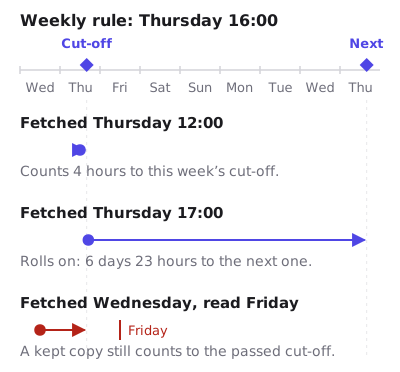
Two responses work. Pick a cadence longer than the cache window where you can, so a monthly rule is safer than a weekly one and a weekly one is safer than a daily one. And send the campaign close to the occurrence rather than days ahead, so the gap between the fetch and the read is small. The client-by-client detail is on the email client table.
How to set it up
- Create a template, or open one from the gallery, and select the timer layer on the canvas.
- In the right-hand panel set the mode to recurring, then choose weekly with a day of the week, or monthly with a day of the month.
- Set the wall-clock time and the IANA timezone. The timezone is the field people skip, and it is what decides whether “Sunday at 23:59” means Sunday in London or Sunday in Los Angeles.
- Set the style, the digit font and the colourway. Unit labels are editable and ship in 44 languages.
- Open Expiration State. A recurring timer rolls forward on its own, so this mostly matters for the minutes between one occurrence passing and the next being computed.
- Publish, then copy the campaign snippet from the publish screen for your platform.
- Paste it into an HTML block in your builder and reuse the same block in every issue. That is the point of the mode: the template does not change from week to week.

Try a weekly rule without an account in the countdown timer generator, and compare the six timing models in timer types. The plan limits are on pricing.
Questions and answers
Is a resetting countdown timer against the law?
The FTC’s 2022 staff report names a “Baseless Countdown Timer” as a deceptive design practice, and its definition turns on the clock being fake rather than on it resetting. A timer tied to a deadline your business actually enforces is not the thing the report describes.
Weekly or monthly, which should I pick?
Pick the one your operation already runs on, then check it against the cache window. A monthly rule survives a stale image better than a weekly one, and a weekly one survives it far better than anything daily.
What happens at the moment an occurrence passes?
The next fetch computes the following occurrence and counts to that. A reader who opens in the seconds either side of the boundary sees the expired state if the image is fetched before the roll, and the new countdown if it is fetched after.
Can I use a recurring timer with a per-recipient deadline?
No. They are separate modes, because one is computed from a template rule and the other is read from the address. Use an evergreen timer if what you need is a window per person.
Does the timer follow the recipient’s local time?
By default no. The occurrence is one instant, fixed by the timezone in the rule, so everybody counts to the same moment. A recipient timezone override does move it, because the rule is a wall-clock promise and the override decides whose wall clock.
Sources
- Bringing Dark Patterns to Light (FTC Staff Report, September 2022)
- Bringing Dark Patterns to Light (FTC report landing page)
- FTC Report Shows Rise in Sophisticated Dark Patterns Designed to Trick and Trap Consumers (FTC press release, 15 September 2022)
- A Technical Take on iOS15 Mail Privacy Protection (FreshInbox, 29 July 2021)
- Mail Privacy Protection and Privacy (Apple Legal)
Related
Put a countdown in the campaign you are writing now
The free plan covers 5,000 opens a month with no card. Starter is $19 a month for 250,000.