Evergreen timers that start when each person opens
By Danish Mohammed, founder. 7 min read
An evergreen countdown timer starts counting from the moment one particular recipient first fetches the image, so somebody who opens on Tuesday and somebody who opens on Thursday both see a full 48 hours left. EmailTimer.App records that first fetch against a hash of the signed image address and counts the duration forward from it. The uncomfortable part is what counts as an open: on Apple Mail with Mail Privacy Protection the image is fetched at delivery, so the clock starts before the person has read anything.
What the renderer actually stores
The first time an image address is requested, the image service writes the current instant to a key derived from a SHA-256 hash of that address. The write is one atomic Redis command, SET key <nowMs> EX <ttl> NX GET, so two fetches racing in parallel cannot disagree about when the countdown began. NX means the first writer wins, and GET hands back whatever instant was already recorded. Every later fetch of the same address reads that stored instant and renders the remaining time against it.
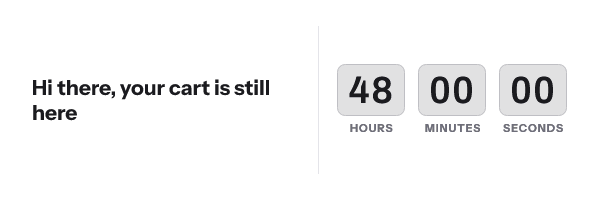
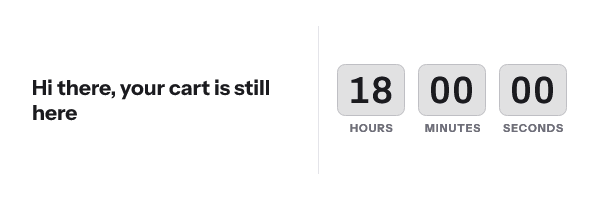
The key holds for the timer’s duration plus thirty days, and never longer than a year. Nothing about the recipient is stored, because the hash is taken over the address rather than over an email address.
When the store cannot answer within 50 milliseconds, the renderer does not invent a start instant. It falls back in a fixed order: the stored instant, then a send timestamp carried in the address, then the current moment. That ordering matters more than it sounds. An earlier version resolved a store outage to “now”, which meant a 72-hour offer read 72:00:00 on every open and never expired, at HTTP 200, invisibly, for a whole campaign.
What Apple Mail Privacy Protection does to the start instant
Apple’s privacy page states that “Protect Mail Activity downloads remote content in the background by default”, regardless of whether the recipient engages with the email. That download happens when the message arrives. For an evergreen timer, the arrival is the event that starts the clock.
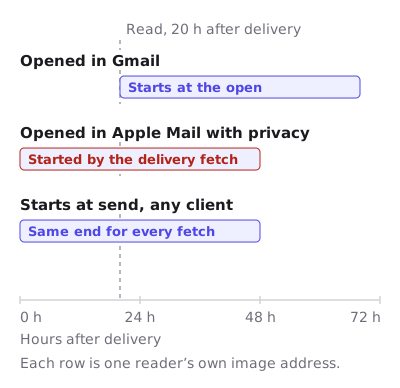
FreshInbox’s 2021 technical analysis reports that once images are downloaded for a message they are cached, and that “opening the email does not entail a load from the server”. The same analysis puts the cache at two to three days. So an MPP recipient who opens on day two is looking at an image drawn on day zero, and the clock they see is the clock as it stood at delivery.
Klaviyo says the same thing about its own timers in plainer words. Apple Mail “generally pre-loads emails before they are opened, which can cause a countdown timer to display an incorrect time when a recipient opens it”. Dotdigital’s help centre gives the identical warning for a countdown that starts from the open. This is not a vendor-specific defect. It is what the mailbox does, and every server-rendered timer lives with it.
Gmail is a separate case with a milder outcome. Google serves images through its proxy servers, and Google publishes no cache lifetime, so the first open is accurate and a later re-open can be served from a copy. For an evergreen timer the first fetch is the one that sets the start instant, so Gmail’s behaviour affects what a re-opener sees rather than when the clock began.
Which deadline model survives which mailbox
| Deadline model | What sets the zero point | What an at-delivery fetch does to it | Use it when |
|---|---|---|---|
| Fixed deadline | An absolute instant set in the template, in a named IANA timezone | Nothing. The image counts toward a real timestamp, so a frame drawn at delivery is still arithmetically correct | The offer ends at one moment for the whole list |
| Per-recipient deadline | A ?deadline= value in the signed address, minted per recipient |
Nothing to the deadline itself. A cached frame can show a stale remaining time on a re-open | Each person has their own end date and your platform already knows it |
| Evergreen from send | A ?sent= instant in the signed address, plus a duration |
Nothing. The zero point is the send, which is in the past and identical for every fetch | You want a rolling window without depending on the open |
| Evergreen from first open | The first fetch of that address | Starts the clock at delivery rather than at the read | The recipient’s own reading moment is the point, and you accept the Apple case |
| Count-up | A start instant in the past, set in the template | Nothing. It never expires | Anniversaries and elapsed-time milestones |
| Recurring | The next occurrence of a weekly or monthly rule, computed at fetch | A cached frame can point at an occurrence that has passed | The offer genuinely resets on a schedule |
Read the table as a ranking. The models that count toward an instant are immune, and the one model that counts from an event is the one the mailbox can move.
Three ways to keep an evergreen number honest
Use a fixed deadline where the campaign allows one. A broadcast with a single cut-off does not need evergreen at all, and a fixed deadline is the only model no caching behaviour can damage. If you are reaching for evergreen because the send date keeps slipping, change the template’s deadline instead.
Anchor to the send instead of the open. In evergreen-from-send mode the duration runs from a ?sent= instant that travels inside the signed address. The send moment is the same for every fetch of that address, it is already in the past, and the timer therefore expires on schedule for everyone. An Apple recipient and a Gmail recipient who were sent the same message at the same minute get the same deadline. The signature covers ?sent=, so the value is baked in when the address is minted rather than substituted by your platform at send time. Mint it from the API as part of building the send, or per recipient from the batch endpoint.
Configure the expired frame before you send. The expired state is a per-template choice: an automatically generated zero variant, a custom uploaded image, or an alternate set of layers. Once the deadline passes, that is what renders. A late opener who sees “this offer has closed” is a better outcome than a counter frozen at 00:00:00, and it is the safety net for every caching case above.
How to set it up
- Open a template from the gallery, or start a new one, and select the timer layer on the canvas.
- In the right-hand panel, set the timer mode to evergreen from first open and enter the duration in hours or days.
- Choose the timer style, the digit font and the colourway in the same panel. Unit labels are editable and ship in 44 languages.
- Open Expiration State and upload the image the template should render after the deadline, or accept the generated zero variant.
- If the campaign can tolerate it, switch the mode to evergreen from send and let the address carry the send instant. That single change removes the Apple caveat.
- Publish. The publish dialog runs its readiness checks and reports the image size, the frame count and the version that goes live.
- Copy the snippet for your platform from the publish screen. The Klaviyo and Customer.io pages show where the HTML block lives in each builder.
- Send yourself a test to an Apple Mail account and to a Gmail account, and open the Apple one an hour later. That five-minute check tells you more than any compatibility claim.

You can try the timing models without an account in the countdown timer generator, and the six timing models are compared in timer types.
Questions and answers
Does an evergreen timer work per recipient, or per email address?
It works per signed image address. Everybody who receives a campaign-mode send shares one address, so they share one start instant, which is why a genuine per-person evergreen needs one minted address per recipient from the batch endpoint. That is a Growth or Agency feature, and the plans are on pricing.
Why does my evergreen timer show less time than expected on iPhone?
Because Mail Privacy Protection fetched the image when the message was delivered, which started the clock then. The remaining time the recipient sees is measured from delivery, and a cached copy can be two to three days old on top of that.
Can I detect which recipients are on Apple Mail?
The analytics screen breaks opens down by client family, including an Apple MPP bucket, so you can see what share of a list is affected. You cannot change the behaviour for those recipients, so the useful response is to pick a deadline model that does not depend on the open.
Is a long duration safer than a short one?
Yes, by a large margin. A cache that is off by a day costs a seven-day window very little and destroys a two-hour one, so pick the longest window the offer can honestly carry.
What happens if the evergreen store goes down mid-campaign?
The image still renders, because the service answers every request with a valid picture. The deadline falls back to the send instant carried in the address, and only if there is none does it treat the fetch as a first open.
Sources
- Mail Privacy Protection and Privacy (Apple Legal)
- A Technical Take on iOS15 Mail Privacy Protection (FreshInbox, 29 July 2021)
- How to add a countdown timer to an email (Klaviyo Help Center)
- Add a countdown timer to an email campaign (Dotdigital Marketing Help Centre)
- Set up an image URL proxy allowlist (Google Workspace Admin Help)
Related
Put a countdown in the campaign you are writing now
The free plan covers 5,000 opens a month with no card. Starter is $19 a month for 250,000.