Timers and stock counts in one image
By Danish Mohammed, founder. 6 min read
A back-in-stock email has urgency built into it, because the thing that made the email worth sending is the same thing that will run out. The useful version puts the product, the quantity and a reservation deadline into one image rather than three HTML blocks that Outlook can reflow. The hard part is the number, which starts ageing the moment the flow writes it.
The three emails, and what each image should carry
| What the image carries | Timer mode | Where the stock number comes from | |
|---|---|---|---|
| Back in stock alert | Product shot, the item name, a hold deadline | Per-recipient deadline, or fixed if the drop is scheduled | The restock event that triggered the flow |
| Low stock warning | Product shot, a rounded quantity, no clock | None, or a fixed deadline if a promotion is attached | The inventory value on the segment or the event |
| Limited drop or restock window | Product shot, a countdown to the window closing | Fixed deadline | Not needed. The window is the constraint |
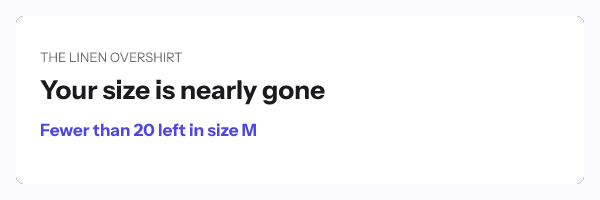
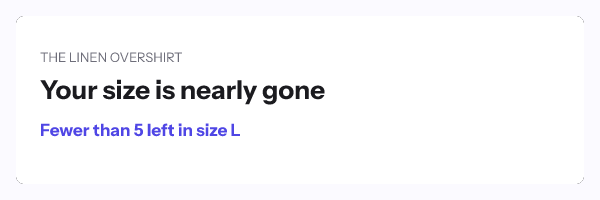
The middle row is the one people get wrong. A low-stock email does not need a clock, because the constraint is the quantity rather than the time. Adding a countdown to it invents a second deadline that nothing enforces.
Why one image instead of three blocks
Outlook on Windows renders HTML through the Word engine, which supports a subset of CSS and reflows tables in ways that break a three-column product row. An image is one element with a width and a height, and it looks the same everywhere.
It also means the product picture, the quantity and the clock are composed together at a known size, rather than assembled by whatever the client decides. In an EmailTimer.App template that is a background layer, an image layer whose source is chosen by rule from your uploaded assets, a text layer for the quantity, and a timer layer. The rendering behaviour per client is on the email client table.
Keeping a stock number honest
The FTC’s September 2022 staff report names a “False Low Stock Message” under the heading SCARCITY. It describes the practice as “Creating pressure to buy immediately by saying inventory is low when it isn’t”, and its example is a message reading “Only 1 left in stock”. The press release for that report lists the same family of tactics.
Two rules keep you clear of it, and they are both about precision rather than about intent.
Round the number to match how fresh it is. A value passed into a broadcast is accurate at the moment the flow ran. “Fewer than 20 left” stays true for a day. “17 left” stops being true within the hour and reads as fabricated the moment somebody checks the product page.
Hide the layer below a threshold rather than letting it count to zero. A conditional rule can hide the quantity layer when the value drops under a floor or is empty. The image then degrades to the product and the offer, instead of advertising a number that is no longer there.
The same logic applies to the clock. A reservation deadline is honest when your store actually holds the item for that long, and it is the FTC’s “Baseless Countdown Timer” when it does not.
What a live inventory feed would add, and what it costs
Some vendors sell an open-time data connector for exactly this. NiftyImages offers External Web APIs, describing them as “any REST endpoint returning JSON” and called “in real time (with per-recipient variables) or on a polling schedule”. Its own caching row reads “Configurable: none to ~24 hours, or polling schedule”. Liveclicker publishes LiveScrape, “Display current articles, available products, and more”, among fifteen named modules.
EmailTimer.App does not do that. There is no external fetch at render time, which is a deliberate security position, so the stock number in the image is the number your platform supplied. The live data page sets out the full comparison, row by row.
The practical difference is smaller than the feature list suggests, for two reasons. A back-in-stock flow fires within minutes of the restock event, so the value it passes and the value a feed would fetch are usually the same. And every vendor selling an open-time feed also documents caching on it, because an inbox waiting on a third-party API is a slow picture. The freshest version in the brochure is not always the freshest version in the inbox.
Where a feed genuinely wins is a broadcast opened days later. The answer without one is the rounding and threshold rules above.
What caching does here
Apple’s privacy page states that “Protect Mail Activity downloads remote content in the background by default”, regardless of engagement, and FreshInbox’s 2021 analysis reports the images are then cached for two to three days.
A restock alert is usually opened within hours of delivery, so the gap between the fetch and the read is small. The configuration that suffers is a short hold, because a two-hour reservation loses most of its meaning to a delivery-time fetch. Pick a hold long enough that being off by an hour does not change what the reader should do.
How to set it up
- Upload the product images you want available to the template as assets. The renderer draws from your uploaded assets rather than from an arbitrary URL.
- Build a template at 600x300 with a background, an image layer, text layers for the item name and the quantity, and a timer layer if the email has a real deadline.
- Declare a variable for the product, the quantity and the deadline, each with a type and a fallback behaviour.
- Add a rule that selects the image layer’s source by the product variable, and a rule that hides the quantity layer when the value is empty or below your floor.
- Open Expiration State and set the graphic for after the hold closes. “This has sold out” keeps the email useful; a clock at zero does not.
- Publish and read the readiness checks.
- For a per-person hold, mint one signed address per recipient from
POST /urls/batchor from a recipient set, and set the imagesrcto the contact field holding it. Both routes are on Growth or Agency. - Paste the snippet into an HTML block. The Shopify Email page shows where that lives for a Shopify store.
The parameter reference is in the merge tags documentation, plans are on pricing, and you can try a timer without an account in the countdown timer generator.
Questions and answers
Can the image show the exact number of units left?
It can show the number your platform passed at send time. Round it before you draw it, because an exact figure stops being true within minutes and is the practice the FTC named.
Does the stock count update when the reader opens the email?
No. The image renders at open, but it renders the value it was given rather than fetching a fresh one, because there is no external call at render time.
Should a back-in-stock email have a countdown at all?
Only if you genuinely hold the item for that window. Without a hold, the scarcity is the quantity, and the honest image says how many rather than how long.
How long should a reservation be?
Long enough to survive a delivery-time image fetch and short enough to mean something, which usually lands between four and twenty four hours. Under an hour, caching error becomes a large share of the window.
Can each recipient see the product they asked about?
Yes. A rule selects the image layer’s source from your uploaded assets by a merge value, so one template covers every product you have loaded. The product and cart page goes into that pattern in detail.
Sources
- Bringing Dark Patterns to Light (FTC Staff Report, September 2022)
- FTC Report Shows Rise in Sophisticated Dark Patterns Designed to Trick and Trap Consumers (FTC press release, 15 September 2022)
- Liveclicker, Real-Time Personalization (Zeta Global), read on 17 September 2026
- Data Sources, Data Stores and External Web APIs (NiftyImages), read on 17 September 2026
- Mail Privacy Protection and Privacy (Apple Legal)
- A Technical Take on iOS15 Mail Privacy Protection (FreshInbox, 29 July 2021)
Related
Put a countdown in the campaign you are writing now
The free plan covers 5,000 opens a month with no card. Starter is $19 a month for 250,000.