Show each person their own products
By Danish Mohammed, founder. 7 min read
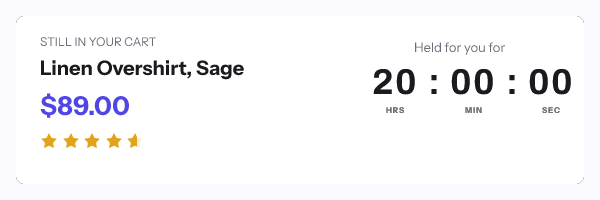
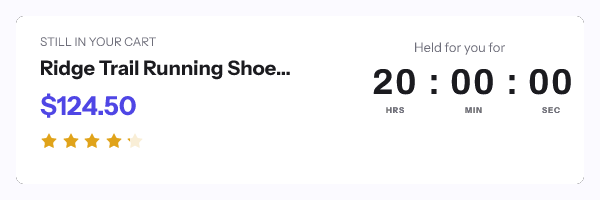
A dynamic product image draws the item a shopper actually looked at, its name and its price into one picture that renders when their client fetches it. For an abandoned cart email that means the cart appears as one block rather than as a table Outlook can reflow, with the hold deadline counting in the same frame. What decides whether it is worth building is the asset library, because every picture the template can draw has to be in it already.
How the product swap works
An image layer in an EmailTimer.App template points at an asset key rather than at a web address. A conditional rule then swaps which asset the layer draws, based on a merge value you pass.
That design is deliberate and it is the main constraint on this page. There is no arbitrary external fetch at render time, so the renderer will not pull a product shot from your storefront when the email is opened. Every image the template can draw has to exist in your asset library first.
The practical consequences, bluntly:
- A curated set works well. Twenty bestsellers, eight categories, four collection heroes, a dozen gift bundles. Upload once, swap by rule, done.
- A full catalogue does not. If you have 40,000 SKUs and every shopper must see their exact variant photograph, this approach does not reach that, and the vendors that do are the ones with open-time API connectors.
- A category fallback bridges the gap. Pass the category rather than the SKU, draw the category hero, and put the exact item name and price in as text. The shopper sees their product named and priced, next to a picture that belongs to it.
For context on what the alternative looks like, NiftyImages describes connecting “Data Stores, CSV uploads, or external APIs to render live values into your images”. Movable Ink’s Studio page names a block sourced from “Your API + Movable Ink”, for a product image pulled from your own website. Those are real capabilities at a different price point, and the live data page sets out the row-by-row comparison.
The cart email sequence
| Send | What the image carries | Timer mode | Hold length |
|---|---|---|---|
| Recovery one, 1 to 2 hours after abandonment | Item name, price, category hero, the hold countdown | Per-recipient deadline | 4 hours from the abandonment event |
| Recovery two, next day | Item name, price, no clock, or a fresh hold | Per-recipient deadline, or none | 24 hours, if you offer one |
| Recovery three, with an incentive | Item name, price, the discount code, a countdown on the code | Per-recipient deadline | As long as the code is genuinely valid |
| Browse abandonment | Category hero and a prompt, no price | None | Not applicable |
| Post-purchase cross-sell | A complementary product from your curated set | None, or a fixed deadline on a bundle offer | Not applicable |
Four hours is the number that keeps coming up for a first recovery email, and the reasoning is arithmetic rather than taste. Under an hour, the error introduced by a delivery-time image fetch becomes a large fraction of the window. Over a day, the hold stops reading as a hold.
Price and item name as merge values
The price and the item name are text layers bound to declared variables. Transforms run before the value is drawn, which is where the practical work happens:
- The currency transform formats a raw number into the shopper’s currency, so
4990becomes the string your store would print. - The truncate transform with an ellipsis stops a 60-character product title from running off the canvas.
- Title case tidies a name that arrived in capitals from a feed.
- Arithmetic can compute a saving from two values without your flow doing it first.
Each variable declares a fallback behaviour, so a missing price hides its layer rather than drawing an empty space where a number should be. The per-platform syntax for getting these values out of your ESP is on the merge tag guide.
Braze’s documentation recommends the url_encode filter when a Liquid value goes into a URL, which is the right advice for values you are appending to the link around the image. Leave it off a field that holds a complete signed image address, because encoding that would corrupt it.
Why a cart email needs a minted address
The hold ends four hours after that shopper abandoned, so the deadline is different for every person, and the deadline is inside the signature of the image address. A merge tag cannot be substituted into a signed string without breaking it.
So a cart email uses one minted address per recipient, from POST /urls/batch at up to 10,000 per call, or from a recipient set uploaded as a CSV. The address goes into a contact field and the image src is that field’s merge tag. This needs Growth or Agency, and the tiers are on pricing. The endpoints are in the API reference.
The ecommerce stack
Most of this runs in one of four places. Shopify Email takes the snippet in a Custom HTML section or a Liquid code module, with no app to install on the store. Klaviyo takes it in an HTML block, and its flows expose the abandonment event’s values alongside the profile’s. Omnisend and Brevo both have HTML code blocks in their builders, and the syntax for each is in the integration directory.
Whichever you use, the rule is the same: paste into an HTML or code block rather than a WYSIWYG image widget. Widgets commonly rewrite the tag or re-upload the image to their own storage, and a re-uploaded dynamic image is a screenshot of one shopper’s cart.
Caching, and why cart emails get away with it
Apple’s privacy page states that “Protect Mail Activity downloads remote content in the background by default”, regardless of engagement, and FreshInbox’s 2021 analysis reports the images are held for two to three days. Klaviyo warns that Apple Mail’s pre-loading “can cause a countdown timer to display an incorrect time when a recipient opens it”.
A cart flow is the mild case. The trigger fires within minutes, the email is opened within hours, and the gap between the fetch and the read is small. The product name and the price do not move at all, so only the clock is exposed, and a four-hour hold absorbs a delivery-time fetch without the reader noticing.
Keeping the hold honest
The FTC’s September 2022 staff report names a “Baseless Countdown Timer” as showing “a fake countdown clock that just goes away or resets when it times out”. A cart hold is one of the easier ones to get wrong, because nothing in most stores actually reserves the item.
Pick one of two positions and build to it. Either your system genuinely holds the cart or the discount code for that window, in which case say so and let it expire. Or it does not, in which case the image carries the item, the price and a prompt, with no clock attached.
How to set it up
- Upload your product or category images to the asset library, named so a rule can select them.
- Build a template at 600x300 with a background, an image layer, text layers for the item name and the price, and a timer layer.
- Declare a variable for the product key, the item name, the price and the deadline, each with a type and a fallback.
- Add a rule that swaps the image layer’s asset by the product key, with a default for anything unmatched.
- Add the currency transform to the price and the truncate transform to the item name.
- Open Expiration State and set the graphic for after the hold closes.
- Publish and read the readiness checks, which report the image size, the frame count and the version going live.
- Mint one signed address per recipient from your flow, write it to a contact field, and set the image
srcto that field’s merge tag. - Send a seed and view the source to confirm nothing was appended to the address.
You can try the timer half without an account in the countdown timer generator, and the render guarantees are on features.
Questions and answers
Can the image show the exact product from a 40,000 SKU catalogue?
Not as a photograph, because every image the template draws has to be in your asset library. Pass the category and draw its hero, then put the exact item name and price in as text, which gets you most of the recognition at a fraction of the setup.
Does the price update if it changes after the send?
No. The price is the value your platform passed when the message was built, because there is no external call at render time. Keep recovery windows short and the two stay in step.
How do I show more than one item from the cart?
Compose a layout with two or three image slots and drive each from its own variable. Beyond about three the picture stops being readable at 600 pixels wide, and a link to the cart does the job better.
What happens when the hold expires?
The expired state renders, so the email becomes a reminder rather than a counter stuck at zero. Set it before the flow goes live, because a cart email sits in inboxes long after the window closes.
Is a four hour hold long enough to be worth it?
It is long enough to survive a delivery-time image fetch and short enough that the shopper treats it as a decision. If your store cannot actually hold anything for four hours, drop the clock rather than the honesty.
Sources
- Bringing Dark Patterns to Light (FTC Staff Report, September 2022)
- Mail Privacy Protection and Privacy (Apple Legal)
- A Technical Take on iOS15 Mail Privacy Protection (FreshInbox, 29 July 2021)
- How to add a countdown timer to an email (Klaviyo Help Center)
- Supported personalization tags (Braze Docs)
- Personalized Images for Email (NiftyImages), read on 17 September 2026
- Studio (Movable Ink), read on 17 September 2026
Related
Put a countdown in the campaign you are writing now
The free plan covers 5,000 opens a month with no card. Starter is $19 a month for 250,000.