Put merge tags inside an image
By Danish Mohammed, founder. 7 min read
A merge tag puts a subscriber’s own value into a message, and every email platform writes them differently. Getting a merge value into an image, rather than into body text, adds one rule that platform documentation never mentions: the image address is signed, so a merge tag inside it breaks the signature. Ten platforms and their syntax are below, and so are the two arrangements that survive that rule.
The rule that governs all of this
The address of every EmailTimer.App image carries an HMAC-SHA256 signature over the path plus a canonical form of the query string. Canonicalisation drops the sig parameter, percent-encodes each key and value, sorts the pairs and joins them. A signature is therefore taken over exactly the characters that were signed.
Paste a merge tag into that address and the signature is computed over the literal text {{ first_name }}. Your platform then substitutes Sarah at send time, the verification fails, and every recipient in the send receives the fallback card instead of your image. The failure is silent, because the image service answers every request with HTTP 200 and a valid picture by design. A delivered email cannot be recalled, so a broken image would be permanent.
So merge tags belong in two places that are not signed, and one that is minted rather than substituted.
The two shapes that work
One image for the whole send. Parameters are fixed when you publish, the address is signed once, and everybody requests the same one. Merge tags go in the link href and the alt text, which your platform substitutes normally. The countdown inside the image is still different for every reader, because the remaining time is computed at the moment they open. This is on every plan including the free one.
One image per recipient. Mint a signed address for each person, carrying their own parameter values. Use POST /urls/batch at up to 10,000 recipients per call, or export one address per row from a recipient set. Import the column into your platform as a contact field and set src to that field’s merge tag. The merge tag is now the entire address rather than a fragment inside a signed string, so nothing is substituted into signed text. This needs Growth or Agency, and the tiers are on pricing.
The second shape is the one the table below is for. The column that matters is the last one.
Syntax by platform
| Platform | First name in body or alt text | Fallback syntax | Contact field holding a signed image address |
|---|---|---|---|
| Klaviyo | {{ first_name }} |
{{ first_name|title|default:'there' }} |
{{ person.et_image_url }} |
| Mailchimp | *|FNAME|* |
Default merge value, set in audience settings | *|ETIMAGE|* |
| HubSpot | {{contact.firstname}} |
Default value on the token in the editor | {{ contact.et_image_url }} |
| Salesforce Marketing Cloud | %%firstname%% |
AMPscript, for example %%=v(@name)=%% after a Set |
%%et_image_url%% |
| Braze | {{${first_name}}} |
Liquid default filter |
{{custom_attribute.${et_image_url}}} |
| Iterable | {{firstName}} or {{profile.firstName}} |
Handlebars helper | {{etImageUrl}} |
| Customer.io | {{customer.first_name}} |
{{customer.first_name | default:"Buddy"}} |
{{customer.et_image_url}} |
| ActiveCampaign | %FIRSTNAME% |
Default value on the custom field | %ET_IMAGE_URL% |
| Brevo | {{ contact.FIRSTNAME }} |
Default in the attribute settings | {{ contact.ET_IMAGE_URL }} |
| GetResponse | {{CONTACT `subscriber_first_name`}} |
{{CONTACT `subscriber_first_name` `Friend`}} |
{{CUSTOM `et_image_url`}} |
Every left-hand column above is taken from the platform’s own current documentation, and the sources are listed at the end of this page. The field names in the right-hand column are the ones EmailTimer.App suggests. Rename them to suit your schema.
Platform notes to read before you build
Klaviyo documents that “Profile personalization generally begins with person, with the exception of a few special tags like first_name and last_name”. So the bare {{ first_name }} is correct for the built-in, and a custom property you create for the image address takes the person. prefix.
Mailchimp is explicit that merge tags belong in URLs as well as text. Its merge tag guide says “Some merge tags use URLs to link to other content, such as text or images”, which is the arrangement in the last column.
Salesforce Marketing Cloud instructs you to “Include the two sets of double percent symbols”, and its list of available strings gives %%firstname%% rather than %%first_name%%, which trips people who assume the underscore. For anything computed, AMPscript is the answer, and Salesforce states that “Inline AMPscript is frequently used within HTML tags to dynamically populate the content of a message”.
Braze recommends the url_encode filter when a Liquid value goes into a URL. For a field holding a complete signed address that filter would corrupt it, so leave it off in that one case and keep it for values you are appending to a link.
Iterable field names are case-sensitive, and event values outrank profile values. Their documentation gives the example directly: {{firstName}} resolves to the triggering event’s value while {{profile.firstName}} resolves to the profile’s. Choose deliberately when both exist. Iterable also asks you to HTML-comment non-outputting Handlebars in the source editor, while a tag that outputs a value must not be commented.
ActiveCampaign does not support hyphens in user-created tags, and personalization tags do not work in the text-only builder. Their documentation covers a tag whose value is a URL, which is the case here.
Brevo documents inserting attributes into a button URL and under a link. The Add variable control is unavailable in the HTML editor, so type the tag by hand there.
GetResponse documents two forms and says so: “In GetResponse, we typically use double square brackets: [[yourcustomfield]] though in some cases you will also need {{}}.” The braced form takes backticks around the field name and an optional second backticked argument as the fallback, which is why the table shows it. Their documentation confirms tags inside a query string and states that “Such dynamic content can also be used in the Custom HTML element”.
What a merge value can change inside the picture
A merge value is not limited to drawing text. In an EmailTimer.App template, a value can set the content of a text layer or select an image layer’s source from your uploaded assets. It can supply a QR code payload, set a progress bar or a star rating, or drive a conditional rule. A rule reads IF <variable, country, device or date> <is, is not, greater than, less than, contains, empty or not empty> <value>. It then shows a layer, hides it, swaps text, swaps an image, swaps a colour, or switches to a named variant.
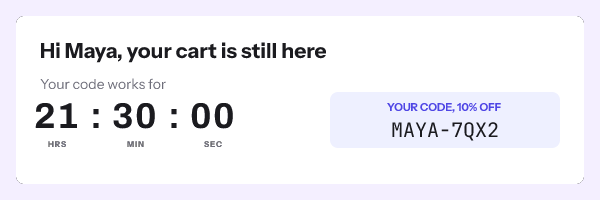
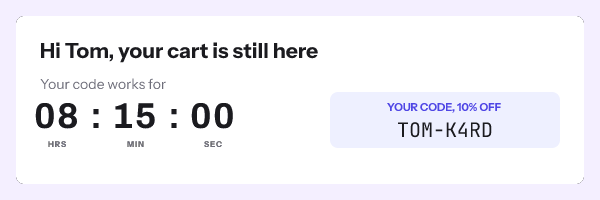
Transforms run on the value before it is drawn: date formatting, number and currency formatting, upper, lower and title case, truncation with an ellipsis, simple arithmetic and string concatenation. Each variable is declared with a type and a fallback behaviour, so an empty value can draw a default, hide its layer, or hide the whole personalization group.
Country and device conditions are flagged as best-effort in the editor, because an image proxy sits between you and the reader. That is a caveat rather than a feature note, and it belongs on the screen where you set the rule.
How to set it up
- Build the template in the editor and add the layers you want personalized.
- Declare a variable per value, with a type and a fallback, in the variables panel.
- Add conditional rules for anything that should appear only sometimes.
- Publish. The readiness checks report the image size, the frame count and the version going live.
- For a whole-send image, copy the campaign snippet from the publish screen and paste it into an HTML block. Your merge tags go in the link and the alt text.
- For one image per recipient, upload a CSV as a recipient set or call
POST /urls/batchfrom your own code, then export one signed address per row. - Create a contact field on your platform using the name in the table above and import the column.
- Set the image
srcto that field’s merge tag, exactly as the last column shows. - Send a seed email and view the source. The
srcmust be a complete signed address with nothing appended to it.

The parameter reference is in the merge tags documentation, the batch endpoint is in the API reference, and the snippet anatomy is in the HTML guide.
Questions and answers
Why did my image come out as a grey card for every recipient?
The signature failed to verify, which almost always means a merge tag was inside the address when it was signed. Move the tag into the link and the alt text, or switch to one minted address per recipient.
Can I append a UTM parameter to the image address?
No. Adding a parameter changes the canonical query and breaks the signature, so track on the link around the image instead. Reordering existing parameters is safe, because the canonical form sorts them.
Do I need the API to personalize an image?
No for a whole-send image, which is on every plan and covers any campaign with a single deadline. Yes for a genuinely per-person value inside the picture, which needs minted addresses on Growth or above.
What happens when a subscriber has no value for a field?
Whatever the variable’s fallback says: draw a default, hide that layer, or hide the group it belongs to. Set it deliberately, because the default of drawing nothing leaves a visible gap in the composition.
Does the syntax differ between a campaign and an automated flow?
On several platforms, yes. Event-triggered messages expose event fields alongside profile fields, and on Iterable the event value wins when both exist under the same name.
Sources
- How to add a first name to an email, SMS, or push message (Klaviyo Help Center)
- Message personalization reference (Klaviyo Help Center)
- Getting Started with Merge Tags (Mailchimp)
- Use personalization tokens (HubSpot Knowledge Base)
- Personalization Strings in Marketing Cloud Engagement (Salesforce Help)
- Personalization Strings in Email Studio (Salesforce Help)
- Adding AMPscript to Your Content (Salesforce Developers)
- Supported personalization tags (Braze Docs)
- Personalizing Templates with Handlebars (Iterable Support)
- Personalize messages with liquid (Customer.io Docs)
- Personalization Tags overview (ActiveCampaign Help)
- Personalize your emails with contact attributes (Brevo Help)
- How to personalize my emails? (GetResponse Help)
Related
Put a countdown in the campaign you are writing now
The free plan covers 5,000 opens a month with no card. Starter is $19 a month for 250,000.