Brevo in practice
Brevo countdown timer setup guide
By Danish Mohammed, founder. 5 min read
The pages competing for this search repeat the same two claims about Brevo automations. I went looking for the source of both. What I found comes before anything else here.
Does Brevo have its own countdown timer
Brevo’s help centre refused every automated request I made while writing this, so I cannot quote it, and I will not pretend otherwise. What I can show you is Brevo’s own community, where the question has been asked and answered in public.
The thread How to insert a Countdown? opens on 13 November 2024 and runs to September 2025. A Brevo moderator takes part. Every answer in it points somewhere outside Brevo: a JavaScript tutorial first, then NiftyImages, then CleverTimer, then an integration called Mailix. Nobody in the thread, including the moderator, replies that Brevo has a countdown block you could drag in.
Read that for what it is. It is strong evidence of absence rather than a statement of absence, and it is the most I can honestly claim without a page from Brevo I can quote.
Where the snippet goes
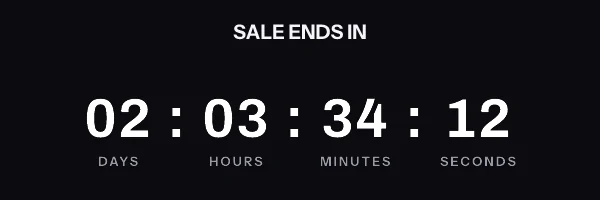
The mechanics are settled in the same thread. The answer from the Mailix representative describes the route exactly: “generate a custom countdown with HTML that you can then add as a html block in the Brevo editor.” Drag the HTML block into your design and paste the image tag into it.
Contact attributes use double braces and an uppercase attribute name. Brevo’s campaign API reference documents both forms side by side. A classic campaign uses the single-brace shape, so a first name is {FNAME}. With the newer template language, the reference says to “use {{contact.FNAME}} {{contact.LNAME}} for personalization”, which is the form to use in a drag-and-drop campaign. Transactional variables arrive separately as {{params.variableName}}, documented in Brevo’s transactional email guide with examples such as {{params.trackingCode}}.
A per-contact deadline does not go in the query string. Every parameter on a signed timer URL is inside the signature, so an attribute substituted after signing breaks verification for the whole send. Store a pre-signed URL on a contact attribute and reference the attribute as the image source:
<img src="{{ contact.ET_IMAGE_URL }}" width="600" height="200" border="0" alt="Your offer ends soon" />
Create the attribute exactly as you will type it. The attribute name has to match the one on your Contact attributes page, and an uppercase convention is what Brevo’s own examples use throughout.
What breaks in automations and flows
Here are the two claims every competing page makes, with their actual provenance.
The first is that timers cache on Brevo’s servers inside automated workflows. The source I can find for it is a competitor’s how-to page, CountdownMail’s Brevo guide, which states: “In automations (automated workflows), the timers can get cached on Brevo’s servers and fail to update. This means the timer might display the same time over and over instead of counting down.” No Brevo documentation I could reach says this. Treat it as a vendor’s field report worth testing on your own account rather than as a documented platform behaviour.
The second is a setting. The same page says to “Go to Campaigns > Settings > Default Settings” and confirm that “the ‘Hide Image URL’ option is set to ‘No’”, on the grounds that images “might not load” otherwise. Again, that is a third party describing Brevo’s interface. It costs you thirty seconds to check the setting, and it is the first thing to look at if your image renders in preview and not in the inbox.
I would rather hand you a weak source labelled as weak than a confident sentence with nothing behind it. If you hit either behaviour, write to me with the campaign type and I will publish what I find.
Separately from those two, the ordinary automation problem applies here as everywhere. A workflow email outlives the offer it was written for, so a fixed calendar deadline inside one goes negative. Set the expired frame at publish time.
What your recipients will see
Brevo hands the message to the recipient’s mail client, and from there the picture is that client’s business. Classic Outlook on Windows renders through the Word engine and shows one frame of an animated GIF rather than playing it, so frame one has to carry the real numbers by itself. Apple Mail with Mail Privacy Protection fetches remote images at about the time the message is delivered, which pins the number to delivery rather than to the open. Gmail fetches through its own image proxy and can serve a copy it already holds when the same recipient opens the mail again.
This is documented client behaviour rather than a render I have watched in a real inbox, and the version with each Outlook build named is on the email client support page. It also explains the shape of the two claims above. A timer that appears frozen inside an automation has several possible causes, and a proxy holding an old copy is a far more common one than a sending platform caching an image.
Test before you send
Use the Preview and Test tab on the campaign before you schedule it, with a real test contact selected so the attribute resolves to a URL rather than to an empty string. Then send yourself the campaign as a test.
Do the second half in two inboxes. A preview proves the markup is right and the attribute has a value. Only a delivered message proves that the recipient’s client fetched the image, which is the step where Outlook and Gmail behave differently from each other and from the editor.
Questions and answers
Does Brevo have a built-in countdown timer block?
Not one I can point you at. Brevo’s own community thread on the question, with a moderator taking part, sends every asker to a third-party tool.
Where do I paste countdown timer code in Brevo?
Into an HTML block in the drag-and-drop editor, which is the route described in that community thread. The image tag goes in whole, including the link and the alt text.
Why does my Brevo timer stop updating inside an automation?
A competitor’s guide blames caching on Brevo’s servers, and no Brevo documentation I could reach confirms it. Before accepting that explanation, rule out the recipient’s own mail client, which caches images far more often than a sending platform does.
What is the Hide Image URL setting?
A default campaign setting that a third-party guide says must be set to No for timer images to load. Check it under Campaigns, then Settings, then Default Settings if your image previews correctly and does not arrive.
Brevo used to be Sendinblue. Does anything differ?
No, the attribute syntax and the HTML block are the same product under a new name. Older guides on a /sendinblue slug describe the same editor. What it costs on this side is 5,000 image opens a month free, and the rest is on pricing.
Sources
- How to insert a Countdown? (Brevo Community, November 2024 to September 2025)
- Send a transactional email (Brevo API documentation)
- Create an email campaign (Brevo API documentation)
- How to Add a Countdown Timer to Your Brevo Emails (CountdownMail), read on 17 September 2026