
Weather in email, drawn for each reader when they open it
To put the weather in an email, add a weather layer to an image. Each time the email is opened, the image is drawn with the forecast for a place you choose: one fixed city, where the reader opened it, or the location in their contact record. Current conditions, today, or up to five days ahead, on every plan.
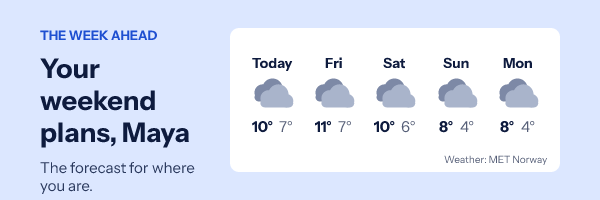
How the weather widget works
An email cannot run a script, so a live forecast has to arrive as a picture. The weather widget is a layer in an EmailTimer.app image, beside your headline, your offer or your countdown. When a reader opens the email, their mail app asks for the image, the image service looks up the forecast for the place the layer points at, and draws it into the pixels before answering.
The forecast comes from MET Norway's global model. It is read for a point rounded to about ten kilometres and kept until MET Norway says it expires, between five minutes and six hours, so a thousand opens in one city ask for it once. Days are the place's own solar day, so "today" in Sydney is Sydney's today.
That makes weather useful in ways a written forecast is not. A fashion retailer leads with coats on a cold morning, a garden centre with seed trays when the rain stops, a venue reminds people to bring an umbrella. The forecast does the deciding; your copy sits beside it.
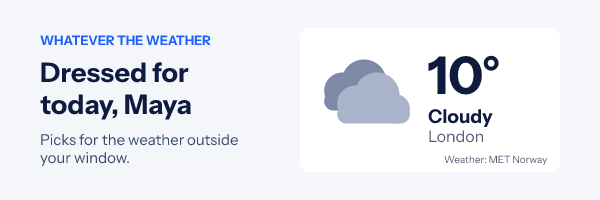
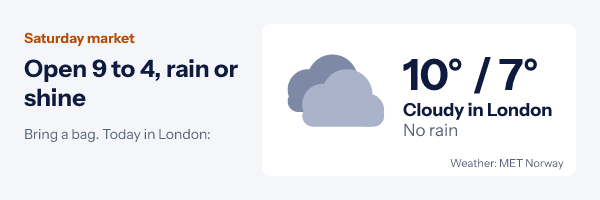
How to add the weather to an email
-
Step 1
Start from a weather design
The Gallery has "Weather where you are" and "Five day forecast". Or add a weather layer to any design of yours from the editor's Add grid.
-
Step 2
Pick the design and units
Now, today, or a row of two to five days; Celsius or Fahrenheit; the text colour and an optional panel behind it.
-
Step 3
Choose where the layer looks
A fixed place for a store or an event, where the reader opened the email, or contact fields holding a latitude and longitude or a city. The fixed place is always kept as the fallback.
-
Step 4
Publish and paste the snippet
Copy the image snippet for your platform from the publish dialog and paste it where the image goes. Every open draws the forecast of that moment.
Examples of weather in email
Both pictures are the engine's own renders of the same five day design, drawn from one recorded MET Norway forecast for London, once in Celsius and once in Fahrenheit.
Plans for the weekend
Travel, events and outdoor retail. The strip answers "what will it be like" before the reader has to ask, and the copy beside it can say what to bring.
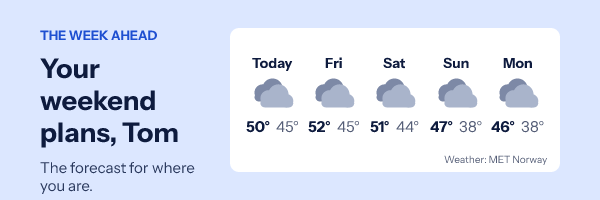
Fahrenheit for a US list
Units are set per layer, so a US send and a European send can share one design with two settings. The reader's first name comes from a merge field like any other text.
Weather pairs well with an event reminder email the day before, and with seasonal sends in a holiday campaign. For a street map of the venue beside it, see maps in email.
Which plan includes the weather
Every plan, the free one included, for a fixed place and for where the reader opened the email. A location from contact fields needs a signed image address per recipient, which comes from a recipient list or the API on Growth ($54 a month) and Agency.
Compare the plansWorks with your email platform
A weather image is an ordinary image tag, so it goes into any platform that sends HTML. These guides show where it goes in each one.
What the weather widget cannot do
- No start date. The forecast always begins today and reaches five days at most.
- No reader location behind Gmail's or Yahoo's proxy. Those opens draw your fixed place. Use contact fields when location has to be right for everyone.
- A copy can be older than the reading. Apple Mail Privacy Protection fetches images at delivery and Gmail keeps its copy for a while, so a reopen can show an earlier forecast.
- Rain chance only in the Nordic area. Elsewhere MET Norway gives an amount, so the image says how much rain, not how likely.
- Days follow the sun, not the time zone. Near a time zone edge, a reading close to midnight can land on the neighbouring day.
- Contact city names are matched against places of 100,000 people or more. A smaller town falls back to your fixed place; a latitude and longitude always works.
What each app does with images is on the Apple Mail and Gmail pages.
Weather widget questions
Where does the forecast come from?
From MET Norway, the Norwegian Meteorological Institute, which publishes a free global forecast. Every weather image carries the credit "Weather: MET Norway" in its corner. The icons are our own drawings.
How does it know where the reader is?
You choose per layer. A fixed place shows the same city to everyone. "Where the reader opened it" uses the approximate location of the device that fetched the image, rounded to about ten kilometres. Contact fields read a latitude and longitude, or a city name, from your list.
What happens in Gmail, where images go through a proxy?
Gmail and Yahoo fetch images from their own servers, so the location they reveal is the proxy’s, not the reader’s. In that case the layer draws your fixed place instead of guessing. If location matters for a Gmail-heavy list, read it from contact fields.
Can I show the forecast for a future date, such as the day of an event?
Not as a start date. Every forecast starts today, and the days design runs two to five days ahead. For an event within five days, the five day strip shows it; further out, send the weather in the reminder that goes the day before.
Celsius or Fahrenheit?
Either, set per layer. Rain is written as a percentage chance where MET Norway gives one, which is the Nordic area, and as the day’s rain in millimetres or inches everywhere else.
Does it cost extra?
No. The weather widget is on every plan, the free one included, and a weather image counts as one open like any other image.
More you can draw into an email
- Maps A map with your marker on it.
- Calendars A month with your dates marked.
- Email Polls One-click votes, results in the image.
The getting started guide covers publishing and the snippet, and the merge tag reference shows how a contact's city reaches the image. Everything else an image can carry is in personalized images for email.
Every feature on one pageLet the forecast pick the offer
Start from the five day design, set the place, paste one image. Free for 5,000 opens a month.