
Interactive email polls with the results in the image
An interactive email poll asks one question: yes or no, a choice of two to six answers, a 1 to 5 rating or the 0 to 10 NPS question. Each answer is a link under an image, a click records the vote, and the image draws the current result each time someone opens the email. It works in Gmail, Apple Mail and Outlook, with no AMP and no code, on every plan.
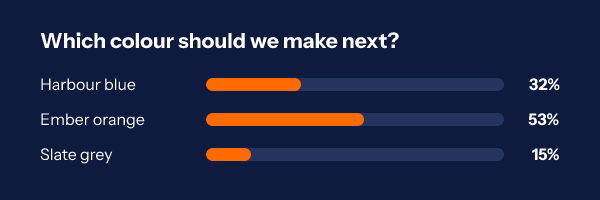
How an interactive email poll works in every inbox
Most inboxes will not run a form inside an email. Gmail and Yahoo strip scripts, Outlook on Windows renders with Word, and AMP email only reaches the readers whose app supports it and whose sender registered for it. So a poll that has to work for a whole list is built from the two things every mail app shows: an image and a link.
The snippet you paste is a small table. On top sits the poll image, which shows the question and a bar for each answer. Under it sits one bordered link per answer. A click on an answer goes to our vote address, which counts the vote and sends the reader on to your thank you page. The next time anyone opens the email, the image service reads the tally and draws the new percentages into the bars.
Because the result is drawn at open time, the email a subscriber reads tomorrow shows tomorrow's numbers. Readers who open late see where the vote has landed, which gives them a reason to add theirs, and you never have to send a follow-up just to announce a result.
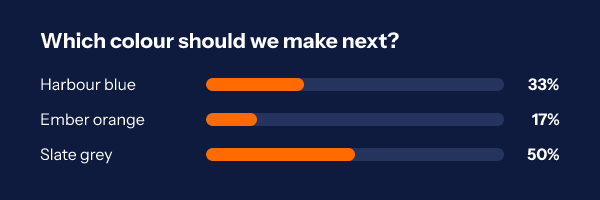
Four kinds of poll in email: yes or no, choice, rating and NPS
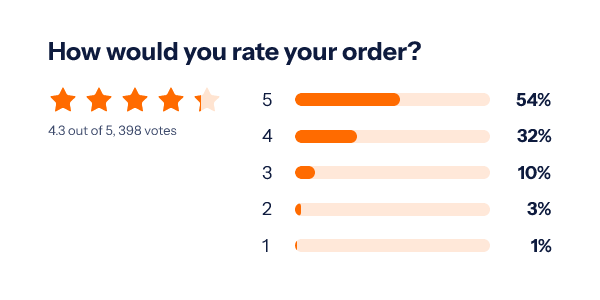
Pick the kind in the Poll section and the answers follow. A yes or no poll has two. A choice poll takes two to six answers in your own words. A rating poll asks for a score from 1 to 5 and draws the average, as numbers or as stars. An NPS poll asks the 0 to 10 recommend question and draws the score, from -100 to 100, with the share of promoters, passives and detractors. Rating and NPS polls put their scores in one row of links under the image, the way readers expect a scale.
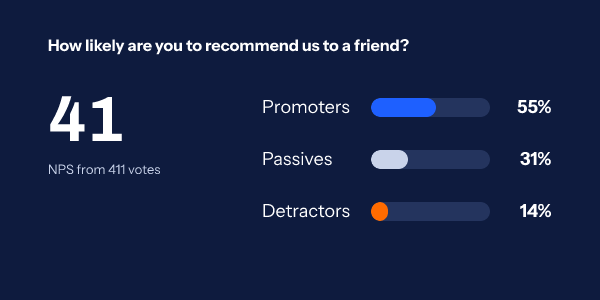
Any answer can have a page of its own. A detractor can land on a page that asks what went wrong while a promoter lands on a review page, and the CSV gains a score column, so a rating or NPS export is ready for a spreadsheet without mapping letters to numbers. The count of votes can also appear elsewhere in the email as a social proof counter.
How to add a poll to an email
Four steps, about ten minutes the first time. Nothing changes in your email platform except one pasted block of HTML.
-
Step 1
Start from a poll design
In the dashboard Gallery, open the Polls category and pick yes or no, product pick, rating, star rating or NPS. Each comes in the 600 by 200 banner, the 600 by 300 hero and a 300 by 250 square.
-
Step 2
Write the question and answers
The editor's Poll section holds the kind, the question, the answers, the thank you page and, if you want them, a page per answer. The picture redraws as you type, with sample shares so you can judge the longest label.
-
Step 3
Publish and copy the snippet
Choose your platform in the publish dialog. To count one vote per person, name the contact id field; the snippet then carries your platform's own tag for it in each answer link.
-
Step 4
Paste, send and watch
Paste the block into an HTML or custom code section of your email. Live shares and the CSV are in the Poll section from the first vote.
Three polls that earn a click
Each picture below is a render from the engine with a fixed tally, the same way the image service draws it for a real open.
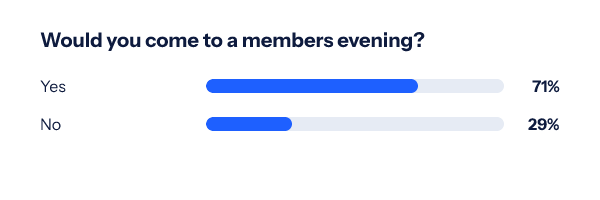
A yes or no before you commit
Gauge interest in an event, a new opening time or a product line before you book the room or the stock. Two answers keep the decision small enough to make in a second.
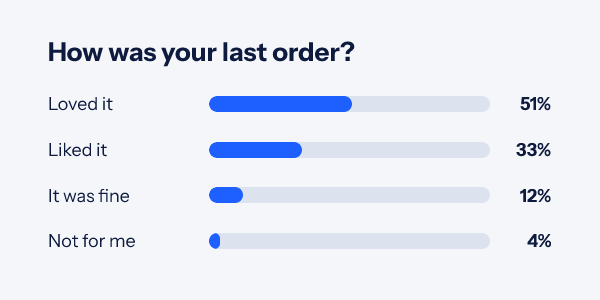
A four step rating after an order
Put it in the delivery follow-up. Send the lowest answer to a thank you page that asks what went wrong, and read the CSV against your order data to find the pattern.
A product pick, like the colour vote at the top of this page, works best in a newsletter or a launch teaser. It turns a list into a panel, and the result is first party data you can segment on later. For more ways to make an email something people play with, read email gamification and interactive versus dynamic email.
Which plan includes polls
Every plan, the free one included. A poll image counts toward your monthly opens like any other image: 5,000 on Free, 250,000 on Starter at $24 a month, 1,000,000 on Growth at $54. Votes are not opens and cost nothing. Free allows three live images at once, so a poll is one of your three.
Compare the plansWorks with your email platform
The poll snippet is plain HTML, so any platform that takes a custom HTML block can send it. These guides show where the block goes and which tag carries a contact id for one vote per person.
What a poll in email cannot do
- No free text. A poll records which answer was clicked. For an open question, use a survey tool and link to it from the thank you page or an answer's own page.
- An NPS poll puts eleven score links in one row. On a phone each one is narrow, so keep the question short and the image wide.
- Results a reader sees can be a little behind. Gmail keeps its own copy of the image for a while, Apple Mail Privacy Protection fetches it at delivery, and Outlook on Windows shows only the first frame of any animation (a poll image has one frame, so nothing is lost there).
- Security scanners. Scanners that name themselves are not counted. One that pretends to be a browser can be, and the per-address limits keep that small rather than at zero.
- The CSV stops at 100,000 votes per poll. The live tally keeps counting past that.
How each mail app treats images is on the Gmail and Apple Mail pages.
Email poll questions
Is a poll in email the same thing as AMP for email?
No. AMP email runs a form inside the message and only works in the few inboxes that support it. An EmailTimer.app poll is an image plus ordinary links, so it works anywhere an image and a link work: Gmail, Apple Mail, Outlook, Yahoo and every mobile app. A vote opens a thank you page in the browser for a moment, which is the trade for working everywhere.
How quickly do the results in the image change?
A vote is counted as soon as the link is clicked, and new shares show in the image within about half a minute. What a given reader sees also depends on their mail app: Gmail keeps its own copy of an image for a while, and Apple Mail with Mail Privacy Protection fetches images when the email is delivered, so a reader may see the results as they stood when their copy was fetched.
Can one person vote twice?
Not if you fill in the contact id field when you copy the snippet. Your platform then writes each contact’s id into the answer links, and a contact’s vote counts once. Without it, each click counts, which suits an anonymous show of hands. Link scanners that name themselves, HEAD requests and requests with no user agent are never counted.
How many answers can a poll have?
It depends on the kind. A choice poll takes two to six answers in your own words, each up to 60 characters. A yes or no poll has two, a rating poll the five scores 1 to 5, and an NPS poll the eleven scores 0 to 10. The question can be up to 200 characters.
Can each answer send people to a different page?
Yes. Each answer can have a page of its own, so a low score can open a page that asks what went wrong. An answer without one goes to the poll's thank you page, or to a plain thank you page if you leave that empty. Every page must be an https address, fixed when you publish and never read from the link, so nobody can turn your poll into a redirect to somewhere else.
Where do I see the votes?
In the Poll section of the editor: the live shares, a JSON results address and a Download CSV button. A rating poll also shows its average and an NPS poll its score and split. The CSV lists every vote with its answer, its time and, for a rating or NPS poll, the score it stands for, up to 100,000 votes per poll.
Which plan do I need?
Polls are on every plan, the free one included. A vote costs nothing per open; the poll image counts toward your monthly opens like any other image.
More you can draw into an email
- Charts Seven chart kinds from your numbers.
- Calendars A month with your dates marked.
- Progress Bars Points, goals and steps drawn as a bar.
Where a poll fits a campaign: ask which product to restock in a product launch sequence, or let readers pick the next offer in a holiday campaign. The getting started guide covers publishing and the snippet, and how we count usage explains what an open is. Everything else an image can carry is in personalized images for email.
Every feature on one pageAsk your list one question this week
Pick a poll design, change the words, paste one block. Free for 5,000 opens a month.