Live data in an email image, and what that phrase really covers
By Danish Mohammed, founder. 6 min read
“Live data in email” covers two very different products that share a phrase. One is a set of enterprise modules that call third-party services at the moment a message is opened, for weather, maps, social feeds and shipment tracking. The other is drawing a number your own systems already know into a picture, which is what EmailTimer.App does, and this page is clear about which side of that line it sits on.
What the enterprise vendors actually sell
Three vendors name their modules publicly, and those lists set the expectation people arrive with.
Liveclicker, now part of Zeta Global, publishes fifteen named modules. LiveForecast is described as “Help customers stay dry with live local weather data”. LiveTracker is “Provide live shipping updates and delivery progress”. LiveSocial is “Display live feeds from virtually any social channel”. LiveMap, LivePoll, LiveScrape, LiveCalendar, LiveVideo and LiveTimer each address a separate job. Their framing for the whole product is open-time data “adapting in real time based on factors like device, location, time of day, and any available customer data”.
Zembula lists ten modules including Weather, Polls, Add to Calendar, Countdown Timers and Product Recommendations. Its weather copy suggests using a ten-day forecast “to make sure your product arrives in time for the upcoming weather”. Its pricing page, read on 17 September 2026, is headed “BUILT FOR THE ENTERPRISE” and quotes “$0.07 per 1,000 emails sent annually (paid annually)”, gated on “Sending 1+ billion emails annually”.
Movable Ink is the vaguest of the three in public. Its Studio page describes generating “unique composite images at the moment of engagement”. It names five example blocks with the data source beside each: live pricing from your own ecommerce platform, live ratings and reviews from the Tripadvisor API, a property image from “Your API + Movable Ink”. It publishes no module list and no pricing. The pricing path returns a 404, and every call to action is a demo request or a contact form.
NiftyImages sits between the enterprise tier and the self-serve one. Its features page names Live Local Weather, Live Polls, Geo-Targeted Maps and Social Signals. Its data sources page offers both hosted Data Stores and External Web APIs, with response caching described as “Configurable: none to ~24 hours, or polling schedule”.
Where EmailTimer.App stands today
There is no external fetch at render time. An image layer’s source comes from your uploaded assets or from a recipient set field, and the renderer does not call arbitrary URLs. That is a deliberate security position rather than an unfinished feature, and it rules out the weather, maps, social and scraping modules above.
So the honest version of “live data” here is narrower: put the number your ESP already knows into the image.
That covers more ground than it sounds like. Your platform already holds the stock level it wrote into the campaign and the price it computed for that segment. It holds the loyalty points on the profile, the delivery date the fulfilment system returned, and the cart total from the abandonment event. Every one of those can be a merge value, drawn into the pixels, styled like any other element in the composition.
The one thing the renderer does know by itself is the time. That is why the countdown is genuinely live and the rest is not, and it is a distinction worth keeping straight when you are comparing quotes.
The matrix
| Capability | Sold as a module by | What EmailTimer.App does today |
|---|---|---|
| Countdown to a deadline | Liveclicker LiveTimer, Zembula Countdown Timers, NiftyImages | Computed at fetch from six timer modes, including evergreen and recurring |
| A number from your own systems | All four, as a data feed or API connector | A merge value fixed at publish, or one per recipient from a signed address or a recipient set |
| Product image chosen per person | Movable Ink, Liveclicker LiveImage, NiftyImages | An image layer whose source is selected by rule from your uploaded assets |
| Price or discount per segment | Movable Ink Live Pricing, fed from your ecommerce platform | A merge value, formatted by the currency transform |
| Stock level or units left | NiftyImages, via a data source | A merge value your ESP supplies, plus a rule that hides the layer below a threshold |
| Loyalty points or tier | Liveclicker LiveRender, Zembula | A merge value, a progress bar layer, or a colour swapped by rule |
| Weather at the reader’s location | Liveclicker LiveForecast, Zembula Weather, NiftyImages | Not available. There is no weather source in the product |
| Map to the nearest store | Liveclicker LiveMap, NiftyImages | Not available |
| Live social feeds or counters | Liveclicker LiveSocial, NiftyImages Social Signals | Not available |
| In-email polls with live results | Liveclicker LivePoll, Zembula Polls, NiftyImages | Not available |
| Shipment tracking status | Liveclicker LiveTracker, and Zembula as a separate product rather than an email module | Not available as a feed. A delivery date your system supplies is a merge value like any other |
| Scraping a web page at open | Liveclicker LiveScrape | Not available, and not planned, because it is an arbitrary outbound fetch |
Six rows say no. Publishing that list is more useful than a page that implies otherwise and disappoints someone after they have built a campaign.
How far a value your ESP already knows will get you
Take a low-stock email. The enterprise version calls your inventory service when the message is opened, so a reader on Thursday sees Thursday’s count. The version here passes the count your platform held when the flow ran, so the reader sees the count as of the trigger. For a flow that fires within minutes of the event, those two answers are usually the same number.
Where they diverge is a broadcast opened days later, and the fix for that is a rule rather than a feed. Set a conditional rule so the layer hides when the value falls below a threshold, and write the copy so a slightly stale number still reads as true. “Fewer than 20 left” survives a day. “17 left” does not.
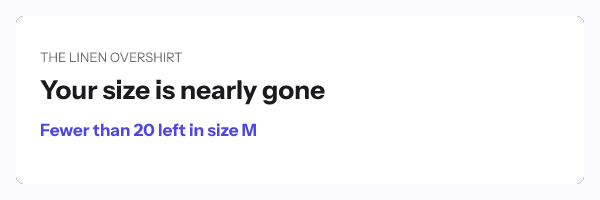
The same reasoning applies to price, points and delivery dates. Match the precision of what you draw to the freshness of the data behind it, and the image stays honest without an open-time API call.
How to set it up
- Decide which value the picture needs and confirm your platform holds it at send time.
- Build the template and add a text layer, a progress bar or a star rating for that value.
- Declare the variable with its type and a fallback behaviour, so a missing value hides the layer rather than leaving a gap.
- Add a transform if the raw value needs formatting: currency, number, date or title case.
- Add a conditional rule for any threshold, so the layer disappears when the number stops being useful.
- Publish and read the readiness checks.
- For a value that differs per recipient, upload a recipient set or call
POST /urls/batch, then set the imagesrcto the contact field holding the signed address. Both are on Growth or Agency.
The per-platform syntax is in the merge tag guide, the parameter reference is in the merge tags documentation, and the batch endpoint is in the API reference. Plans are on pricing and the render guarantees are on features.
Questions and answers
Can I show live weather in an email image here?
No. There is no weather data source in the product, and no external fetch happens at render time. Liveclicker, Zembula and NiftyImages all sell a weather module, and their pages are linked in the sources.
Is an open-time API call safer or riskier than a merge value?
It is fresher and it is more fragile. A feed adds a dependency that can be slow or down at the exact moment an inbox is waiting for a picture, which is why response caching appears in every vendor’s documentation for these modules.
How stale can a merge value be before it misleads?
That depends on how precise the copy is, not on the value. Round the number and add a threshold rule, and a figure from yesterday still tells the reader something true.
What about a live stock counter for a back-in-stock email?
Use the count your platform already has and hide the layer below a threshold. The pattern is covered on the back-in-stock page.
Will external data sources be added?
They are not in the product today and this page will say so until they are. Anything else would be selling a roadmap as a feature, which is the thing this category does too much of.
Sources
- Liveclicker, Real-Time Personalization (Zeta Global), read on 17 September 2026
- Classic Real-time email personalization modules (Zembula), read on 17 September 2026
- Zembula's pricing (Zembula), read on 17 September 2026
- Studio (Movable Ink), read on 17 September 2026
- Dynamic Email Marketing Personalization Features (NiftyImages), read on 17 September 2026
- Data Sources, Data Stores and External Web APIs (NiftyImages), read on 17 September 2026
Related
Put a countdown in the campaign you are writing now
The free plan covers 5,000 opens a month with no card. Starter is $19 a month for 250,000.