Build an evergreen countdown timer for email
By Danish Mohammed, founder. , updated 5 min read
An evergreen countdown runs for a fixed length, such as 48 hours, from a starting moment rather than to a date. The free generator on this site will draw one but will not save one. A free account will publish one, and that is the route below.
See one without an account
The generator’s preview route takes a length in seconds and draws the timer exactly as a recipient’s first open would see it. Nothing is saved, so every load starts again from the full length. Open this link for a 48-hour countdown in the Cards style:
api.emailtimer.app/v1/public/tools/preview.gif?duration=172800&style=cards
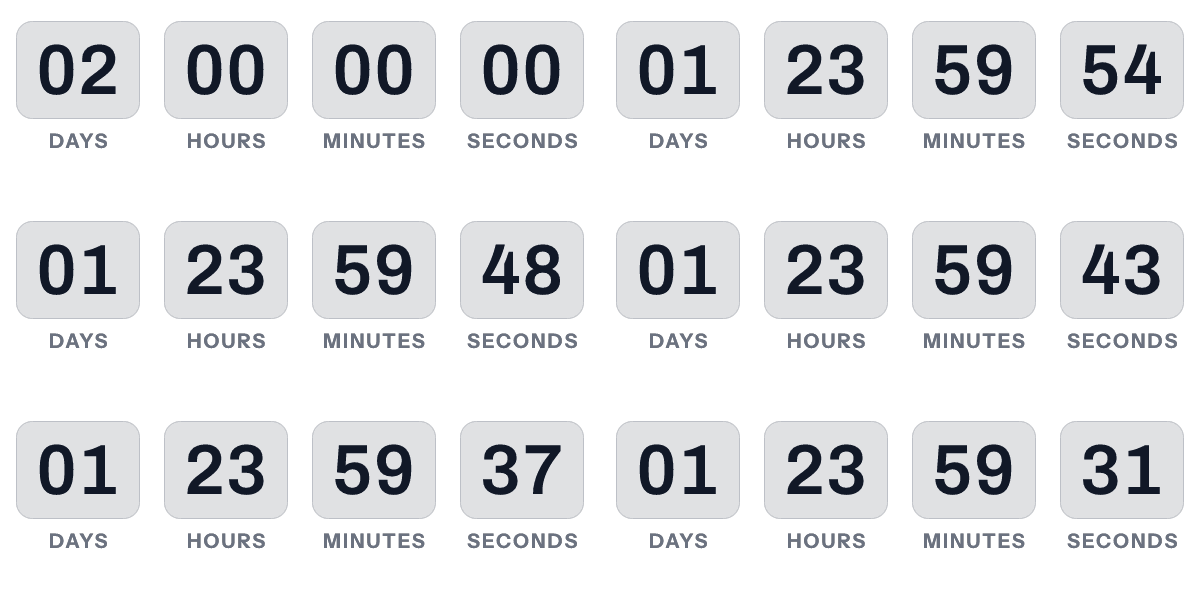
It returns a 600 by 200 GIF of 30 frames, starting at 02 days, 00 hours, 00 minutes and 00 seconds. Change the query to try other settings:
| Parameter | What it takes |
|---|---|
duration |
Seconds, from 60 up to 7,776,000, which is 90 days |
style |
cards, flip, circles, rings, plain, underline, stacked or bar |
size |
600x200, 600x300 or 300x250 |
lang |
A label language code such as en, es or ja |
bg, digit, label |
Hex colours such as 111827 |
headline |
Up to 60 characters of plain text |
The route allows 60 renders a minute from one address. A value it cannot use is refused with a sentence naming the parameter and what it accepts.
Why the free generator will not save it
The generator publishes a real timer into a workspace that belongs to the free tool rather than to a person, and each one is deleted 30 days after the deadline it counted to. An evergreen timer has no deadline, so nothing would ever find it to delete. Ask the free tool to save one and it answers, in these words:
An evergreen timer cannot be saved from the free generator, because it has no deadline to expire on. Send “deadline” instead, or sign up to publish an evergreen timer.
A fixed-date timer is the free tool’s job. For that, use the countdown timer generator, which needs no account at all. A timer from it works for 500 opens without an account, and for 1,000 once you sign in and claim it.
Publish one on the free plan
- Create a free account at app.emailtimer.app and verify the email address.
- Pick a design from the Gallery, or open a template, and select the timer layer.
- Under “Counts to”, choose “A countdown that starts on first open”.
- Under “Runs for”, enter the days, hours and minutes. Days go up to 365.
- Under “When it expires”, choose all zeros or an image of your own.
- Publish, and copy the snippet for your email platform from the publish screen.
The free plan includes 5,000 image opens a month, and its listing counts three live images at a time. It publishes a timer that starts on first open like any other plan does. The plans and what each adds are on pricing.
One clock per address, not per person
The service records the first fetch of an image address and counts every later fetch of that address from it. A campaign snippet is one address shared by the whole list. So everybody who receives that snippet shares one clock, and it starts at the first fetch by anybody.
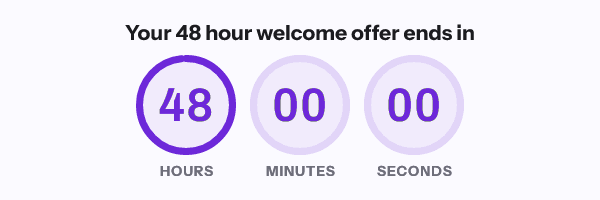
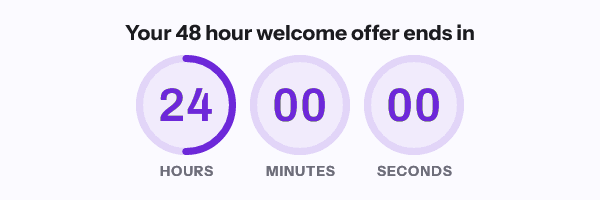
That suits a 48-hour window that opens when a campaign first goes live. A separate 48 hours for each reader needs a separate address for each reader. Those come from a recipient list or the batch API, on Growth at $49 a month or Agency at $149.
Other tools draw the line in other places. Prices checked on 17 September 2026:
| Tool | What its pricing page says about evergreen |
|---|---|
| MailTimers | “Need Evergreen Timer? They are available only in premium plans, please upgrade your plan.” |
| Sendtric | The “Start on Open (Perpetual Evergreen) Timers” row reads No on Free and Yes from Micro, shown at $8.25 a month billed annually |
| EmailTimer.App | A timer that starts on first open publishes on the free plan, as one clock per address. One address per person needs Growth, $49 a month |
Sendtric’s page describes its start-on-open timers as beginning “counting down when each recipient opens the email”. I have not tested how either tool keys its clock.
What Apple Mail does to the start
Apple documents that Protect Mail Activity “downloads remote content in the background by default” when a message arrives, whether or not the reader engages with it. For a timer that starts on first open, that download is the first fetch. The clock starts at delivery, before anybody has read a word.
The publish screen shows this before you send. Its “Apple Mail with privacy” preview lets you choose how long after delivery the reader opens the message, and draws the countdown that reader would get.
If the window has to be the same length for every client, use “A countdown that starts at send” instead. The send time is signed into the image address, so delivery does not move it. That address has to be minted through the API, on Growth or Agency. The full comparison is on timer types, and countdown timers in Apple Mail sets out what Apple documents and what testing found.
Questions and answers
Can I make an evergreen timer for free?
Yes, in a free account, as one clock per image address. The free generator without an account will draw a preview of one but will not save it.
Why will the free generator not save an evergreen timer?
Free generator timers are deleted 30 days after their deadline, and an evergreen timer has no deadline to expire on. The tool refuses rather than keep a timer it could never clean up.
Does an evergreen timer start separately for each subscriber?
Only if each subscriber has their own image address. A campaign snippet is one address, so everyone who receives it shares one start. Per-recipient addresses are on Growth and Agency.
What does an evergreen timer show after it runs out?
Whatever the template’s “When it expires” setting says: all zeros, or an image you chose.
How long can an evergreen countdown run?
The editor takes up to 365 days. The preview route draws up to 90 days.
Prices checked on 17 September 2026. Vendors change their prices without announcing it, so check the figure you care about before you act on it.
Sources
- Mail Privacy Protection and Privacy (Apple Legal)
- Pricing (MailTimers), read on 17 September 2026
- Pricing and plan comparison (Sendtric), read on 17 September 2026
Related
Put a countdown in the campaign you are writing now
The free plan covers 5,000 opens a month with no card. Starter is $19 a month for 250,000.