Outlook started resuming timers from a cached frame
By Danish Mohammed, founder. 7 min read
There is an unresolved thread on Microsoft’s own Q&A site, asked on 7 May 2025, reporting that countdown timer GIFs in Outlook restart “from a specific cached frame” on every new open instead of showing the correct remaining time. It names both new Outlook for Windows and classic Outlook, says mobile Outlook is unaffected, and records two vendor workarounds that did not work. It is locked as a migrated question and unresolved, and it is still the best public documentation of the problem.
What the report actually says
The question is titled “Why animated gif countdown timers aren’t showing correct time in Outlook Email Client?” and was asked on 7 May 2025. The details worth keeping:
The versions named are new Outlook for Windows 1.2025.319.100 on the Production channel, and classic Outlook version 2502, build 18526.20286. A follow-up in the same thread names new Outlook 1.2025.430.200, which is how you can tell the reporter had already taken the advice to update.
The behaviour is that on each new open of the message, the timer GIF begins from a cached frame rather than from the correct remaining time. The reporter describes the numbers as wrong, not the image as missing.
The scope is desktop and web. The reporter states that mobile Outlook showed the correct time while the desktop and web clients did not.
The timer vendor is Sendtric.
Two workarounds were attempted and both failed. The first was setting up fallback imagery. The second was setting the timer based on the user’s time zone.
Microsoft’s responder suggested updating to the latest version and syncing the Windows clock. The reporter was already on an updated build, and noted that the affected users could not sync the Windows time without administrator rights. The thread is locked as a migrated question and remains unresolved.
Why the suggested fixes could not work
Fallback imagery addresses an image that fails to load. The report describes an image that loads perfectly and contains an old number. A fallback never fires, because nothing failed. Substituting a static image would only change what the recipient sees when the request does not complete, which was not the failure.
Setting the timer by the recipient’s time zone addresses arithmetic. A server-rendered countdown computes the remaining time before the bytes leave the server, so the recipient’s zone and the recipient’s clock are not inputs to the number on the screen. Changing the zone changes which deadline instant the server counts to. It cannot change which cached copy of an image a client decides to display.
Syncing the Windows clock fails for the same reason, and it is worth being explicit because it is the advice people are still given. For a server-rendered GIF, the local clock plays no part in the arithmetic. The machine decodes pixels that already contain digits.
All three suggestions treat the symptom as a time calculation. The report describes a cache identity problem: the client is showing bytes, or decoded frames, that it obtained earlier. Every useful lever sits in the HTTP conversation between the client and the origin, not in the timer’s configuration.
The two mechanisms that produce this symptom
There are two distinct things a client can do, and they look the same to a marketer.
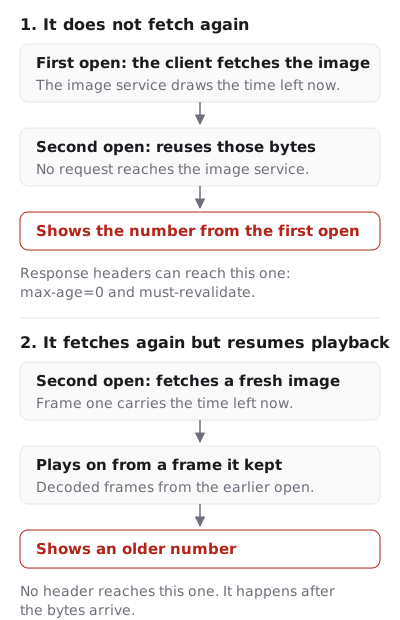
It does not refetch. The client holds the image bytes from an earlier open and reuses them. The displayed number is the number that was correct when those bytes were made. This is ordinary HTTP caching, and it is governed by response headers and by whether the client revalidates.
It refetches but resumes playback. The client holds the decoded animation and resumes at the frame where it stopped, so a fresh image is not played from its first frame. The phrase in the report, “starts from a specific cached frame”, is consistent with this. This one is not governed by headers at all, because it happens after the bytes arrive.
I cannot tell you which of the two is happening, and neither can the thread. Distinguishing them requires access to the client’s network log on an affected machine, and the affected users in the thread could not change a Windows setting without administrator rights, let alone capture traffic.
What a sender can actually influence
The headers are the only lever available for the first mechanism, and they are worth setting correctly whether or not they turn out to be sufficient.
A live timer response from EmailTimer.App carries max-age=0, s-maxage=30, must-revalidate and no-transform, with a strong ETag over the exact bytes. Each of those does something specific here.
max-age=0 addresses the private cache, which is the Outlook client itself, rather than only the shared caches in front of it. Directives that bind shared caches alone leave a client-side cache to a heuristic, and a heuristic is precisely the behaviour the thread is complaining about.
must-revalidate forbids reusing a stale copy without asking. The strong ETag makes that ask cheap, because the renderer is deterministic: identical inputs produce byte-identical output, so a match is a 304 rather than a fresh image. A client that revalidates gets a new render when the number has changed and gets nothing on the wire when it has not.
no-transform matters more in corporate mail than people expect. Image-optimising gateways and proxies re-encode images in transit, and a countdown re-encoded as a still frame is a broken timer that generates no error anywhere in your sending stack.
For the second mechanism, resumed playback, there is no header. What helps is a design that does not depend on the animation starting at its first frame. That is also the design classic Outlook needs for a different reason: Microsoft’s support page says that with animations off, “only the first frame of the animation appears”. Frame one of every EmailTimer.App GIF is a complete full-canvas image with the numbers for the instant of that fetch already painted in, not a title card. The animation holds its last frame rather than looping, so a reader is left on the most recent number rather than sent back to the oldest one. Neither of those makes a resumed animation correct. Both of them make the failure smaller.
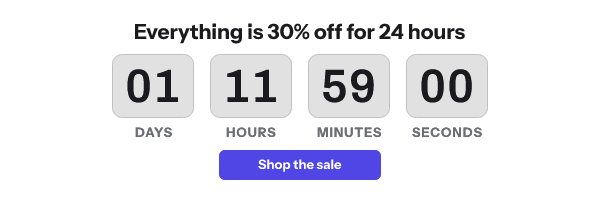
I have not reproduced the behaviour in the report and I am not claiming immunity to it. When I have dated screenshots from affected Outlook builds, they will be published with the dates on them.
How to check it in your own inbox
This takes fifteen minutes and it is worth doing before your next urgent send.
Send yourself the campaign. Open it in the affected Outlook, note the number, close the message, wait five minutes, and open it again. If the second number is five minutes lower, you are fine. If it is the same, or lower by less than the elapsed time, you have the behaviour described in the thread.
Then take the image URL out of the message source and load it in a browser on the same machine. Reload it twice. If the browser shows correct numbers, the renderer is working and the difference is the client. That single comparison is what the thread never had.
What to do about it
- Write the cut-off in body text beside the image, with the zone. Correct under every mechanism above, including the ones nobody can fix.
- Use a fixed absolute deadline for Outlook-heavy lists. A cached render of a fixed deadline is still telling the truth about the cut-off. A cached render of a start-on-open timer is not.
- Show hours and minutes rather than seconds. A minutes display drifts less visibly when the frame it is showing is old, and it is still legible when the animation never plays.
- Confirm your vendor sends revalidation headers on a live timer. Fetch the image URL with
curl -Iand read theCache-ControlandETaglines. A longmax-ageon a countdown is a vendor telling every cache to keep an old clock. - Insist on
no-transform. Without it, a corporate gateway is permitted to re-encode your animation into a still image. - Know where the frames run out. GIF frame limits in email timers lists the documented ceilings, and Apple MPP and the shared image cache covers the other client that renders early and reuses the answer.
- Set the expired image before the send. An Outlook reader with a cached copy is the likeliest person to see a counter sitting on zeros after the sale.
- Run the fifteen-minute check above on your own build and record the date. Your own dated observation beats every compatibility claim on the internet, including the ones on this site.
Questions and answers
Is this a confirmed Outlook bug?
It is a reported, unresolved and locked thread on Microsoft’s own Q&A site from 7 May 2025, naming specific builds. Microsoft has not published a fix or an acknowledgement that I can find.
Which Outlook versions are affected?
The report names new Outlook for Windows 1.2025.319.100 and classic Outlook 2502, build 18526.20286, and says desktop and web were both affected while mobile was not.
Will a fallback image fix it?
No. A fallback fires when an image fails to load, and in this report the image loads successfully with an old number in it.
Does a per-recipient image URL help?
It stops one cached render from serving many recipients, which limits the spread. It does not change what one client does between two opens of the same message.
What should I do before a launch send this week?
Run the fifteen-minute check, put the deadline in text, and use a fixed deadline. The version-by-version detail is on countdown timers in Outlook, and what the renderer guarantees about frame one is on features.
Sources
Related
Put a countdown in the campaign you are writing now
The free plan covers 5,000 opens a month with no card. Starter is $19 a month for 250,000.