What a timer shows when it is not counting down
By Danish Mohammed, founder. 5 min read
An EmailTimer.App image address never returns an error. Whatever goes wrong, the answer is HTTP 200 and a valid picture, because the email it sits in has already been delivered and a broken-image icon would stay in it for good. Three different pictures can take the place of a live countdown, and each one is set somewhere different.
The three pictures
| Picture | When it appears | Where it is set | Counts as an open |
|---|---|---|---|
| The expired frame | The deadline has passed | “When it expires” in the editor | Yes |
| The template’s fallback image | This template could not be drawn for this request | fallbackAssetKey in the template document |
Yes |
| The service card | The request could not be tied to a usable template | Nowhere. It is the same for everyone | No |
The expired frame
After a deadline, every fetch gets the expired frame. The editor’s timer panel has a section called “When it expires” with two choices.
All zeros draws the same design with every unit at 00, as a single frame. It needs nothing uploaded, and it is still a true statement about the offer.
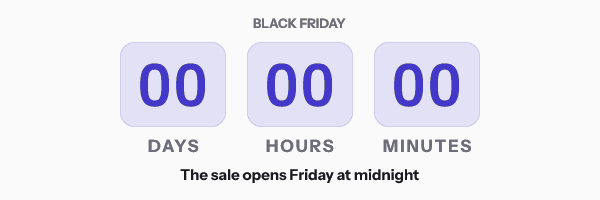
An image draws a picture of your own over the whole canvas, such as “This sale has ended” with a link to the next one. The field takes the image’s asset key, which the Assets screen does not display today. The API’s GET /assets returns it as assetKey. If that image cannot be read at render time, the renderer falls back to the zeros version rather than to anything blank.
Publishing checks that an image the template names is still in the workspace. If it is not, the refusal reads “The image” and the key, then “is no longer in this workspace, so it would be missing from every render.”
An expired frame is cached longer than a live countdown, with max-age=86400, s-maxage=604800, because it will not change again. A count-up timer never expires, so it never shows one.
The template’s fallback image
Sometimes a template cannot be drawn for one particular request. Examples:
- a template set to “A date from your list” is fetched for a recipient whose row has no deadline
- a template set to “A countdown that starts at send” is fetched through an address with no send time in it
- a
deadlineorsentvalue signed into the address cannot be read as a date - something in the render fails in a way the engine can see
The renderer will not guess at a deadline in any of these, because a countdown showing the wrong number is worse than no countdown. It draws the template’s fallback image instead: the asset named by fallbackAssetKey, drawn over the template’s whole canvas. A template with no fallback image, or one whose image cannot be read, gets a flat light grey card at the template’s own size.
The editor has no control for fallbackAssetKey today. It is a field on the template document, so it is set through the API with PATCH /templates/{id} and a draft that includes it, then a publish. The API is on Growth and Agency. The asset itself is an ordinary uploaded image, up to 5 MB, in PNG, JPEG, GIF or WebP.
Publishing also runs the template once before it goes live. If that render lands on the fallback image, the publish is refused with “This template could not be rendered, so publishing it would send a blank card to every recipient.” So the fallback image is a guard for problems that only appear per request, not for a template that was broken from the start.
A fallback render carries s-maxage=30, so once the cause is fixed, a shared cache that honours the header asks again within about 30 seconds. A fallback render counts as an open today, because it is a rendered response for a real template. How opens are counted has the full rule.
The service card
Some requests never reach a template at all. The service answers them with one fixed card, 600 by 200 pixels, reading “image unavailable” with “emailtimer.app” beneath it. It appears when:
- the signature does not match, which is what happens when an email platform fills a merge tag into the address after it was signed
- the address names a template that does not exist, or one from a different workspace
- the workspace has been suspended
- one network address sends more requests than the per-address limit allows
- the service is at its concurrency ceiling, or a render runs out of time
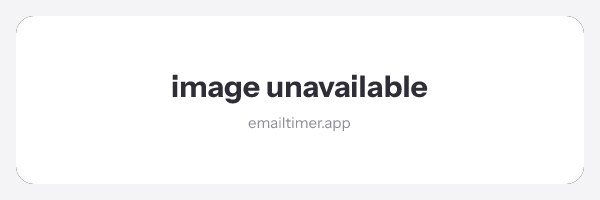
It carries the same short cache lifetime as a fallback render, so a temporary overload clears quickly. It does not count as an open.
The merge tag case is the one to check for before a send, because it hits every recipient at once and produces no error anywhere. Open the image address from your test send in a browser. A countdown means the address is good. The card means it is not. Countdown timer not showing covers the other reasons an image never appears, including ones on the mail client’s side.
Questions and answers
What does a recipient see if my plan runs out?
A normal countdown. Going over a plan never swaps in any of these pictures. Past 110 percent of the allowance, new renders carry a small corner watermark and nothing else changes, as plan quota and the watermark explains. The allowance for each plan is on pricing.
Can I set a custom fallback image in the editor?
Not today. The expired image is set in the editor. The fallback image for a template that cannot be drawn is set through the API.
Why does my whole send show “image unavailable”?
The likeliest cause is that the image address was changed after it was signed, usually by a merge tag inside it. The signature covers every parameter, so any substitution breaks it for every recipient.
Is a grey card the same as a broken image?
No. A broken-image icon means the mail client got nothing it could show. Every answer from the image service is a valid picture, so the layout of the email stays intact.
Related
Put a countdown in the campaign you are writing now
The free plan covers 5,000 opens a month with no card. Starter is $19 a month for 250,000.