What happens when a workspace goes over its plan
By Danish Mohammed, founder. 4 min read
Going over a plan never breaks an image. Every render keeps working, the countdown keeps counting, and personalized values keep drawing. The only visible consequence arrives past 110 percent of the period’s opens: a small line of text in the corner of new renders. Getting back under 110 percent clears it from new renders within about 15 minutes, and there are two ways it can outlast that.
The three thresholds
| Share of the period’s opens | What happens |
|---|---|
| 80 percent | One email to the workspace’s owners and admins |
| 100 percent | One email to the same people. Rendering is unaffected |
| Past 110 percent | New renders carry the watermark until the workspace is back under |
Each email is sent once per billing period. A workspace that jumps from under 80 percent to over 100 between two checks gets only the 100 percent email, because a warning about room left means nothing once the room is gone.
The 80 percent email says it in its preview line: “Nothing changes at this level.” The 100 percent one says “Nothing has been switched off. Your images keep rendering.”
Usage is checked every 15 minutes, so a threshold can pass up to 15 minutes before anything reacts to it. The allowances are 5,000 opens on Free, 250,000 on Starter, 1,000,000 on Growth and 5,000,000 on Agency, with prices on pricing. How opens are counted sets out what one open is.
What the watermark is
The watermark is the text “Powered by EmailTimer.App”, in 11 pixel grey type, in the bottom right corner of the image, 8 pixels in from the right edge. It is drawn into new renders for the workspace while it is on, whether the image is a live countdown, a personalized image or an expired frame. The countdown, the animation and the personalization are unchanged.
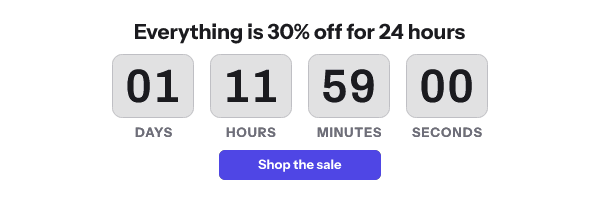
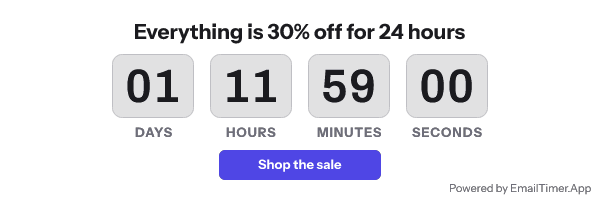
It applies to every plan the same way, Free included. It is never a replacement image, never a blank card, and never a reduced frame count.
A design with digits close to the bottom right corner can have the line pass under them. The Photoshop import checks for that and says how many pixels to leave clear.
How it comes off
When the workspace is back under 110 percent, the next check clears the flag, and new renders are clean again. That happens in two ways:
- An upgrade. A higher plan raises the allowance, so the same usage is a smaller share of it.
- A new period. Usage counts from zero again at the start of the next billing period, or on the first of the month in UTC on the free plan.
Either way, allow up to 15 minutes for the next check.
Two ways a watermark can outlive the upgrade
An address minted while the workspace was over. When the workspace is past 110 percent, a newly minted image address carries wm=1 inside its signature. That includes a snippet copied from the publish screen, a recipient list export and an API call. The signature cannot change, so that address stays watermarked after the upgrade. Copy the snippet or export the list again after upgrading. Through the API, a mint request can pass "watermark": false to get a clean address while the workspace is over, and the service still watermarks it at fetch time until the workspace is back under. Minting image URLs in bulk shows where that field goes.
A copy already in somebody’s cache. A watermarked render that a mail provider has already stored can be shown again after the watermark is off. A live countdown asks shared caches to check back within 30 seconds. A still personalized image allows them up to seven days, and an expired frame the same. What a cache that ignores those headers does is up to its owner.
What going over does not do
It does not stop, slow down or swap any image in an email already sent. The emails say so, and the quota logic has no path that denies a render.
Suspension is a separate thing with a separate cause: an unpaid balance after retries, or abuse. A suspended workspace’s images are replaced by the plain “image unavailable” card. Quota alone never suspends a workspace. The terms cover when suspension can happen.
Questions and answers
Will my images break if I go over my plan?
No. Past 110 percent new renders carry a small corner watermark. Nothing else changes, and nothing already sent stops working.
Does the free plan show a watermark?
The over-quota watermark follows the same rule on Free as on every other plan. It appears past 110 percent of the plan’s 5,000 opens.
I upgraded and some images still show the watermark. Why?
Either the address was minted while the workspace was over, so the watermark is inside its signature, or a mail provider is showing a copy it stored earlier. Copy the snippet again after upgrading, and allow for caches.
How quickly does an upgrade remove the watermark?
Within about 15 minutes for new renders, when the next usage check runs, provided the new allowance puts the period’s opens back under 110 percent.
Who gets the quota emails?
The workspace’s owners and admins. Members without either role do not.
Related
Put a countdown in the campaign you are writing now
The free plan covers 5,000 opens a month with no card. Starter is $19 a month for 250,000.