Why your timer shows the wrong time
By Danish Mohammed, founder. 7 min read
A countdown of remaining time has no time zone in it. “14 hours 22 minutes” means the same thing in Lisbon and in Manila, so if two recipients see different numbers, either the image was fetched at two different moments or the deadline was recorded in a zone you did not intend. The one thing that is almost never the cause is the recipient’s own clock, because a server-rendered GIF is drawn before it leaves the server and the recipient’s machine only decodes pixels.
The distinction that resolves most of these tickets
There are two different numbers people call “the timer”, and they behave differently.
Remaining time is a duration. It is zone-free. A server computes it as the deadline minus the instant of the fetch, and the answer is identical for every recipient fetched at the same instant.
The cut-off is a wall-clock time, and it is meaningless without a zone. “Ends at midnight” is four different instants across the United States and a different day in Australia.
A timer image shows the first. Your copy usually promises the second. The mismatch between them is where most of the confusion lives, and it is a copywriting problem before it is a rendering one.
This page assumes a number is showing. If the timer is missing, a broken image or alt text, that is a delivery problem instead, and why your countdown timer is not appearing at all covers it.
Cause one, two recipients fetched at different moments
This is the most common report and it is not a fault. A Klaviyo community thread from 12 January 2022 records the symptom: “customers have fed back saying that they are receiving different times when they open the email.” Klaviyo’s own answer in the thread is direct about the mechanism: “When using these as image blocks however, the countdown timer will not be exact.”
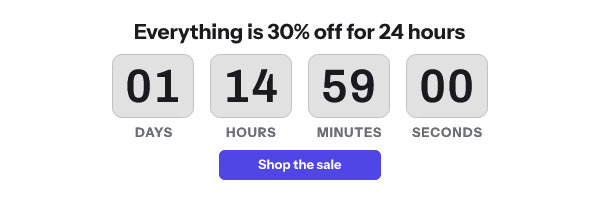
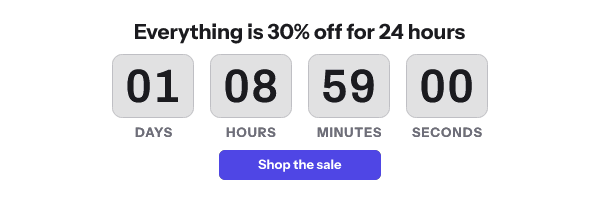
Two people who open a message an hour apart get two renders an hour apart. Both are correct. If one of them re-opens an old message, Gmail’s proxy may replay the copy it already holds, so a third number appears that is correct for a moment in the past. Apple Mail’s prefetch produces the same effect from the other direction, because Protect Mail Activity “downloads remote content in the background by default”, whether or not the recipient engages with the message.
The test that separates this from a real deadline error is to take the image URL out of the sent message and load it in a browser. A browser has no mail proxy in front of it. If the number is right there, every remaining discrepancy is a fetch moment.
Cause two, the deadline was recorded in the wrong zone
Some tools ask for a deadline and quietly interpret it in the account’s zone. MailerLite documents this for its native block: “The countdown timer uses your account time zone to calculate the expiry date.” If the account was created by a colleague in another country, the deadline you typed is not the deadline you meant, and every recipient is off by the offset between the two zones.
The fix is to write deadlines as an absolute instant with an explicit zone, and to check which zone the tool is using before the first send rather than after. EmailTimer.App takes an IANA zone per template, so “23:59 Europe/London” survives the move into and out of summer time with no recalculation. A fixed offset such as UTC+1 does not.
Cause three, per-recipient local time is mostly not possible
Vendors contradict each other in public on this, so read the claim carefully before you buy on it.
MotionMail’s help centre is the honest version: the sender chooses the zone, and “the recipient sees how much time is left based on the end date and time in the time zone you select”. Other vendors in this category advertise automatic adjustment to each recipient’s local time. For that to be true, something at fetch time has to know where the recipient is, and there are only two sources for that.
The first is data you already hold. If your list carries a time zone or a country per subscriber, the render can use it, but not as a merge tag your ESP writes into the image URL, because the URL is signed and a value added after signing breaks it. EmailTimer.App accepts a recipient zone as a value signed into that recipient’s own image address, generated through the API, for this reason. This works, and it works precisely to the extent that your data is right.
The second is the IP address of the request. Under Apple’s Mail Privacy Protection the request comes from one of Apple’s relays, and the design exists specifically so that the second relay “knows the remote Mail content you receive, but not your IP address”, handing the destination a generalised identity instead. Under Gmail the request comes from Google’s proxy servers, not from the reader. So for the two largest mail platforms, the IP at fetch time is a data centre, not a recipient. Geolocation on a proxied fetch is a guess about a proxy.
That is the whole of it. Per-recipient local time works when you supply the zone and does not work when a vendor promises to infer it.
Cause four, the recipient’s clock is a red herring
The Microsoft Q&A thread from 7 May 2025 about Outlook showing incorrect timer times contains a telling exchange. A support specialist suggested syncing the Windows clock. The reporter noted that the affected users could not change the Windows time without administrator rights, and the thread went nowhere.
For a server-rendered timer, the local clock is not an input. The server reads its own clock, computes the difference, paints digits, and sends a file. If a number is wrong, it was wrong when it was drawn, or the file is an old one. Time spent on the recipient’s system clock is time not spent on the causes that are real.
Cause five, the deadline is in the past
If a timer shows zeros everywhere including in a browser, the deadline has passed or was never in the future. Common versions: a date typed for the wrong year, a flow that recycled a deadline from an old campaign, a per-recipient deadline computed from a trigger that fired days before the send. Load the URL in a browser, then check the year on the deadline the template was published with, or on that recipient’s row.
What to do about it
- Write the cut-off in the body copy with the zone spelled out. “Ends 23:59 UTC on Friday 25 September” removes the ambiguity that the image cannot remove, and it is the one fix that works in every client.
- Set the deadline as an absolute instant with an explicit IANA zone. Not a wall-clock time in whatever zone the account happens to carry.
- Check the account zone of every tool in the chain before the first send. Your ESP, your timer service and your own calendar can disagree.
- If you want per-recipient local time, supply the zone from your list. Generate one signed image address per recipient with their zone in it, and hold it in a contact field. A zone added as a merge tag breaks the signature. If you do not hold that field, do not buy a promise that the zone will be detected.
- Stop asking two recipients to see the same number. They will not, and they should not. The number that has to match across your whole list is the cut-off in the copy.
- Load the image URL in a browser before you blame the inbox. Two reloads separate a render fault from a cache effect in about ten seconds.
- Read the Gmail case if your list is consumer. Countdown timers in Gmail explains why two first opens produce two different numbers and why that is correct.
- Pick the timer model deliberately. Timer types sets out which deadline models survive a delivery-time fetch and which ones do not. Plans and limits are on pricing.
Questions and answers
Why do two customers see different times on the same timer?
Because the image was rendered when each of them fetched it, and those were different moments. Both numbers were correct when they were drawn.
Can an email timer show each recipient their own local deadline?
Only if you supply the recipient’s time zone from your own data. It cannot be inferred from the request, because Apple and Google both proxy the fetch.
Does the recipient’s computer clock affect the timer?
No. The remaining time is computed on the server before the image is sent, so the reader’s clock plays no part in the arithmetic.
My timer is an hour out for everyone. What happened?
Almost always a summer time boundary or an account zone you did not set. Use an explicit IANA zone rather than a fixed offset, and re-check the account zone of the tool that stored the deadline.
Why does the timer show zeros in a test send?
The deadline is in the past. Check the year and the zone on the deadline in the template, then see why your email timer is stuck for the caching cases.
Sources
- How does MotionMail deal with time zones? (MotionMail Help), read on 17 September 2026
- How to use a countdown timer (MailerLite Help)
- Countdown timer displaying wrong/different times for customers (Klaviyo Community, 12 January 2022)
- Why animated gif countdown timers aren't showing correct time in Outlook Email Client (Microsoft Q&A, 7 May 2025)
- Mail Privacy Protection and Privacy (Apple Legal)
- Set up an image URL proxy allowlist (Google Workspace Admin Help)
Related
Put a countdown in the campaign you are writing now
The free plan covers 5,000 opens a month with no card. Starter is $19 a month for 250,000.