Countdown timers in Yahoo Mail and AOL Mail
By Danish Mohammed, founder. 5 min read
Yahoo Mail and AOL Mail get less attention than Gmail, Outlook and Apple Mail, and they get almost no attention in this category. Searching for whether a countdown timer works in Yahoo returns nothing purpose-built. Vendors list Yahoo in a compatibility table with a green tick and move on.
Here is what the two companies actually publish, what they leave unstated, and what a timer should be built to survive either way.
What Yahoo documents
Yahoo’s help centre covers image display from the recipient’s side. The setting is called “Show images in messages” and it offers two options: “Always, except in Spam folder” and “Ask before showing external images”. Yahoo describes the default as showing all images except those in spam, and it frames the alternative as a privacy and security choice.
Yahoo also publishes a help page titled “Mail Proxy Servers”. The version served today opens with “This is the legacy page. For updated information go to Proxy Servers”, and carries no technical detail about what is proxied or for how long. So Yahoo confirms proxying exists as a concept in its product and documents nothing you can plan around.
There is a third page, “Embedded images are not displayed in emails”, which handles the symptom rather than the mechanism.
What AOL documents
AOL publishes an article titled “Enable or block images in AOL Mail”. Its body is drawn by script rather than served in the page, so the title is the only part quotable from that URL. What the title names is the same recipient-side switch Yahoo describes, and nothing further is published, so treat the two as one planning problem.
What neither company documents
Four things, and they are the four that decide what a timer looks like.
GIF animation. Neither Yahoo nor AOL publishes a statement about animated GIF playback in their mail clients or apps. Every compatibility table you have read that puts a tick in the Yahoo column is reporting somebody’s observation, not a vendor commitment.
Cache lifetime. No figure is published. Anyone quoting you one for Yahoo is quoting a test they ran on a day you cannot check.
Prefetch. Nothing is published about whether images are fetched before a human opens the message, the way Apple Mail Privacy Protection does.
Proxy behaviour. The page that would describe it is a legacy stub.
I have not sat in front of Yahoo Mail with a stopwatch, so this page describes documented behaviour and named gaps rather than a photographed inbox test. When that test exists, this page will carry the date it was run.
What to build for
The uncertainty above collapses into a short set of rules, and they are the same rules that make a timer survive Outlook and Apple Mail.
| Assumption | Why | What it means for the design |
|---|---|---|
| Images may be off | Yahoo’s own setting offers “Ask before showing external images”, and the spam folder never shows images | The deadline must also exist in body text next to the image |
| Frame one may be all that renders | No animation commitment is published by either company | Frame one carries the live numbers and reads as a finished picture |
| A later open may serve an older copy | No cache lifetime is published | Configure the expired image so a stale open degrades into a closed-sale message |
| The image may be fetched through a proxy | Yahoo documents that proxy servers exist | Keep the URL simple, keep the response an image, never depend on cookies or a referrer |
Every one of those is satisfied by the same build, which is the useful part. A timer designed for Outlook already survives Yahoo.
How EmailTimer.App handles it
Frame one of every generated GIF is a complete full-canvas image with the live numbers painted in for the instant of the fetch. It is never a title card and never a blank plate waiting for the animation. A Yahoo reader whose client does not animate sees an accurate still countdown rather than a placeholder.
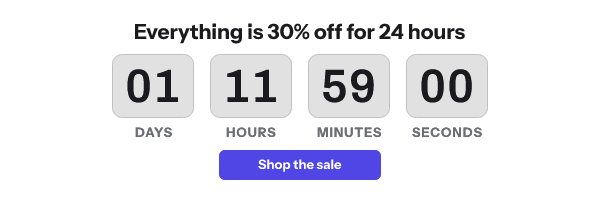
The GIF loops by default, so the seconds keep moving while the message is open, and each pass jumps back by the length of the animation. Set the template’s “At the end” setting to Hold and it plays once instead, leaving its last frame on screen and never showing a number twice.
Alt text is set on the snippet, so the images-off case and the spam-folder case both show words rather than an empty box. The troubleshooting page for a timer that is not showing covers the rest of that path.
The image service answers every request with HTTP 200 and a valid image, degraded to a fallback if anything upstream fails. A delivered email cannot be recalled, so a 500 is never an acceptable answer to a proxy that asks twice.
A checklist before you send to a Yahoo or AOL list
- Write the deadline in body text next to the image. “Ends 23:59 UTC on Friday” survives images-off, frame-one-only and a stale copy at once.
- Look at frame one on its own. If it does not communicate the offer without motion, the design is not finished.
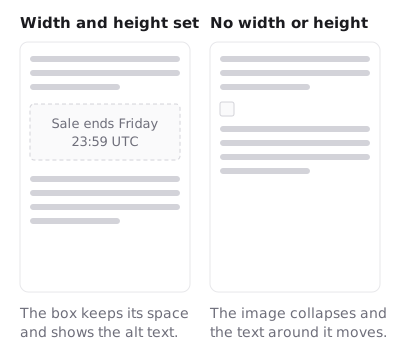
- Set width and height on the
<img>tag, so a blocked image reserves its space instead of collapsing the layout. - Write real alt text. “Sale ends Friday” beats “countdown timer”.
- Prefer hours and minutes over seconds for a list with a large Yahoo or AOL share. A seconds display is noise on a still frame.
- Configure the expired image before the send, not after the deadline.
- Send yourself a test to a real Yahoo address and a real AOL address, with images set to “Ask before showing external images” for one of them.
Questions and answers
Does Yahoo Mail support countdown timers?
A countdown timer is an image, and Yahoo displays images by default, so it displays. Whether it animates is not something Yahoo documents anywhere. Build frame one to be correct on its own and the answer stops mattering.
Why are images not showing in my Yahoo test?
Check the “Show images in messages” setting first. Yahoo offers “Always, except in Spam folder” and “Ask before showing external images”, and its own help page covers the case where embedded images do not display. A message that landed in spam will not load images at all.
Is AOL Mail different from Yahoo Mail for timers?
AOL has its own article on enabling or blocking images, and its title names the same switch. Neither company publishes anything about GIF animation or caching, so plan for both the same way.
How long does Yahoo cache a timer image?
No published figure exists. Treat a re-open as possibly showing an older copy, set the expired image, and put the deadline in text.
Do Yahoo opens count against my plan?
Yes. An open here is one fetch of the image, counted the same way for every client. The free plan is 5,000 image opens a month with no watermark, and the rest is on the pricing page.
Next: countdown timers in Gmail for the client that does document its proxy, countdown timers in Outlook for the frame-one case in detail, and the full client table for everything in one place.
Sources
Related
Put a countdown in the campaign you are writing now
The free plan covers 5,000 opens a month with no card. Starter is $19 a month for 250,000.