

Maizzle is an open-source framework for building HTML emails with Vue components and Tailwind CSS: since version 6 you write each email as a .vue file and it compiles to inlined, email-safe HTML. MJML does the same job with its own tags (<mj-section>, <mj-column>), Foundation for Emails uses a Sass framework plus a tag language called Inky, and React Email lets you write emails as React components; all four turn short source into the table-heavy HTML that Outlook and Gmail need.
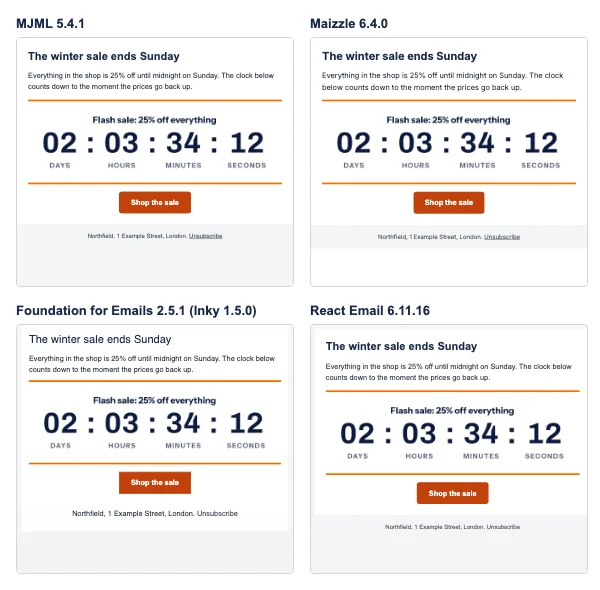
To compare them fairly, I built one small email (a headline, a paragraph, a live countdown image, a button and a footer) in all four on 21 November 2026, with the current version of each, and measured what came out. This page shows the source for each, the compiled output side by side, the size, exactly what each one writes for classic Outlook, how actively each project is maintained, and which to pick for which team. If you are new to how email HTML works, the HTML email developer’s guide covers the ground rules these frameworks automate.
What an email framework does for you
Hand-written email HTML is a stack of nested tables with every style written inline, plus Outlook-only code in conditional comments, because classic Outlook for Windows draws email with Microsoft Word’s engine and Word ignores much of modern CSS. Microsoft’s own documentation of that engine lists max-width, display and many others among the properties it does not support. A framework gives you:
- Short source. You write a section and a column; the compiler writes the tables.
- Inlined CSS. You style in one place; the build copies the styles onto each element.
- Outlook code you do not have to remember. Fixed-width “ghost” tables,
mso-properties and button padding tricks are generated for you. - Reuse. Layouts, partials and components, so a footer change is one edit.
What none of them does is test your email for you, fix your images, or stop your HTML growing past Gmail’s clipping point. Those stay your job; Gmail clipped message covers the size limit, and Outlook rendering issues covers the bugs that still get through.
How each framework works
| MJML | Maizzle | Foundation for Emails | React Email | |
|---|---|---|---|---|
| You write | .mjml files with mj- tags |
Vue single-file components (.vue) |
HTML with Inky tags, Sass | React components (.jsx, .tsx) |
| Styling | Attributes on each tag, mj-attributes, mj-class |
Tailwind CSS 4 classes | Sass variables and classes | Inline style objects, or its Tailwind component |
| Layout model | Sections and columns, 600px body by default | Your own markup or built-in components | 12-column grid: container, row, columns | Container, Section, Row, Column components |
| Build | mjml CLI, Node.js API, or the online editor |
maizzle build (Vite underneath) |
Gulp task in the Foundation stack, or the CSS-only download plus an inliner | render() in your own code |
| Logic and data | Includes; templating left to your ESP | Full Vue: props, v-for, v-if |
Handlebars through Panini | Full React and TypeScript |
| Licence | MIT | MIT | MIT | MIT |
Sources: each project’s documentation and its GitHub repository, read on 21 November 2026.
The same email in all four
Here is the source of the test email in each framework. The countdown image is the same <img> URL in every version; it is a live image, so the framework only has to place it.
MJML
<mjml lang="en">
<mj-head>
<mj-title>The winter sale ends Sunday</mj-title>
<mj-preview>25% off everything until midnight Sunday.</mj-preview>
<mj-attributes>
<mj-all font-family="Arial, Helvetica, sans-serif" padding="0 24px 16px" />
<mj-text font-size="16px" line-height="24px" color="#1f2937" />
</mj-attributes>
</mj-head>
<mj-body background-color="#f3f4f6" width="600px">
<mj-section background-color="#ffffff" padding="24px 0 8px">
<mj-column padding="0">
<mj-text font-size="24px" line-height="30px" font-weight="bold" color="#1b2a4a">The winter sale ends Sunday</mj-text>
<mj-text>Everything in the shop is 25% off until midnight on Sunday. The clock below counts down to the moment the prices go back up.</mj-text>
<mj-image src="https://img.emailtimer.app/i/k7mQ2pXd.gif?w=w_8ha3fq&v=3&sig=YOUR_SIGNATURE" width="552px" alt="Sale ends Sunday at midnight" />
<mj-button href="https://example.com/sale" background-color="#c2410c" color="#ffffff" font-size="16px" font-weight="bold" border-radius="6px" inner-padding="14px 26px">Shop the sale</mj-button>
</mj-column>
</mj-section>
<mj-section padding="16px 0">
<mj-column padding="0">
<mj-text font-size="13px" line-height="20px" color="#4b5563" align="center">Northfield, 1 Example Street, London. <a href="https://example.com/unsubscribe" style="color:#4b5563;">Unsubscribe</a></mj-text>
</mj-column>
</mj-section>
</mj-body>
</mjml>
Compiled with npx mjml sale.mjml --config.minify true -o sale.html (MJML 5.4.1); the MJML tutorial explains each tag. Most of those attributes could be set once in mj-attributes instead of on each tag.
Maizzle
<template>
  <Layout class="bg-gray-100">
    <Preheader>25% off everything until midnight Sunday.</Preheader>
    <Container class="max-w-[600px]">
      <Section class="bg-white p-6">
        <Heading class="m-0 mb-4 text-2xl/[30px] font-bold text-[#1b2a4a]">
          The winter sale ends Sunday
        </Heading>
        <Text class="m-0 mb-4 text-base/6 text-gray-800">
          Everything in the shop is 25% off until midnight on Sunday. The clock below counts down to the moment the prices go back up.
        </Text>
        <Img
          src="https://img.emailtimer.app/i/k7mQ2pXd.gif?w=w_8ha3fq&v=3&sig=YOUR_SIGNATURE"
          width="552"
          alt="Sale ends Sunday at midnight"
          class="mb-4"
        />
        <Button href="https://example.com/sale" align="center" class="rounded-md bg-[#c2410c] text-base font-bold text-white">
          Shop the sale
        </Button>
      </Section>
      <Section class="px-6 py-4">
        <Text class="m-0 text-center text-[13px]/5 text-gray-600">
          Northfield, 1 Example Street, London. <Link href="https://example.com/unsubscribe" class="text-gray-600 underline">Unsubscribe</Link>
        </Text>
      </Section>
    </Container>
  </Layout>
</template>
Saved as emails/sale.vue in the official starter and built with npx maizzle build --minify (framework 6.4.0). One note on setup: on 21 November 2026, npx maizzle new maizzle/maizzle my-emails --install failed for me with a 404, because the CLI asked GitHub for a main branch and the starter repository’s default branch is master. Cloning the starter with git clone https://github.com/maizzle/maizzle.git and running npm install worked.
Foundation for Emails (Inky)
<container class="body-drip">
<spacer size="16"></spacer>
<row class="main">
<columns small="12" large="12">
<h1>The winter sale ends Sunday</h1>
<p>Everything in the shop is 25% off until midnight on Sunday. The clock below counts down to the moment the prices go back up.</p>
<img src="https://img.emailtimer.app/i/k7mQ2pXd.gif?w=w_8ha3fq&v=3&sig=YOUR_SIGNATURE" width="552" alt="Sale ends Sunday at midnight">
<spacer size="16"></spacer>
<center>
<button class="radius sale" href="https://example.com/sale">Shop the sale</button>
</center>
</columns>
</row>
<row>
<columns small="12" large="12">
<p class="text-center small">Northfield, 1 Example Street, London. <a href="https://example.com/unsubscribe">Unsubscribe</a></p>
</columns>
</row>
</container>
Plus nine lines of CSS for the brand colours (table.button.sale table td { background: #c2410c; } and so on), because Foundation’s look comes from its stylesheet, not from attributes.
The official route is the Foundation stack: the docs say to install foundation-cli and run foundation new --framework emails. That CLI’s GitHub repository is archived, with its last release in January 2022, and the template it downloads, foundation-emails-template, was last changed in November 2023. When I cloned that template and ran npm install on Node.js 22, it failed while building node-sass, an old native dependency. The 2.5.0 framework itself moved to Dart Sass; the official template repository, last changed in 2023, still pulls node-sass in through gulp-sass 4. So I rebuilt the stack’s own steps by hand from its gulpfile: Inky 1.5.0 to expand the tags, foundation-emails 2.5.1 for the CSS, unused CSS removed (the template uses uncss), every rule inlined, and the media queries kept in a <style> block, as the template’s inliner does.
React Email
import * as React from "react";
import { Html, Head, Preview, Body, Container, Section, Heading, Text, Img, Button, Link } from "react-email";

export default function SaleEmail() {
  return (
    <Html lang="en">
      <Head />
      <Preview>25% off everything until midnight Sunday.</Preview>
      <Body style={{ backgroundColor: "#f3f4f6", fontFamily: "Arial, Helvetica, sans-serif" }}>
        <Container style={{ maxWidth: "600px" }}>
          <Section style={{ backgroundColor: "#ffffff", padding: "24px" }}>
            <Heading style={{ margin: "0 0 16px", fontSize: "24px", lineHeight: "30px", color: "#1b2a4a" }}>
              The winter sale ends Sunday
            </Heading>
            <Text style={{ margin: "0 0 16px", fontSize: "16px", lineHeight: "24px", color: "#1f2937" }}>
              Everything in the shop is 25% off until midnight on Sunday. The clock below counts down to the moment the prices go back up.
            </Text>
            <Img
              src="https://img.emailtimer.app/i/k7mQ2pXd.gif?w=w_8ha3fq&v=3&sig=YOUR_SIGNATURE"
              width="552"
              alt="Sale ends Sunday at midnight"
              style={{ marginBottom: "16px" }}
            />
            <Section style={{ textAlign: "center" }}>
              <Button
                href="https://example.com/sale"
                style={{ backgroundColor: "#c2410c", color: "#ffffff", fontSize: "16px", fontWeight: "bold", borderRadius: "6px", padding: "14px 26px" }}
              >
                Shop the sale
              </Button>
            </Section>
          </Section>
          <Text style={{ textAlign: "center", fontSize: "13px", lineHeight: "20px", color: "#4b5563" }}>
            Northfield, 1 Example Street, London. <Link href="https://example.com/unsubscribe" style={{ color: "#4b5563" }}>Unsubscribe</Link>
          </Text>
        </Container>
      </Body>
    </Html>
  );
}
Turned into HTML with await render(<SaleEmail />) from the react-email package (6.11.16). React Email’s docs now import every component from react-email itself; I confirmed that 6.11.16 exports Img, Text and the other components used here under those names, and this file compiled as shown.
Output size
| Source | Compiled HTML | Gzipped | Tables | Outlook conditionals | |
|---|---|---|---|---|---|
| MJML 5.4.1 (minified) | 1,519 bytes | 6,729 bytes | 1,793 bytes | 12 (4 inside conditionals) | 8 |
Maizzle 6.4.0 (--minify) |
1,239 bytes | 7,088 bytes | 1,563 bytes | 3 (all 3 inside conditionals) | 10 |
| Foundation 2.5.1 + Inky 1.5.0 (inlined, minified) | 1,462 bytes | 12,323 bytes | 1,998 bytes | 10 | 0 |
| React Email 6.11.16 | 1,919 bytes | 5,228 bytes | 1,261 bytes | 4 | 2 |
Measured on 21 November 2026 from the builds described above. The Tables column counts every <table> tag in the file, including those inside Outlook conditional comments, which the bracket shows.
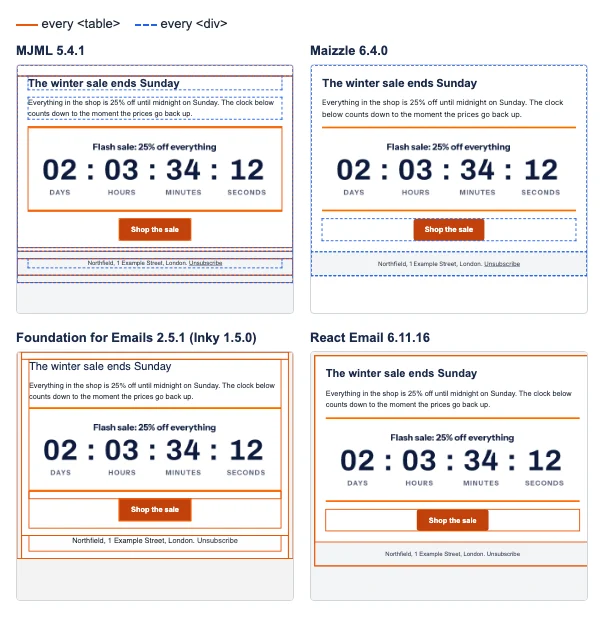
Three things explain the differences. Foundation is the largest because every element carries the inlined copy of the framework’s base styles, so a plain paragraph in my build carried eleven properties, including font-family, padding, margin twice over and text-align. Maizzle’s starter Layout and React Email’s Preview both pad the preheader with a long run of invisible characters, so the inbox preview shows only your text: 3,545 bytes of Maizzle’s output and 2,402 bytes of React Email’s are that filler. Take the filler out of both and React Email is still the smallest (2,826 bytes against Maizzle’s 3,543). MJML writes the most tables, because each section and column becomes a <div> for modern clients plus a table for Outlook.
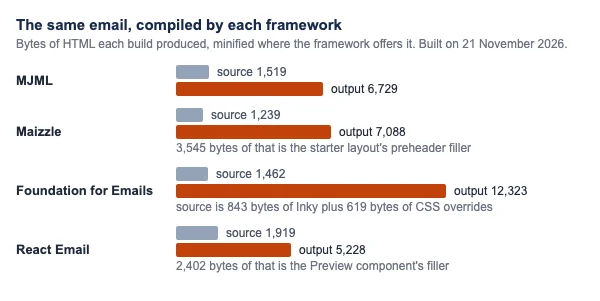
For a single short email none of these sizes matters; Gmail clips at about 102 KB. For a long newsletter the multiplier does: a framework that turns every block into four or five times its source will reach the limit sooner than hand-tuned HTML. Each framework has a minify option, and image files never count toward the limit, since they load from their own addresses.
How each one handles Outlook
All four outputs below come from the builds above.
MJML: ghost tables around every block
MJML draws each section as a <div> with max-width:600px for modern clients and wraps it in a fixed-width 600 pixel table inside <!--[if mso | IE]> comments, since Word ignores max-width; it also adds Outlook’s <o:OfficeDocumentSettings> block and pads buttons with mso-padding-alt, which keeps their size but not their rounded corners. MJML 6, in alpha since 9 October 2026, reports “about a 10-15% reduction” in compiled HTML in its benchmark testing and adds dark mode and ARIA attributes; Outlook rendering issues explains the ghost table and DPI settings in full.
Maizzle: div layout with MSO tables, and a VML-free button
Maizzle 6’s components also write <div> elements for modern clients with <!--[if mso]> tables around them, and its starter layout adds an Outlook-only style block that sets font-family: "Segoe UI", sans-serif and mso-line-height-rule: exactly on text elements; Outlook rendering issues explains the Times New Roman fallback that a rule like this guards against. Its button looks like this:
<a style="display: inline-block; border-radius: 6px; background-color: #c2410c; padding: 16px 24px; font-size: 16px; line-height: 1; font-weight: 700; color: #fffffe; text-decoration: none; mso-padding-alt: 0;" href="https://example.com/sale">
<!--[if mso]><i style="mso-font-width: 150%; mso-text-raise: 31px;" hidden> </i><![endif]-->
<span style="mso-text-raise: 16px;">Shop the sale</span>
<!--[if mso]><i style="mso-font-width: 150%;" hidden> ​</i><![endif]-->
</a>
Outlook ignores padding on links, so the invisible <i> spacers make the width (mso-font-width) and mso-text-raise makes the height. Maizzle’s docs say this keeps the button “fully clickable without using VML”. For backgrounds there are OutlookBg and Vml components, and Outlook and NotOutlook components wrap code for one side only. HTML email buttons compares this approach with padding and VML buttons.
Foundation for Emails: plain tables, no conditional comments
Inky turns rows and columns into real tables (<table class="row"> with <th class="small-12 large-12 columns">), and Outlook understands tables natively, so my build contained no Outlook conditional comments at all. The container gets a fixed width: 580px from the CSS, which Outlook respects. The trade is that the responsive part, the media queries that stack columns on phones, lives in a <style> block that the Foundation boilerplate injects inside <body>. Can I email records that Gmail supports <style> only in the head, not inside the body, so move that block into the <head> if Gmail readers on phones matter to you. One more thing I noticed: the 2.5.1 stylesheet now writes its hover colours with decimals, such as rgb(20.0897959184, 124.906122449, 193.9102040816), after the release replaced Sass darken() with color.adjust(). Override them with plain hex values if you see odd link colours.
React Email: the same button trick, but no ghost table
React Email’s Button uses the same mso-font-width and mso-text-raise spacers as Maizzle, scaled from the padding you set. Its Container, though, was a table with width="100%" and style="max-width:600px" and no Outlook-only fixed-width table. Word ignores max-width, so check it in classic Outlook, or put the content in a fixed-width table of your own.
What each output relies on, client by client
| Technique in the output | Classic Outlook for Windows (2007 to 2019 in caniemail’s tests; 2021, 2024 and Microsoft 365 use the same Word engine) | New Outlook for Windows, Outlook on the web | Gmail | Apple Mail and iOS Mail | Used by |
|---|---|---|---|---|---|
max-width on a div or table |
No in 2007 to 2016; tables only in 2019 | Yes | Yes | Yes | MJML, Maizzle, React Email |
| MSO conditional comments | Yes, they are written for it | Ignored | Ignored | Ignored | MJML, Maizzle, React Email |
@media queries in the head |
No | Partial (no nested queries) | Partial (Google accounts, width queries) | Yes | MJML, Maizzle, Foundation |
A <style> block |
Partial: it must come before the elements it styles | Yes | In the head only, up to 16 KB | Yes | All four; Foundation’s boilerplate puts it in the body |
Sources: Can I email’s max-width, @media and <style> data, read on 21 November 2026, and Microsoft’s documentation of Word’s rendering engine, which lists max-width among the CSS properties Word does not support. Microsoft says the new Outlook for Windows is “based on WebView2” and that “the experience is provided by Outlook on the web”, so it follows that column. Gmail and Outlook have their own pages if you need more detail.
Learning curve
- MJML is the quickest to start. There are about two dozen tags, the names say what they do, and the free online editor at mjml.io shows the rendered email beside your code, with buttons to view or minify the HTML, so a designer who knows basic HTML can be productive in an afternoon. The cost comes later: anything MJML has no tag for goes in
mj-raw, which MJML passes through untouched. - Maizzle is quickest for a team that already writes Tailwind and Vue. If you do not, you are learning both, plus Maizzle’s components. In return you get real components with props, loops and conditions, and full control of the markup.
- Foundation for Emails asks for Sass, Inky’s tags, Handlebars partials through Panini, and a Gulp build. The tag set is small (
container,row,columns,button,callout,menu,spacer), but the toolchain is the hardest to get running today, as the install failure above shows. - React Email is natural for React developers and an odd choice for anyone else. Emails are components rendered by your app code, which suits transactional email sent from a Node.js backend.
Maintenance status in November 2026
I checked each project’s GitHub releases on 21 November 2026.
| Framework | Latest stable release | Most recent activity | Notes |
|---|---|---|---|
| MJML | v5.4.1, 10 September 2026 | v6.0.0-alpha.1 on 9 October 2026; repository updated 20 November 2026 | v5.0.0 shipped 16 April 2026 after v4.18.0; MIT |
| Maizzle | v6.4.0, 16 November 2026 | Four releases between 21 October and 16 November 2026 | v6.0.0 shipped 9 June 2026, a full rewrite on Vue and Tailwind CSS 4; MIT |
| Foundation for Emails | 2.5.1, 12 March 2026 | No release since; repository last changed 13 March 2026 | 2.5.0 (11 March 2026) was the first release since 2.4.0 in March 2022. The docs sidebar still shows v2.3.0 |
| Inky v2 (Foundation’s successor) | Beta only: v2.0.0-beta.10, 14 July 2026 | Repository changed 23 September 2026 | A Rust rewrite; its README says Inky “was formerly known as Foundation for Emails” |
| React Email | react-email 6.11.16, 17 November 2026 | Ten releases of the react-email package between 5 and 17 November 2026 | MIT, maintained by Resend |
What this means in practice. MJML and Maizzle are both actively developed, and both changed major versions in 2026, so pin your version: MJML 5 changed its minifier and the outer HTML of every email, and Maizzle 6 replaced its PostHTML templates with Vue, with an upgrade guide that recommends “starting fresh with the v6 starter and porting templates over rather than upgrading in place”. Foundation for Emails 2 gets occasional fixes, and its future is Inky v2, which bundles the CSS, inlining, validation, a --hybrid div layout with Outlook ghost tables, VML buttons, and a migrate command from v1 syntax; it was still in beta when I checked. React Email ships the most often of all.
Which one to pick
- A marketing team, or developers who hand finished HTML to a sending platform: MJML. It has the gentlest start, the online editor needs no install, and every section gets a fixed-width Outlook table without you asking. It also has a large following: 18,301 stars on GitHub on 21 November 2026, second of the four only to React Email’s 19,986.
- A front-end team that already writes Tailwind and Vue, or that wants complete control of the markup: Maizzle. It produced the second-leanest markup in my test, after React Email, its components cover Outlook buttons and backgrounds, and it can run as a Vite plugin inside an existing app.
- An app that sends transactional email from Node.js, built by React developers: React Email. Render the email in the same code that sends it, with props from your data. Check the container width in older Outlook.
- An existing Foundation for Emails codebase: keep it running, and plan your move. For a new project in 2026 I would not start on Foundation for Emails 2: its official starter did not install on a current Node.js for me, and its successor is still in beta.
If none of these fits, the free HTML email template is a hand-written starting point with no build step at all.
Moving between frameworks
Maizzle’s docs include a component map from MJML: mj-section becomes Section, mj-column becomes Column, mj-image becomes Img, mj-button becomes Button, mj-raw becomes Raw, and mj-include becomes your own Vue component. Styling is the bigger change, since MJML attributes become Tailwind classes. Going the other way, from Foundation or hand-written tables to MJML, the usual route is to rebuild one template at a time and compare the compiled output in a browser and in Outlook before switching the next. Whichever direction, keep the old build until the new one has gone through a real send.
Merge tags and live images in each framework
All four place an image as a plain <img>, so a live image such as an email countdown timer from EmailTimer.app drops in with each framework’s image tag: mj-image, Maizzle’s Img, a plain <img> in Inky, or React Email’s Img. The snippet the EmailTimer.app editor copies carries your sending platform’s merge tags in the link and the alt text, so the thing to check is that your framework leaves {{ }} and *|FNAME|* alone. In my tests on 21 November 2026, both came through unchanged in attributes and in text with MJML 5.4.1 (minify on), Maizzle 6.4.0 and Inky 1.5.0. Two cautions: in Maizzle, {{ }} in text is read by Vue, so wrap it in the Raw component, as its docs show; and the Foundation stack runs pages through Handlebars, which reads {{ }} too. The image address itself is signed, so never add a merge tag inside it; merge tags in personalized images explains the two arrangements that work. The timer’s <img> came out of all four builds with the same address it went in with (MJML and Inky write each & as &, which is the same URL), so you can paste a snippet from the countdown timer generator into whichever framework you choose.
Questions and answers
What is Maizzle?
Maizzle is an open-source framework for building HTML emails with Vue and Tailwind CSS. Since version 6, released on 9 June 2026, each email is a Vue single-file component, and maizzle build renders it, inlines the CSS, removes unused CSS and minifies it. It is MIT licensed.
Is MJML better than Maizzle?
Neither is better for everyone. MJML is easier to learn and its tags hide the email markup from you, which suits teams that want to ship templates quickly. Maizzle gives you the markup itself, styled with Tailwind, which suits developers who want control.
Is Foundation for Emails still maintained?
Lightly. Version 2.5.0 and 2.5.1 came out in March 2026, the first releases since March 2022, with Sass and build fixes. The Foundation team’s newer work is Inky v2, a Rust rewrite that its README calls the successor to Foundation for Emails, which was at beta 10 in July 2026.
What is Inky in email?
Inky is Foundation’s tag language: you write <container>, <row> and <columns> and it expands them into the nested tables email needs. Inky 1.x is part of Foundation for Emails 2. Inky v2, in beta, is a complete framework of its own with built-in CSS, inlining, validation and a CLI.
Which email framework produces the smallest HTML?
In my test of one short email, React Email produced the smallest file (5,228 bytes) and Foundation the largest (12,323 bytes). Maizzle came in at 7,088 bytes, but 3,545 of those were invisible preheader filler from its starter layout; without it, it was second to React Email, whose own filler is 2,402 bytes. Measure your own templates, because the difference depends on your layout.
Do email frameworks fix Outlook rendering?
They fix the predictable parts: fixed-width tables for layouts, button sizing, and Outlook’s document settings in the head. They do not fix everything, such as line-height differences, background images without VML, or bugs in content your platform adds. Test the sent email in classic Outlook for Windows either way.
Is React Email a good alternative to MJML?
For React developers sending transactional email from code, yes: emails are components with typed props, rendered by the same app that sends them. For a marketing team that pastes HTML into a sending platform, MJML is simpler. Note that React Email’s container relies on max-width, which classic Outlook ignores.
Can I use merge tags like {{ first_name }} with these frameworks?
Yes, with care. MJML 5 and Inky 1.5 passed them through unchanged in my tests, and Maizzle kept them in attributes; in Maizzle text, wrap them in Raw, because Vue would otherwise treat {{ }} as its own expression. Keep them out of any signed image address, such as an EmailTimer.app timer’s. MJML 5’s release notes add that template syntax inside CSS can cause a CssSyntaxError when CSS minification is on.
Do I need Node.js to use an email framework?
For Maizzle and React Email, yes. MJML has a free online editor that needs no install, and Foundation for Emails has a CSS-only download that you run through an inliner. Inky v2 also ships as a single binary through Homebrew or Cargo.
Can I move my MJML templates to Maizzle?
Yes. Maizzle’s documentation has a migration page that maps each MJML tag to a Maizzle component and shows the same email in both. The main work is rewriting MJML attributes as Tailwind classes, so plan to port templates one at a time.
Are these email frameworks free?
Yes. MJML, Maizzle, Foundation for Emails and React Email are all open source under the MIT licence, according to their GitHub repositories. The paid products around them, such as hosted editors and sending services, are separate.
Should I hand-code HTML email instead of using a framework?
Hand-coding makes sense for one or two templates you will rarely change, or when you need every byte under control. A framework pays off once you maintain several templates or a team edits them. Either way, the rules of email HTML are the same, and the HTML email developer’s guide explains them.
Sources
- MJML documentation (mjml.io), read on 21 November 2026
- MJML releases on GitHub, v5.4.1 and v6.0.0-alpha.1, read on 21 November 2026
- MJML v5.0.0 release notes and upgrade guide (GitHub), read on 21 November 2026
- MJML 6.0.0-alpha.1 release notes (GitHub), read on 21 November 2026
- What is Maizzle? (Maizzle docs, v6), read on 21 November 2026
- Templates (Maizzle docs, v6), read on 21 November 2026
- Upgrade guide, v5 to v6 (Maizzle docs), read on 21 November 2026
- Button component (Maizzle docs, v6), read on 21 November 2026
- Raw component (Maizzle docs, v6), read on 21 November 2026
- Migrating from MJML (Maizzle docs, v6), read on 21 November 2026
- CLI (Maizzle docs, v6), read on 21 November 2026
- Maizzle framework releases on GitHub, v6.4.0, read on 21 November 2026
- Foundation for Emails 2 documentation (Foundation), read on 21 November 2026
- Getting started with Sass, Foundation for Emails (Foundation), read on 21 November 2026
- Inky, Foundation for Emails (Foundation), read on 21 November 2026
- Foundation for Emails v2.5.0 release notes (GitHub), read on 21 November 2026
- Inky v2 README (GitHub, foundation/inky), read on 21 November 2026
- foundation-cli repository, archived (GitHub), read on 21 November 2026
- foundation-emails-template repository (GitHub), read on 21 November 2026
- React Email introduction (react.email), read on 21 November 2026
- React Email render utility (react.email), read on 21 November 2026
- React Email repository and releases (GitHub, resend/react-email), read on 21 November 2026
- max-width support by email client (Can I email), read on 21 November 2026
- @media support by email client (Can I email), read on 21 November 2026
- <style> element support by email client (Can I email), read on 21 November 2026
- Word 2007 HTML and CSS Rendering Capabilities in Outlook 2007 (Microsoft Learn), read on 21 November 2026
- Overview of the new Outlook for Windows (Microsoft Learn), read on 21 November 2026
Related
Put a countdown in the campaign you are writing now
The free plan covers 5,000 opens a month with no card. Starter is $24 a month for 250,000.