

Open-time personalization means part of an email is decided when the message is opened rather than when it is sent. In practice that part is an image: the email carries an image address, and a server draws the picture when the mail client requests it. Apple Mail Privacy Protection makes that request at delivery, so open time is often delivery time.
Most definitions stop before that last sentence, and it changes what the phrase can promise. Two different things are sold under the one name. The first is content worked out at the request, such as a clock, or a stock count looked up that second. The second is a value fixed when the email was sent, such as a first name or a points balance, which is simply drawn later. Both turn up in personalized images in email, and they behave very differently once Apple and Gmail are involved.
How open-time personalization works
Your platform sends the email with an ordinary <img> tag. Its src points at a server that you or a vendor runs, and nothing in the message is a picture yet. When a mail client asks for that address (or a proxy asks on its behalf), the server decides what to show, draws it, and answers with an image, usually a PNG or a GIF. Anything the server knows at that moment can go into the pixels.
Everything else was settled at send: the subject line, the body text, the links, and the image address itself. The request is the only moment left for anything in the email to change.
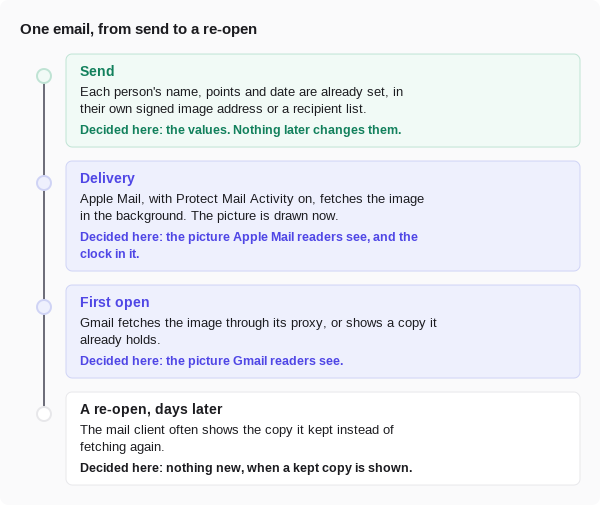
Send time against open time
A value can be decided at two moments. This table sorts the usual contents of a personalized image by which moment can decide them.
| What the image shows | Decided at send | Decided at open |
|---|---|---|
| Stored values: a name, a tier, points, a date on the profile | Yes, as the profile stood when the platform sent | Only if the server looks the value up again at the request |
| The current time, and so a countdown | No. The send time is all the platform knows | Yes, at every fetch |
| The reader’s location and device | No | Best effort. Apple’s relays hide the reader’s IP address and Gmail fetches from Google’s servers, so both are guesses |
| Live data: stock, price, weather, a fresh recommendation | A snapshot taken at send | Yes, when the server fetches it at the request |
The right-hand column is the whole case for open time. If nothing you want to show is in it, a value fixed at send does the job with fewer moving parts.
What is really decided at open
Two things are decided at the request: the time, and data fetched from a live source.
The time is the plain case. A countdown to Sunday 23:59 has to be drawn at the fetch, because the number it shows is the gap between now and the deadline, and “now” only exists at the request.
Live data is the expensive case. Salesforce documents that Marketing Cloud Personalization “recalculates recommendations after 1 hour”, so a reader who comes back within the hour sees the same products and one who returns later may see different ones. The hour can be changed. The enterprise content platforms connect stock feeds and weather services, and choose at the request what to show.
Now the part that gets blurred. A first name is not decided at open. Neither is a points balance or a coupon code that was settled for each person before the send. The server draws those values at the request, but it draws the same value at every fetch. That is send-time data drawn late: the picture is made at open, and the decision was made at send.
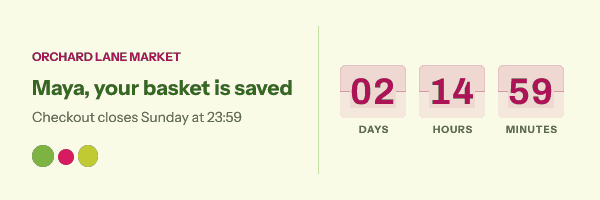
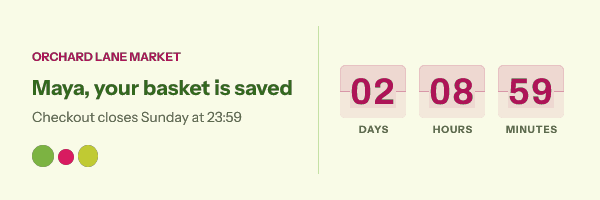
The split shows up inside the largest products too. Salesforce draws its open-time product tiles ahead of time. When an item template is published, “an image generation job creates the initial set of images for all items that match the item type of the template”, and those images sit on Salesforce’s CDN, refreshed when the product data they show changes. What is decided at open is which items to show. The pictures of them were drawn before anyone opened anything.
What Apple Mail and Gmail do to “open time”
“Open time” assumes the image is requested when a person opens the email. Apple Mail and Gmail bend that assumption in different ways.
Apple Mail fetches at delivery
Apple’s own page says Protect Mail Activity “downloads remote content in the background by default”, whether or not the reader engages with the email, and routes it through two relays operated by different entities. For an Apple Mail reader with it switched on, the image is requested close to delivery. A clock is drawn for the delivery moment, and so is any live data.
Salesforce says as much about its own product, in one line of its help: for Apple Mail recipients, “Personalization generates recommendations at send time, rather than open time because of the way Apple handles requests.”
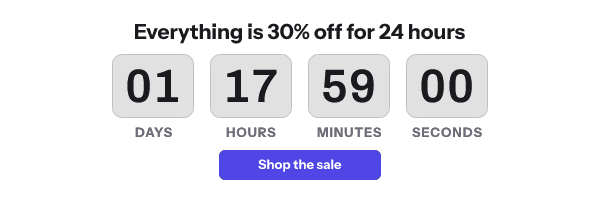
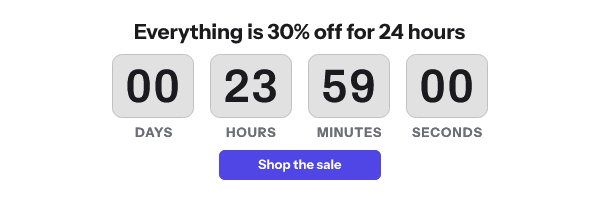
The deadline in that example is fixed, so the upper picture is still true: the sale ends at 23:59 on Friday either way. The countdown Apple breaks is one meant to start when the reader opens the email, because it starts at delivery instead. The Apple Mail page has the detail and the published testing.
Gmail fetches at the first open, then may keep a copy
Google documents that “Gmail uses Google’s secure proxy servers to serve images” when users open messages. So in Gmail the first fetch does happen at an open, from Google’s servers rather than the reader’s device. Google publishes no cache lifetime for that proxy. Salesforce’s help for its open-time emails warns that “certain mailbox providers use additional internal image caching on top of the browser cache”, which can change how often the images refresh. A Gmail reader who opens the same email twice may see the first picture again.
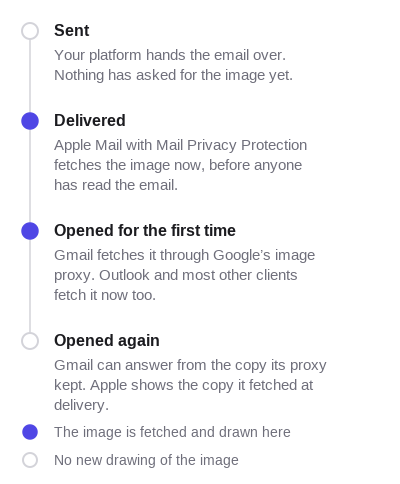
Notice who pays for this. A first name drawn at delivery is the same first name. A stock count drawn at delivery is a delivery-time count, however late the reader opens. The cost falls on exactly the content that justifies open time. How email image caching works goes through each provider, and prefetch, image proxy and the other terms used here are defined in the glossary.
Who offers open-time personalization, by category
The vendors fall into four groups, sorted by where the data comes from. How the approaches compare goes further, with what each can draw and who can change a value.
Built into a marketing cloud
Salesforce Marketing Cloud Personalization has Open Time Email campaigns. Creating one “generates a block of HTML code that you use in your existing email marketing service”, so it works beside whatever platform sends the email. Recommendations are decided at the open and recalculated after an hour. Item images are drawn ahead of time, and Apple Mail readers get recommendations made at send.
SAP’s help portal lists Open Time Content for SAP Emarsys as “a third-party plug-in, delivering contextualized, personalized content to your email campaigns, updated in real time”, shown as “customizable widgets”. SAP’s glossary page for SAP Engagement Cloud adds that the content is pulled “directly from your website, social or product feed”.
Enterprise open-time content platforms
Movable Ink, Zembula and Liveclicker (sold by Zeta Global) connect to feeds and APIs and decide content at the request. Their own pages, read on 26 September 2026, put it in similar words. Movable Ink describes content “unique to each customer at the moment of engagement”. Liveclicker offers “content personalized at the moment of open”, with a LiveFeed module to “Call on third-party APIs”. Zembula lists modules including product recommendations, weather, polls and countdown timers. Kickdynamic is the fourth name: Litmus acquired it, and destinationCRM reported in February 2022 that Litmus Personalize, built on it, extracts “the latest data from CRM systems, product feeds, and more”. This is the group to look at when the data changes after the send.
Image renderers driven by the link
NiftyImages, Sendtric and OKZest draw an image at the request from values your platform fills into its link, plus a clock where the image has one, and each can also pull from other data sources. OKZest says it “generates the image the moment a recipient views it” and takes data from “a CRM, a database, an API”. NiftyImages says “One image URL makes the decision when requested” and adds that “Email caching can delay updates”; its business plans connect data stores and external APIs. Sendtric picks a rule-based variant “fresh on every open, not just at send time”, and can pull data from your CRM through a REST API, or from a CSV upload, a Google Sheet or an Excel Online workbook. Those connections put a foot in the group above.
EmailTimer.app, the product this site belongs to, sits in this group with one difference in where per-person values come from. They are not merge tags written into the image link at send. Each person gets their own signed image address before the send, from a recipient list you upload or from the API. That whole address goes into a contact field, and the email takes its image source from the field. Both are on Growth and Agency. A recipient list address carries only an opaque token, and the values are looked up from it when the image is fetched. On every plan, one address for the whole send can still carry a clock drawn at every fetch, a weather layer from MET Norway forecasts, a map, a poll, and rows from a data store you keep in the workspace. On Growth and Agency a web source reads your own HTTPS endpoint at open. A missing value draws the fallback you declared for it. Image layers draw only your own uploads, never an outside URL. The plans are on pricing, and live data has the limits for data stores and web sources.
A renderer you build yourself
The fourth group is your own team. An image server on your domain can draw from your own data at the request, with no vendor between you and it. In exchange, every open is your uptime problem, and Apple and Gmail treat your server exactly as they treat a vendor’s. If it ever fetches a URL that arrives in the request, it needs the defences in OWASP’s cheat sheet on server-side request forgery. Building a timer yourself counts the parts a renderer has to handle.
When open time is worth it, and when a send-time value is enough
Picture the reader who opens the email three days late. If what they should see then differs from what was true at send, you need open time. If it is the same, a send-time value drawn into the image is enough.
Open time earns its cost for:
- A countdown. There is no send-time version of a clock.
- Stock and price in a broadcast that people read over several days.
- Recommendations that should follow browsing done after the send.
- An offer that has to stop showing once it ends, which a timer’s ended state covers.
A send-time value is enough for:
- Names and coupon codes, which do not change between send and read.
- A points balance or a renewal date, with copy written as a snapshot. “2,450 points as of Monday” stays true all week.
- Triggered flows that send minutes after the event, where the send-time data is already fresh.
- A list read mostly in Apple Mail with Mail Privacy Protection. The fetch happens near delivery, which for a broadcast is usually within hours of the send.
If you are unsure, start with send-time values and a clock. Add a live feed when you can name the content that goes stale between send and read, and what counts as live data sets out how far a number your platform already holds will go.
How to set it up
In EmailTimer.app, an image with each subscriber’s name and a clock takes these steps.
- Design one template in the editor with a text layer and a timer layer. Declare a variable such as
{{first_name}}in the text, with a fallback such as “there” for a row that has no name. - Give the timer a fixed deadline, which stays true whenever the image is fetched. For a deadline per subscriber, put it in a
deadlinecolumn of the recipient list instead. - Publish the template.
- Upload your recipient list as a CSV, up to 500,000 rows, and read the import report. A row that cannot be read is listed with its line number and the reason.
- Export the addresses: one signed image address per row. Import that file into your email platform as a contact field, and set the image source in your template to that field’s merge tag, so the whole address comes from the field. Image mail merge walks through this route, and minting image URLs in bulk has the API calls for the same flow.
- Send yourself a test and check that the name and the clock both appear.
Recipient lists and the API are on Growth and Agency. A template with no per-person values, such as a countdown with a weather layer, needs neither and works on every plan.
Questions and answers
What is open-time personalization?
It is content in an email, nearly always an image, that a server decides and draws when the mail client requests it, rather than when the platform sends the message. The time and data fetched from a live source are decided at that moment. Values written at send are drawn then too, but they do not change.
Is a first name in an image open-time personalization?
The picture is made at open, but the name was decided before the send. Every fetch draws the same name. That is a send-time value drawn late, which is right for a greeting and misleading if it is sold as live.
Does Apple Mail Privacy Protection break it?
It moves it. Apple downloads remote content in the background by default, so the image is drawn near delivery. A clock shows the time left at delivery, and live data reflects delivery time. Salesforce generates Apple Mail recommendations at send for this reason. A fixed deadline stays true, and a name is not affected at all.
Can an email show live weather or stock?
Yes. EmailTimer.app draws weather from MET Norway on every plan, and on Growth and Agency a web source reads stock from your own HTTPS endpoint when the email opens. It never fetches an address a value hands it: a server that fetches addresses it is handed is the setup behind server-side request forgery, which OWASP’s cheat sheet lists with the example of an application downloading an image from a URL a user supplied. A web source is an address you saved, checked so it cannot reach a private network. The simpler alternative is a number your platform already holds, written so it stays true for a few days, and what counts as live data shows how.
What is the difference between open-time and real-time personalization?
Real-time personalization is the wider term: content based on data as current as possible, in any channel, such as a web page that changes while someone browses. In an email, content can change after the send only when an image is requested. So real-time personalization in email comes down to open-time content, with Apple’s delivery fetch and Gmail’s proxy deciding when that request happens.
How fresh is a value fixed at send?
As fresh as the send. If a subscriber’s points changed an hour later, the image still shows the balance that was set for them before the send. Browsers and mail providers can also keep a copy of the picture, which matters little for a value that was fixed at send anyway. For a balance that moves daily, put “as of” and the send date in the design, or look the number up at open from a data store.
Sources
- Mail Privacy Protection and Privacy (Apple Legal)
- Set up an image URL proxy allowlist (Google Workspace Admin Help)
- About Open Time Email Campaigns (Salesforce Help), read on 26 September 2026
- Open Time Email Campaigns and Templates (Salesforce Developers), read on 26 September 2026
- Image Generation in Open Time Email Campaigns (Salesforce Developers), read on 26 September 2026
- Solution Glossary, Open Time Content (SAP Help Portal, SAP Emarsys), read on 26 September 2026
- Open-Time Content (SAP Engagement Cloud glossary), read on 26 September 2026
- Server Side Request Forgery Prevention Cheat Sheet (OWASP)
- The Magic Behind Your Marketing, home page (Movable Ink), read on 26 September 2026
- Email Personalization Software Solution, home page (Zembula), read on 26 September 2026
- Liveclicker: Real-Time Personalization (Zeta Global), read on 26 September 2026
- Litmus Adds Email Personalization Capabilities (destinationCRM, 23 February 2022), on Litmus Personalize and Kickdynamic, read on 26 September 2026
- Dynamic Images for Email Personalization, home page (NiftyImages), read on 26 September 2026
- Personalized Images for Email Campaigns (Sendtric), read on 26 September 2026
- Personalized image campaigns for marketing agencies, home page (OKZest), read on 26 September 2026
Related
Put a countdown in the campaign you are writing now
The free plan covers 5,000 opens a month with no card. Starter is $24 a month for 250,000.