Oracle Responsys in practice
Oracle Responsys countdown timer, with RPL
By Danish Mohammed, founder. 5 min read
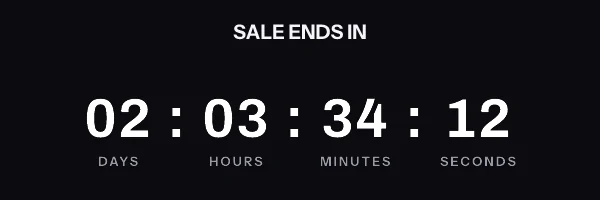
A countdown in Oracle Responsys is a signed timer image in the message’s HTML. For a date everyone shares, paste the fixed address. For a date per recipient, store one signed address per recipient in a profile extension table and let RPL write that column whole into the image source, ${ext.ET_IMAGE_URL}. RPL personalizes the link and the alt text; it never builds any part of the address.
Responsys has no countdown block of its own, and nothing in Oracle’s Responsys documentation that I read describes one. The top results for a Responsys timer search are about program timers, the step that pauses a program until a date, which is a different thing. So this page covers the email image, from the RPL syntax Oracle documents. It is one of four enterprise ESP guides, beside Iterable, Marketo Engage and Oracle Eloqua; the enterprise guide covers choosing a vendor for the programme.
The shared deadline, for a batch launch
Most Responsys countdowns are this one. A seasonal cut-off, a sale end, a holiday campaign last posting date: every recipient counts to the same instant. Publish the timer, copy the signed address, and paste the snippet into the message’s HTML. That is on every plan, including the free one.
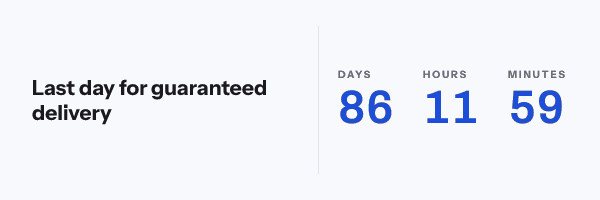
Batch launches are where a shared address earns its keep. The time left is worked out when each mail client fetches the picture, against the deadline in the address, so a recipient in the last wave of a long launch sees the same correct number as one in the first. Nothing about launch time enters the arithmetic.
Oracle’s Working with Message Content says the Email Message Designer shows “the HTML source code and the live view of your email side-by-side”. Paste the snippet into the source where the banner would go. The designer’s image dialog also has an Enter URL option, “a web location of an image to insert”, which takes the fixed address if you would rather not touch the source.
Where RPL may personalize the snippet
The signature is the rule. Every image address here carries an HMAC-SHA256 signature over its path and every query parameter. If Responsys writes a value into part of the address during the launch, the signature no longer matches, and every recipient gets a grey “image unavailable” card at HTTP 200. Nothing reports an error.
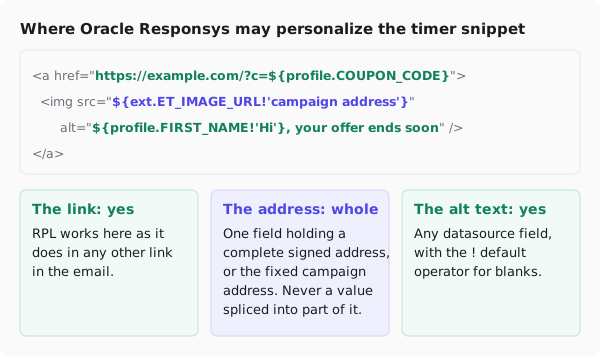
RPL reaches data through the alias your campaign gives each datasource. Oracle’s Namespace Reference writes a field as ${alias.field}, and its own example is ${profile.email} for a datasource aliased profile. The aliases below, profile for the profile list and ext for the profile extension table, are examples; use the ones your campaign declares.
<a href="https://yourstore.com/sale?code=${profile.COUPON_CODE}" target="_blank">
  <img src="${ext.ET_IMAGE_URL!'https://img.emailtimer.app/i/k7mQ2pXd.gif?w=w_8ha3fq&v=3&sig=YOUR_SIGNATURE'}" alt="${profile.FIRST_NAME!'Hi'}, your offer ends soon" width="600" height="200" border="0" style="display:block; width:100%; max-width:600px; height:auto; border:0;" />
</a>
The ! after a field is RPL’s default value operator. Oracle’s Handling missing values gives the form unsafe_expr!default_expr, with examples in both quote styles, including ${seq[0]!'-'}. Single quotes keep the default from closing the double-quoted HTML attribute around it. Here a recipient with no address in the table gets the campaign timer rather than an empty src. The same page documents ?? to test whether a value exists, if you would rather show a different block altogether.
What RPL must not do is assemble the address: a base address followed by &deadline=${profile.RENEWAL_DATE}. The signature was taken over the address before Responsys ever saw it, so any value RPL adds breaks it for the whole launch.
A deadline per recipient, in a profile extension table
A renewal date or a contract end belongs to the person, so it needs one signed address per person, made before the launch. They come from a recipient list upload in the dashboard or from the REST API’s batch endpoint, up to 10,000 addresses per call, and both are on the Growth and Agency plans.
For an upload, put your Responsys recipient identifier in the file’s external_id column, the deadline in a deadline column as a full timestamp with a zone, such as 2026-12-01T09:00:00Z, and any values you want drawn into the picture, such as first_name. The download pairs each external id with its signed address.
Store the addresses in a profile extension table. Oracle’s Creating Profile Extension Tables describes a one-to-one relationship between a recipient and the profile table, which is exactly one address per person. A PET holds up to 20 attributes and a list can have up to 40 PETs, so a single-column timer table costs little. Give the column a text type long enough for the longest address in the file: a truncated address fails the signature in the same way an altered one does.
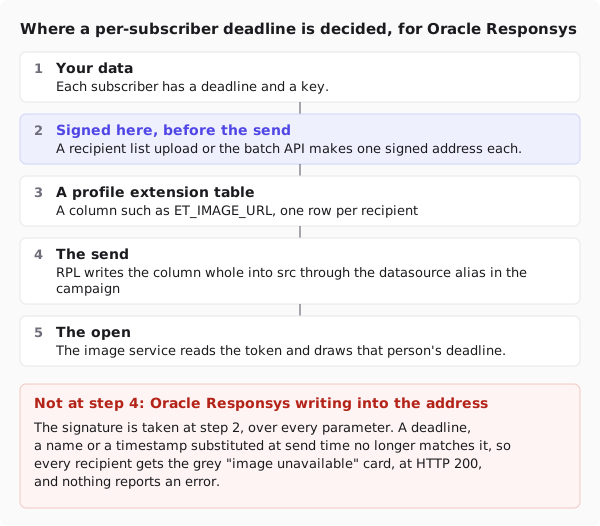
Then add the PET to the campaign as a personalization datasource, give it the alias your RPL uses, and the snippet above picks it up. The address carries a recipient token and nothing else personal: the deadline and any name stay with the recipient list and are read at the open.
The dashboard’s snippet generator does not write RPL. Responsys is not one of the twelve platforms on its publish screen, so you copy the address or download the per-recipient file and write the ${...} yourself, as above.
What your recipients will see
Responsys hands the message to the mail client, and the client decides. In Outlook with animation off, Microsoft’s support page says, “If only the first frame of the animation appears, you have animations, or animated GIFs, disabled.” The first frame of every timer here is a complete, correct countdown, so that reader sees a still with the right number. Apple Mail’s privacy protection fetches images around delivery, and Gmail serves through its own proxy, which can answer a second open from a copy. The email client support page goes through each, from the vendors’ documentation rather than from tests in live inboxes.
Write the deadline in body text beside the image as well. RPL can print the same date there from the same datasource, and plain text survives every client.
Test before you launch
Send a proof to yourself against a seed record that has a real address in the PET column, and one against a record with the column empty, to see the default. Open the proof’s HTML source and compare the src with the address in the file, character for character. Then open the proof in Outlook and in a web client.
Questions and answers
Does Oracle Responsys have a countdown timer block?
Not in the Responsys documentation I read. A countdown in a Responsys email is an image from a timer service, pasted into the message’s HTML source or placed through the image dialog’s Enter URL option.
Can RPL add the recipient’s deadline to the timer URL?
No. The address is signed over every parameter, so a value RPL writes in at launch breaks the signature and every recipient gets the fallback card. Sign one address per recipient before the launch and let RPL output that column whole.
Where should the per-recipient address live in Responsys?
In a profile extension table, which Oracle describes as one-to-one with the profile table. Add it to the campaign as a datasource and reference the column through its alias.
What does a recipient with no address see?
With the ! default operator pointing at the campaign address, the shared timer. Without a default, an empty src and no image. Per-recipient addresses need Growth or Agency, which pricing compares.
Sources
- Namespace Reference (Oracle Responsys Personalization Language)
- Handling missing values (Oracle Responsys Personalization Language)
- Working with Message Content (Oracle Responsys Help Center)
- Creating Profile Extension Tables (Oracle Responsys Help Center)
- Email Campaign Designer, personalizing your message (Oracle Responsys Help Center)
- The animated graphic in my e-mail message doesn't work (Microsoft Support)