EmailTimer.App

Countdown timers and personalized images for Oracle Eloqua

Your subscribers see how long is left on the offer, counted from the moment they open the message, and it goes into the Oracle Eloqua campaign you have already built. One snippet, in the merge syntax Oracle Eloqua already uses.

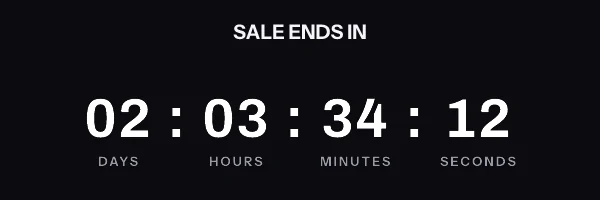
Animated countdown in the digital style, reading 02 days 03 hours 34 minutes 12 seconds and counting down
A render from the engine at 600 by 200, the size that goes into a Oracle Eloqua image block.

Oracle Eloqua merge syntax

The tags you already use, around the image

The same merge fields that put a subscriber's name in your subject line go in the link and the alt text around the image, where Oracle Eloqua fills them in as it sends. They never go inside the image address, for the reason in the warning further down. A name or a deadline drawn inside the image itself comes from an address signed for each subscriber, held in a contact field.

Worth checking in your own account. Eloqua writes a field merge as a span element, which is body-text markup. It cannot go inside an HTML attribute, because an element nested in an attribute value is not valid HTML and Eloqua will not resolve it there. So the snippets on this page leave the link and the alt text unpersonalized. Oracle also documents a field merge in a URL only after the question mark, never in the path, so a contact field cannot be the whole image address either: Eloqua gets the campaign timer, or one timer per group through its own dynamic content.

First name
<span class=eloquaemail>FirstName</span>
Coupon code
<span class=eloquaemail>CouponCode</span>
Deadline
<span class=eloquaemail>OfferDeadline</span>
Email address
<span class=eloquaemail>EmailAddress</span>

Checked against Oracle Eloqua's own documentation: Field merge examples (Oracle Eloqua Help Center) and Adding field merges to emails in the Design Editor (Oracle Eloqua Help Center), read on 23 September 2026.

The snippet to paste into Oracle Eloqua

Put it in source editor, or a shared content block. There are two shapes, and which one you want depends on whether every subscriber gets the same deadline or their own. The editor generates whichever you pick, already filled in with your ids.

One thing to know before you paste anything. A merge tag cannot go inside the image address. The address is signed, and the signature covers every part of it, so if Oracle Eloqua swaps a name into it after signing, the signature no longer matches and every subscriber gets the fallback graphic instead of your timer. It happens quietly, because the image service always answers with a valid picture rather than an error. Both snippets below put the merge tags in the link and the alt text, where they belong and where they work.

One image for the whole send

On every plan, including the free one. Everybody requests the same address, and the clock is worked out at the moment each person opens, which is what lets one address show a different time to every reader. The name and the code go in the link and the alt text.

<a href="https://yourstore.com/sale" target="_blank" rel="noopener">
  <img src="https://img.emailtimer.app/i/k7mQ2pXd.gif?w=w_8ha3fq&v=3&sig=YOUR_SIGNATURE" alt="Your 25% off ends at midnight tonight" width="600" height="200" border="0" style="display:block; width:100%; max-width:600px; height:auto; border:0;" />
</a>

A different image for each subscriber

There is no snippet to paste for this one, and the honest reason is above: Oracle Eloqua writes a field merge as an element rather than as text, so it cannot sit inside the address attribute of an image. Use Oracle Eloqua's own dynamic content to show a different timer to each group, each with its own fixed address, or stay on the campaign snippet and let the clock do the personalizing.

The addresses come from the batch endpoint in the REST API, or from a CSV export if you would rather not write code.

Setting it up in Oracle Eloqua

Four steps, and the longest one is deciding what the timer should look like.

  1. 1

    Build the image in EmailTimer.App

    Set the timer style and the deadline. Webinar and event reminders are the common case in Eloqua, so the event start time is usually the deadline you want.

  2. 2

    Copy the Eloqua snippet

    The image address is signed, so no field merge goes inside it. Oracle documents a field merge in a URL only in the query string, after the question mark, and never in the path, so a merge belongs in the query string of a link you own rather than anywhere in the image address.

  3. 3

    Paste it into the source editor

    Field merges in this form belong in the HTML source rather than the Design Editor. Paste the tag into the source editor, or into a shared content block if several campaigns use the same banner.

  4. 4

    Preview with a real contact

    Preview the email against a contact record. Eloqua highlights field merges while you edit, so anything unresolved is easy to spot before you send.

Things that only matter in Oracle Eloqua

Eloqua writes field merges as <span class=eloquaemail>FieldName</span>, and the Design Editor writes a merge inside a link in its own tilde form instead. Oracle documents a merge in a URL only after the question mark, and says field merge values are always HTML encoded, images included. Use the field merge names as they appear in your own Eloqua instance rather than the generic ones shown here.

Before procurement asks

You will have to explain this to someone in security

Running Oracle Eloqua usually means a review before anything new goes near a send. The short version you can forward: an image URL goes in the template, the values it carries are the merge fields you choose, and no script runs anywhere. Nothing is installed inside Oracle Eloqua and no data leaves your platform except what you put in that URL.

The Agency plan adds white-label image domains, so the URL your subscribers see reads as your own brand rather than ours, along with a separate workspace per brand or region and control over what each person on the team can touch. There is no dedicated IP option and no written uptime commitment; what the service does when something fails is on the status page.

What your Oracle Eloqua subscribers will actually see

B2B recipients open on corporate Outlook more often than consumer lists do, and Outlook on Windows shows only the first frame. That frame carries the correct remaining time, so the countdown reads as a still rather than as a broken animation.

What each client is documented to do

Email client Fetch moment Cache lifetime GIF animation What EmailTimer.App does Basis
Apple Mail (iOS 15+, macOS Monterey+) Apple Mail Privacy Protection (MPP) Delivery time (pre-fetched by Apple server) Testing reports 2 to 3 days Full 30-second live animation The timer counts down from the time remaining at delivery. A fixed deadline, such as 23:59 UTC, is still the right deadline. Documented by Apple
Gmail (web, iOS, Android) Google image proxy First open by recipient Not published by Google Full 30-second live animation First open displays a real-time countdown. A re-open can be served from the copy the proxy already holds. Documented by Google
Outlook on Windows (2016 to 2024) Word rendering engine Open time Not documented First frame only (static image) Frame 1 is a complete image with the time left at the fetch, so a reader who sees only that frame sees a correct still countdown. Expected, not yet documented or tested
Outlook on the web and mobile (iOS, Android) Native browser or app engine Open time Not documented Full 30-second live animation Expected to play the animation, 30 frames at one frame per second by default. Expected, not yet documented or tested
Yahoo Mail and AOL Yahoo image proxy Open time Not documented Full 30-second live animation Expected to fetch the image when the message is opened and play the animation. Expected, not yet documented or tested

The Apple and Gmail rows rest on Apple's and Google's published documentation and on third-party testing. Neither company publishes a cache lifetime: Apple documents the prefetch, Google documents the proxy, and the two to three days is FreshInbox's 2021 testing. The Outlook and Yahoo rows are what we expect those clients to do, with no vendor document behind them. No row comes from a test by us yet, and we will publish dated screenshots when we have them. Sources: Apple on Mail Privacy Protection, Google on the Gmail image proxy, FreshInbox on Mail Privacy Protection image caching.

Oracle Eloqua in practice

Oracle Eloqua countdown timer, and its limits

By Danish Mohammed, founder. 6 min read

A countdown in an Oracle Eloqua email is a signed timer image with a fixed address, pasted into the email as it is. One address serves every contact, and each sees the time left at their own open. For a different deadline per region or per event, use Eloqua dynamic content with one timer per variant. A deadline per individual contact is not something Eloqua’s documented field merges can carry, and this page explains why.

That last sentence is the one most worth knowing before you plan a campaign, so it comes first rather than last. The rest is where the image goes, which Eloqua features can vary it, and what a corporate Outlook audience sees. For the wider decision, the enterprise guide covers what a vendor review asks; Oracle Responsys, Marketo Engage and Iterable have their own pages.

Why Eloqua cannot carry a timer per contact

On other platforms, a per-person countdown works by storing one complete signed address per person in a contact field and making that field the whole image source. Eloqua’s own documentation closes that route twice.

First, where a merge may sit. Oracle’s Field merge examples limits a merge used in a web address to the part “after the ? in the URL string”, and adds: “You cannot use field merges as part of the actual URL path.” A field that holds the whole address would put the merge before the question mark, which that page rules out.

Second, what a merge after the question mark would do. Every image address here carries an HMAC-SHA256 signature over its path and every query parameter. A value Eloqua writes into the query at send time is a value the signature never saw, so every contact gets a grey “image unavailable” card, at HTTP 200, with no error anywhere. The same Oracle page adds that “field merge values are always HTML encoded”, images included.

So in Eloqua, the timer’s address goes in exactly as it was signed. That is not a small loss, and I would rather say so here than let a campaign find out. A team that needs a deadline per contact, a renewal date for example, sends that email from a platform that can hold a per-person address, or shows the date as merged body text beside a shared timer.
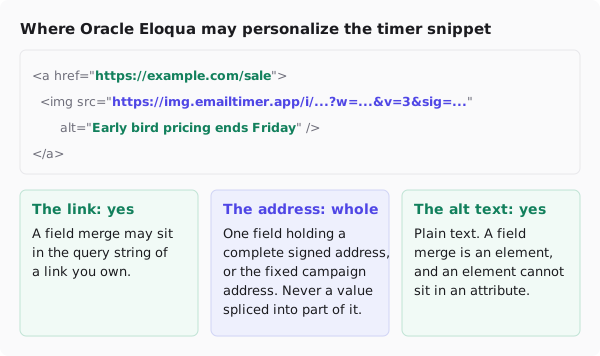
Diagram of the timer snippet in Eloqua. The link, to a page you own, may carry a field merge in its query string. The image source is the fixed signed campaign address, pasted as is. The alt text is plain text, because a field merge is an element and cannot sit inside an attribute.
In Eloqua, the image address is always the fixed one, and the alt text is plain.

The shared timer, on every plan

For a webinar, an event or an early-bird price, every contact counts to the same moment, and this is the case Eloqua handles well. Publish the timer, copy the signed address, and paste the snippet into the email’s HTML where the banner would sit. The free plan includes it. Because the time left is drawn when each mail client fetches the picture, one address still shows each reader the right number at their own open.
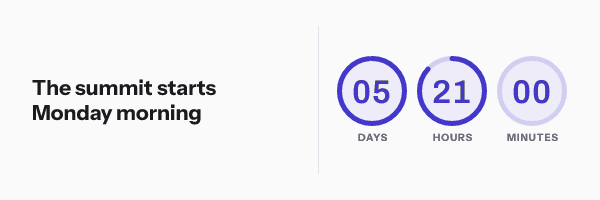
A countdown beside the headline The summit starts Monday morning, reading 05 days 21 hours 00 minutes in three rings
An event timer from the dashboard gallery, rendered by the product's engine at 12:00 UTC on 23 September 2026, counting to 09:00 UTC on 29 September.

Personalize around the image rather than in it. In a link to your own page, Oracle documents a merge after the question mark. In the Design Editor, Oracle’s field merge page for the Design Editor says links use an HTML-compliant tilde syntax, ~~eloqua..type--emailfield..syntax--field_merge_name~~, and “does not use the <span class="eloquaemail">field_merge_name</span> format”. Outside it, a field merge is a <span class=eloquaemail> element, which is body text: an element cannot sit inside an HTML attribute, so the alt text stays plain.

One more note from Oracle, because it is the page an earlier version of this site cited. encodeFor=url is documented on the page for query string field merges, and that page says those merges “are not available for use on landing pages, in emails”. So this page does not rely on it for email, and neither should a snippet.

The dashboard’s snippet generator does not write Eloqua field merges. Eloqua is not one of the twelve platforms on its publish screen, so copy the signed address and paste it as above.

A timer per region or per event, with dynamic content

Dynamic content is how an Eloqua email shows different people different blocks, and each block can carry its own timer with its own fixed address. Oracle’s Creating dynamic content lists the rule types: compare contact fields, compare account fields, a linked record in a custom object, and a linked record in an event. It also says the full editor handles images and HTML: “If you want to add images, field merges, or hyperlinks, or edit HTML code, click Full to open the rich text editor.”
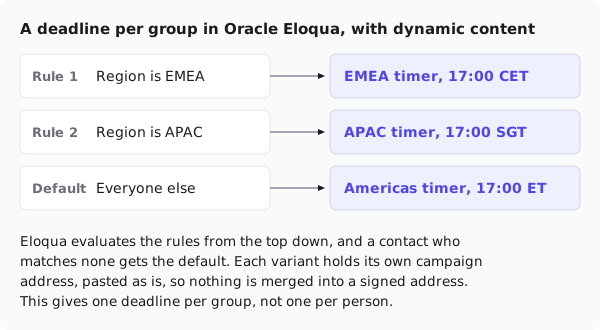
Diagram of three dynamic content rules evaluated from the top down. Region is EMEA shows an EMEA timer ending 17:00 CET, region is APAC shows an APAC timer ending 17:00 SGT, and the default shows an Americas timer ending 17:00 ET. Each variant holds its own fixed campaign address.
One timer per group, chosen by an Eloqua rule. Nothing is merged into a signed address.

Two uses come up in B2B programmes.

A deadline per region. A promotion that closes at 17:00 local time in each region is three deadlines, not one. Publish three timers, or one template published with three deadlines, and give each dynamic content rule its own address. Oracle’s order matters: “Eloqua evaluates the rules from the top down. If a contact doesn’t meet any of the rule conditions, then the default content is used.” Set the default first, as Oracle says to.

A countdown per event session. The event rule type, “Has Linked Record in Event”, lets registrants for one session see that session’s timer. A three-session webinar series is three timers and three rules, and a registrant sees the one they signed up for. The webinar registration page has designs for it.

The limits are Eloqua’s. A rule cannot “search for a particular value in a large text field”, and this is a handful of groups, not thousands. A rule per contact is not a workable way to fake a per-contact timer.

What your contacts will see

B2B lists read on corporate Outlook more often than consumer lists do. Microsoft’s support page says, “If only the first frame of the animation appears, you have animations, or animated GIFs, disabled”, and classic Outlook for Windows shows the first frame regardless. The first frame of every timer here is a complete, correct countdown, so that contact sees a still with the right number.

The Email clients tab of the publish dialog, showing the same timer as four clients would: Gmail on first open, Gmail opened again, Apple Mail with privacy protection, and Outlook on the desktop, which holds one frame and is marked Right, with a note that Outlook hides images until the reader downloads them
The publish dialog's Email clients tab, which shows what each client does with this timer before you send, captured from a local test instance of the dashboard.

Corporate Outlook also often blocks images until the reader downloads them, which is what the alt text is for. Since the alt text in Eloqua is plain, write it as the message itself, “Early bird pricing ends Friday at 17:00”, and put the same date in body text next to the image. The Outlook page goes through it by version, from Microsoft’s documentation rather than from a test in each inbox.

Test before you send

Preview the email against a contact from each dynamic content group, and against one who matches no rule, to see the default. Check the image address in the rendered HTML matches the published one exactly. Then send a test to an Outlook mailbox and a web mailbox.

Questions and answers

Can Oracle Eloqua show a countdown timer?

Yes, as an image from a timer service with a fixed signed address, pasted into the email. Every contact sees the time left at their own open. Eloqua has no timer block of its own.

Can I give each Eloqua contact their own deadline?

Not through a field merge. Oracle documents merges in a URL only after the question mark, never in the path, and a merge in the query of a signed address breaks its signature. Use dynamic content for a deadline per group, or send per-contact deadlines from a platform that can store a complete address per person.

Can a field merge go in the timer’s alt text?

No. Outside the Design Editor’s link syntax, an Eloqua field merge is an element, and an element cannot sit inside an HTML attribute. Write the alt text as plain words that carry the deadline.

Which plan does an Eloqua timer need?

The shared timer is on the free plan, which has 5,000 image opens a month and three live images at a time, so three regional variants fit. A fourth needs Starter, which has no template limit. Pricing has the rest.

Sources

Related

Campaigns to build in Oracle Eloqua

Each playbook says which timing model the campaign needs, which snippet it takes, and what to get right before you send it.

Setting this up on another platform

The snippet is the same everywhere. Only the merge syntax changes, and each page below carries the exact syntax that platform expects.

All 21 platform setup guides

Put a timer in your next Oracle Eloqua send

Free for 5,000 opens a month, $19 for 250,000, and the snippet above is the whole integration.