

Gmail clips a message when the HTML of the email is larger than about 102 KB: it shows the top part, then a line reading “[Message clipped] View entire message”, and the rest only appears if the reader clicks that link. Images do not count toward the size, because they load from their own addresses; the markup does, including inline styles, tracking links and code your email platform adds after you press send.
This page explains exactly what counts, how to measure your own email, and the six fixes that bring it back under the line, with before and after code for each. I built a 32-story test newsletter for this page and measured it after every fix, so four of the six fixes come with a measured number.
What a clipped message looks like
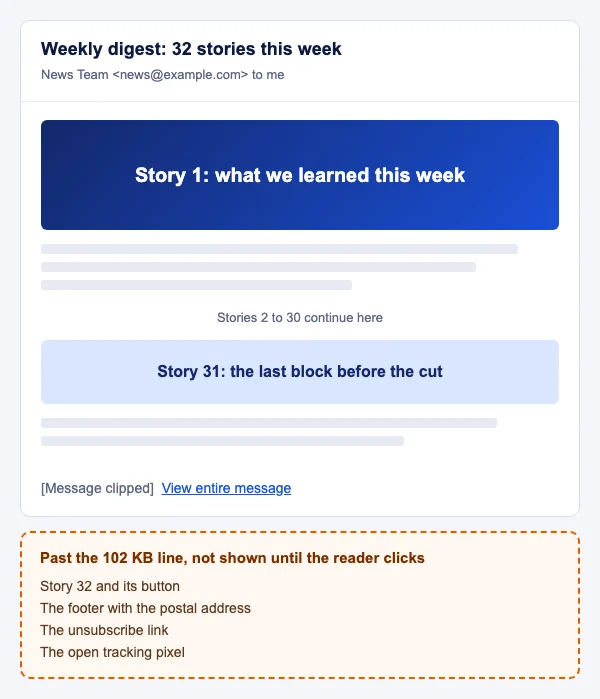
The reader sees an email that simply ends. Nothing tells them the footer, the last offer or the unsubscribe link are missing unless they notice the small grey line and click it. Most readers do not.
Why Gmail clips messages: the 102 KB limit
Google does not publish the limit in any help page or developer document I could find. The 102 KB figure comes from senders measuring it. Al Iverson at Spam Resource wrote that “everybody in the world advertises 102KB as the HTML limit,” tested it himself, and found the cut-off “around 105KB (for me, anyway)”. Twilio SendGrid’s support article states it the same way: “If your email’s HTML content is larger than 102KB, Gmail will generally clip the message.”
Two details from that testing matter for the fix:
- It is the HTML part only. Iverson found the limit applies to the HTML part, not to the HTML plus the plain text part plus the headers. Your plain text version and your headers can be any reasonable length.
- Images do not count. An
<img>tag is a few hundred bytes of markup whatever the size of the picture it points to. A 900 KB hero photo adds the length of its tag. Email image size covers image weight, which affects load time, not clipping.
Nobody outside Google knows whether that “KB” means 1,000 or 1,024 bytes, and the encoding of the message shifts the point a little (more on that below). Treat 102 KB as a cliff edge, not a target. I aim for 90 KB or less measured on the message as it arrives, which leaves room for the code a platform adds.
What counts toward the size
Everything between the first and last byte of the HTML part. In a typical marketing email, the bytes go to these places, roughly in order of how much they cost:
- Inline CSS. Builders write the full style on every element: font family, size, line height and colour on each paragraph, each link and each cell. Thirty paragraphs carry the same 150 characters of style thirty times.
- Tracking links. Your email platform rewrites every link into a long redirect address with an encoded token, and adds UTM parameters. A 30 character link can become 300.
- Outlook code. MSO conditional comments, ghost tables wrapped around every section, and VML for buttons and backgrounds. Necessary where they do something, dead weight where they are copied in by habit. Email template for Outlook explains which ones you need.
- Whitespace and comments. Indentation, blank lines and
<!-- section start -->notes left by the builder. Readable, and invisible to the reader. - Hidden text. Preheader spacers such as
‌ repeated a hundred times are 12 bytes per pair, and hidden mobile or desktop versions of a block count in full even though only one shows. Email preheader shows a shorter spacer. A long HTML signature counts too, since it is part of the HTML of every message it is added to; HTML email signature builds a lean one. - Platform additions after send. The open tracking pixel, a view-in-browser link, the footer with your address, and sometimes a block of the platform’s own CSS. You never see these in the editor, so your editor’s size is always lower than what arrives.
- Encoding. Emails travel as quoted-printable, base64 or unencoded. Iverson found the cut-off moves a little with encoding: a base64 message needed “more than 110KB” of HTML source before it clipped, about 5 KB more than the others, so measure the decoded HTML and aim under 102 KB whatever the encoding. He also warns that unencoded extended characters, such as accented letters or a raw
©, can trigger clipping well below the usual size.
How to measure the size of your HTML
Measure twice: once on your file while you work, and once on the message as it arrives, because only the second includes what your platform adds.
Your file. On macOS or Linux, in a terminal:
wc -c newsletter.html
# 109780 newsletter.html
On Windows, in PowerShell:
(Get-Item newsletter.html).Length
In any browser, open the developer console and put your HTML into a string. Blob.size returns the size “in bytes”, as MDN documents, after encoding the string as UTF-8, which is what your email will use:
new Blob([html]).size // html is your email as a string
The message as Gmail receives it. Send a test to a Gmail address. Open it, choose More next to Reply, then “Show original”, as Gmail’s help describes. The window shows the raw message. Copy everything from the line after Content-Type: text/html and its blank line, down to the next boundary line that starts with --, into a file and run wc -c on it. Check the Content-Transfer-Encoding line above the part. If it says base64, decode it first (base64 -d part.txt | wc -c); quoted-printable reads slightly high, which errs on the safe side. That number is the HTML part with every tracking link and pixel already in place. If it is close to 102 KB, you are one long subject line or one extra product block from a clip.
How to stop Gmail clipping your messages: six fixes
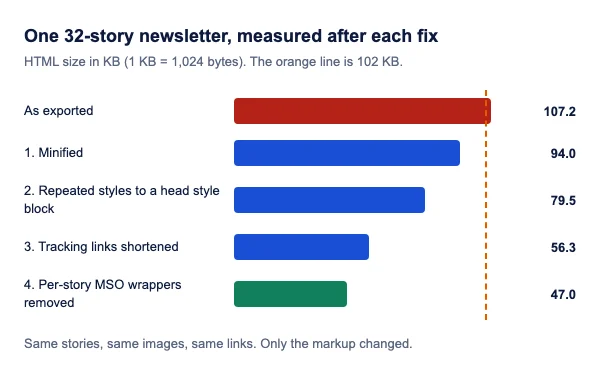
The test newsletter started at 109,780 bytes, past the line, with the unsubscribe link at byte 109,475 and the open pixel at byte 109,583: both would sit in the hidden part. The fixes below are numbered in the order to do them, because the first two are safe in every client and the later ones need a decision.
1. Minify the HTML
Minifying removes indentation, line breaks between tags and comments, and shortens colour codes such as #333333 to #333. It changes nothing a reader sees. Two rules keep it safe for email:
- Keep MSO conditional comments. Some minifiers strip every comment, and
<!--[if mso]>is a comment. html-minifier-terser keeps conditional comments by default; the ignore rule below is a safety net for other tools. - Collapse whitespace conservatively, leaving one space where there was whitespace between inline elements, so words next to links do not run together.
With html-minifier-terser, these options did both on my test file:
import { minify } from 'html-minifier-terser';

const out = await minify(html, {
  collapseWhitespace: true,
  conservativeCollapse: true,   // keep one space between inline elements
  removeComments: true,
  ignoreCustomComments: [/^\s*\[if/, /^\s*<!\[endif/, /^\s*\[endif/], // keep MSO comments
  minifyCSS: true
});
Result: 109,780 bytes to 96,253. Under the line, but not by enough to survive what a platform adds.
2. Remove duplicate inline styles
Text styles inherit. If the cell sets the font family, size, line height and colour, the paragraphs and links inside it do not need to repeat them. Only set on a child what differs from its parent.
Before, as a builder exports it:
<tr>
<td style="padding:24px 32px 8px 32px; font-family:Helvetica, Arial, sans-serif;">
<h2 style="margin:0 0 12px 0; font-family:Helvetica, Arial, sans-serif; font-size:22px; line-height:28px; font-weight:bold; color:#111111;">
Story 1: what we learned this week
</h2>
<p style="margin:0 0 16px 0; font-family:Helvetica, Arial, sans-serif; font-size:16px; line-height:24px; color:#333333;">
Our team tested the new layout across the clients our readers use most.
</p>
<p style="margin:0 0 16px 0; font-family:Helvetica, Arial, sans-serif; font-size:16px; line-height:24px; color:#333333;">
Here is what we changed, and what you can copy for your own sends.
<a href="https://click.esp-example.com/ls/click?upn=u001.Qm9vZ2xlLWNsaXBwaW5nLWV4YW1wbGUtbGluay10cmFja2luZy10b2tlbg-2FzYXZlZC1ieXRlcw&utm_source=newsletter&utm_medium=email&utm_campaign=november_weekly_digest_2026&utm_content=story_1_link_1" style="color:#1a56db; text-decoration:underline; font-family:Helvetica, Arial, sans-serif;">Read the full write-up</a>.
</p>
</td>
</tr>
After, with the text styles set once on the cell, the duplicates removed, the link shortened (fix 4) and the whole block minified:
<tr><td style="padding:24px 32px 8px;font-family:Helvetica,Arial,sans-serif;font-size:16px;line-height:24px;color:#333"><h2 style="margin:0 0 12px;font-size:22px;line-height:28px;color:#111">Story 1: what we learned this week</h2><p style="margin:0 0 16px">Our team tested the new layout across the clients our readers use most.</p><p style="margin:0 0 16px">Here is what we changed, and what you can copy for your own sends. <a href="https://e.example.com/c/Fq3k9TzX" style="color:#1a56db">Read the full write-up</a>.</p></td></tr>
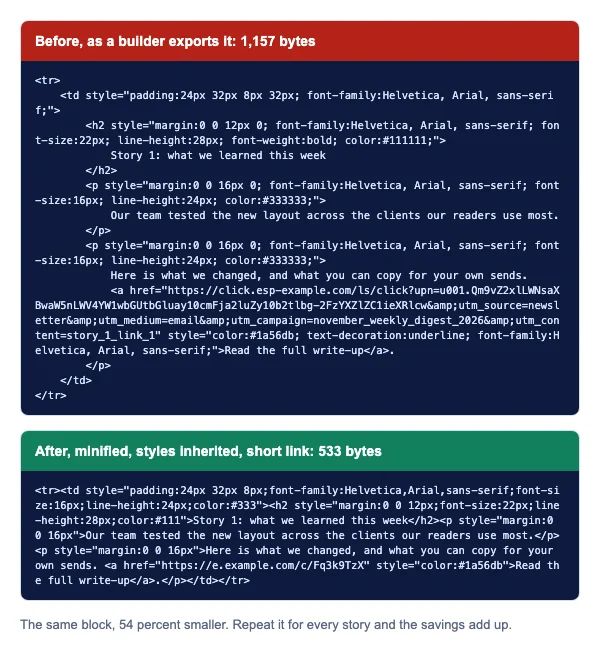
Three things to keep inline on the child even when they repeat: the color on links (several clients apply their own link colour otherwise), margin on paragraphs and headings (browsers and clients disagree on the defaults), and anything on an element inside a VML block. The h2 keeps its own font-size and line-height because they differ from the cell’s. It does not need font-weight:bold, which is the default for a heading.
3. Move repeated styles to a style block in the head, where supported
Styles that repeat across many blocks but cannot inherit, such as the style of every story heading, can move to a class in a <style> element in the <head>. Gmail supports this. Google’s CSS page says “You can style email sent to Gmail using inline <style> blocks and standard CSS” and “Gmail supports class, element, and ID selectors.”
<head>
  <style>
    .h { margin:0 0 12px; font-family:Helvetica,Arial,sans-serif; font-size:22px; line-height:28px; color:#111; }
    .p { margin:0 0 16px; font-family:Helvetica,Arial,sans-serif; font-size:16px; line-height:24px; color:#333; }
  </style>
</head>
<body>
  <h2 class="h">Story 1: what we learned this week</h2>
  <p class="p">Our team tested the new layout across the clients our readers use most.</p>
</body>
This is the fix with limits, so use it only for styles whose loss leaves the email readable. Can I email’s tests record three: in Gmail the <style> element is “Not supported inside the <body>”, “The size of the <style> tag is limited to 16 KB”, and in the Gmail apps it is “Not supported with non Google accounts”, which means someone reading an Outlook.com or Yahoo address in the Gmail app sees the email without those styles. Classic Outlook for Windows supports it, with the note that “<style> elements need to be declared before their rules are used”, so keep the block in the head. Layout, widths, background colours and button styles stay inline.
On my test file: 96,253 bytes to 81,424.
4. Shorten the tracking links
The biggest single saving in my test. Each story had two links, and each tracked link was about 400 characters as written in the HTML. Shortening them took the file from 81,424 bytes to 57,651.
<!-- Before: the platform's long redirect plus five UTM parameters -->
<a href="https://click.esp-example.com/ls/click?upn=u001.Qm9vZ2xlLWNsaXBwaW5nLWV4YW1wbGUtbGluay10cmFja2luZy10b2tlbg-2FzYXZlZC1ieXRlcw&utm_source=newsletter&utm_medium=email&utm_campaign=november_weekly_digest_2026&utm_content=story_1_link_1">Read the full write-up</a>
<!-- After: a short tracking domain and no repeated parameters -->
<a href="https://e.example.com/c/Fq3k9TzX">Read the full write-up</a>
You rarely type these links yourself, so the work happens in your platform’s settings:
- Turn off click tracking for links that do not need it. Social icons, the postal address and the “view in browser” link rarely need a tracked redirect.
- Use short UTM values.
utm_campaign=nov26rather thanutm_campaign=november_weekly_digest_2026, written once per link, not repeated inutm_contentas well. - Use a short branded tracking domain if your platform offers one. It also keeps your links on a domain you control rather than one shared with every other sender on the platform.
- Fewer links per block. An image, a headline and a button that all point to the same story are three tracked links. One or two is usually enough.
5. Drop unused MSO code
Outlook for Windows needs some conditional code: a fixed-width ghost table around a fluid layout, and VML where you want rounded buttons or background images in classic Outlook. It does not need a ghost table around every section when one around the whole email does the same job.
Before, repeated around each of the 32 stories:
<!--[if mso]>
<table role="presentation" width="600" cellpadding="0" cellspacing="0" border="0" align="center">
  <tr>
    <td width="600" style="padding:0;">
<![endif]-->
  <table role="presentation" width="100%" style="max-width:600px; margin:0 auto;">
    <!-- story -->
  </table>
<!--[if mso]>
    </td>
  </tr>
</table>
<![endif]-->
After, once around the whole email:
<!--[if mso]><table role="presentation" width="600" cellpadding="0" cellspacing="0" border="0" align="center"><tr><td><![endif]-->
  <!-- all 32 stories, each a table with max-width:600px -->
<!--[if mso]></td></tr></table><![endif]-->
Line by line: <!--[if mso]> opens a comment that every client ignores except Outlook’s Word engine, which reads what is inside. The table gives Outlook a fixed 600 pixel column, because it does not support max-width. <![endif]--> closes it. The second pair closes the table for Outlook only. Every other client sees two comments and the fluid tables.
Also look for VML blocks left over from a template’s background image or button you have since replaced, and duplicate desktop and mobile versions of the same block where one hides the other. On my test file, removing the per-story wrappers took it from 57,651 bytes to 48,162 (with the single wrapper added back), the final 47.0 KB in the chart. Email background image and HTML email button show the VML that is worth keeping.
6. Split long newsletters
If an email is still near the line after the first five fixes, it has more content than one email should carry. Two ways to cut it:
- Send the top stories in full and the rest as a list of headlines that link to a page on your site.
- Split one weekly digest into two sends, or move evergreen sections such as “from the archive” to a page linked from the footer.
The reader gets a shorter email they can finish, and your click tracking shows which stories were worth the full treatment next time.
What a clipped message costs you
The part after the clip is still in the email, but most readers never see it, and the code in it never runs. That is worse than it sounds, because email platforms put the most important plumbing at the end:
- The unsubscribe link. SendGrid’s article warns that “if your email gets clipped, users might not see the unsubscribe links.” A reader who cannot find it may press the spam button instead. Gmail’s own unsubscribe button in its interface comes from the
List-Unsubscribeheader, which Gmail’s sender guidelines ask bulk senders to include alongsideList-Unsubscribe-Post: List-Unsubscribe=One-Click, the method RFC 8058 defines. Headers are not part of the HTML and are not clipped, so set them up. The link in your footer still matters for everyone else. - The open tracking pixel. SendGrid: “the pixel added at the end of the email to record opens is not loaded” unless the reader clicks “View entire message”. Your open rate for Gmail readers drops, and any automation that waits for an open, such as a resend to non-openers, fires for people who did open.
- The footer. Your postal address, legal text and preference links.
- Your last offer and any live image placed low. An image below the clip is not requested at all, so a countdown or a product feed placed in the final block simply does not appear.
Gmail clipping across email clients
The clip is Gmail’s. Other clients may handle very long messages in their own ways, but none documents a size cut-off like this one. What does change from client to client is fix 3, the head style block.
| Client | Clips long HTML | <style> in the head (fix 3) |
|---|---|---|
| Gmail on the web | Yes, at around 102 KB of HTML, with “[Message clipped] View entire message” (Spam Resource, SendGrid) | Supported in the head, not in the body; the block is limited to 16 KB (Can I email) |
| Gmail app, iOS and Android, with a Gmail address | Yes, Gmail’s clip applies | Supported in the head |
| Gmail app with a non-Google address | Not documented | “Not supported with non Google accounts” (Can I email) |
| Outlook for Windows, classic | No size clip documented | Supported; declare the block before the rules are used (Can I email) |
| Outlook.com and Outlook on the web | No size clip documented | Supported (Can I email) |
| New Outlook for Windows | No size clip documented | Not tested separately by Can I email; test it yourself |
| Apple Mail, macOS | No size clip documented | Supported (Can I email) |
| iOS Mail | No size clip documented | Supported (Can I email) |
| Yahoo Mail | No size clip documented | Supported; older Android versions removed the first <head> (Can I email) |
| Samsung Email | No size clip documented | Supported (Can I email) |
Gmail and Outlook cover the other ways these two clients treat images and code.
Pre-send checklist
- The HTML part of a test message, measured from “Show original”, is under 90 KB.
- The file is minified, with MSO conditional comments kept.
- Text styles are set on cells and inherited, not repeated on every paragraph and link.
- Anything in the head
<style>block is safe to lose, and the block is under 16 KB. - Click tracking is off for footer and social links, and UTM values are short.
- One MSO wrapper around the email, not one per section; no leftover VML.
- No raw
©, accented or other extended characters left unencoded where your platform does not encode them; use©or check that the message declares UTF-8. - The unsubscribe link and footer are in the received copy, and
List-Unsubscribeheaders are set. - Test sends to Gmail use different subject lines, so Gmail does not group them into one long thread.
Timers in a long email
On this page the question is where the image sits, not how heavy it is. An image costs the 102 KB budget only the length of its tag: the frames and file size of an email countdown timer from EmailTimer.app load from their own address and never count toward the clip. Two rules keep it working in a long email:
- Place it above the clip. Gmail never requests an image after the “[Message clipped]” line, so a timer in the last block is the first thing a clipped email loses. Put it near the top, next to the offer it counts down to.
- Keep its tag short. Paste the snippet as the editor gives it, without wrapping it in extra tables or tracking its link twice. A timer made in the countdown timer generator is a single tag.
Countdown timer HTML for email explains each attribute of that tag. Plans and free limits are on pricing.
If you are starting a new email rather than trimming an old one, the HTML email template begins well under the limit.
Questions and answers
Why is Gmail clipping my messages?
Because the HTML part of the email is larger than about 102 KB. Gmail shows the first part and hides the rest behind “View entire message”. The usual causes are long inline styles repeated on every element, long tracking links, and code your email platform adds when it sends.
How do I stop Gmail from clipping my emails?
Bring the HTML under about 90 KB as it arrives. Minify it, set text styles once on the cell so children inherit them, shorten tracking links, remove repeated Outlook code, and cut very long newsletters into a shorter email that links to the rest.
What is the Gmail clipping limit?
About 102 KB of HTML. Google does not publish the number; it comes from senders measuring where the clip happens. Spam Resource found it around 105 KB in its own test and recommends aiming for 102 KB or less.
Do images count toward the 102 KB limit?
No. Images load from their own addresses, so only their <img> tags count, a few hundred bytes each. A heavy image makes the email slower to load but does not make it clip.
What does “[Message clipped] View entire message” mean?
It means Gmail stopped displaying the email at that point because the HTML was too large. Clicking “View entire message” opens the full message. Anything after the line, including the footer and the open tracking pixel, is not shown or loaded until the reader clicks.
Does a clipped email hurt open rates?
It hurts the open rate you measure. Most platforms put the open tracking pixel at the end of the email, and SendGrid notes it is not loaded unless the reader clicks “View entire message”, so opens by Gmail readers go uncounted.
Is the unsubscribe link lost when Gmail clips an email?
The link in your footer is hidden if it falls after the clip. Gmail’s own unsubscribe button uses the List-Unsubscribe header, which is not part of the HTML and is not clipped, so set those headers as Gmail’s sender guidelines ask.
How do I check the size of my email HTML?
Run wc -c file.html on macOS or Linux, (Get-Item file.html).Length in PowerShell, or new Blob([html]).size in a browser console. Then check the received copy: in Gmail open “Show original” and measure the HTML part, since it includes what your platform added.
Why does my email clip in Gmail when my file is under 102 KB?
Your platform adds tracking links, a pixel and footer code at send time, and the platform’s tracking links are much longer than the ones in your file. Unencoded extended characters such as a raw copyright symbol can also cause clipping below the usual size, as Spam Resource reported.
Does minifying HTML break emails?
Not if you keep MSO conditional comments and collapse whitespace conservatively. A minifier that strips every comment removes the <!--[if mso]> blocks classic Outlook relies on, and aggressive whitespace removal can join words that sit next to links.
Why did Gmail clip my test email but not the real send?
Gmail groups messages with the same subject into one conversation, and SendGrid notes identical subject lines can lead to clipping. Change the subject for each test send so every test is measured on its own.
Does Outlook clip long emails like Gmail?
No size cut-off like Gmail’s is documented for Outlook, Apple Mail, Yahoo or Samsung Email. The fixes on this page still help them, since a smaller email loads faster everywhere.
Does dark mode code add to the size?
Yes, a little. Dark mode rules live in a head <style> block, so they count toward the HTML size and toward Gmail’s 16 KB style limit. Email dark mode shows a compact set of rules.
Can I send a large HTML email from Gmail itself?
Gmail’s compose window has no source view, so you would need a workaround. Send an HTML email from Gmail gives the methods that work, including an Apps Script you can copy, and the same 102 KB limit applies to what you send.
Sources
- What is Gmail clipping and what to do? (Al Iverson, Spam Resource, 12 January 2022), read on 22 November 2026
- [Message clipped] Emails Sent to Gmail Inboxes (Twilio SendGrid Support), read on 22 November 2026
- Email sender guidelines (Gmail Help), read on 22 November 2026
- Trace an email with its full header (Gmail Help), read on 22 November 2026
- CSS support (Gmail, Google for Developers), read on 22 November 2026
- style element (Can I email), read on 22 November 2026
- RFC 2045: MIME Part One, Format of Internet Message Bodies (IETF), section 6, Content-Transfer-Encoding, read on 22 November 2026
- RFC 8058: Signaling One-Click Functionality for List Email Headers (IETF), read on 22 November 2026
- Blob: size property (MDN Web Docs), read on 22 November 2026
Related
Put a countdown in the campaign you are writing now
The free plan covers 5,000 opens a month with no card. Starter is $24 a month for 250,000.