

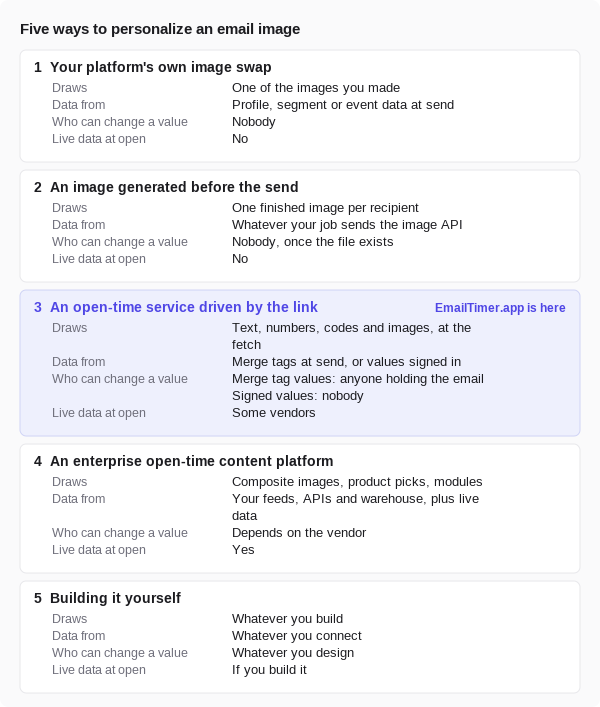
There are five ways to personalize an image in an email: your platform’s own image swap, an image generated per recipient before the send, an open-time image service driven by the link, an enterprise open-time content platform with live data feeds, and a renderer you build yourself. They differ in what they can draw, where the data comes from, who can change a value, and whether anything is decided at open.
Image personalization software for email is sold in all five shapes, and a search for it mixes them freely. A design API and an enterprise content platform with a demo form can sit on the same page of results. This page puts every approach in the same columns and names the tools in each. If you want the mechanism first, start with what a personalized image in email is.
We make EmailTimer.app, which sits in the third approach. It gets the same columns as everyone else, limits included. Every claim about another tool comes from that tool’s own page as we read it on 26 September 2026. Those tools are named, never linked, and the sources list names each page. The email platforms’ own documentation is linked where it is quoted.
The five approaches at a glance
| Approach | What it draws | Where the data comes from | Who can change a value | Live data at open | Typical buyer | Effort | Where it breaks |
|---|---|---|---|---|---|---|---|
| Your platform’s own image swap | Picks one of the images you made | Profile, segment or event data at send | Nobody. An edited link reaches another of your files at most | No | Any team already on the platform | Low: a setting in the editor | Cannot draw a name or a number; one file per version |
| An image generated before the send | One finished image per recipient | Whatever your job sends the image API | Nobody once the file exists | No | Teams with a developer or an automation tool | Medium to high: a job per send | Stale by the open; a file per person per campaign |
| An open-time service driven by the link | Text, numbers, codes and images, drawn at the fetch | Merge tags your platform fills at send, or values signed into each recipient’s link, sometimes a data source | Merge tag values: anyone holding the email, on their own copy, within whatever checks the vendor runs. Signed values: nobody | Some vendors: weather, polls, feeds | Marketing and CRM teams, self-serve | Low to medium: design, then a snippet or a list of addresses | Merge tag values sit in the link, and & or # from a platform that cannot encode cuts them short |
| An enterprise open-time content platform | Composite images, product picks, modules, decisioning | Your feeds, APIs and warehouse, plus live data at open | Depends on the vendor, so ask | Yes, the main reason to buy | Large brands and retailers, through sales | High: a contract and an integration | Cost, lead time, one more dependency at every open |
| Building it yourself | Whatever you build | Whatever you connect | Whatever you design | If you build it | Teams with engineers to spare | Highest, and it never ends | Fonts, caches, abuse, the on-call rota |
One group is out of scope. Sales outreach tools make personalized images too: Hyperise sells them for email, LinkedIn and websites, with prospect data pulled from a CRM. They are built for prospecting sequences. This page is about marketing email sent to a list from an email platform.
Your email platform’s own image swap
Start here, because you already pay for it. Every platform below can change which image a subscriber sees. None of them draws a subscriber’s own text into the pixels. Each one chooses between images you made, or points the image at an address you stored.
- Klaviyo has a Dynamic image option in the image block. Its help page says the image comes from “data stored in their Klaviyo profile or event data”, and that event data only works in metric-triggered flows: “Images stored in event data cannot be displayed in campaigns or non-metric triggered flows.” A
|default:filter supplies a backup when a profile has no image. Klaviyo’s guide. - Salesforce Marketing Cloud has Dynamic Content in Content Builder: content “according to the rules that you define based on the subscriber’s attributes or data extension column values”. The first matching rule wins, and Default Content goes to everyone else. Salesforce Help.
- Marketo Engage makes an element dynamic by segmentation, with a version per segment. One catch sits in its own documentation: variables inside dynamic content are “only supported when using Trigger Campaigns”, not batch campaigns. Adobe Experience League.
- Iterable has a Dynamic image toggle on the image block and a Dynamic URL field that accepts Handlebars. Its own help page tells you to paste an address “you created in the dynamic image service”, which is the third approach below. Iterable Support.
- Adobe Campaign Standard lets you personalize an image “according to a particular criterion” by putting personalization fields, content blocks or dynamic content into the image source. Adobe Experience League.
This approach does one job well: showing one of a few versions. A banner per loyalty tier, say, or a hero per language.
It breaks on arithmetic. Four tiers in six languages is 24 files to design, export and keep in step. A first name is impossible, because you would need a file for every name on the list. And every choice is made at send, so nothing in the picture changes after that.
An image generated per recipient before the send
Here a job runs before the send. It calls an image API once per contact, with that contact’s values, stores the finished file, and writes the file’s address to a field on the contact. The email then shows whatever that field points at. Klaviyo’s profile-property dynamic image is exactly that slot.
The tools in this approach are design automation APIs rather than email products:
- Bannerbear calls itself an “API for Automated Image and Video Generation”.
- Abyssale offers “A simple REST API, with official Node.js and Python SDKs”, plus a spreadsheet tool for batches.
- Placid says it can “Generate images from templates with our URL or REST API”, with no-code routes through Zapier, Make, n8n and Airtable.
All three also offer a link mode that draws on request: Bannerbear’s Simple and Signed URLs, Abyssale’s Dynamic Image URLs (“Each unique combination of parameters is rendered once and then served from cache”) and Placid’s URL API (“Your image is generated as soon as it is first requested”). Used that way, they belong in the next approach.
The cost is in the files. A list of 200,000 contacts means 200,000 renders and 200,000 stored images for one campaign, opened or not. Change the offer after the job ran and you run it again. The picture is fixed the moment it is made, so a points balance is Tuesday’s balance, and nothing can count down.
Nobody can change a finished file, which is the approach’s real strength. The catch is that each file sits at its own address with a person’s name drawn into it. Anyone holding that address, including whoever receives a forward, can open it.
An open-time image service driven by the link
An image link goes in the email, and the service draws the picture when the mail client fetches it. The per-person values reach the service in one of two ways. Most vendors here have your platform fill merge tags into one shared link at send. The other way is a signed link minted for each recipient before the send, which your platform takes from a contact field. Either way, a name drawn this way is send-time data drawn late. What is truly decided at the fetch is the clock, plus any live data the service looks up. Open-time personalization covers where that line falls and what Apple Mail does to “open time”.
- NiftyImages tells you to add your platform’s merge tags to its image link, sets fallback text per layer, and names Klaviyo, Mailchimp, Salesforce Marketing Cloud, Bloomreach, Braze, Iterable and ActiveCampaign. Data stores and external web APIs are extra data sources. Its page is candid about freshness: “Merge-tag values come from your email platform; they do not automatically refresh from a customer’s account.”
- Sendtric says to “select the merge tags from your ESP, or connect to a data source”, including REST APIs, CSV, Google Sheets and Excel Online. It says “the correct variant is chosen fresh on every open”, and a missing value shows your fallback text, image or widget. It also sells weather and polls.
- OKZest generates an image “the moment a recipient views it”, takes values from your platform, a CRM, a database or an API, and lets you “set a default fallback value for when a variable is missing”.
- Alterable puts your platform’s merge tags in its image link (its own Mailchimp example falls back to “Friend”), and adds open-time rules on location, device, language, weather and time of day. That puts one foot in the enterprise approach, on a self-serve plan.
- EmailTimer.app, which makes this page, draws text, numbers, QR codes, progress bars, a picture from your own uploads, and a countdown, at the fetch. It takes the second way. Per-person values come from a recipient list or the API, on Growth and Agency, and each recipient gets a signed address, so nobody can change a value by editing the link. A recipient list address carries only an opaque token. It does not take merge tags inside the image link today. On every plan one shared link can carry a clock, MET Norway weather, maps, polls and rows from a data store in your workspace. Its limits: no fetch of an outside image, and a web source that reads your own endpoint at open only on Growth and Agency.
What to compare between them: how each handles a value that is missing or wrong, which platforms it can make a value safe for a link, whether a stranger can change what the picture says, and what the meter counts. The last one is on cost per open by vendor.
An enterprise open-time content platform
This approach is built around live data fetched at open and software deciding what to show. It is bought through a sales process, and the vendors’ pages say so.
- Movable Ink describes content “unique to each customer at the moment of engagement”, with its Da Vinci AI handling “Creative Decisioning” and “Frequency & Send Time”, across email, mobile and web. Its calls to action ask for a demo.
- Zembula calls itself “The Composition Engine for daily retail email personalization”. Its modules include product recommendations, countdown timers, weather and shipment tracking, fed from data warehouses such as Snowflake. Its pricing page is headed “BUILT FOR THE ENTERPRISE” and aims at brands “Sending 1+ billion emails annually”.
- Liveclicker, now sold by Zeta Global, describes “dynamic, interactive content personalized at the moment of open” through fifteen named modules, from LiveTimer and LiveForecast to LiveScrape, across email, mobile push and in-app. The page ends in a demo form.
- Litmus Personalize lists countdown timers, scratch-offs, live polls, personalized images and product recommendations. Its page now reads “Email personalization is now part of Validity Engage”.
- Kickdynamic is on older shortlists. Litmus announced it had bought Kickdynamic on 11 November 2021, and destinationCRM reported in February 2022 that Litmus Personalize is “Powered by Kickdynamic”. When we tried kickdynamic.com on 26 September 2026, it answered with a 404.
Pick this approach when the picture must reflect something that changes after the send: stock, weather, a price, a parcel. Or when you want software choosing the content per person. EmailTimer.app covers part of that now: weather, maps, poll results and rows from your own data store on every plan, and your own JSON endpoint on Growth and Agency, read when the email opens. It does not choose content for each person by itself. The live data page lists what is read at open and what is not.
What breaks is mostly outside the pixels. A contract and an integration project come first. After that, a vendor service has to answer at every open, days after your send.
Building it yourself
Some teams should. If data cannot leave your network, or you need an output nobody sells, a renderer of your own is the answer.
Count the parts first. You need fonts that cover every script on your list, and a text layout that survives a 20-letter surname. A signed link, so a stranger cannot rewrite your offer. Value checks for kind, length and words you never want in your brand’s image. Cache headers that keep one person’s picture out of a shared cache for long. A plan for Apple Mail fetching at delivery and Gmail fetching through its proxy. And a rule that the renderer never fetches an address a value names, which is the OWASP cheat sheet again.
Then someone has to run it on a Saturday. Building a countdown renderer yourself counts what the timer half takes, from this product’s own code. A personalized image adds the value rules on top.
Who can change a value, approach by approach
This is the column a security review asks about first.
Your platform’s swap. Nobody can change what a chosen file shows. If the image link is built from a profile field, an edited link can load another file you host, on that person’s own screen. That is the whole exposure.
Generated before the send. Nobody can change a finished file. But the person’s data is drawn into a file at a fixed address, and that address travels with every forward.
Open-time services driven by the link. Where your platform fills merge tags into the link, the values sit in it in plain view. Anyone who has the email can edit a value on their own copy of the image, and screenshot the result. The question is what the service lets through. NiftyImages added an option on 22 July 2026 to send Text, Number and Date values Base64-encoded, to “Keep personalized values out of plain sight”. Encoding hides a value from a casual reader. It is not a signature, so someone who decodes it can encode a different one.
A link minted per recipient works differently: its values are signed, so an edited link stops matching its signature and gets a blank, transparent image instead of a changed picture. That is how EmailTimer.app works.
Ask each vendor in this group the same three things: which characters a value may contain, whether a value can become a link or a QR code target, and how fast you can stop drawing filled values during an incident. EmailTimer.app’s own answers are on its security review page.
Enterprise platforms. It depends on the vendor, and none of the pages we read says. Ask which values ride in the link and which are looked up on the vendor’s side from an identifier, and whether the link is signed.
Your own build. Whatever you designed. Sign it.
Keeping data out of links entirely is a separate question. In EmailTimer.app a recipient list, on Growth and Agency, puts only an opaque token such as r=tok_… in the link and looks the values up on our side. The full question set is in what a security review asks an email image service.
How to choose image personalization software for email
Decide by what the picture has to contain, then by who owns the data.
- A handful of versions (tier, language, segment): use your platform’s own swap. It is included, and nothing new touches your data.
- A finished image per person, on a small list or a one-off, and a developer with time for it: generate before the send.
- A name, points, a code or a date drawn into a designed image on every send, with no live data needed: an open-time service driven by the link. The trial below tests each one the same way.
- Stock, weather, prices or AI choosing content at open, at retail scale: an enterprise platform.
- Data that cannot leave your network: build it, after reading what that costs.
Prices change often and the meters count different things (opens, views, generated images, sends), so this page prints none. Cost per open by vendor converts each published price to one unit, dated. The evaluation checklist is the question list to send before you sign. Side-by-side pages for the vendors named here are under alternatives, and our own plans are on pricing.
How to test any of these before you buy
Run the same trial on every shortlisted tool, with one design and your own email platform:
- Build one image with a name and one other field, such as points or a tier, and set a fallback for each.
- Send it to a contact with no data at all. You should see the fallbacks, never an empty gap or a broken image.
- Send it to the longest name on your list. The name should fit, or be handled the way you chose, never run off the design.
- Send a value containing
&, such as a company called “Marks & Spencer”. It should arrive whole, or show the fallback, never “Marks”. - Send a test with the tag left unfilled, which many platforms do for test sends. The literal tag should never appear in the picture.
- Open the results in Gmail on the web, Outlook for Windows and Apple Mail. Classic Outlook shows the first frame of an animated image, so check that frame reads on its own.
- Ask what the meter counted for each of those opens, and compare it with cost per open by vendor.
Questions and answers
What is the difference between dynamic content and a dynamic image?
Dynamic content is your platform choosing which block, text or image each subscriber gets, by rule or segment, at send. A dynamic image is a picture drawn or chosen when the mail client fetches it. Dynamic content picks from things you made. A dynamic image can contain something nobody made in advance, such as a subscriber’s own name.
Do I need a separate tool if my platform has dynamic images?
Not if every version of the picture can be made in advance. If the image has to contain a name, a number or a date, yes: the platform features above choose between images and draw no text. Iterable’s own help page sends you to a dynamic image service for that.
Which approach can show live data?
Enterprise open-time platforms, and some open-time services: Sendtric’s weather, Alterable’s location and weather rules, NiftyImages’ external web APIs. EmailTimer.app draws the clock, weather, maps, poll results and data store rows at the fetch, and on Growth and Agency a web source reads your own endpoint. A per-person value minted before the send stays the value it was minted with. What counts as live data draws that line in detail.
Which approach keeps personal data out of image links?
A platform swap puts nothing but a file address in the link. A generated image keeps the data out of the link but draws it into a file anyone with the address can open. Services that have your platform fill merge tags into the link put the values in it. In EmailTimer.app, a recipient list on Growth or Agency carries only an opaque token, and a link minted per recipient, also on Growth and Agency, signs its values so nobody can change them, though they stay readable.
Is there a free option?
EmailTimer.app’s Free plan covers 5,000 opens a month, with countdown timers, weather, maps, polls and charts. Per-person values from a recipient list or the API start on Growth. From the other vendors’ own pages: Alterable’s Engage plan is free with 10,000 impressions a month; Sendtric’s free plan has 10,000 views a month and one dynamic text layer; OKZest’s free plan is 2,500 watermarked images a month, “built for preview/testing”; NiftyImages lets you try its paid tiers with free images, “No time limit or credit card required”.
Our free countdown generator is a different thing. A timer from the free generator works for 500 opens without an account, and for 1,000 once you sign in and claim it. It makes countdown timers only.
How do I compare prices?
Convert every quote to one unit, because the meters differ: some count opens, some views, some generated images, and one counts sends. Cost per open by vendor does that for each published price, with the date it was read.
Sources
- How to insert a dynamic image in an email (Klaviyo Help Center), updated 7 July 2025, read on 26 September 2026
- Dynamic Content (Salesforce Help, Marketing Cloud Engagement), read on 26 September 2026
- Using Dynamic Content in an Email (Adobe Marketo Engage), updated 13 May 2026, read on 26 September 2026
- Drag and Drop Editor (Iterable Support Center), read on 26 September 2026
- Personalizing email content, Personalizing an image source (Adobe Campaign Standard), updated 24 April 2026, read on 26 September 2026
- Server-Side Request Forgery Prevention Cheat Sheet (OWASP)
- Litmus Adds Email Personalization Capabilities (destinationCRM), published 23 February 2022, read on 26 September 2026
- Bannerbear home page and its help article What are Signed URLs?, read on 26 September 2026
- Abyssale home page and its Dynamic Image URLs page, read on 26 September 2026
- Placid home page and its URL API documentation, Generate Images, read on 26 September 2026
- NiftyImages, Personalized Images for Email, read on 26 September 2026
- NiftyImages, What's New, entry of 22 July 2026 on Base64-encoded merge tags, read on 26 September 2026
- NiftyImages pricing page, the free trial line only, read on 26 September 2026
- Sendtric, Personalized Images for Email Campaigns, and its pricing page, read on 26 September 2026
- OKZest home page and its pricing page, read on 26 September 2026
- Alterable home page, Dynamic Images page and pricing page, read on 26 September 2026
- Alterable, Create a Personalized Image for Your Email Campaign, updated 13 November 2024, read on 26 September 2026
- Movable Ink home page, read on 26 September 2026
- Zembula home page and pricing page, read on 26 September 2026
- Liveclicker product page on Zeta Global's site, read on 26 September 2026
- Litmus Personalize page, now part of Validity Engage, read on 26 September 2026
- Litmus press release announcing the acquisition of Kickdynamic, 11 November 2021, read on 26 September 2026; kickdynamic.com answered with a 404 the same day
- Hyperise home page, read on 26 September 2026
Related
Put a countdown in the campaign you are writing now
The free plan covers 5,000 opens a month with no card. Starter is $24 a month for 250,000.