
AMP for Email is a restricted form of the AMP web framework that runs inside a message, carried in an extra MIME part of type text/x-amp-html, so a reader can submit a form, flip a carousel or load live data without leaving the inbox. When I checked on 21 November 2026, amp.dev listed five email clients that render it (Gmail, Yahoo Mail, AOL Mail, Mail.ru and FairEmail), Microsoft had switched it off in Outlook.com in October 2020, and Apple Mail does not support it, so every AMP email still needs a complete HTML version that most of your readers will see instead.
I ran the example below through amphtml-validator 1.0.38 in AMP4EMAIL mode on 21 November 2026, and the screenshots are browser renders of that code, not screenshots of Gmail or Yahoo Mail.
Which email clients support AMP for Email in 2026
Two public sources track this: amp.dev, the AMP project’s own list, and caniemail.com, which records dated hands-on tests. Where they disagree, the table says so.
| Client | AMP part rendered? | What the sources say (read 21 November 2026) |
|---|---|---|
| Gmail on the web | Yes, for registered senders | On amp.dev’s list. Google names Chrome 69, Firefox 58, Opera 48 and Safari 10 as minimum browsers and marks Edge as not supported, so a reader on Edge gets the HTML part. |
| Gmail app, iOS and Android | Yes, for registered senders | Google supports the latest apps; Android needs version 5.0 and WebView 74 or later. caniemail marks Gmail in a phone browser as not supported. |
| Yahoo Mail | Yes, for registered senders | On amp.dev’s list. Yahoo says AMP works on “Yahoo Webmail as well as the Yahoo Mail applications on iOS and Android”. |
| AOL Mail | Unconfirmed | On amp.dev’s list, but caniemail’s only test, from October 2019, found no support, and I found no AOL sender documentation. Test with a real account. |
| Mail.ru | Yes, for allowlisted senders | On amp.dev’s list, with its own registration (below). caniemail recorded support in October 2020. |
| FairEmail | Listed by amp.dev | An Android app on amp.dev’s list. I found no other documentation, so I make no further claim. |
| Outlook, all versions | No | Microsoft wrote on 9 September 2020 that “the developer preview of AMP for Email will end on October 1st. After that date, AMP for Email will be turned off in Outlook.com”, and pointed senders to its own Actionable Messages format. caniemail marks every Outlook as not supported. |
| Apple Mail and iOS Mail | No | Not on amp.dev’s list; caniemail marks both as not supported. |
| Samsung Email, Thunderbird, Proton Mail, Fastmail | No | Not on amp.dev’s list; caniemail marks each as not supported. |
caniemail’s overall estimate was 16.28% support, weighted by its own client mix. Your real share is the part of your list that opens in Gmail, Yahoo Mail or Mail.ru, in a supported app or browser, from a sender those providers have approved.
When the AMP part shows, and when it does not
Even in Gmail, the AMP part does not always show. Google’s debugging page lists the fallback reasons, and several are decided by the reader or by time rather than by your code:
OLD_EMAIL: “The email was sent over 30 days ago.”DYNAMIC_EMAIL_DISABLEDandHIDING_IMAGES: the reader turned off Dynamic email or Always display external images.AUTO_FORWARDED: the email was forwarded automatically from another account.THREAD_TOO_LONG: “Dynamic content is only rendered for the last 10 messages in a thread.”TRANSLATED,ACCOUNT_TYPE,WRONG_VERSION: translation is on, the account type is not supported, or the app or browser is not.
The rest are sender failures: AUTH_FAILED, DKIM_FAILED, DKIM_NOT_MATCHING_FROM, SPF_FAILED, TLS_ENCRYPTION, INVALID_AMP, MALFORMED (more than one AMP part, or no HTML or text part) and MESSAGE_CLIPPED (the AMP part “is too long”). Gmail on the web can show a banner with the reason on any email from an address you allowlist in its developer settings.
Sender registration and authentication
No provider shows AMP from an unknown sender. Each one runs its own approval, and passing one does not approve you with the others.
Gmail
Google’s registration page says you “must register with Google for each sender email address that you use”. You send “a real, production-ready email coming from your production servers”, with the AMP part, directly (not forwarded) to ampforemail.whitelisting@gmail.com, then fill in Google’s registration form. Google “aims to respond to most requests within 5 business days”. Its conditions:
- A production-quality email, “not a demo or ‘Hello World’ example”, with no placeholders such as
{name}or test strings such as[Test]. - A similar HTML or text part.
- SPF and DKIM passing, with DKIM aligned to the From domain, and TLS in transit. DMARC at
p=quarantineorp=rejectis recommended and “might be enforced in the future”. - One registration per address, even for two addresses on the same domain.
- A low spam complaint rate, no email that third parties can author and send directly, and a real website on the sender’s domain.
Yahoo Mail
Yahoo’s sender page says “we require senders to register with us before we enable AMP content”. You send a production email with SPF, DKIM, DMARC and the AMP part to ampverification@yahoo.com, and you can skip this if your sending platform is already registered with Yahoo. Yahoo requires a similar HTML or text part, a DKIM signature from an approved domain, and a pass on “DMARC OR DKIM with strict domain alignment”, with DMARC quarantine or reject recommended. Yahoo also lists quirks of its own validator: a self-closing tag fails if there is a space before the slash (its example: <amp-img src="..." noloading/> works, <amp-img src="..." noloading /> fails), it assumes a doctype is present, and it only recognises the literal amp4email attribute rather than the lightning bolt symbol. So for Yahoo, write <html amp4email>, as every example on this page does, and never put a space before />.
Mail.ru
Mail.ru’s postmaster page is in Russian; translated, its conditions are:
- A website on the sending domain with your logo and company information, matching the subject of your mailings.
- SPF, DKIM and DMARC set up, with DMARC in blocking mode,
p=quarantineorp=reject. - DKIM-signed mailings for at least three months, complying with Mail.ru’s rules.
- At least 5,000 emails a month from the domain, for at least three months.
- A
List-Unsubscribeheader, honoured both from Mail.ru’s unsubscribe button and from the link in the email. - The domain registered in Mail.ru Postmaster, with feedback loop reports received and processed.
If you meet them, you add the AMP part to an existing mailing and send Mail.ru your sending address to be allowlisted, from a message that passes SPF, DKIM and DMARC.
If your SPF, DKIM and DMARC are not yet in order, fix that first; SPF, DKIM and DMARC explained walks through the records.
How an AMP email is structured
An AMP email is a normal multipart/alternative message with one more part. The AMP spec says to “add a new MIME part with a content type of text/x-amp-html as a descendant of multipart/alternative”. There can be only one AMP part in that node, and at least one text/html or text/plain part beside it.
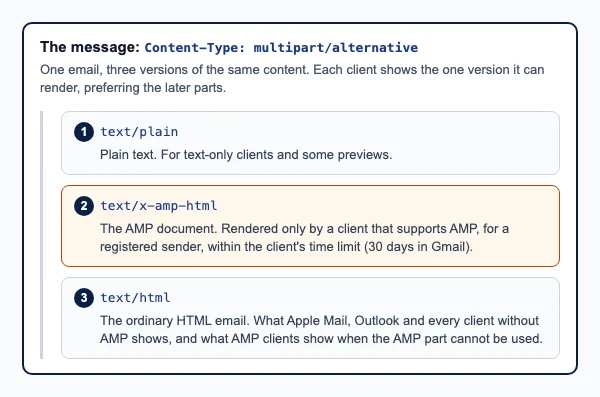
The order matters. RFC 2046 says the parts of multipart/alternative appear “in an order of increasing faithfulness to the original content”, and the AMP spec notes that some clients render only the last part, so it recommends “placing the text/x-amp-html MIME part before the text/html MIME part”. Google’s testing page says the same. Plain text first, AMP second, HTML last is the safe order.
This is the raw message, shortened, with the AMP part second:
From: Workshops <events@example.com>
To: reader@example.net
Subject: Hold your seat for 3 December
MIME-Version: 1.0
Content-Type: multipart/alternative; boundary="b1"

--b1
Content-Type: text/plain; charset="UTF-8"

Winter planning workshop, 3 December. Book: https://example.com/workshop

--b1
Content-Type: text/x-amp-html; charset="UTF-8"

<!doctype html>
<html amp4email data-css-strict>
...the AMP document from the next section...
</html>

--b1
Content-Type: text/html; charset="UTF-8"

<!DOCTYPE html>
...the HTML fallback from the section after it...
</html>

--b1--
Your sending platform normally builds this from an AMP field and an HTML field.
A minimal valid AMP email
The AMP spec gives the smallest document that counts as an AMP email. It must start with <!doctype html>, use <html ⚡4email> (or <html amp4email>), have <head> and <body>, put <meta charset="utf-8"> first in the head, load the AMP runtime, and include the boilerplate style that hides the body until AMP is ready:
<!doctype html>
<html amp4email data-css-strict>
<head>
  <meta charset="utf-8">
  <script async src="https://cdn.ampproject.org/v0.js"></script>
  <style amp4email-boilerplate>body{visibility:hidden}</style>
</head>
<body>
  Hello, world.
</body>
</html>
The data-css-strict attribute is not in amp.dev’s minimal example, but the current validator warns without it: “Tag ‘html’ marked with attribute ‘amp4email’ is missing the corresponding attribute ‘data-css-strict’ for enabling strict CSS validation. This may become an error in the future.” That is what I got on 21 November 2026, and the AMP project’s issue 32587 explains the change. Add it now and the warning goes away.
A working example: an RSVP form
Hello world proves nothing, and Google rejects demo emails at registration anyway. This is a real use: the reader picks a session and submits without leaving the inbox. It passes amphtml-validator --html_format AMP4EMAIL with no errors and no warnings.
<!doctype html>
<html amp4email data-css-strict>
<head>
  <meta charset="utf-8">
  <script async src="https://cdn.ampproject.org/v0.js"></script>
  <script async custom-element="amp-form" src="https://cdn.ampproject.org/v0/amp-form-0.1.js"></script>
  <script async custom-template="amp-mustache" src="https://cdn.ampproject.org/v0/amp-mustache-0.2.js"></script>
  <style amp4email-boilerplate>body{visibility:hidden}</style>
  <style amp-custom>
    body { margin: 0; background-color: #f3f4f6; font-family: Arial, Helvetica, sans-serif; }
    .card { max-width: 560px; margin: 16px auto; padding: 28px 24px; background-color: #ffffff; }
    h1 { margin: 0 0 8px; font-size: 22px; line-height: 28px; color: #0b1f44; }
    p { margin: 0 0 16px; font-size: 15px; line-height: 22px; color: #334155; }
    label { display: block; margin: 0 0 10px; font-size: 15px; color: #1f2937; }
    button { padding: 12px 22px; border: 0; border-radius: 6px; background-color: #c2410c; color: #ffffff; font-size: 15px; font-weight: bold; }
    form { margin: 0 0 18px; }
    .done { padding: 14px 16px; border-radius: 6px; background-color: #ecfdf5; color: #065f46; }
  </style>
</head>
<body>
  <div class="card">
    <h1>Winter planning workshop, 3 December</h1>
    <p>Pick a session and we will hold your seat. You can change it later from this email.</p>
    <form method="post" action-xhr="https://example.com/api/rsvp">
      <label><input type="radio" name="session" value="am" required> 10:00 to 11:00 ET</label>
      <label><input type="radio" name="session" value="pm"> 15:00 to 16:00 ET</label>
      <button type="submit">Hold my seat</button>
      <div submit-success>
        <template type="amp-mustache">
          <p class="done">Seat held for the {{session_label}} session. A calendar invite is on its way.</p>
        </template>
      </div>
      <div submit-error>
        <template type="amp-mustache">
          <p class="done">That did not go through. Use the link below to book on the web.</p>
        </template>
      </div>
    </form>
    <p><a href="https://example.com/workshop">Book on the web instead</a></p>
  </div>
</body>
</html>
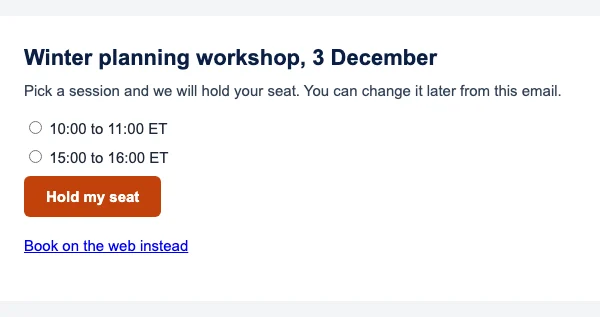
What each part does:
<html amp4email data-css-strict>marks the document as AMP for Email with strict CSS checks. The spec also accepts⚡4email, but Yahoo’s validator only recognises the word.- Each AMP component needs its own extension script. The supported set is short:
amp-form,amp-selector,amp-bind,amp-state,amp-list,amp-mustache,amp-accordion,amp-carousel,amp-fit-text,amp-layout,amp-sidebar,amp-timeago,amp-imgandamp-anim. <style amp-custom>holds all the CSS, capped at 50,000 bytes, with no external stylesheets. Pseudo-classes such as:hover,:focusand:checkedare allowed.action-xhrreplacesaction. The form posts in the background asapplication/x-www-form-urlencoded, whateverenctypesays, and redirects after submit are not allowed.submit-successandsubmit-errorhold Mustache templates filled from your endpoint’s JSON, such as{"session_label": "10:00 ET"}.- The plain link is for a reader whose submit fails. Always give one.
What the endpoint has to do
The form only works if your server answers the way AMP expects. Google’s security page says Gmail “proxies all XMLHttpRequests (XHRs) that originate from an AMP email to protect user privacy”, and that as a result the requests do not contain cookies, so do not rely on cookies; amp.dev also forbids credentials="include" on amp-list. All amp-form and amp-list endpoints must implement CORS and set the AMP-Email-Allow-Sender header. amp.dev’s CORS page explains the exchange: the client sends AMP-Email-Sender with the sender’s address, and your response must return AMP-Email-Allow-Sender with the same address, or *, which amp.dev allows but does not recommend.
POST /api/rsvp HTTP/1.1
AMP-Email-Sender: events@example.com

HTTP/1.1 200 OK
Content-Type: application/json
AMP-Email-Allow-Sender: events@example.com

{"session_label": "10:00 ET"}
amp.dev also describes an older, deprecated version 1 of this exchange and says “it’s recommended to support both on your server-side”. In version 1 the client sends an Origin header and puts the sender in an __amp_source_origin query string parameter, and expects Access-Control-Allow-Origin (the same value as Origin), AMP-Access-Control-Allow-Source-Origin (the sender’s address, no *) and Access-Control-Expose-Headers: AMP-Access-Control-Allow-Source-Origin in the response. A request that carries Origin is version 1; one that carries AMP-Email-Sender is version 2.
Two more rules from Google: an XHR URL “must not use HTTP redirection”, and because there are no cookies, you identify the reader with an access token in the URL, which Google says “must be cryptographically secure and time- and scope-limited”, for example action-xhr="https://example.com/api/rsvp?token=...", generated per recipient at send time.
Limits worth knowing before you build
- The whole AMP document “must not exceed 200,000 bytes”, and Gmail falls back with
MESSAGE_CLIPPEDwhen the part is too long. - A plain
<img>is not allowed; use<amp-img>with a width and height. When I added an<img>to the minimal example, the validator answered “The tag ‘img’ is disallowed.” - No
amp-analytics,amp-pixelor AMP variable substitution. An ordinary tracking pixel still works. amp-bindmay not bind to[href]or[src].- The optimal width is “800px or less”; wider content may be cut off.
The fallback HTML part
Every reader outside Gmail, Yahoo and Mail.ru, every reader after 30 days, and every reader who turned dynamic email off gets this part. For most lists that is the majority, so it is not a backup. It is the email. Build it with everything in the HTML email developer’s guide.
The rule is that it must do the same job without interaction. Here the AMP form becomes two buttons, each linking to the booking page with the session already chosen:
<!DOCTYPE html>
<html lang="en">
<head>
  <meta charset="utf-8">
  <meta name="viewport" content="width=device-width, initial-scale=1">
  <title>Winter planning workshop, 3 December</title>
</head>
<body style="margin:0; padding:0; background-color:#f3f4f6;">
  <table role="presentation" width="100%" cellpadding="0" cellspacing="0" border="0" style="background-color:#f3f4f6;">
    <tr>
      <td align="center" style="padding:16px 8px;">
        <table role="presentation" width="100%" cellpadding="0" cellspacing="0" border="0" style="max-width:560px; background-color:#ffffff;">
          <tr>
            <td style="padding:28px 24px; font-family:Arial, Helvetica, sans-serif;">
              <h1 style="margin:0 0 8px; font-size:22px; line-height:28px; color:#0b1f44;">Winter planning workshop, 3 December</h1>
              <p style="margin:0 0 18px; font-size:15px; line-height:22px; color:#334155;">Pick a session and we will hold your seat. Each button opens the booking page with that session chosen.</p>
              <table role="presentation" cellpadding="0" cellspacing="0" border="0" style="margin:0 0 10px;">
                <tr>
                  <td style="background-color:#c2410c; border-radius:6px;">
                    <a href="https://example.com/workshop?session=am" style="display:inline-block; padding:12px 22px; font-family:Arial, Helvetica, sans-serif; font-size:15px; line-height:20px; font-weight:bold; color:#ffffff; text-decoration:none;">Hold a seat, 10:00 ET</a>
                  </td>
                </tr>
              </table>
              <table role="presentation" cellpadding="0" cellspacing="0" border="0" style="margin:0 0 18px;">
                <tr>
                  <td style="background-color:#c2410c; border-radius:6px;">
                    <a href="https://example.com/workshop?session=pm" style="display:inline-block; padding:12px 22px; font-family:Arial, Helvetica, sans-serif; font-size:15px; line-height:20px; font-weight:bold; color:#ffffff; text-decoration:none;">Hold a seat, 15:00 ET</a>
                  </td>
                </tr>
              </table>
              <p style="margin:0; font-size:13px; line-height:19px; color:#64748b;">You are getting this because you signed up for workshop news. <a href="https://example.com/unsubscribe" style="color:#64748b;">Unsubscribe</a></p>
            </td>
          </tr>
        </table>
      </td>
    </tr>
  </table>
</body>
</html>
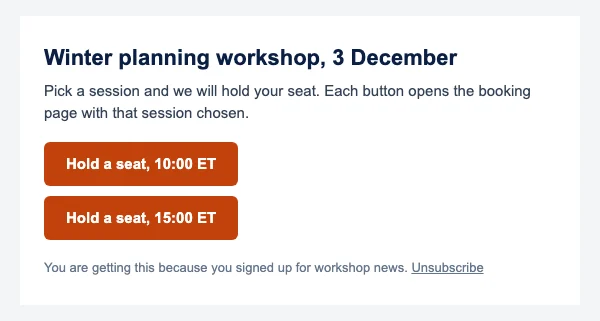
The buttons are table-based so they hold their shape in Outlook; the bulletproof HTML email button explains the variants, including the VML version for classic Outlook’s rounded corners. For the full layout skeleton this sits in, start from the HTML email template, and check how it behaves in dark mode with the dark mode email guide.
One thing the AMP part cannot do is outlive its 30 days, but the HTML part can still change after you send it. Put a live email countdown timer from EmailTimer.app above the buttons and the workshop email keeps telling the truth: an Apple Mail reader in week one, and a Gmail reader in week five whose AMP form has quietly expired, both see how many days are left before the session.
Which ESPs can send AMP for Email
amp.dev’s list of sending platforms, as read on 21 November 2026, has 34 entries: Adobe Campaign Classic, Amazon Pinpoint, Amazon SES, AWeber, Blueshift, Braze, Cheetah Digital, Clang, Copernica, Customer.io, dotdigital, Elastic Email, eSputnik, ExpertSender, ExpressPigeon, Iterable, Klaviyo, MagNews, Mailmodo, Mailrelay, Mapp Cloud, Maileon, Mailgun, Mailkit, MessageGears, MindBox, MoonMail, Netcore Cloud, Salesforce Marketing Cloud, SendPulse, SocketLabs, SparkPost, Tripolis and Twilio SendGrid. Mailchimp and HubSpot are not on it.
Being on the list means the platform can build the three-part message; how you supply the AMP part differs. Braze takes it in an amp_body API field, and its documentation says “AMP for email is available for SparkPost and SendGrid only”, meaning its sending providers. Amazon SES has no AMP field: the AWS Messaging blog builds the MIME message itself and sends it with send_raw_email. Customer.io lets you write AMP in its Design Studio editor.
Whatever your platform, test an email sent through it, not only a file. Google asks you to send from your production system with the developer setting on, because a platform can modify an email on the way out, for example by rewriting links, and break the AMP.
Testing before and after registration
You can test in Gmail before Google approves you:
- In Gmail, open Settings, General, Dynamic email, then Developer settings, and add the address you send from. Gmail then renders AMP from that address to your account, registered or not.
- To send from the AMP for Email Playground instead, allowlist
amp@gmail.devin the same dialog. - Validate the AMP part before every send, with the web validator, the playground, or
npm install -g amphtml-validatorthenamphtml-validator --html_format AMP4EMAIL email.html. amp.dev says “An AMP Email should only be sent if it passes the validator.” - Open the sent email with the developer setting on. If the HTML part shows, the debugging banner in Gmail on the web names the reason.
- Check the HTML part on its own in the clients that will see it, which is most of them. The email testing checklist covers that side.
Is AMP for Email worth building in 2026?
What it costs. Two versions of every email kept in step, a registration with each provider, an endpoint that speaks AMP’s CORS headers and tokens, a validator in your pipeline, and a sending platform that supports it.
What it reaches. Gmail and Yahoo Mail readers in supported apps and browsers, plus Mail.ru, for 30 days. Not Outlook, not Apple Mail, and not a Gmail reader on Edge, in a phone browser, or with dynamic email or images switched off.
Build it when your list is mostly Gmail and Yahoo (your opens by client will tell you), and the reader has to give you something inside the email where each extra tap costs responses: a multi-question survey, an RSVP with a choice of slots, a preference update, a list that must be current when they act on it.
Skip it when your readers are mostly in Outlook or Apple Mail, when the goal is to show something current rather than collect an answer, when the interaction is as small as tabs or a reveal (interactive vs dynamic email covers the CSS-only option), or when the outcome is just a click to a web page.
My verdict: AMP for Email is alive, narrow, and expensive per reader reached. Build it when an in-inbox answer is the point of the email and your readers are in Gmail and Yahoo. Otherwise, put the effort into an HTML email that works everywhere. To try a live image on the fallback of an AMP email you already have, the free countdown timer generator gives you a timer for 500 opens without signing up.
Pre-send checklist
- The message is
multipart/alternativewith plain text, thentext/x-amp-html, thentext/html, and only one AMP part. - The AMP part passes
amphtml-validator --html_format AMP4EMAILwith no errors and no warnings, includingdata-css-stricton<html>. - No plain
<img>, no external stylesheet, CSS under 50,000 bytes, document under 200,000 bytes. - No tag has a space before
/>, for Yahoo’s validator. - Every endpoint returns
AMP-Email-Allow-Sender, uses no redirects, and authenticates with a per-recipient token in the URL. - The success and error templates both render, and the error state gives a link to finish on the web.
- The HTML part does the same job with links, carries the preheader, and contains the words a reader would search for.
- SPF passes, DKIM passes and aligns with the From domain, DMARC is at quarantine or reject, and the email went out over TLS.
- The From address is registered with Gmail, and with Yahoo and Mail.ru if you send to them.
- You opened the email from your production system in a Gmail account with the developer setting on, and checked the HTML part in Outlook and Apple Mail.
Questions and answers
Do I have to register to send AMP emails?
Yes, separately with each provider. Gmail registers each sender address on its own after reviewing a real production email, Yahoo approves your DKIM signing domains or accepts mail from a sending platform it has already registered, and Mail.ru allowlists sending addresses that meet its conditions. Without registration, those clients show your HTML part.
How long does Gmail’s AMP registration take?
Google says it “aims to respond to most requests within 5 business days”. You can test before then: add your sending address under Dynamic email developer settings in your own Gmail account, and Gmail renders the AMP from that address for you.
Why does Gmail show the HTML version of my AMP email?
The usual reasons are an unregistered sender, failed or misaligned DKIM, failed SPF, invalid AMP, a forwarded copy, or a reader who turned off dynamic email or external images. Age is the other: Gmail stops rendering the AMP part of any email sent more than 30 days earlier, the OLD_EMAIL reason. Allowlist your address in Gmail’s developer settings to see a banner with the exact reason in Gmail on the web.
What happens when someone replies to or forwards an AMP email?
The AMP part is dropped. The AMP spec says the client “strips out the text/x-amp-html part” on reply or forward, and Google’s registration page says Gmail removes AMP parts when forwarding. The person who receives the forward sees your HTML part, so links in it must work for someone who was not the original recipient.
Can I personalize an AMP email for each recipient?
Yes, in two ways. Your platform’s merge tags fill in names and values at send time, as in any email. For data that must be current at open, amp-list fetches it from your server, and because Gmail’s requests carry no cookies, you identify the reader with a per-recipient access token in the request URL, which Google says must be “time- and scope-limited”.
Can I track opens and clicks in an AMP email?
Opens are tracked the usual way: amp.dev says AMP emails can use pixel tracking, the same as HTML emails. amp-analytics and amp-pixel are not supported. amp.dev adds that user-initiated requests, such as a form submit, tell you the reader is interacting, and so can requests for images inside amp-carousel or amp-accordion.
Does the AMP part change the preheader or Gmail search?
No. Google’s tips page says the preheader shown in the inbox comes from the HTML or plain text part, and that Gmail search does not index the dynamic parts of an email. Write the preheader and the words a reader might search for into the HTML part.
Can I use JavaScript in an AMP email?
No. You can only use the components AMP for Email supports, such as amp-form, amp-bind, amp-list and amp-carousel, each loaded by its own script from cdn.ampproject.org. amp-bind gives you simple state and events, but it may not bind to href or src, and a plain <img> is rejected in favour of <amp-img>.
What does it cost to build an AMP email?
Mostly engineering time rather than fees. The ongoing cost is keeping two versions of every email accurate, and the one-off cost is the endpoint and the registrations. If your platform is not on amp.dev’s list, as Mailchimp and HubSpot were not on 21 November 2026, add the cost of sending through another one.
What should I build instead of AMP?
To collect an answer from everyone, use buttons that open a pre-filled web form. For tabs or a reveal, CSS-only kinetic email runs in Apple Mail, Yahoo Mail and Samsung Email without registration. For content that must be current when read, use an image drawn at open.
Sources
- Supported Email Platforms (amp.dev), read on 21 November 2026
- AMP for Gmail (Google for Developers, last updated 3 September 2026), read on 21 November 2026
- Register with Google to send dynamic emails (Google for Developers), read on 21 November 2026
- Security requirements (Gmail AMP, Google for Developers), read on 21 November 2026
- Debug dynamic email (Google for Developers), read on 21 November 2026
- Test your AMP emails in Gmail (Google for Developers), read on 21 November 2026
- Supported platforms for dynamic email (Google for Developers), read on 21 November 2026
- Tips and known limitations (Gmail AMP, Google for Developers), read on 21 November 2026
- Authenticating requests (Gmail AMP, Google for Developers), read on 21 November 2026
- AMP for Email format (amp.dev)
- Structure and rendering of AMP emails (amp.dev)
- AMP for Email supported components (amp.dev)
- Supported CSS in AMP for Email (amp.dev)
- CORS in AMP for Email (amp.dev)
- Validate AMP Email (amp.dev)
- Encourage AMP Email usage of data-css-strict, issue 32587 (ampproject/amphtml on GitHub)
- AMP for email (Yahoo Sender Hub), read on 21 November 2026
- AMP в Почте Mail.ru (Mail.ru Postmaster), read on 21 November 2026
- AMP support in email clients (caniemail.com), read on 21 November 2026
- Developer preview of AMP for email in Outlook.com, no longer supported (Microsoft Tech Community, updated 9 September 2020)
- RFC 2046: MIME Part Two, Media Types, section 5.1.4 (IETF)
- AMP for email (Braze documentation), read on 21 November 2026
- Increase your email engagement using AMP (AWS Messaging blog)
- AMP for email (Customer.io documentation), read on 21 November 2026
Related
Put a countdown in the campaign you are writing now
The free plan covers 5,000 opens a month with no card. Starter is $24 a month for 250,000.