
A dynamic QR code in email you can change after sending
Add a QR code to any image you build in EmailTimer.app, style it in your brand colours, and change where it goes at any time, without resending the email.
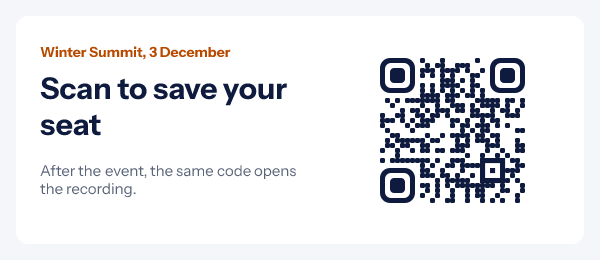
How a dynamic QR code in email works
An ordinary QR code holds its destination for good. Once the email is sent, a wrong link or a page that has moved stays wrong in every inbox.
A dynamic code holds a short link that EmailTimer.app hosts. In the dashboard's QR codes screen you change where that link goes at any time, without resending the email, republishing the image or reprinting anything. Because the picture itself never changes, the new destination also applies to an email already opened and cached by the mail client, to a screenshot, and to a printed copy.
You add the code in the editor, to a countdown timer or a personalized image. The image is drawn when each reader opens the email, so the code is always current. It is an ordinary image with no JavaScript, and it works wherever the email client shows images.
What you can change after the email is sent
All four are in the dashboard's QR codes screen, for each code separately.
-
Change where it goes
Open the QR codes screen, pick the code and give it a new address. The next scan lands there, from an email sent last week as much as from one sent today.
-
Switch on a date
Set a date and time and a second address. The code goes to the first address before that moment and to the second after it, with nobody at a desk to flip it.
-
Pause it
A paused code shows a short “this code is paused” page instead of redirecting. Use it when an offer is withdrawn or a venue changes and the new details are not ready.
-
Count the scans
Each code shows its total scans, when it was last scanned, and scans per day for the last 30 days. Automated link checkers are left out of the count.
A scheduled switch, in one example
One invitation, sent on 20 November for an event on 3 December at 6pm. The code is set to switch when the event ends at 8pm.
| When it is scanned | Where the code goes |
|---|---|
| Before 3 December, 8pm | The first address: the registration page |
| After 3 December, 8pm | The second address: the recording |
| While the code is paused | A short “this code is paused” page |
A sale works the same way: a teaser page before it opens, the shop once it does. The event reminder email guide covers when to send each message around the date.
QR code styles in your brand colours
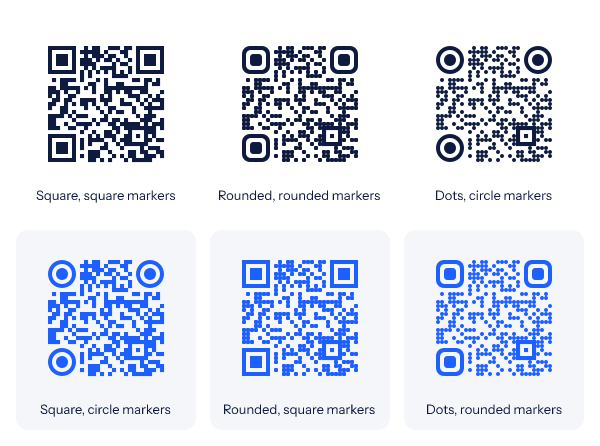
The small squares that make up the code can be square, rounded or dots. The three corner markers can be square, rounded or circles. You pick the colour of the code and the colour of the background behind it.
Every style is checked with a QR decoder in our tests, so a style in the editor is one a phone can read. Two habits keep it that way: keep the code clearly darker than its background, and scan a test send before the campaign goes out. Dots and rounded shapes are drawn from 120 pixels wide; a smaller code uses plain squares, so it still scans.
For how large to draw a code and why it needs a clear margin, read QR codes in email.
How to add a dynamic QR code to an email
-
Step 1
Add a QR code to an image
In the editor, open a countdown timer or a personalized image and add a QR code to it. Leave some plain space around the code.
-
Step 2
Choose what it holds
For a dynamic code, choose “A link you can change later” and give it the first address. A code can also hold a fixed link, plain text, an email address, a phone number, an SMS or WiFi details.
-
Step 3
Pick the style
Choose the shape of the small squares and of the corner markers, then the code colour and the background colour.
-
Step 4
Publish, paste and scan a test
Publish the image, paste it into your email platform and send yourself a test. Scan it once. From then on, the code is managed from the QR codes screen.
What a QR code can hold
A link, plain text, an email address, a phone number, an SMS, or WiFi details. A link is the kind that can be dynamic. With a merge tag in it, a code holds a different value for each reader, such as their own voucher code or ticket number.
Where QR code email marketing works
A code is for the moment a second screen or a scanner is involved. For a reader who is already on their phone, a button does the same job in one tap, so send both.
An in-store voucher for each customer
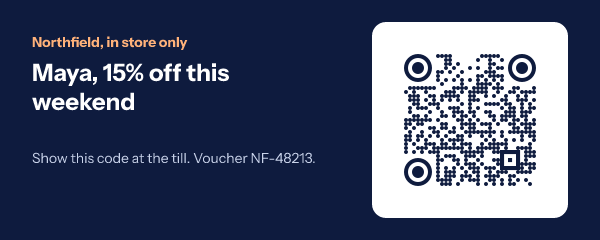
With merge tags, each reader gets their own code. Maya's image holds her voucher code and the next customer's holds theirs, on Growth and Agency. How to issue the codes is in unique coupon codes, and a till that reads bars rather than squares wants a barcode in email.
-
Event tickets and check-in
Each attendee’s ticket number in their own code, shown on a phone at the door. Before the event the invitation’s code goes to registration; afterwards the same code opens the recording.
-
An app download
Someone reading on a laptop points their phone at the screen and lands on the app’s listing. If the listing moves, change the destination and leave the email alone.
-
A menu or catalogue that changes
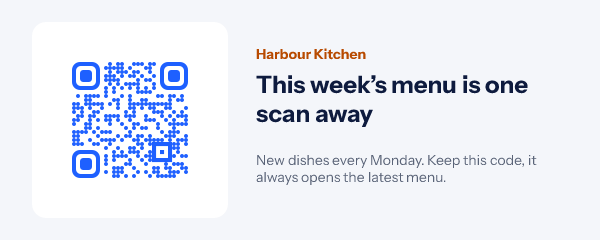
Send the code once. Each time the menu or the catalogue is replaced, point the code at the new one.
-
A code that also goes to print
Use the same code on a parcel insert or a counter card. A printed code cannot be recalled, so a destination you can change is what keeps it from going stale.
Which plan includes QR codes
QR codes, styled and dynamic, are included with Starter ($24 a month) and the plans above it, as the pricing page lists. They are not on the Free plan. Signing up is free.
Compare the plansWorks with your email platform
A QR code is part of an ordinary image tag. These guides show where the image goes in each platform and how its merge tags are written.
What a QR code in email cannot do
- No logo in the middle. A code is its shapes, its three corner markers and two colours.
- No location or device reports. Scan counts are a total, the last scan time and scans per day. They do not say where a scan happened or on which phone.
- No personal data per scan. A scan is counted, not tied to a reader.
- No password protected codes. Anyone who scans a code reaches its destination.
- No bulk import of codes. You add each code in the editor.
- Dynamic means a link. Text, an email address, a phone number, an SMS and WiFi details are written into the code itself.
- Images must load. A reader with images turned off sees your alt text, so put the link in the email's text too.
Dynamic QR code in email questions
What is a dynamic QR code in an email?
A QR code that holds a short link instead of the final destination. EmailTimer.app hosts the short link, and you choose where it goes in the dashboard’s QR codes screen. You can change that at any time without resending the email.
What happens if I change the destination after sending?
Every copy of the code goes to the new place from then on. The picture of the code never changes, so this includes an email that was already opened and cached by the mail client, a screenshot, and a printed copy. There is nothing to resend, republish or reprint.
Does a QR code in email work in Gmail and Outlook?
Yes, wherever the email client shows images. The code is part of an ordinary image, with no JavaScript. A reader who has images turned off sees your alt text until they allow images, so put the same link in the text of the email as well.
Will a styled QR code still scan?
Every combination of square, rounded and dot shapes with square, rounded and circle corner markers is checked with a QR decoder in our tests, at every size from 80 to 240 pixels. Keep the code clearly darker than its background, and scan a test send with your own phone before the campaign goes out.
How are scans counted?
Each dynamic code shows its total scans, the time of the last scan, and scans per day for the last 30 days. Automated link checkers are not counted. A scan is a count: it is not tied to a person, and there are no location or device reports.
Can each reader get their own QR code?
Yes. Put a merge tag in what the code holds, such as a voucher code or a ticket number, so each person’s image carries their own code. That needs a signed image address per recipient, from a recipient list or the API on Growth and Agency.
Can I pause a code or switch it on a date?
Both. A paused code shows a short “this code is paused” page instead of redirecting. For a scheduled switch you set a date and time and a second address: the code goes to the first address before that moment and to the second after it.
Which plan includes QR codes?
QR codes are included with Starter, $24 a month, and the plans above it. They are not on the Free plan. Signing up is free. A different code per recipient needs Growth or Agency.
More you can draw into an email
- Barcodes Code 128 and EAN-13, ready for the till.
- Update After Send Change an image that is already delivered.
- Personalized Images Names and codes drawn in at open.
The merge tag reference shows how a voucher or ticket field is written in each platform. For changing the rest of an image after it has gone out, see edit an email after sending, and everything else an image can carry is in personalized images for email.
Every feature on one pageSend a code you can still change tomorrow
Add a QR code to an image, pick its style, paste one image. Signing up is free, and QR codes are on Starter at $24 a month.