The email footer, from the legal minimum to a layout people can read
By Danish Mohammed. 7 min read
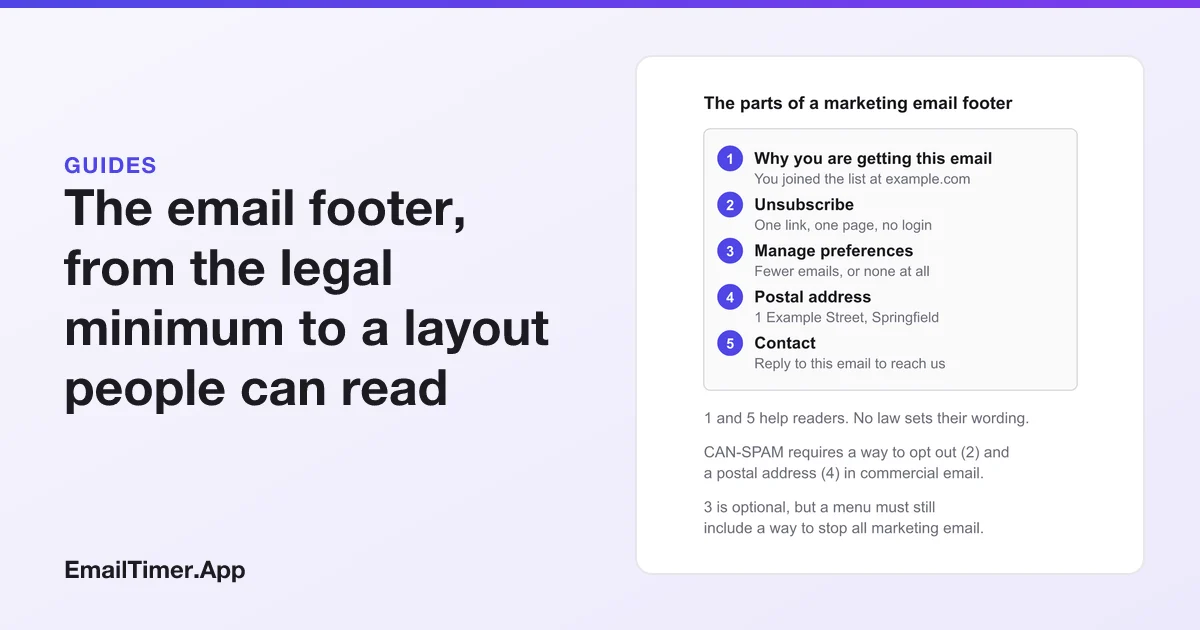
An email footer is the block at the bottom of a marketing email that tells readers who sent it and how to stop it. In the US, the CAN-SPAM Act requires two things there in commercial email: a valid physical postal address and a clear way to opt out. Gmail and Yahoo also require bulk senders to show a visible unsubscribe link in the body.
Most footers carry more than the legal minimum, and most of what goes wrong with them is layout: an unsubscribe link in pale gray at 10 pixels, or a footer drawn as an image that vanishes when images are blocked. This page covers the requirements first, with the wording of each rule, then the layout.
This is general information drawn from the FTC’s guide and the mailbox providers’ own pages, not legal advice. Other countries have their own laws on marketing email.
What must an email footer include?
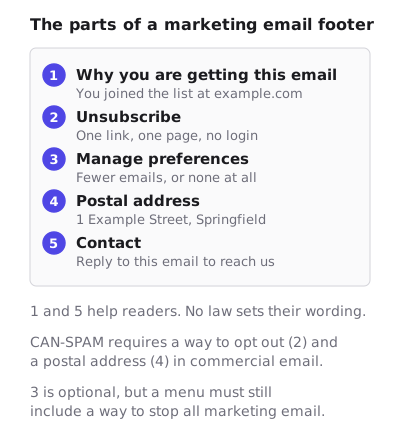
| Footer item | Required by | What the rule says |
|---|---|---|
| Physical postal address | CAN-SPAM, all commercial email | “Your message must include your valid physical postal address.” |
| A way to opt out | CAN-SPAM, all commercial email | “a clear and conspicuous explanation of how the recipient can opt out of getting marketing email from you in the future” |
| Visible unsubscribe link in the body | Gmail, for senders of more than 5,000 messages a day | “include a clearly visible unsubscribe link in the message body” |
| Visible unsubscribe link in the body | Yahoo, for bulk senders | “Have a clearly visible unsubscribe link in the email body - this may direct to a preference page.” |
| One-click unsubscribe header | Gmail and Yahoo, bulk senders | Not in the footer itself: a List-Unsubscribe header your sending platform adds |
| Why the reader is getting it | No rule | Helps a reader who has forgotten signing up |
| Contact details | No rule | Gives a reader somewhere to go other than the spam button |
The FTC lists a third requirement that is not a footer item but is often handled near it: “You must disclose clearly and conspicuously that your message is an advertisement.” The FTC page does not say where in the message that disclosure goes.
The law covers more than retail newsletters. The FTC says plainly: “The law makes no exception for business-to-business email.”
What counts as a physical address?
The FTC names three options. The address “can be your current street address, a post office box you’ve registered with the U.S. Postal Service, or a private mailbox you’ve registered with a commercial mail receiving agency established under Postal Service regulations.”
So a home-based business does not have to print its home address. A registered PO box or a private mailbox meets the rule. A made-up or out-of-date address does not, because the rule says valid.
What the unsubscribe has to do
The FTC sets out what an opt-out may and may not ask of the reader. The opt-out must be “a return email address or another easy Internet-based way to allow people to communicate their choice to you.” Then:
- No barriers. “You can’t charge a fee, require the recipient to give you any personally identifying information beyond an email address, or make the recipient take any step other than sending a reply email or visiting a single page on an Internet website as a condition for honoring an opt-out request.” An unsubscribe that needs a login breaks this.
- Menus are allowed, with a catch. “You may create a menu to allow a recipient to opt out of certain types of messages, but you must include the option to stop all marketing messages from you.”
- No selling the address afterwards. “Once people have told you they don’t want to receive more messages from you, you can’t sell or transfer their email addresses, even in the form of a mailing list.”
- Do not block the replies. “Make sure your spam filter doesn’t block these opt-out requests.”
How fast must an unsubscribe take effect?
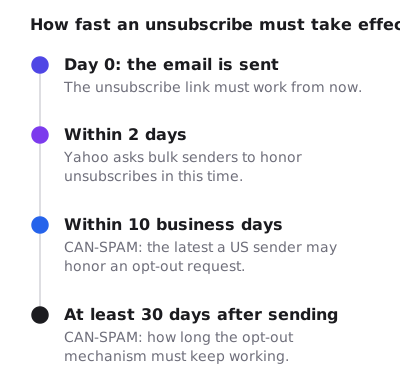
The FTC: “You must honor a recipient’s opt-out request within 10 business days,” and “Any opt-out mechanism you offer must be able to process opt-out requests for at least 30 days after you send your message.” Yahoo is stricter for bulk senders: “Honor unsubscribes within 2 days.”
Google’s sender guidelines require bulk senders to support one-click unsubscribe as well as the visible link, through the List-Unsubscribe and List-Unsubscribe-Post headers. Those live in the email header rather than the footer. The email header, field by field shows how to open a test message and check they are there.
What happens if you get it wrong?
The FTC: “Each separate email in violation of the law is subject to penalties of up to $53,088.” Handing the sending to an agency or a platform does not move the responsibility, because “you can’t contract away your legal responsibility to comply with the law.” Both the company whose product is promoted and the company that sends the message may be held responsible.
Transactional email, such as a receipt or a password reset, is treated differently, but the FTC warns that “the law views these categories narrowly.” A receipt that also promotes a sale can count as commercial. When in doubt, the footer costs nothing to include.
Email footer best practices
The rules say “clear and conspicuous”. The FTC adds that the notice should be “easy for an ordinary person to recognize, read, and understand”, and that “Creative use of type size, color, and location can improve clarity.” Turned around, that is a description of what a bad footer does with size, color and position. The practices below follow from that and from how mail clients handle images.
- Write the footer in live text, not an image. Some mail clients hold back images until the reader allows them. A footer drawn as a picture then shows nothing at all, including the unsubscribe link and the address the law requires.
- Make the unsubscribe link look like a link. Underlined, in a color with enough contrast against the background, at a size people can tap on a phone. Hiding it does not keep subscribers. It sends them to the spam button, which Gmail and Yahoo both count against you: Yahoo asks senders to “Keep your spam rate below 0.3%.”
- Say why the email arrived. One line, such as “You are getting this because you signed up at example.com”, answers the question a confused reader is about to ask the spam button.
- Offer fewer emails as well as none. A preference page that lets a reader drop to a monthly email keeps some of them. It must still include a way to stop all marketing email.
- Check it in dark mode. Gray text on a white footer can become gray on near-black when the inbox turns dark. Test the colors in both. Dark mode countdown timers shows how mail clients change colors, and the same handling applies to footer text.
- Keep the address and links the same in every email. If your platform can save the footer as a reusable block, use it, so no campaign goes out with an old address.
What goes above the footer
The footer closes the email, so anything time-limited belongs higher up. A countdown timer, for example, is an image in the body and should carry its meaning in its alt text and in a line of live text beside it, for the same reason the footer is live text: images get blocked. Accessible countdown timers shows how to write that text.
The other email footer: your signature
In personal and work email, “footer” often means the signature: your name, role, phone number and perhaps a logo. No law sets its contents for one-to-one messages. In Outlook, Microsoft’s steps are:
- New Outlook: on the View tab, select View settings, then Accounts, then Signatures.
- Classic Outlook: in a new message, select Insert, Signature, then Signatures.
If the signature carries an image, set its size there and keep it small. A countdown timer in an email signature covers the image side.
Questions and answers
What should be in an email footer?
For US commercial email, a valid physical postal address and a clear way to opt out, which CAN-SPAM requires. Most footers add a line saying why the reader got the email, a preferences link and contact details.
Is an unsubscribe link legally required?
CAN-SPAM requires a clear way to opt out, by reply email or another easy internet-based method, which in practice is usually a link. Gmail and Yahoo require bulk senders to show a visible unsubscribe link in the body.
Can I use a PO box as the address in my email footer?
Yes. The FTC accepts a post office box registered with the US Postal Service, or a private mailbox registered with a commercial mail receiving agency.
How long do I have to process an unsubscribe?
CAN-SPAM allows up to 10 business days. Yahoo asks bulk senders to honor unsubscribes within 2 days. The opt-out must keep working for at least 30 days after the email is sent.
Does a transactional email need a footer?
Purely transactional messages, such as receipts, are treated differently under CAN-SPAM, but the FTC reads that category narrowly. A message that also promotes something can count as commercial, so many senders include the footer anyway.
Sources
- CAN-SPAM Act: A Compliance Guide for Business (Federal Trade Commission), read on 29 October 2026
- Email sender guidelines (Google Workspace Admin Help), read on 29 October 2026
- Sender Best Practices (Yahoo Sender Hub), read on 29 October 2026
- Add a logo or image to your signature in Outlook (Microsoft Support), read on 29 October 2026
Related
Put a countdown in the campaign you are writing now
The free plan covers 5,000 opens a month with no card. Starter is $19 a month for 250,000.