Countdown timers and deliverability
By Danish Mohammed, founder. 5 min read
A countdown timer adds one image and one link to an email. Gmail’s published sending requirements are about the sender rather than the design. The content rules a filter such as SpamAssassin applies to images are narrow, and anyone can read them.
What Gmail publishes about sending
Google’s sender guidelines set requirements for everyone who sends to Gmail accounts, “Starting February 1, 2024”. Every requirement in the list for all senders concerns the sender, not the design:
- “Set up SPF or DKIM email authentication for your sending domains.”
- “Keep spam rates reported in Postmaster Tools below 0.3%.”
- Valid forward and reverse DNS for sending domains or IPs, a TLS connection, and messages formatted to RFC 5322.
Senders of more than 5,000 messages a day to Gmail accounts also need SPF, DKIM and DMARC. Their “Marketing messages and subscribed messages must support one-click unsubscribe, and include a clearly visible unsubscribe link in the message body.”
The content guidance on the same page has two lines that touch a timer email. “Don’t use HTML and CSS to hide content in your messages. Hiding content might cause messages to be marked as spam.” And “Web links in the message body should be visible and easy to understand.” When I read the page on 17 September 2026, its only mention of images was a warning against placing them next to a display name to imply verification. It said nothing about image counts or a ratio of text to images.
What a content filter scores
Apache SpamAssassin is open source, so its rules can be read. Its HTML rules include two families aimed at emails that are mostly pictures.
The HTML_IMAGE_ONLY rules fire on HTML with images and little text, in bands. The first is described as “HTML: images with 0-400 bytes of words” and the last as “HTML: images with 2800-3200 bytes of words”. The HTML_IMAGE_RATIO rules are described as “HTML has a low ratio of text to image area”.
A rule can carry four scores, one per setup. The documentation explains that the first applies when Bayes and network tests are both off and the fourth when both are on. A rule with a single score uses it in every setup. These are the values in the default score file in SpamAssassin’s source repository, read on 17 September 2026:
| Rule | Text in the message | Scores, set 0 to set 3 |
|---|---|---|
HTML_IMAGE_ONLY_04 |
0 to 400 bytes of words | 1.680, 0.342, 1.799, 1.172 |
HTML_IMAGE_ONLY_08 |
400 to 800 bytes | 0.585, 1.781, 1.845, 1.651 |
HTML_IMAGE_ONLY_12 |
800 to 1,200 bytes | 1.381, 1.629, 1.400, 2.059 |
HTML_IMAGE_ONLY_16 |
1,200 to 1,600 bytes | 1.969, 1.048, 1.199, 1.092 |
HTML_IMAGE_ONLY_20 |
1,600 to 2,000 bytes | 2.109, 0.700, 1.300, 1.546 |
HTML_IMAGE_ONLY_24 |
2,000 to 2,400 bytes | 2.799, 1.282, 1.328, 1.618 |
HTML_IMAGE_ONLY_28 |
2,400 to 2,800 bytes | 2.799, 0.726, 1.512, 1.404 |
HTML_IMAGE_ONLY_32 |
2,800 to 3,200 bytes | 2.196, 0.001, 1.172, 0.001 |
HTML_IMAGE_RATIO_02 to _08 |
Low text to image area | 0.001 |
For scale, the documentation for required_score says “5.0 is the default setting”. So in the default file one image-heavy band adds between 0.001 and 2.799 points toward that 5, depending on how much text there is and how the filter is set up. The ratio rules add 0.001, which is next to nothing.
Two cautions. A mailbox provider running its own filter is not bound by these numbers, and installations can change any score. And the rules measure how little text sits alongside the images, so adding a timer to a message with real copy is not what they target. An email that is a timer, a logo and a button with almost no words is the case they describe.
What the timer itself adds
The snippet EmailTimer.App hands you is a link wrapping one img tag, with width, height, alt and an inline style. It contains no script and no separate tracking pixel. The image request itself is counted as an open, both against your allowance and on the dashboard’s Usage screen. The link goes to whatever address you put in it.
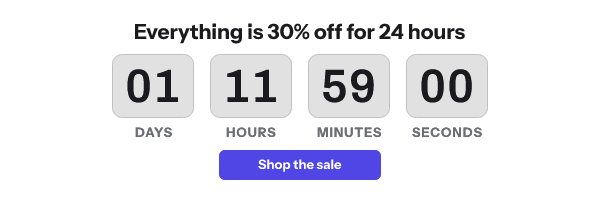
The image is served from img.emailtimer.app for every customer. White-label image domains are on the Agency listing, and a domain can be added and verified today, but serving images on one waits on a setting that is not switched on yet. I have no data on how any filter treats the shared image host, so I will not claim it helps or hurts.
The file is small. The 141 renders of the gallery’s designs weighed between 9.0 KB and 58.6 KB on 17 September 2026, and the method is on countdown timer examples. Neither Google’s guidelines nor the SpamAssassin rules above count image bytes.
One effect of a timer falls on the reader. Microsoft’s support page says “Microsoft Outlook is configured by default to block automatic picture downloads from the Internet”, and lists “Helping you avoid tracking pixels” among the reasons. A remote timer is one of the images held back, so the alt text and the body copy are what those readers see first.
Sending a timer email a filter can read
- Authenticate the sending domain with SPF, DKIM and DMARC, as Google requires of senders above 5,000 a day.
- Write the offer and the deadline in body text, not only in the image. It helps with the image-only rules and with every reader who has images off.
- Use one timer. A second one adds weight and a second place for the deadline to disagree with itself.
- Do not hide content with CSS, including a hidden second timer for dark mode. Countdown timers in dark mode has a design that needs no swap.
- Make the words around the link say where it goes, which is what Google’s line on visible links asks for.
- Keep the unsubscribe link visible and one-click, as Google requires above 5,000 messages a day.
If the timer does not appear at all, that is a rendering problem rather than a filtering one, and countdown timer not showing goes through the documented causes.
Questions and answers
Does a countdown timer GIF send email to spam?
Nothing in the sources on this page scores an image for being a GIF. Google’s sender requirements concern authentication, spam rates and unsubscribing. SpamAssassin’s image rules score emails with little text around their images, so a timer inside a message with real text is not what they describe.
What text-to-image ratio is safe?
Google publishes none. SpamAssassin’s default file scores bands of text measured in bytes, from 0 to 3,200, in HTML with images. The lowest band ends at 400 bytes of words, which in plain English text is about 400 characters.
Does the size of the timer image affect deliverability?
Neither Google’s guidelines nor the SpamAssassin rules quoted here look at image file size. Weight matters to readers on slow connections, which is a reason to keep it low anyway.
Will a white-label image domain improve inbox placement?
I have no evidence either way. Agency lists white-label image domains, and serving images on them is not switched on yet. Plans and allowances are on pricing.
Sources
- Email sender guidelines (Google Workspace Admin Help)
- rules/20_html_tests.cf (Apache SpamAssassin source, trunk)
- rules/50_scores.cf (Apache SpamAssassin source, trunk)
- Mail::SpamAssassin::Conf, SpamAssassin 4.0 documentation (Apache SpamAssassin)
- Block or unblock automatic picture downloads in email messages (Microsoft Support)
Related
Put a countdown in the campaign you are writing now
The free plan covers 5,000 opens a month with no card. Starter is $19 a month for 250,000.