SPF, DKIM and DMARC, explained from the standards
By Danish Mohammed. 9 min read
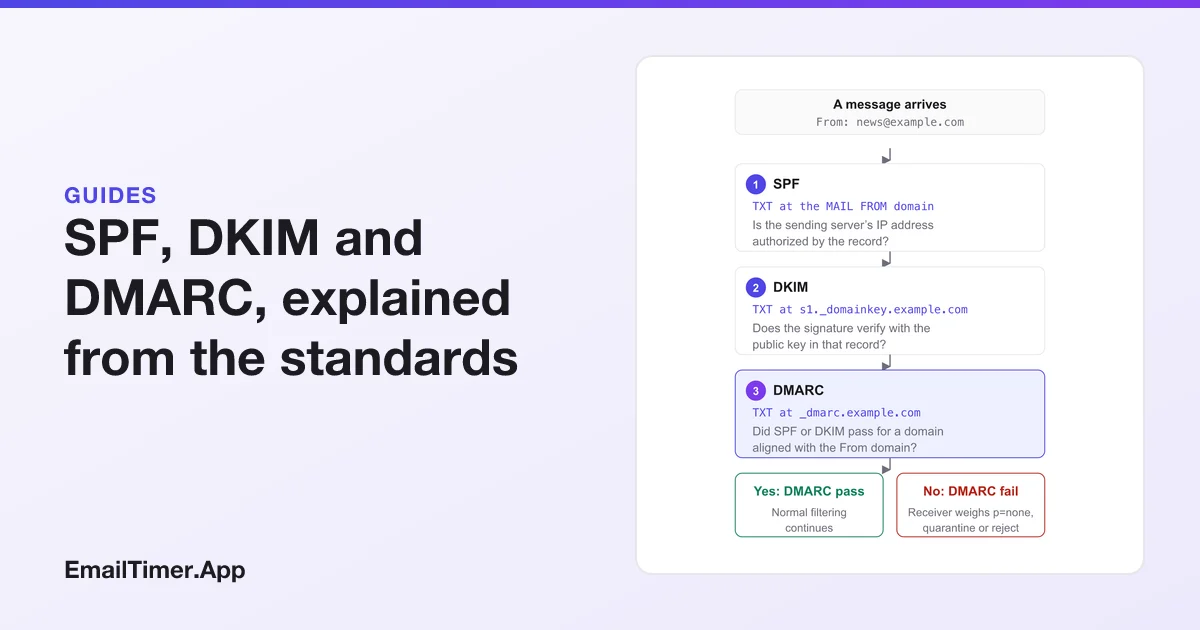
SPF, DKIM and DMARC are three DNS records that let a receiving mail server check whether a message really comes from the domain it claims. SPF lists the servers allowed to send for a domain. DKIM adds a signature that a public key in DNS can verify. DMARC tells receivers what to do when neither check passes for a domain that matches the visible From address.
All three are published as DNS TXT records, and none of them is a filter on its own. They give the receiver facts to weigh. The explanations below come from the standards themselves (RFC 7208, RFC 6376 and RFC 7489, which RFC 9989 replaced in 2026) and from Google’s and Yahoo’s sender pages, all read on 29 October 2026. Every example uses example.com, a domain reserved for documentation.
What do SPF, DKIM and DMARC stand for?
| Record | Full name | Where it lives in DNS | What it answers |
|---|---|---|---|
| SPF | Sender Policy Framework | TXT at the MAIL FROM (bounce) domain | Is this server allowed to send for the domain? |
| DKIM | DomainKeys Identified Mail | TXT at selector._domainkey.domain |
Was this message signed by the domain, and is it unchanged? |
| DMARC | Domain-based Message Authentication, Reporting, and Conformance | TXT at _dmarc.domain |
Did SPF or DKIM pass for the From domain, and what if not? |
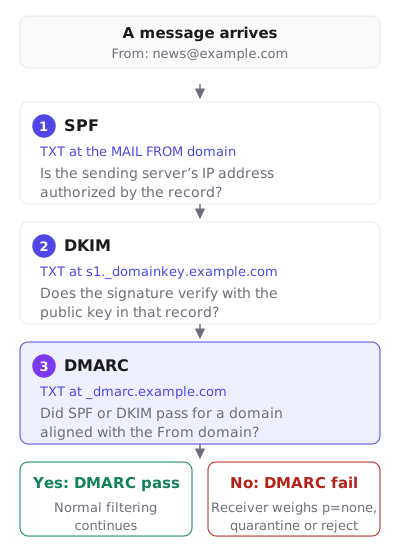
The order matters. A receiver checks SPF and DKIM first, then uses DMARC to connect their results to the address the reader actually sees.
What does SPF check?
RFC 7208 describes SPF as the way domain owners “can explicitly authorize the hosts that are allowed to use their domain names”. A receiver takes the domain from the SMTP conversation, not from the From header the reader sees: “The “MAIL FROM” and “HELO” identities are checked.” The MAIL FROM address is the one bounces go to, and many sending platforms set it to a domain of their own or to a subdomain of yours.
An SPF record for example.com that allows one server of its own and one sending service looks like this:
example.com. TXT "v=spf1 ip4:192.0.2.10 include:_spf.example.net -all"
Read left to right: the version, then the server at 192.0.2.10 is allowed, then whatever _spf.example.net allows is allowed too, then -all says every other server fails. The rules the RFC sets for this record:
- It must start with exactly
v=spf1, and it “MUST be published as a DNS TXT (type 16) Resource Record (RR) only”. - One domain gets one SPF record. “If the resultant record set includes more than one record”, the check returns permerror. Two services means one record with two
include:terms, not two records. - Each mechanism has a qualifier:
+pass (the default),-fail,~softfail,?neutral. The RFC calls softfail “a weak statement by the publishing ADMD that the host is probably not authorized”. - Terms that need another DNS lookup (
include,a,mx,ptr,existsandredirect) are capped: implementations “MUST limit the total number of those terms to 10”, and past that limit “the implementation MUST return “permerror”“. Lookups inside an included record count toward the 10, so each new sending service you add uses up part of the budget.ip4,ip6andallcost nothing.
What does DKIM check?
RFC 6376 says DKIM “permits a person, role, or organization that owns the signing domain to claim some responsibility for a message”. The sending server signs selected headers and the body, and adds a DKIM-Signature header. Two of its tags tell the receiver where to find the key: d=, the signing domain, and s=, the selector.
DKIM-Signature: v=1; a=rsa-sha256; d=example.com; s=s1;
  h=from:to:subject:date; bh=...; b=...
The receiver then asks DNS for the key. The RFC’s rule is that “All DKIM keys are stored in a subdomain named “_domainkey”“, under the selector, so this signature sends the receiver to s1._domainkey.example.com:
s1._domainkey.example.com. TXT "v=DKIM1; k=rsa; p=MIIBIjANBgkq...IDAQAB"
The p= value is the public key, shortened here. Your sending platform generates the pair and shows you the record to publish. Selectors let one domain hold several keys at once, one per platform or one per year, and “An empty value means that this public key has been revoked”, which is how an old key is retired.
DKIM proves less than it seems to. A valid signature says the domain in d= took responsibility and the signed parts were not changed. The RFC is plain that verification “asserts nothing else about “protecting” the end-to-end integrity of the message”, and that whether the signing domain should match anything else is “an Assessor policy issue”. That gap is what DMARC fills.
What is DMARC?
DMARC is a published policy that ties SPF and DKIM to the domain in the From header. RFC 7489 calls it “a scalable mechanism by which a mail-originating organization can express domain-level policies” for handling and reporting. The record sits at _dmarc under the From domain:
_dmarc.example.com. TXT "v=DMARC1; p=none; rua=mailto:dmarc-reports@example.com"
The tags you will meet most:
| Tag | Meaning | Default if left out |
|---|---|---|
v |
Version, must be DMARC1 and come first |
No default, required |
p |
Policy: none, quarantine or reject |
Required in RFC 7489 |
rua |
Where aggregate reports go | No reports are sent |
ruf |
Where failure reports go | No reports are sent |
adkim, aspf |
DKIM and SPF alignment, r relaxed or s strict |
r |
sp |
Policy for subdomains | Same as p |
pct |
Share of failing mail the policy applies to (RFC 7489 only) | 100 |
p=none asks for no change in handling and is the usual first step: you collect rua reports, find every service that sends as you, fix their SPF and DKIM, then move to quarantine and later reject. Without rua, receivers “MUST NOT generate aggregate feedback reports”, so a p=none record with no address tells you nothing.
A DMARC pass is not a ticket to the inbox. Normal filtering continues after it, on content, reputation and complaints. A fail is where the policy comes in: the receiver weighs p=none, quarantine or reject alongside its own judgment.
What alignment means
Alignment is the part most explanations skip. A message passes DMARC when SPF or DKIM passes for a domain that matches the From domain. RFC 7489 describes the From domain as “requiring that it match (be aligned with) an Authenticated Identifier”. In relaxed mode the two only need the same organizational domain. In strict mode “only an exact DNS domain match is considered”.
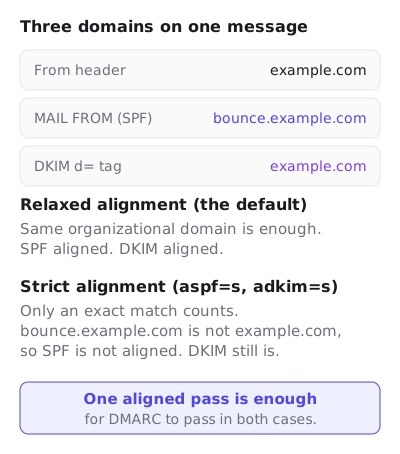
This is why a message can pass SPF and DKIM and still fail DMARC. If a platform sends with its own bounce domain and signs with its own d= domain, both checks pass for the platform, and neither is aligned with your From address. The fix is in the platform’s settings: a custom return path, a DKIM key published under your domain, or both.
RFC 9989 replaced RFC 7489 in 2026
DMARC was first published as an Informational RFC. In 2026 the IETF published RFC 9989 as a Proposed Standard, which obsoletes RFC 7489. Records written for the old version still start with v=DMARC1. The changes a domain owner will notice:
pctis gone. The RFC explains that “it didn’t make sense to support a tag named “pct” that had only two valid values” in practice, and addst, a test mode, wheret=ymeans the owner “does not want the Domain Owner Assessment Policy to be applied”. Its default isn.- New tags:
npfor subdomains that do not exist, andpsdfor public suffix domains. rfandriare removed and listed as historic.- The organizational domain is found with a “DNS Tree Walk” rather than only a public suffix list.
RFC 9989 also says unknown tags must be ignored, so an existing pct=100 does no harm. A record with only v, p and rua reads the same under both versions.
What do Gmail and Yahoo require?
Both mailbox providers publish rules that turn these records from good practice into conditions of delivery. Google’s apply “Starting February 1, 2024”. The table covers authentication, unsubscribing and spam rate; Google’s page also asks all senders for valid forward and reverse DNS, a TLS connection and messages formatted to RFC 5322.
| Requirement | Gmail, all senders | Gmail, over 5,000 a day | Yahoo, all senders | Yahoo, bulk senders |
|---|---|---|---|---|
| SPF and DKIM | SPF or DKIM | SPF and DKIM | SPF or DKIM at a minimum | Both SPF and DKIM |
| DMARC | Not listed | Required, policy can be none |
Not listed | At least p=none, and it must pass |
| From domain aligned | Not listed | With the SPF or the DKIM domain | Not listed | With the SPF or the DKIM domain |
| One-click unsubscribe | Not listed | For marketing and subscribed mail | Not listed | Required, RFC 8058 POST method recommended |
| Spam rate | Below 0.3% | Below 0.30% | Below 0.3% | Below 0.3% |
Google’s monitoring section sets a lower target as well: “Keep spam rates reported in Postmaster Tools below 0.10% and avoid ever reaching a spam rate of 0.30% or higher.” Yahoo adds that bulk senders must “Honor unsubscribes within 2 days.”
One-click unsubscribe connects back to DKIM. RFC 8058 defines the List-Unsubscribe-Post: List-Unsubscribe=One-Click header, and requires that “The List-Unsubscribe and List-Unsubscribe-Post headers MUST be covered by the signature”. So one-click unsubscribe only works on mail that DKIM signs, which is one more reason bulk senders need DKIM set up.
How to set up SPF, DKIM and DMARC
- List everything that sends as your domain. Your email platform, your help desk, your billing system, your own office mail. Each one needs to be covered.
- Publish one SPF record with an
include:for each service, ending in-allor~all. Count the lookups and stay at 10 or fewer. - Turn on DKIM in each platform and publish the key record it gives you, at the selector it names.
- Publish DMARC at
p=nonewith aruaaddress. Read the reports for a few weeks. Each source that fails alignment is a service you have not set up yet, or someone sending as you who should not be. - Move to
quarantine, thenreject, once the reports show your real mail passing.
Check each record with a DNS lookup before you rely on it: dig TXT _dmarc.example.com or the equivalent in your DNS provider’s tools.
Where a countdown timer fits
None of these records looks at the images in an email. SPF checks the server that delivered the message, DKIM checks a signature over its headers and body, and DMARC compares those results with the From domain. An image loaded later from another host is not part of any of the three. A timer from EmailTimer.App is an image served from our image host, so it does not change your SPF, DKIM or DMARC results, and you do not add our domain to your SPF record. Image questions that do touch filtering, such as an email that is one large picture, are in countdown timers and deliverability. On the Agency plan the images can also come from a hostname of your own, which takes a CNAME and a TXT record and is set out in white-label image domains.
Questions and answers
Do I need all three, SPF, DKIM and DMARC?
If you send more than 5,000 messages a day to Gmail, or bulk mail to Yahoo, yes: both publish all three as requirements. Smaller senders need SPF or DKIM at a minimum, and publishing all three costs only three DNS records.
Can a domain have two SPF records?
No. RFC 7208 says multiple SPF records “are not permitted for the same owner name”, and a receiver that finds two returns permerror. Merge them into one record with several include: terms.
Is DMARC p=none enough?
It meets Google’s and Yahoo’s bulk sender requirement, since both accept a none policy. It does not stop anyone sending as your domain. Its value is the rua reports, which show you what to fix before you move to quarantine or reject.
Why does my email pass SPF and DKIM but fail DMARC?
Usually because neither passing domain matches your From domain. The platform’s own bounce domain passes SPF and its own d= domain passes DKIM, but DMARC needs one of them aligned with your address. Set up a custom return path or a DKIM key under your domain in the platform.
What is the difference between ~all and -all?
-all is fail: servers not listed are not authorized. ~all is softfail, which RFC 7208 calls “a weak statement” that the host is “probably not authorized”. Under DMARC both count as an SPF result that did not pass.
Does adding a countdown timer affect SPF or DKIM?
No. The timer is an image fetched from its own host when the email is opened. SPF and DKIM are checked on the message as it is delivered, before any image loads.
Sources
- RFC 7208, Sender Policy Framework (SPF) for Authorizing Use of Domains in Email, Version 1 (IETF, April 2014), read on 29 October 2026
- RFC 6376, DomainKeys Identified Mail (DKIM) Signatures (IETF, September 2011), read on 29 October 2026
- RFC 7489, Domain-based Message Authentication, Reporting, and Conformance (DMARC) (IETF, March 2015), read on 29 October 2026
- RFC 9989, Domain-Based Message Authentication, Reporting, and Conformance (DMARC) (IETF, 2026), read on 29 October 2026
- RFC 8058, Signaling One-Click Functionality for List Email Headers (IETF, January 2017), read on 29 October 2026
- Email sender guidelines (Google Workspace Admin Help), read on 29 October 2026
- Sender Best Practices (Yahoo Sender Hub), read on 29 October 2026
Related
Put a countdown in the campaign you are writing now
The free plan covers 5,000 opens a month with no card. Starter is $19 a month for 250,000.