Email signature dark mode: why logos break, and how to fix them
By Danish Mohammed. 6 min read
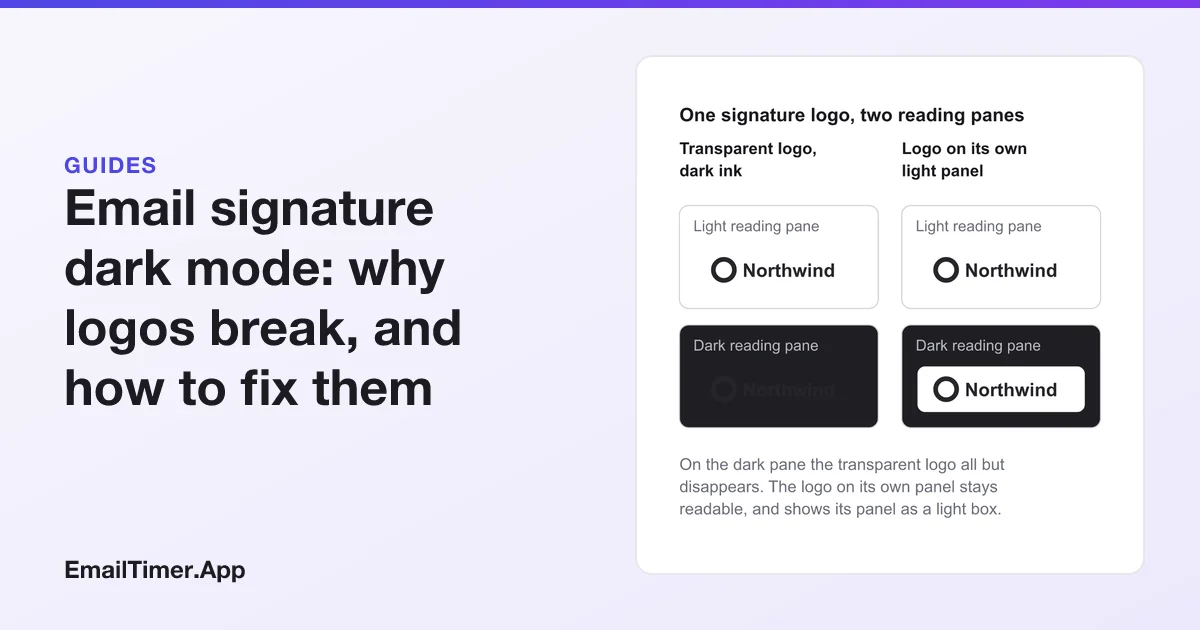
Email signature dark mode problems have one cause: the reader’s mail app darkens the background around your signature but leaves the pixels of your images alone. A dark logo on a transparent background then all but disappears, and a logo saved with a white background shows as a white box. The fix is a logo that reads on light and dark, and contact details typed as text.
You cannot switch dark mode off for the people you write to. Every app that offers it gives the reader the switch, not the sender. What you control is the logo file and how the signature is built, and that is what this page is about.
What dark mode does to an email signature
Each mail app documents its dark mode switch. None of them documents what happens to the images in a message, which is the part a signature depends on.
| Mail app | What its maker documents | How a reader goes back to light |
|---|---|---|
| New Outlook and Outlook on the web | “the reading pane has a dark background to reduce eye strain” | Turn on the lights at the top of the reading pane |
| Classic Outlook | Dark mode comes with the Black Office theme | The sun button on the message; or tick Never change the message background color under File, Options, General |
| Apple Mail on Mac | Use dark backgrounds for messages, under Mail, Settings, Viewing, when the Mac is set to Dark | View, Message, Show with Light Background |
| Gmail app on Android | Theme: Light, Dark or System default, on Android 10 and up | Change Theme in General settings |
| Gmail app on iPhone and iPad | Follows the device’s Dark Mode setting | Change the device setting |
Testing by email vendors goes further than the makers’ pages. Litmus’s chart, summarized client by client in dark mode email, sorts clients into no change, a partial invert of light backgrounds, and a full invert. Those changes apply to backgrounds and text. Your logo’s pixels stay what they were, on a background that is no longer white.
Why a transparent logo disappears
A logo exported with a transparent background looks like the safe choice: whatever is behind it shows through. That works until what is behind it turns dark and the logo is dark too.
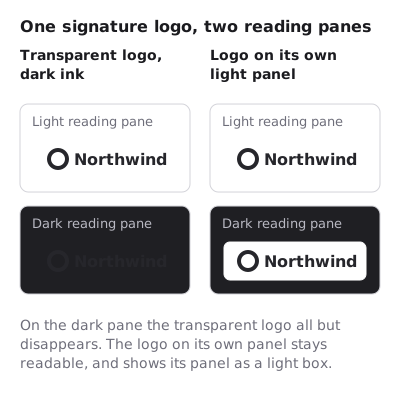
The opposite design fails the opposite way. A logo with its own white background stays readable on a dark pane, but it arrives as a white rectangle under your name. Whether that box is acceptable is a brand decision. It is at least visible, and a vanished logo is not.
Why a white square appears around a signature image
This one has a Microsoft Q&A thread of its own. On 14 August 2023 a user of Outlook on the web reported that a transparent PNG signature showed “a white square background” in dark mode, although the file had no background.
The reply came from a community member, not from Microsoft, and should be read that way. It explained that Outlook changes the colors of text and other elements in dark mode, that an image has no color element for Outlook to change, and that “Outlook can’t handle this, so it adds a white background”. Its workaround was to give the image a background color of its own by wrapping it in an element with an inline background-color, edited in the local signature file of classic Outlook for Windows. Nobody in the thread confirmed that it fixed the problem.
A GIF logo has a second problem of its own, at the edges. The GIF89a specification has a single “Transparency Index”: a pixel with that index means “the corresponding pixel of the display device is not modified”, and every other pixel is drawn solid. There is nothing in between. The smooth edge of a letter is made of in-between pixels, so a GIF has to blend them against one color when the file is made.
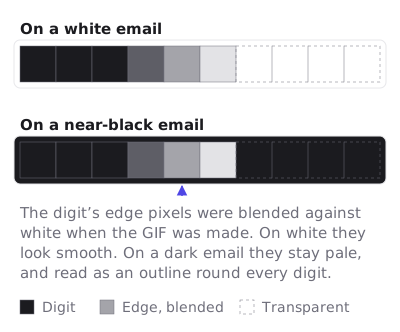
Blend them against white and put the logo on a dark pane, and every letter carries a faint light outline. That is the halo people see around animated signature logos in dark mode.
How to make a dark mode email signature
Four designs work. Pick by what your logo looks like and how much a visible panel bothers you.
| Design | On a light pane | On a dark pane | What it costs |
|---|---|---|---|
| Logo on its own panel | Reads; the panel blends into white | Reads; the panel shows as a box | A visible rectangle in dark mode |
| Mid-tone logo color | Reads | Reads, if the contrast holds against both | May mean a variant of the brand color |
| Light keyline around a dark logo | Reads; the keyline is barely visible | Reads; the keyline separates logo from background | A second version of the logo file |
| Text instead of an image | Reads | Recolored by the app with the rest of the text | No logo, or a small one beside the text |
A few rules hold whichever you choose:
- Type the contact details. Your name, title, phone and address belong in the signature as text. Text is what the apps recolor for dark mode, so it stays readable when an image does not.
- Pick colors with contrast against both. A mid-tone with white or near-white lettering on its own panel reads on a white email and a near-black one. The contrast thresholds worth meeting are in accessible countdown timers.
- Make a GIF on the color it will sit on. If the logo is a GIF, give it a solid background, or blend its edges against the exact color behind it. A transparent GIF is only clean on the background it was made for.
- Avoid a light and a dark logo swapped with CSS. It needs a media query that the full invert clients ignore, and it works by hiding one image, which Google’s sender guidelines warn against. Dark mode email has the detail.
How to test your signature in dark mode
- Send a message with the signature to yourself, at an Outlook address and a Gmail address.
- Open it in new Outlook or Outlook on the web with dark mode on, then select Turn on the lights to compare.
- On a Mac, set Appearance to Dark, tick Use dark backgrounds for messages in Mail’s Viewing settings, and open the message. View, Message, Show with Light Background switches it back for comparison.
- In the Gmail app on Android, set Theme to Dark under General settings and open the same message.
- Reply once, and check the signature again in the quoted part of the thread.
Animated signatures and countdowns in dark mode
An animated GIF signature carries the same risks as a still logo, on every frame, plus the halo at its edges. Draw it on a solid panel. The sizing rules for a signature GIF, including Gmail’s 100 pixel height limit, are in animated GIF email signature, and a live deadline in a signature is covered in countdown timer in an email signature. EmailTimer.App draws a countdown on a solid canvas color you choose, which is the panel design in the table above.
Questions and answers
Why does my email signature look different in dark mode?
The reader’s mail app darkens the background and recolors text, but leaves images as they are. A dark logo on transparency loses its contrast, and a logo with a white background shows as a white box.
How do I make my email signature dark mode friendly?
Type your contact details as text, and use a logo that reads on light and dark: on its own panel, in a mid-tone color, or with a light keyline. Then test it in Outlook, Apple Mail and Gmail with dark mode on.
Should my signature logo be a transparent PNG?
Only if the logo reads on dark as well as on white. A dark logo on transparency all but disappears in dark mode, and one Outlook on the web user reported a white square appearing behind a transparent PNG anyway.
Can I stop Outlook from changing my signature in dark mode?
Not for the reader. Classic Outlook’s “Never change the message background color” and the “Turn on the lights” button are the reader’s settings. A design that reads on both backgrounds is the part you control.
Why does my GIF logo have a white outline in dark mode?
Its edge pixels were blended against white when the GIF was made, because GIF transparency is on or off per pixel. Make the GIF on a solid background, or against the exact color it will sit on.
Sources
- Dark Mode in Outlook (Microsoft Support), read on 29 October 2026
- Dark mode in Outlook.com and Outlook on the web (Microsoft Support), read on 29 October 2026
- My signature keeps creating a white square background in dark mode (Microsoft Q&A, 14 August 2023), read on 29 October 2026
- Change Viewing settings in Mail on Mac (Apple Support), read on 29 October 2026
- Change your Gmail background, Android (Gmail Help), read on 29 October 2026
- Change your Gmail background, iPhone and iPad (Gmail Help), read on 29 October 2026
- Email sender guidelines (Google Workspace Admin Help), read on 29 October 2026
- Graphics Interchange Format, Version 89a (W3C copy of the specification), read on 29 October 2026
Related
Put a countdown in the campaign you are writing now
The free plan covers 5,000 opens a month with no card. Starter is $19 a month for 250,000.