Email open rate, and what it can and cannot tell you
By Danish Mohammed. 7 min read
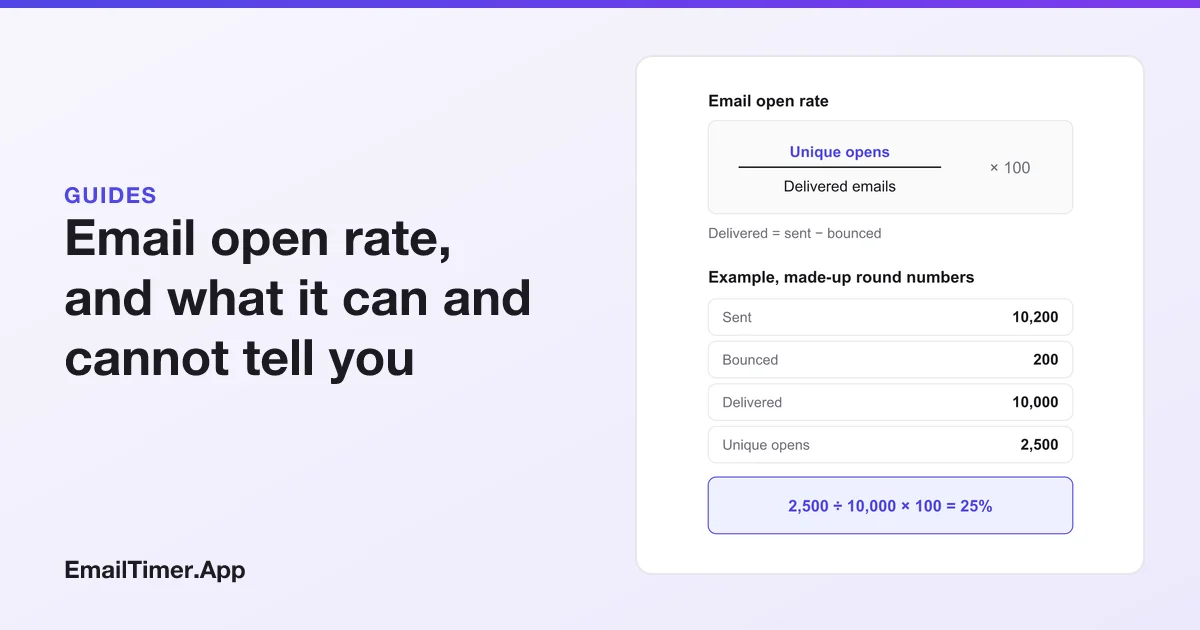
Email open rate is the share of delivered emails that registered an open: unique opens divided by delivered emails, times 100. An open is recorded when a tiny tracking image in the email is downloaded. That makes the number an estimate. Images that are blocked hide real readers, and Apple Mail Privacy Protection downloads images for readers who never looked.
So the open rate is still worth reading, but as a trend inside one list rather than a score to compare with someone else’s. This guide gives the formula as the sending platforms define it, a worked example, the mechanism behind an open, and what Apple’s own description of Mail Privacy Protection means for the count. Every definition was read on the platform’s own help page on 29 October 2026.
How do you calculate email open rate?
The formula most platforms use:
Open rate = unique opens ÷ delivered emails × 100, where delivered emails = sent − bounced.
The platforms word it in near-identical ways. Klaviyo: “the number of unique opens divided by the number of delivered messages.” Campaign Monitor: “the number of unique opens is divided by the number of emails sent, minus those that bounced.” Mailchimp: “a percentage that tells you how many successfully delivered emails were opened by recipients.”
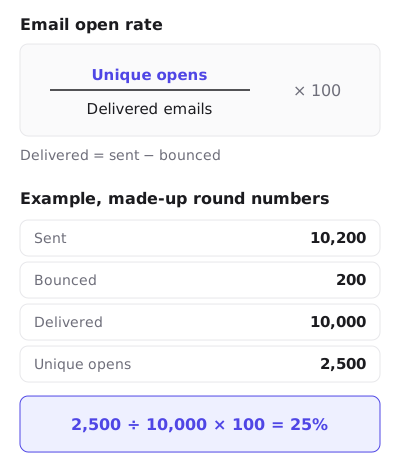
A worked example
These numbers are made up and round, to show the arithmetic:
| Step | Number |
|---|---|
| Emails sent | 10,200 |
| Bounced | 200 |
| Delivered (10,200 − 200) | 10,000 |
| Unique opens | 2,500 |
| Open rate (2,500 ÷ 10,000 × 100) | 25% |
Two details change the answer if you get them wrong. Divide by delivered, not sent: using 10,200 here would give 24.5%. And count unique opens, not total opens. Campaign Monitor says “Multiple opens are not taken into account when calculating your open rate percentage.” Mailchimp reports both, defining total opens as “The total number of times the email was opened by recipients”, which includes the same person opening three times.
How is an email open recorded?
An open is an image request. Mailchimp describes the method plainly: it embeds “a tiny invisible graphic in the bottom of your HTML email”, called a web beacon, which “is unique to each email you send”. When the graphic is downloaded, the platform logs an open for that recipient.
Everything wrong with open rates follows from that one fact. The platform never sees a person read anything. It sees an image being fetched, and an image can be fetched without a reader, or a reader can read without the image being fetched.
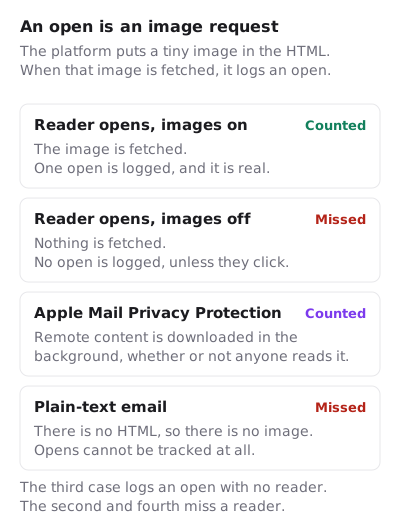
The cases, from the platforms’ own pages:
- Images off. Mailchimp: “open tracking won’t work if your recipients or their email client have chosen not to display images.” A click still proves the email was opened, so Mailchimp counts a click as an open “if click tracking is enabled”.
- Plain-text email. The beacon needs HTML, so a plain-text email reports no opens at all.
- Machine downloads. Mailchimp warns that “Apple’s Mail Privacy Protection (MPP) can falsely inflate open and click metrics”, and its report shows whether “bot filtering for email opens (Apple MPP)” is switched on.
What Apple Mail Privacy Protection does to open rates
Apple’s page on Mail Privacy Protection is short and specific. Protect Mail Activity “downloads remote content in the background by default”, and does so “regardless of whether you engage with the email”. It “routes all remote content downloaded by Mail through two separate relays”, so the sender sees neither the reader’s IP address nor their location. Apple names the problem it is solving: without it, “Email senders may learn when and how many times you opened their email.”
A tracking pixel is remote content. So for a reader with Protect Mail Activity turned on, the pixel is fetched when the message arrives, whether the reader opens it that day, next week or never. The platform logs an open either way. Campaign Monitor’s help page draws the same conclusion: “Privacy features such as Apple Mail Privacy Protection can cause open rates to artificially increase.”
Three consequences for anyone reading an open rate:
- The rate goes up, and the rise is not interest. Campaign Monitor dates the change to September 2021, when open rates and click-to-open rates “will become less reliable”. A list with many Apple Mail readers can show a higher open rate after that date without anyone reading more.
- Open time tells you nothing for those readers. The fetch happens at delivery, so “opened within the first hour” is delivery time for them.
- Anything triggered by an open misfires. A follow-up sent to “everyone who did not open” skips Apple readers who never saw the first email. A resend to non-openers misses them too.
Some platforms now try to filter these machine opens out, Mailchimp among them, and each does it its own way. Before comparing a rate from before and after a platform turned on filtering, check which one you are looking at.
The image cache behind this is its own subject. How Apple’s image cache freezes a countdown covers what Apple publishes and what testing has reported about how long the fetched copy is kept, and how email image caching works does the same for Gmail, Outlook.com and corporate proxies.
What Gmail’s image proxy does to opens
Gmail is different. Google states: “When your users open email messages, Gmail uses Google’s secure proxy servers to serve images”. The fetch is tied to the open, so the first open in Gmail is a real one. Google does not document whether or for how long the proxy keeps the copy it fetched. Other vendors’ documentation, collected in how email image caching works, reports that later opens can be answered from a kept copy. If so, a second open by the same person never reaches the platform, which leaves total opens too low while the unique open is still recorded.
Is there an average email open rate?
Many sites print a table of average open rates by industry. This page does not, for three reasons that follow from the sections above:
- Definitions differ. The platform quotes above already word the rate differently, and a published benchmark inherits the definition and the counting rules of the platform that computed it.
- Machine opens differ. A benchmark from a platform that filters Apple’s background downloads is not comparable with one that does not, or with your own report if your settings differ.
- Dates matter. A figure from before Apple released Mail Privacy Protection measures a different thing from one after.
If your platform publishes a benchmark computed the same way as your report, with the same filtering, that is the one comparison worth making. The more useful comparison is your own list over time: the same audience, the same platform, the same settings, send after send. A sudden change there means something changed, in the list, the subject line, the sending reputation or the platform’s filtering. The countdown timer statistics page applies the same caution to the published numbers about timers: each figure is listed with its source and date, or left out.
What open rate is still good for
Open rate is weak as an absolute number and still useful for some decisions:
| Question | Open rate useful? | Better measure |
|---|---|---|
| Did this subject line beat that one, on the same list, same day? | Yes, if the split is random | Clicks, if the numbers allow; click-to-open rate for the body |
| Is my list engaged? | Only as a trend | Click-through rate |
| Did my emails start landing in spam? | A sudden drop is a warning sign | Your platform’s deliverability reports, then SPF, DKIM and DMARC |
| Who should get the follow-up email? | No, for Apple readers | Clicks or site activity |
| Is my campaign better than my industry’s? | No | None from open data |
A countdown timer is an image request too
A countdown timer in an email works the same way as the tracking pixel: it is an image at an address, drawn by the image host when a mail client asks for it. EmailTimer.App counts one open each time it renders and sends a timer image in full, and how opens are counted explains why that is not the same as a person reading. Apple’s background download is one open for us too, Gmail’s proxy can answer later opens without asking us, and a reader with images off never fetches the timer. That is why the timer’s numbers and your platform’s open rate will not match, and why neither should be read as a head count. If you want to try one, the free countdown timer generator needs no account for 500 opens, or 1,000 when you sign in.
Questions and answers
What is a good email open rate?
There is no universal figure. Platforms define and filter opens differently, and Apple’s background downloads inflate the count by different amounts on different lists. A good open rate is one that is stable or rising on your own list, measured the same way each time.
Does Apple Mail Privacy Protection count as an open?
In most platforms’ raw counts, yes. Apple says Protect Mail Activity downloads remote content “regardless of whether you engage with the email”, and the tracking pixel is remote content. Some platforms, Mailchimp among them, offer a filter to separate those opens; check whether yours is on.
Why is my open rate over 100%?
That usually means total opens were divided by delivered emails, so one person opening five times counts five times. Use unique opens for the rate.
Can you track opens in a plain-text email?
No. Open tracking depends on an image in the HTML, and a plain-text email has neither. Clicks on tracked links still work.
Should I divide by sent or delivered?
Delivered. Every platform cited here divides by delivered emails, which is sent minus bounced. A bounced email could never have been opened.
Sources
- About Open and Click Rates (Mailchimp Help), read on 29 October 2026
- Use Open Tracking in Emails (Mailchimp Help), read on 29 October 2026
- About Email Reports (Mailchimp Help), read on 29 October 2026
- Getting started with analytics or overview dashboards (Klaviyo Help Center), read on 29 October 2026
- Open and click rates (Campaign Monitor Help), read on 29 October 2026
- Mail Privacy Protection and Privacy (Apple Legal), read on 29 October 2026
- Set up an image URL proxy allowlist (Google Workspace Admin Help), read on 29 October 2026
Related
Put a countdown in the campaign you are writing now
The free plan covers 5,000 opens a month with no card. Starter is $19 a month for 250,000.