Email gamification that works in every inbox
By Danish Mohammed. 11 min read
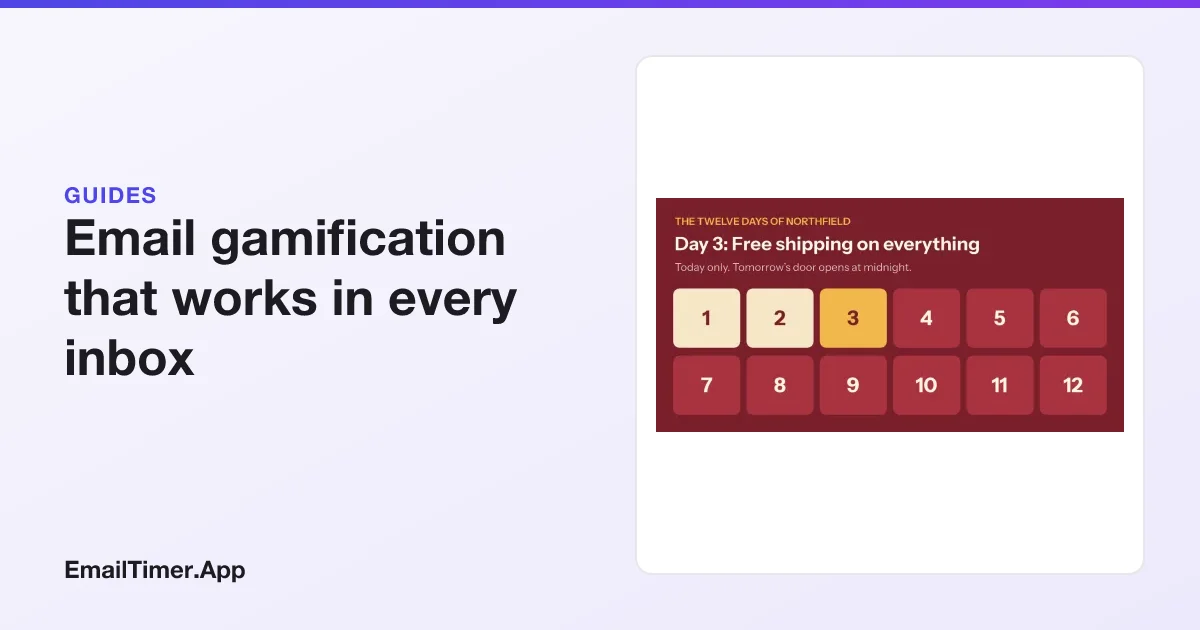
Email gamification is putting a game mechanic, such as a daily door, a reveal, a progress bar or a status level, inside a marketing email so the reader has a reason to open it and come back. There are three ways to build one: an AMP game that only a few inboxes run, a game on a landing page the email links to, or an image that is drawn at the moment of opening, which every inbox shows.
This guide is about the third way, because it is the one that reaches your whole list. It covers which inboxes run what, seven plays a CRM or lifecycle team can ship today, what an email cannot do no matter who sells it to you, and how to measure the result once Apple has made open rates unreliable.
The three ways to put a game in an email
| AMP game in the email | Game on a landing page | Image drawn at open | |
|---|---|---|---|
| Where the game runs | Inside the message, in the inboxes that support AMP | In the browser, after a click | Inside the message, as an ordinary image |
| What a reader can do | Tap, type, submit, see the result without leaving | Anything a web page can do | Look. The image changes with the date, their data and your rules, not with a tap |
| Who sees it | Gmail, Yahoo Mail, AOL Mail, Mail.ru and FairEmail; everyone else sees the HTML fallback | Everyone who clicks | Everyone who loads images |
| What it costs to build | An AMP part, a separate HTML part, sender registration with Google | A landing page and its tracking | One template and its rules |
| What it is good for | Polls, quizzes and forms answered in the inbox | Spin to win, scratch cards, anything with a random result | Daily doors, reveals, countdowns, progress, tiers, event states |
The columns are not rivals. A campaign can carry an image that changes at open and link to a landing page where the spinning happens. What matters is knowing which part of the experience every reader gets, and which part only some of them get.
Which inboxes run what
Checked on 29 October 2026, amp.dev lists five email clients that support AMP for Email: AOL Mail, FairEmail, Gmail, Mail.ru and Yahoo Mail. Apple Mail and Outlook are not on the list. For a typical consumer list, that means a large share of readers never see the AMP version at all.
Even inside Gmail the AMP version has conditions. Google’s registration page says registration “works on a per-sender-email-address basis”, that the messages must pass SPF and DKIM, and that every AMP email “must have a similar HTML or text MIME part”. Google’s debugging page lists the cases where Gmail shows that fallback instead, including OLD_EMAIL, “The email was sent over 30 days ago”. An AMP game is therefore always two emails: the AMP one, and the HTML one most people actually read.
An image is different because an <img> tag is the most widely supported thing in email. If the reader’s client loads images, the image is there. What changes per client is when the image is fetched, which is the subject of the caching section further down.
Interactive vs dynamic email goes through AMP properly, including the cases where it is the better tool.
The game board drawn at open
The idea behind every play below is the same. The email carries one image address. When the reader’s client requests it, EmailTimer.App draws the picture for that moment: the countdown at its current value, the layers your rules show or hide, the text your rules swap, and any values carried in that subscriber’s own address.
A rule in the editor reads like a sentence. “When the time the image is opened is at or after 3 December, change the color of door 3.” The subjects available today are the time the image is opened, a field carried in the subscriber’s address, the recipient country and the device. The actions are show a layer, hide a layer, change its text, change its image, change its color, and switch to a variant. Rules run from the top down, so a later rule wins over an earlier one on the same layer, which is what lets a door turn gold on its day and cream the day after.
Rules are on Starter and above. Values that differ per subscriber travel in signed addresses you mint through the API or a recipient list, which are on Growth and Agency; batch minting explains both routes.
Seven plays you can run today
Each of these is built from the parts above. The pictures are real renders from the engine, not mockups.
1. The daily door
One image, twelve doors, a door that opens each day. Send the same image in every daily email and each send shows that day’s door and offer. The reader is rewarded for opening, and every open is also a check on what today brings.
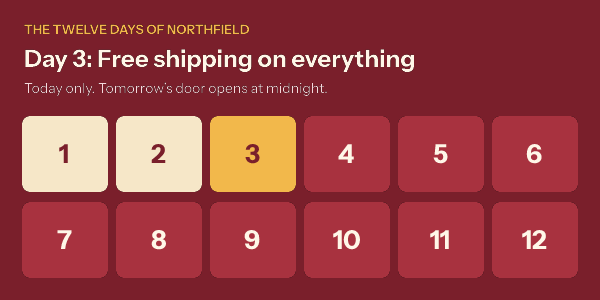
The full build, with the rules written out and the time zone questions answered, is in the advent calendar email guide.
2. The timed reveal
A mystery offer works as a countdown to a moment you pick, and then the offer itself. Before the moment, the image shows the clock. After it, a rule hides the clock and shows the code.
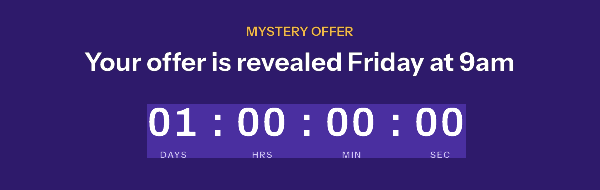
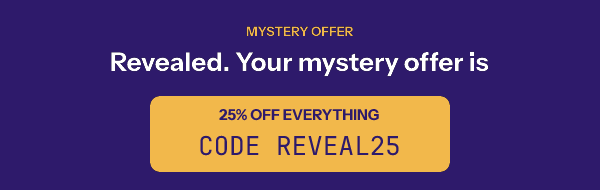
What a reveal cannot be is random. The image does not draw a prize when the email opens. If you want each subscriber to get a different prize, assign it in your CRM before the send and carry it in their address, so the reveal shows what is already theirs.
3. The event in three states
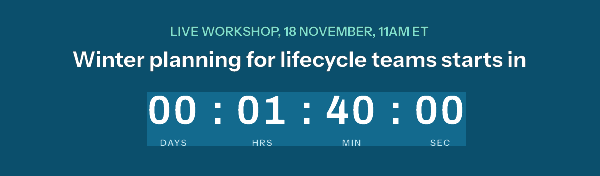
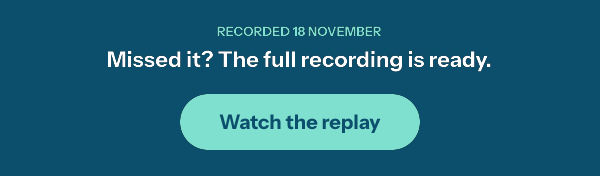
A webinar, a launch or a live shopping hour has three moments: before, during and after. One image can show all three: “starts in” with a countdown, “we are live” with a join button, and “watch the replay” once it is over. A reader who opens the invitation the next morning sees the replay, not a clock at zero.
4. The progress bar
A progress bar layer draws a bar from a number: points toward a reward, orders toward free shipping, steps toward a finished profile. The number has to come from your data, so this is a per-subscriber play, carried in each subscriber’s signed address.
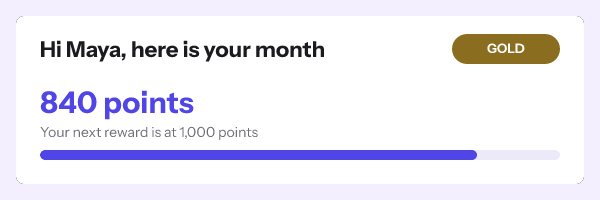
Two cautions belong in the plan before the design. A cached image freezes the value at the moment it was fetched, so a bar is a snapshot of send day, not a live meter. And an empty field must not draw an empty bar: set the variable to hide its group when the value is missing, so a guest sees an invitation instead of a zero.
5. The status card
Bronze, silver and gold are the oldest game mechanic in retail. A rule that reads the tier field can change the badge color, the headline and the perk shown, so one template serves every level. Pair it with the progress bar and the card says both where the reader stands and how far the next level is. The loyalty render above is one such card; personalized images covers the field and fallback rules.
6. The streak and the milestone
Seven days in a row, thirty orders, a hundred workouts: a streak is a number with thresholds. A rule such as “when the field streak is at least 30, show the 30 badge” handles each threshold, and the number reads through the same signed address as the progress bar. The game is in the threshold, so pick ones a real share of your list can reach.
7. The year in review
The annual recap is a status card with more numbers on it: orders placed, favorite category, miles run, hours listened. Each one is a field, and each field needs a plan for when it is empty or small. A recap that tells a light user “you placed 1 order” is not a celebration. Use a rule to swap that panel for a different message below a threshold.
What gamification inside an email cannot do
Some mechanics are sold as “in the email” when they happen somewhere else. Being clear about this is better for you than being surprised by it after the send.
| Mechanic | Inside the email, in every inbox? | What actually works |
|---|---|---|
| Scratch card | No. An image cannot respond to a finger | A timed reveal, or a scratch card on the landing page |
| Spin to win | No. Nothing random happens at open | A prize assigned in your CRM and shown by rule, or the wheel on a landing page |
| Live poll with vote counts | Only in AMP inboxes | Two linked buttons, results shown in the next email |
| Quiz | Only in AMP inboxes | Answer links that land on a result page |
| Content that changes after a click | No | The landing page changes; the email cannot know a click happened |
| Live weather or stock feeds | Not in EmailTimer.App, which makes no external call at render time | Values your platform passes at send time, rounded so they stay true |
The pattern in the right column is the honest one: the email carries the state, and the interaction happens one click away. That is still gamification. It is also the only kind that reaches an Outlook reader.
Caching and privacy: when the picture is drawn
An image drawn at open is only as current as the moment it was fetched. Two mail systems decide most of that.
Gmail fetches images through Google’s proxy. Google’s admin documentation says that “when your users open email messages, Gmail uses Google’s secure proxy servers to serve images”. The first open is a live fetch. Google does not publish how long its copy lasts, so plan for a re-open to show the copy from the first one. How email image caching works sets out what each provider documents.
Apple Mail with Mail Privacy Protection “downloads remote content in the background by default”, in Apple’s words. The picture is then drawn close to delivery, not to reading, and FreshInbox’s testing reports that an image shared across emails is fetched once. Apple MPP and the shared image cache covers what that does to each kind of timer.
Three rules follow for every play above:
- Put the state that matters in live text too. If the day’s offer is in the image, say it in the copy or the button as well.
- Pick moments that survive a fetch a few hours early. A daily door that flips at midnight is fine; a reveal meant to last fifteen minutes is not.
- Treat country and device rules as best effort. A proxy can hide both, and when it does, the rule does not fire, so design the default state to be correct on its own.
Measuring a gamified email
Opens are the wrong number for this kind of email, for two reasons. Apple’s background downloads register as opens whether a person looked or not, and a daily door is designed to be opened again, which inflates opens further. Count what a human has to do:
- Clicks and click-to-conversion on the offer the image is promoting.
- Return rate across a series: the share of readers who click in three or more of the daily sends.
- Revenue or sign-ups per recipient, compared with a holdout that received the same offers with a static image.
The holdout is the only clean answer to “did the game help”. A static version of the same campaign to a random tenth of the list costs little and tells you whether the mechanic earned its place.
Fake urgency and the law
A game built on a deadline is a countdown, and a countdown that lies is a known dark pattern. The FTC’s 2022 staff report names the “Baseless Countdown Timer”, and the UK’s Digital Markets, Competition and Consumers Act 2024 lists “falsely stating that a product will only be available for a limited time” among practices that are unfair in all circumstances. The fix is simple: every door, reveal and deadline in a gamified email must be one you actually honor. Fake countdown timers has the detail for the US, EU and UK.
How to start
- Pick one play and one moment that matters, such as a December series or a product launch.
- Try a countdown in the free countdown timer generator, which needs no account for 500 opens, or 1,000 when you sign in.
- Build the template, add the rules, and read them back in order. The Rules tab marks each rule as firing now or not now, so write down what each moment should show and check the dates against that list before you send.
- Paste one image tag into the email, put the same state in live text, and set up the holdout.
Questions and answers
Can you put a game in an email?
Yes, in two senses. In AMP inboxes you can put a real interactive game in the message. Everywhere else, the email can carry the board, a picture that shows each reader the current state, and the move happens one click away.
Does email gamification work in Outlook and Apple Mail?
The AMP kind does not; both show the HTML fallback. An image drawn at open works in both, subject to Apple’s background download, which draws the picture close to delivery rather than at reading.
What is a good first gamified email?
A daily door series in December, or a reveal for a launch. Both need only the time the image is opened, so they work without any subscriber data.
Is gamification just a gimmick?
Measured on opens, it can look better than it is. Measured on clicks and conversions against a static holdout, you find out. The mechanic is worth keeping when it changes what readers do, not only how often they open.
Do I need AMP for gamified emails?
No. AMP is the right tool when the reader must answer inside the inbox, such as a poll or a form. For anything that is a state to look at, an image reaches more of your list with less to build.
Sources
- Supported Email Platforms (amp.dev), read on 29 October 2026
- Register with Google to send dynamic emails (Google for Developers), read on 29 October 2026
- Debug dynamic email (Google for Developers), read on 29 October 2026
- Set up an image URL proxy allowlist (Google Workspace Admin Help)
- Mail Privacy Protection (Apple legal)
- A Technical Take on iOS15 Mail Privacy Protection (FreshInbox, 29 July 2021)
- Bringing Dark Patterns to Light (FTC Staff Report, September 2022)
- Digital Markets, Competition and Consumers Act 2024, Schedule 20 (legislation.gov.uk)
Related
Put a countdown in the campaign you are writing now
The free plan covers 5,000 opens a month with no card. Starter is $19 a month for 250,000.