Drip campaign, how to plan one and when to stop it
By Danish Mohammed. 8 min read
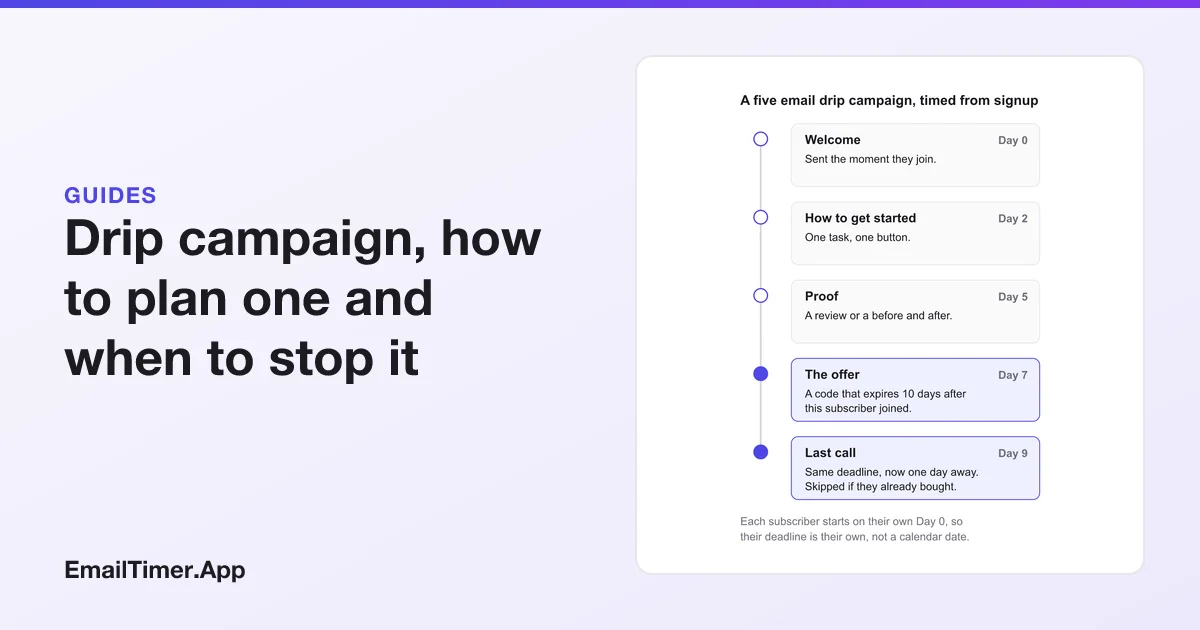
A drip campaign is a set of emails sent automatically, one after another, on a schedule that starts when a person does something: signs up, starts a trial, leaves a cart. Everyone gets the same sequence, but each person starts it on their own day. That makes it different from a newsletter or a sale email, which goes to the whole list at one moment.
This guide covers how to plan one: what each email is for, how many to send and how far apart, the rules that should stop a sequence early, and the one technical detail most drip guides skip, which is how a deadline in email four can count from each subscriber’s own start instead of from a date on the calendar.
What is a drip campaign, and how is it different from a newsletter?
The word “drip” describes the delivery: small amounts, spaced out, triggered per person. Three things define one.
| Drip campaign | Newsletter or broadcast | |
|---|---|---|
| What starts it | Something one person did (a signup, a purchase, a cart left behind) | A date you chose |
| Who gets email two | Everyone who received email one, a set time later | Not applicable. There is one send |
| What day it lands | Different for every person | The same for everyone |
| What a deadline is measured from | That person’s start | One moment for the whole list |
The last row is the one that matters once you add an offer. A broadcast can say “ends Sunday at midnight” and be true for every reader. A drip email sent on day seven of a sequence lands on a different calendar day for every subscriber, so a fixed date in it is right for a few people and wrong for the rest.
Which drip campaign should you build first?
Most teams need only a few sequences. Start with the one whose trigger already happens most often on your site.
| Sequence | Trigger | Typical length | What it has to achieve |
|---|---|---|---|
| Welcome | Newsletter or account signup | 3 to 5 emails over 1 to 2 weeks | Get a first purchase or a first real use |
| Onboarding | Trial or account start | 4 to 6 emails, paced to the trial | Get the person to the one action that predicts they stay |
| Abandoned cart | Cart left with an email address known | 2 or 3 emails over 2 to 3 days | Bring them back to the same cart |
| Trial ending | A fixed number of days before the trial ends | 2 or 3 emails | Make the end date and the choice clear |
| Post purchase | Order placed | 2 to 4 emails over a few weeks | Setup help, then a review request, then a related product |
| Re-engagement | No clicks for a set period | 2 or 3 emails | A clear decision: stay or leave the list |
The lengths are ranges to plan from, not rules. There is no published standard for how long a drip campaign should be, and a guide that gives you one exact number is guessing. The honest answer is in the next section.
How many emails should a drip campaign have, and how far apart?
Plan the sequence backwards from the one action you want, and give each email a single job toward it. When you run out of jobs, the sequence is long enough.
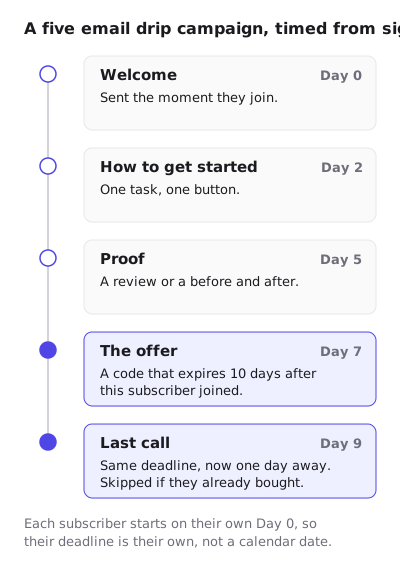
The welcome sequence above shows the shape:
- Day 0, welcome. Sent the moment they join. It confirms what they signed up for and delivers anything you promised, such as a discount code or a guide.
- Day 2, how to get started. One task, one button. Not a tour of everything you sell.
- Day 5, proof. A review or a before and after: evidence from someone other than you.
- Day 7, the offer. A code that expires 10 days after this subscriber joined.
- Day 9, last call. Same deadline, now one day away. Skipped if they already bought.
Spacing follows the decision, not a fixed gap. Abandoned cart emails are close together because the intent fades in hours. A welcome sequence can breathe over a week or two. Onboarding is paced by the trial, so a 14 day trial gets its emails before day 14, not after.
When should a drip campaign stop early?
Every sequence needs exit rules as much as it needs emails. Sending email five to someone who bought after email two is a common drip campaign mistake, and an automation with an exit rule prevents it.
- Stop on the goal. If the goal is a purchase, a purchase ends the sequence. If it is a first use, the first use ends it.
- Stop on an unsubscribe, immediately. The FTC’s CAN-SPAM guide says “You must honor a recipient’s opt-out request within 10 business days”, and it states that “The law makes no exception for business-to-business email.” Yahoo’s sender guidance for bulk senders is stricter: “Honor unsubscribes within 2 days”.
- Do not stack sequences. A person who joins the newsletter and starts a trial the same day should not get both welcome sequences in parallel. Pick a priority.
- Watch the replies to silence. Google’s sender guidelines suggest you “Consider unsubscribing recipients who don’t open or read your messages”, and ask senders to “Keep spam rates reported in Postmaster Tools below 0.10%”. A drip that keeps mailing people who never engage pushes in the wrong direction on both.
Opens are a weak signal for that last rule. Apple’s privacy page says Mail Privacy Protection “downloads remote content in the background by default”, so an Apple Mail reader can register an open without reading anything. Google says plainly that it “doesn’t track open rates”. Base engagement rules on clicks and purchases, which a background download cannot fake.
Email drip campaign examples, step by step
Two real emails that sit naturally inside a drip campaign, each shown as the brand sent it with an EmailTimer.App countdown added where a deadline already exists in the copy.
A trial ending step. Zapier’s email lands three days before a trial ends. The headline names the time left and uses the reader’s first name, the first paragraph repeats it in bold, and there is one orange button above the fold. The plan comparison is below the button, for readers who want it, rather than in the way of the ones who do not.


In a drip, this email belongs to a sequence keyed to the trial start, and every reader’s end date is different. That is exactly where a countdown needs its own deadline per person.
An abandoned cart step. Gantri’s email opens with “You found something” and a single Return to Gantri button, then shows the exact lamp left behind with a Take another look button under it. The copy is short and does not apologize or pressure: “Maybe it wasn’t the right moment. It isn’t going anywhere.” The reassurance about the warranty and the guarantee comes after the product, not before.


Gantri’s own email has no deadline, and that is a choice worth copying. A cart email should only carry a clock if something genuinely ends, such as a held discount. Fake countdown timers sets out where a clock with nothing behind it crosses the FTC’s line.
How do you put a deadline in a drip email that counts from signup?
This is where drip campaigns and timers meet, and where the obvious approach fails. A countdown image in an email is one image address. If every subscriber’s email carries the same address, everyone shares one countdown, and a fixed end date in it is wrong for everyone who entered the sequence on a different day.
There are three honest ways to do it with EmailTimer.App.
| Approach | How it knows each subscriber’s deadline | What it needs |
|---|---|---|
| Per-recipient deadline | The deadline travels inside a signed image address minted for that person, which your platform stores in a contact field | Growth or Agency, the API or a recipient list |
| Evergreen from send | The send moment travels inside a signed address, plus a fixed length such as 72 hours | Growth or Agency, the same minting |
| Recurring | No per-person deadline. The offer genuinely resets on a schedule, such as every Sunday at midnight | One template on any plan |
The first two are what a drip really wants, because each subscriber’s clock is theirs. The evergreen mode that starts from the first open also exists, but it starts at the first fetch of an address. Apple Mail’s background download can make that the delivery moment rather than the read, and a shared campaign address gives everyone one start. The evergreen guide explains the trade in detail, and the trial and renewal playbook walks through minting one address per person.
The third row is the shortcut for teams without per-recipient addresses. If your offer really does close every Sunday, a recurring countdown timer is correct for every reader whatever day they joined, and it needs no minting at all.
Whichever you use, set what the image shows after the deadline. A reader who opens the last call email a week late should see that the offer has closed, not a clock stuck at zero. You can try a timer and its expired state without an account in the countdown timer generator, which allows 500 opens without signing in and 1,000 when signed in.
Questions and answers
What does drip mean in marketing?
It describes automated messages sent in small amounts over time, each one triggered by a person’s own start date or action, rather than one send to everyone at the same moment.
How long should a drip campaign be?
As long as it takes to give each email one job toward a single goal, and no longer. Welcome sequences commonly run three to five emails and cart sequences two or three, but no published standard sets a number.
Is a drip campaign the same as email automation?
A drip campaign is one kind of email automation: a timed sequence. Automation also covers single triggered emails, such as an order confirmation, that are not part of a sequence.
Can a drip email show a countdown that is different for each subscriber?
Yes, if each subscriber’s email carries their own signed image address with their deadline in it. A single shared address gives everyone the same countdown.
Should every drip email have a deadline?
No. Only the emails where something genuinely ends: a code that expires, a trial that closes, a held price. A clock in a welcome email with nothing behind it is a fake deadline.
Sources
Related
Put a countdown in the campaign you are writing now
The free plan covers 5,000 opens a month with no card. Starter is $19 a month for 250,000.
These emails belong to the brands that sent them and are credited to each one. We added our timers to show how they look in real campaigns. Brand owners can ask us to remove their email at privacy@emailtimer.app, and we will do it the same day.