
An abandoned cart email is an automated email a store sends to a shopper who put items in their cart, gave an email address and left without paying. Most stores send two or three: a reminder a few hours later, a help email the next day, and sometimes a last email with an offer. Every one of them stops the moment the shopper buys.
It is usually the first flow a store builds when it starts with email automation, because the shopper supplies the trigger, the audience and the goal. Below: when to send each email and why, what goes in each one, examples by type of store, the discount question, the US and UK rules, and how to tell whether the flow earns anything. Subject lines have their own page of examples, and the reservation countdown that can sit inside the email is set up in the cart abandonment playbook.
What counts as an abandoned cart?
Two things: a cart or checkout with items in it, and an email address you are allowed to write to. Shopify’s help center says a checkout “is considered abandoned if it remains incomplete for more than ten minutes after the customer has provided their email information”. A shopper who entered only a phone number gets no recovery email from it.
Klaviyo splits the idea in two and recommends “setting up both: one flow triggered by Added to Cart and a separate flow triggered by Started Checkout”. The second is the stronger signal. Klaviyo’s guide puts it plainly: someone who starts checkout “has shown stronger purchase intent than someone who only added an item to their cart”.
| Added to cart flow | Started checkout flow | |
|---|---|---|
| Trigger | An item goes into the cart of a known shopper | The checkout form is started with an email address |
| What it tells you | Interest | Intent: price, delivery and payment were next |
| First email | Later, and lighter in tone | Sooner, and about finishing |
| Overlap | Skip anyone who goes on to start checkout | Takes over from the cart flow |
Klaviyo’s guide keeps one shopper out of both with a filter on the cart flow: Started Checkout “zero times since starting this flow”.
The abandoned cart email sequence, and when to send each one
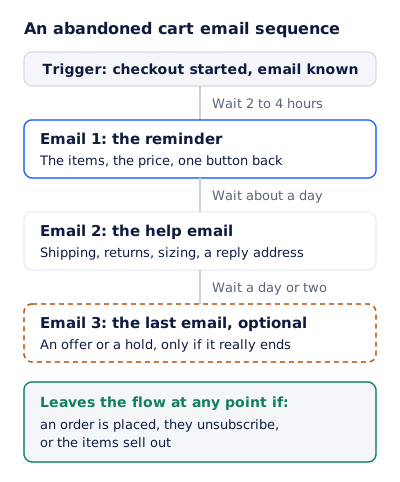
Klaviyo recommends the first message 2 to 4 hours after someone starts a checkout, “and then sending a second email 20-48 hours later”. Its own pre-built flows wait four hours before the first message, and it reports that two or three messages in a flow perform best. The playbook on this site suggests one to two hours. Either way, the logic is the same:
- Not instantly, because the shopper may still finish on their own, and an order placed in the meantime has to reach the email platform before the purchase filter can see it. A reminder that lands after the purchase is a bad first impression.
- Not next week, because by then the cart has stopped being a live decision.
- Wider gaps each time, because a shopper who ignored a reminder needs a reason, not a repeat.
| When | Its job | Discount | |
|---|---|---|---|
| 1. The reminder | 1 to 4 hours after the trigger | Show the cart and the way back to it | No |
| 2. The help email | About a day later | Answer what stopped them: cost, delivery, fit, trust | No |
| 3. The last email, optional | A day or two after that | Close the loop, with an offer or a hold only if it really ends | Your call, see below |
The whole flow, as a spec to copy:
Flow: Abandoned checkout
Trigger: Started Checkout, email address known
Filter, checked before every email: Placed Order zero times since starting this flow
Also skip: not subscribed to email marketing (see the rules below), items out of stock

Wait 3 hours
Email 1  The reminder: cart items with image, variant and price, one button to the
         saved cart, a reply address that reaches a person

Wait 1 day
Email 2  The help email: delivery cost and date to their address, the returns
         policy, sizing or fit help, reviews you really have

Wait 1 day
Email 3  The last email (optional): the cart again, and either "your cart is saved"
         with no deadline, or a single-use code or a held cart with a real end time

End of flow
What goes in each abandoned cart email
Email 1: the reminder
Show the cart. Each item’s picture, name, variant and price, and one button that opens the cart already filled. No discount and no clock.
Subject: You left the [item] in your cart
Preheader: Your cart is saved. One click to finish.

Hi [first name],

You were nearly done. Here is what you picked:

[image]  [item], [variant]   x[qty]   [price]
[image]  [item], [variant]   x[qty]   [price]

[Return to your cart]

Questions about size, delivery or returns? Reply to this email and
a person will answer.

[store name], [postal address]
[unsubscribe]
Showing each shopper their own items is a form of dynamic email content, and there are two ways to do it. Your platform’s cart flow can print the items as HTML from the cart event. Or the item, its price and a hold can be drawn into one image per shopper: product and cart images covers what EmailTimer.app can draw, and its limit, which is that every product picture has to be uploaded to your asset library first. Either way, keep the item name in live text as well, for readers whose images are off.
Email 2: the help email
Something stopped the shopper, often something checkout showed them for the first time: the delivery cost, the delivery date, the returns policy. The help email answers one or two of those with your real policy. “Free returns for 30 days” if that is true, the delivery window to their state if you can promise it, and a reply address that a person reads.
Email 3: the last email
There are two honest versions. One says the cart is saved whenever they are ready, with no deadline at all, and leaves the door open. The other makes an offer or holds the cart until a time that is real. If you send the second kind, it follows the same rules as any final reminder email: one deadline, said plainly, and nothing extended after it.
Abandoned cart email examples by store type
These are patterns written for this page, not emails from real stores, and none comes with a recovery rate. What stopped the shopper changes by store, so email 2 changes most.
| Store | What usually stops the shopper | What email 2 answers | A real deadline, if any |
|---|---|---|---|
| Clothing | Fit, returns | Size guide, the returns policy | A reserved size, if the store holds stock |
| Furniture | Delivery date and cost, assembly | Delivery window and cost to their ZIP code | A delivery slot held for them |
| Beauty and skin care | Shade, skin type | Shade guide, ingredients | Rarely one, so no clock |
| Electronics | Compatibility, warranty | The spec that settles compatibility, warranty terms | A sale price that really ends |
| Groceries and meal kits | The delivery slot | The next open slot | The slot’s order cut-off |
Two cart abandonment email examples, written out:
A clothing store that reserves stock. It holds the sizes in a cart for 24 hours from the moment the shopper leaves. Email 1 goes three hours later with the hold counting down. Email 2 goes the next morning with the size guide and the returns policy. No email 3: when the hold ends, the stock goes back on sale and the flow stops.
A furniture store with no hold. A sofa is not a two-hour decision, so the waits stretch: email 1 after four hours, email 2 after three days with the delivery window and fabric swatches, email 3 a week in, saying the cart is saved. No discount and no clock, because nothing is held.
Should an abandoned cart email include a discount?
Not in the first one. Klaviyo’s own guide says “we don’t encourage you to include a coupon in the first email”, because “this can train customers to abandon carts in order to get the discount and is oftentimes unnecessary”. It suggests holding any incentive until the final email, “or only offer it to people who have never purchased before”.
| Approach | What it costs | The catch |
|---|---|---|
| No discount at all | Nothing | Some carts lost on price stay lost |
| A code in the last email only | The discount, paid also by shoppers who would have bought anyway | Regular customers learn to wait |
| A code for first-time buyers only | Less, since repeat buyers pay full price | Needs order history in the flow filter |
| Free delivery instead of a percentage | The delivery cost | Only helps when delivery was the objection |
Whichever you choose, a code with an end time has to stop working at that time. The FTC’s 2022 staff report on dark patterns names a “False Limited Time Message”: an offer said to be good “only for a limited time” with no real deadline, “or with a meaningless deadline that just resets when reached”.
Holding the cart: a deadline per shopper
A cart email can carry a countdown only if something happens when it reaches zero: reserved stock goes back on sale, or a code stops working. When that is true, the deadline belongs to one shopper and is counted from when they left, so every recipient’s clock is different.
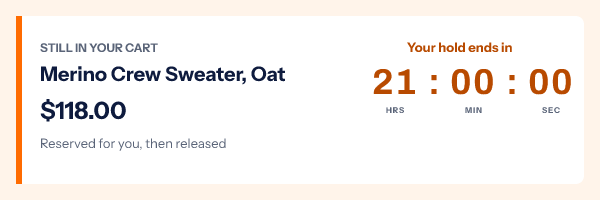
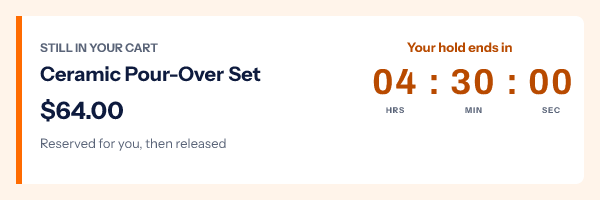
In EmailTimer.app this is a per-recipient deadline carried in a signed image address, minted for each shopper by the API when the cart is abandoned. Your flow writes the address to a contact field, and the image source in the email is that field. It needs the Growth or Agency plan (pricing), and the cart abandonment playbook walks through the setup and how long a hold should run. An evergreen timer, which starts at each reader’s first open, is the wrong model here: the hold began when the shopper left, not when they opened the email. The evergreen timer guide sets the timing models side by side.
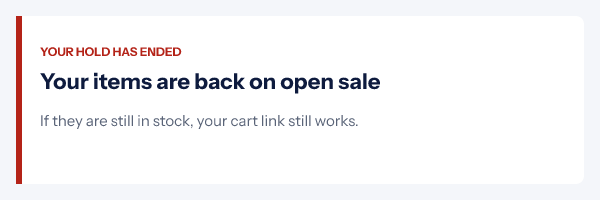
Then expire the hold for real. The FTC report describes a “Baseless Countdown Timer” as “showing a fake countdown clock that just goes away or resets when it times out”. A clock that reaches zero while the cart stays held, or while the code keeps working, is that clock. Fake countdown timers has the EU and UK rules as well. After the deadline, the image should say what happened rather than sit at zero, and in the template that is the image you choose under When it expires:
What the rules say about abandoned cart emails
In the US, a cart email is commercial. The FTC’s CAN-SPAM guide defines a commercial message as one whose primary purpose is “the commercial advertisement or promotion of a commercial product or service”. The transactional exemption covers messages about a transaction “the recipient already has agreed to”, and an abandoned cart is exactly the purchase they did not agree to. So the usual rules apply: honest header and subject line, the message identified as an ad, your postal address, a working opt-out, and opt-outs honored “within 10 business days”. The guide puts penalties at “up to $53,088” for each email in violation.
In the UK, marketing email to an individual needs consent under PECR, unless the soft opt-in applies. The ICO’s guidance sets its conditions: the person bought, or negotiated to buy, a similar product or service from you, and you gave them a simple way to opt out when you collected their details and in every message since. It “does not apply to prospective customers or new contacts”, and it does not say whether an abandoned cart, on its own, counts as negotiating to buy. The cautious build is an unticked marketing box at checkout, and a cart flow that goes only to people who ticked it or who have bought from you before. Shopify’s automation already works that way: “By default, the abandoned checkout automation is only sent to customers that are subscribed to email marketing.”
In the EU, Article 13 of the ePrivacy Directive has the same shape: consent first, with an exception for a customer’s address obtained “in the context of the sale of a product or a service”. Member states write their own rules on top of it.
This is a summary of the regulators’ guidance, not legal advice for your store.
How do you measure an abandoned cart flow?
Not by the revenue your platform shows beside it. That figure is attribution, and it counts orders that would have happened anyway. Klaviyo uses a last touch model by default, with a window of “5 days for email clicks” and “5 days for email opens”. A shopper who opens email 1, forgets it, and comes back on day three through a search ad counts as recovered. Opens are the weaker half: Apple’s privacy page says Mail Privacy Protection “downloads remote content in the background by default”, so an Apple Mail reader can register an open without reading anything.
The honest number comes from a holdout group. Hold back a random 10% of the shoppers who enter the flow, send them nothing, and compare:
Bought within 7 days, emailed group  = buyers ÷ shoppers who entered the flow
Bought within 7 days, holdout group  = buyers ÷ shoppers held back
What the flow adds                   = emailed rate minus holdout rate
Run it until both groups are large enough that the difference is not noise.
| Measure | How | What it tells you |
|---|---|---|
| Cart abandonment rate | Carts started but not bought, divided by carts started | How many shoppers enter the flow, not what it does |
| Clicks per email | Clicks divided by delivered | Which email does the work |
| Unsubscribes and complaints per email | Per email, not per flow | Whether email 3 costs more than it brings |
| Discount cost | Codes redeemed times the average discount | Whether the offer pays for itself |
Questions and answers
How soon should an abandoned cart email be sent?
Between one and four hours after the shopper leaves. Klaviyo recommends 2 to 4 hours after checkout starts.
How many emails should an abandoned cart sequence have?
Two or three, each with a different job: a reminder, a help email and an optional last email. Each one checks first whether the shopper has bought.
Is an abandoned cart email transactional?
No. Under CAN-SPAM it is commercial, because it promotes a purchase the shopper has not agreed to, so it needs an unsubscribe link and your postal address.
Can I send cart emails to shoppers who did not subscribe?
In the US, yes, with a working opt-out. In the UK and the EU you need consent or the existing customer exception, so send only to subscribers and past buyers.
Should the first abandoned cart email include a discount?
No. Klaviyo warns it “can train customers to abandon carts”. Keep any offer for the last email, and make the code stop working when it says it will.
What is the difference between cart abandonment and checkout abandonment?
Cart abandonment means items were added and the shopper left. Checkout abandonment means they started the checkout form, a stronger sign they meant to buy.
Sources
- Recovering abandoned checkouts (Shopify Help Center), read on 3 November 2026
- Managing the abandoned checkout automation (Shopify Help Center), read on 3 November 2026
- How to create an abandoned cart flow (Klaviyo Help Center), read on 3 November 2026
- Understanding Klaviyo message attribution (Klaviyo Help Center), read on 3 November 2026
- CAN-SPAM Act: A Compliance Guide for Business (Federal Trade Commission), read on 3 November 2026
- Electronic mail marketing, Guide to PECR (Information Commissioner's Office, UK), read on 3 November 2026
- Directive 2002/58/EC on privacy and electronic communications, Article 13 (EUR-Lex), read on 3 November 2026
- Bringing Dark Patterns to Light (FTC Staff Report, September 2022), read on 3 November 2026
- Mail Privacy Protection and Privacy (Apple Legal), read on 3 November 2026
- Photo by Kindel Media on Pexels
Related
Put a countdown in the campaign you are writing now
The free plan covers 5,000 opens a month with no card. Starter is $19 a month for 250,000.