
A unique coupon code is a discount code issued to one customer and valid for one use, such as SAVE20-7QX2K, instead of one public code like SAVE20 that anyone can paste. It cannot spread to coupon sites, and every redemption traces back to the email that carried it. Your store creates the codes; your email gives each person theirs.
The email half is where this page spends its time. A sending platform can print a code as text, and an image can draw it into the design with the shopper’s name, a QR for the till and their own end date. That second part is image personalization for email, and the two work best together.
What is a unique coupon code, compared with a static one?
Klaviyo’s help center puts the difference plainly: “A static coupon code is a single phrase or alphanumeric string that unlocks a specific discount”, while with unique codes “each recipient receives their own code for a coupon.”
| Difference | Static code | Unique code |
|---|---|---|
| Example | SAVE20 |
SAVE20-7QX2K |
| Who can use it | Anyone who has it | The person it was sent to, once |
| Can it be shared on coupon sites | Yes | Once, and then it is used up |
| What a redemption tells you | That someone used the code | Which email, and often which person |
| Setup | Type it into the email | Generate a batch, then give one to each recipient |
| Best for | Public sales, social posts | Welcome offers, win-backs, birthday and loyalty rewards |
Where do unique codes come from?
From your store, because the checkout is what accepts or refuses a code. That matters more than it sounds. Klaviyo warns that “uploading a list to Klaviyo does not create the discounts in your store”, and the same is true of any image tool: a code drawn into a picture is only a string until your store knows it.
On Shopify, a discount has a setting for “the number of times that a code can be used”, and Shopify’s help center notes “a cumulative limit of 20,000,000 unique discount codes for each store.” The batch itself usually comes from Shopify’s own tools or an app; Braze’s Shopify guide, for example, uses Shopify’s Bulk Discount Code Bot to generate the codes and export them as a CSV before uploading them as a code list. Other platforms (WooCommerce, BigCommerce, a custom checkout) have their own generators. Whatever you use, the output is the same: one file of codes, all under one discount, each usable once.
A format that holds up: a short prefix that names the offer, then a random part long enough that nobody guesses a neighbour’s code, as in SAVE20-7QX2K. Leave out characters that look alike in print, such as 0 and O or 1 and I, because someone will read the code off a phone and type it.
How to put a unique coupon code in an email
There are two places a code can go, and you want both.
As live text, from your sending platform. Most platforms that sell to stores have a coupon block or tag that assigns one code per recipient at send time. This is the copy a reader can select, paste at checkout, and read with a screen reader. The W3C’s success criterion 1.4.5 asks that “text is used to convey information rather than images of text” where text can achieve the same presentation, and a code someone has to type is exactly that kind of information.
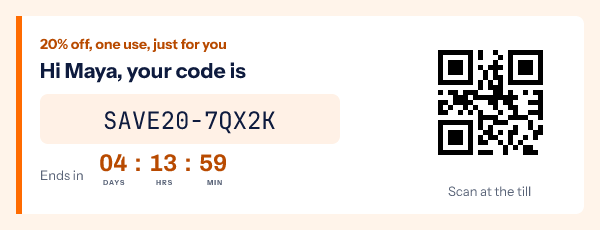
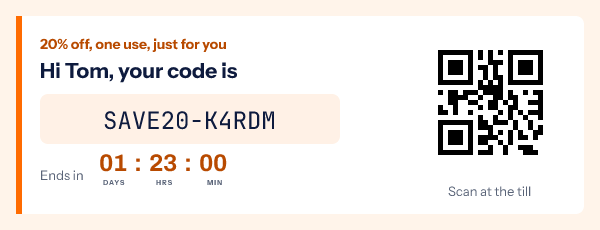
Drawn into the image, from your list. An image can do what a text block cannot: set the code in the campaign’s design, add a QR of the same code for scanning at a till, and count down to that shopper’s own end date. In EmailTimer.app, a template holds a text layer reading {{code}}, a QR layer whose content is {{code}}, and a timer set to a per-recipient deadline.
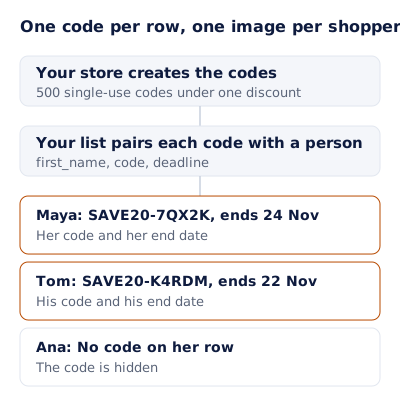
The codes reach the image as rows. Your store creates the codes, and your list pairs each code with a person: one row with first_name, code and deadline. Upload it as a recipient list, export one signed image address per row, and import that column into your platform as a contact field. The image src is that field, so the image draws that row. Per-recipient addresses come with Growth and Agency on pricing, and the API mints the same addresses from code.
Use the same file for both halves, so the text block and the image show the same code. If your platform assigns codes itself at send time, export them afterwards, or let the image carry the design and the QR while the text block carries the code.
What happens when you run out of codes?
Platforms differ, so check yours before a big send. Klaviyo’s help center says: “If a campaign or flow message cannot assign a code to a recipient, that recipient’s message is skipped”, and “flow emails that contain coupon codes with 0 available cannot be turned live.” It also says uploaded codes are stored “for 1 year” by default, after which “unsent codes will expire automatically”.
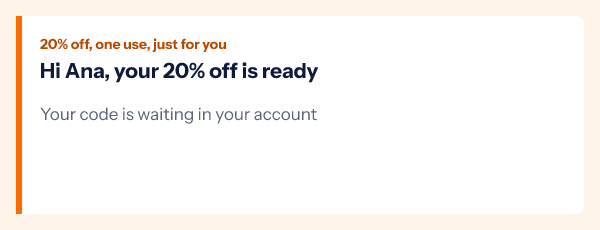
In an image drawn from your list, a row with no code is not skipped: the variable’s fallback decides. Set the code to hide its group, as in Ana’s render above, and the reader gets a sensible line instead of a blank box or a code that does not exist. That keeps the email safe, but it does not give Ana a discount, so:
- Generate more codes than you have recipients, and count both before the send.
- For a flow that runs for months, top the code list up on a schedule.
- Never fill an empty row with a shared code; one leaked static code undoes the reason for unique ones.
Giving each code its own end date
A single-use code often has a personal window: seven days from signup, or 48 hours from a cart being left. A per-recipient deadline in the same image shows that window counting down, using the deadline column on the same row. The clock is honest only if the code really stops working then, so set the same expiry on the discount in your store. The guide to fake countdown timers covers where a timer stops being a fact.
A unique coupon code email you can copy
The list you upload, one row per recipient:
email,first_name,code,deadline
maya@example.com,Maya,SAVE20-7QX2K,2026-11-24T23:59
tom@example.com,Tom,SAVE20-K4RDM,2026-11-22T09:00
ana@example.com,Ana,,
The email around the image:
Subject: Maya, your 20% off code is inside
Preheader: One use, yours only, until 24 November.

[Image: name, code, QR for the till, countdown to her end date]
Alt text: Your code SAVE20-7QX2K, 20% off until 24 November

Your code: SAVE20-7QX2K    (live text, so it can be copied)
[Button: Shop with your code]   (link that applies the code, if your store supports it)

Small print: one use per customer, ends 24 November at 11:59pm ET,
cannot be combined with other offers.
The same pattern carries a referrer’s own code in a referral email, a reward in a birthday email, and a points redemption in a loyalty email. For a code that is scanned rather than typed, the QR code in email guide covers size and quiet zone.
Questions and answers
What is a unique coupon code?
A code issued to one customer and valid for one use, generated in a batch under one discount. It stops public sharing and tells you which email led to the order.
Does EmailTimer.app create the coupon codes?
No. Your store creates them, because the checkout has to accept them. EmailTimer.app draws the code each row carries into the image, with a QR of it and that person’s end date if you want them.
Should the code be in the image or in the text?
Both. The image sets it in the design and can add a QR and a countdown; the text is what readers copy, what screen readers read, and what shows when images are off.
What if a recipient forwards the email?
Whoever holds a single-use code can redeem it once. If that matters, check whether your store can also limit the discount to the customer it was meant for.
Can each code expire at a different time?
Yes. Put each person’s deadline on their row, and set the matching expiry on the discount in your store so the countdown and the checkout agree.
Sources
- Getting started with coupon codes (Klaviyo Help Center), read on 4 November 2026
- Discount codes (Shopify Help Center), read on 4 November 2026
- Shopify discount codes (Braze Documentation), read on 4 November 2026
- Understanding Success Criterion 1.4.5: Images of Text (W3C, WCAG 2.2), read on 4 November 2026
- Photo by Tim Douglas on Pexels
- Photo by Mikhail Nilov on Pexels
Related
- QR codes in email, and a different code for every recipient
- Referral emails that show each referrer their own code and progress
- Loyalty program email examples, from the welcome to the anniversary
- Birthday email templates, with the subscriber's name in the image
- Fake countdown timers, and where regulators drew the line
Put a countdown in the campaign you are writing now
The free plan covers 5,000 opens a month with no card. Starter is $19 a month for 250,000.