
Hyper personalization in email means every recipient of one send gets values that belong to them alone: their name, their single-use code, their points balance, their tier, their own deadline, and a product picture chosen by their data. It works whenever those values already sit in your records at send time. It stops where a value would have to be looked up live, at the moment of opening.
Most of what makes a send feel one to one lives in the pictures, because an image can carry a balance, a progress bar and a countdown that body text cannot. That is image personalization for email, and this page draws the line between what it can do per recipient today and what would need live data you may not have.
What is hyper personalization?
The pages that rank for the term are vendor definitions, and they agree on the ingredients. IBM calls it “a business strategy that uses advanced technologies to deliver highly tailored experiences”, based on each customer’s behavior and preferences. Salesforce opens with “the use of advanced data and analytics to tailor experiences, communications, and offerings”. Sitecore puts the weight on timing: “It’s about responding to individual intent in real time”.
Read them side by side and two claims repeat: the data is about one person rather than a segment, and some of it is live. Both are fair. But none of the three pages says which parts of an email can carry that data, or what happens to the “real time” part once a message has left your platform and sat in an inbox for two days.
For email, a working definition is narrower and more useful. Hyper personalization is a send in which the fields that matter to the reader (the offer, the amount, the date, the picture) are drawn from that reader’s own record, not picked from a short list of segment versions. The test is simple. If two recipients could compare their emails and find every important number different, the send was hyper personalized. If they would find one of four versions, it was segmentation.

Hyper personalization vs personalization in one email
The difference is not a new technology. It is how many of the email’s facts come from the individual record, and where in the email they can appear.
| Level | What differs per recipient | Example | What it needs |
|---|---|---|---|
| Segmentation | Which of a few versions they get | Gold members get version A, everyone else version B | A segment rule |
| Basic personalization | A field or two in text | “Hi Maya” in the subject line | A name field |
| Per-recipient values | Every number and code | Maya’s 1,240 points and her code MAYA-7QX2 | One record per person, current at send |
| Per-recipient values in the image | The same values, drawn as a designed picture | Her balance, a bar to her next tier and her code’s own countdown | The values, plus an image drawn at open |
| Live context at open | Facts that change after the send | Today’s stock count or the weather where she is reading | A data source queried at the moment of opening |
The first three rows run inside any decent email platform. The fourth is where most “1 to 1 personalization” claims are actually delivered. The fifth is where vendor definitions say “real time”, and where an email program should check what it really has before promising it.
What can differ per recipient in one send
Here is the honest inventory, field by field. Every row can be different for every recipient of the same campaign.
| Value | Example | Where it comes from | How it shows up |
|---|---|---|---|
| First name | Maya | Your contact record | Text in the image, with a fallback such as “there” |
| Points balance | 1,240 points | Loyalty system, written to the record before the send | Text, formatted with a thousands separator |
| Tier | Gold | Loyalty system | A badge whose color a rule changes per tier |
| Progress to the next tier | 62 percent of the way to 2,000 | Worked out from the balance before the send | A progress bar |
| Single-use code | MAYA-7QX2 | Your store or coupon system | Text, or a QR code that carries it |
| Their own deadline | The code expires 21 November, 23:59 | Issue date plus the validity period | A countdown that counts to that recipient’s instant |
| Product picture | The jacket in the color they bought last | A value that names one of your uploaded images | An image layer that picks the matching upload |
That last row matters more than it looks. The value does not carry a picture. It names one, and the renderer draws the matching image from your own uploads, falling back to the layer’s default image when the value is missing or unknown. Which product to show is still your platform’s decision, made from its own purchase or browsing data. Personalized product images covers that split in detail.
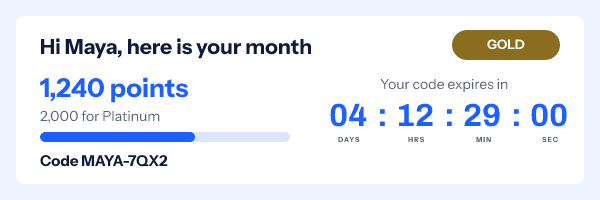
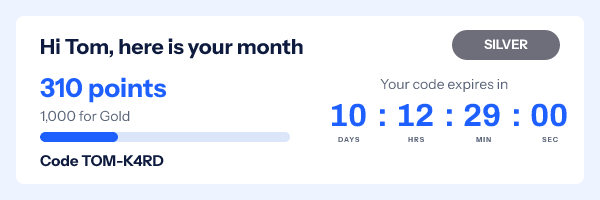
Here is one template, rendered by the product’s own engine for two members on the same afternoon:
Hyper personalization examples by email type
| What is the reader’s own | Where it goes deeper | |
|---|---|---|
| Monthly loyalty statement | Balance, tier, bar to the next tier | Loyalty program emails |
| Welcome offer | A single-use code and its own 7-day expiry | Unique coupon codes |
| Renewal reminder | Their plan, their renewal date, a countdown to it | Image mail merge |
| Back in stock | The product picture for the size or color they wanted | Personalized product images |
Rules add a second layer of difference without more data. A rule reads a field in the recipient’s values, the time the image is opened, the recipient’s country or their device, and then shows or hides a layer, changes text, swaps an image or a color, or switches to a named variant. Country and device come with a caveat: Google says “Gmail uses Google’s secure proxy servers to serve images”, and Apple’s Mail Privacy Protection masks the reader’s IP address, so for a large share of opens those two signals are missing or describe a proxy. Build rules on the record and the open time first.
What needs live data you may not have
Every value in the table above was known before the send. Some of what the definitions promise is not.
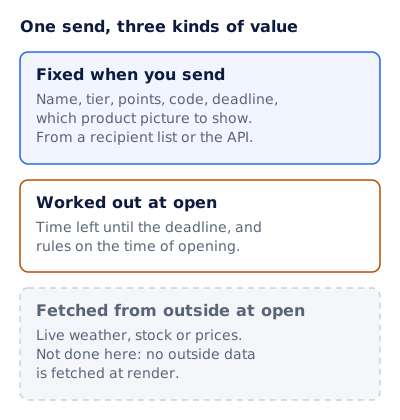
Fixed when you send. The bulk of a hyper-personalized email. The values are tied to each recipient’s image address before the send, from a recipient list or the API, and they do not change afterwards.
Worked out at open. The renderer knows one thing by itself: the time. So the time left until each recipient’s deadline is computed when the image is requested, and so is any rule that reads the time of opening, such as swapping the headline once early access begins. Apple’s page says “Protect Mail Activity downloads remote content in the background by default”, so for those readers “at open” can mean at delivery.
Fetched from outside at open. Live weather, stock or prices that moved since the send, the item they looked at an hour ago. Each needs a data source queried during the image request. EmailTimer.app does not do this: no outside data is fetched at render, which is a security position rather than a missing switch, because an image service that calls arbitrary addresses on demand is one more thing that can leak or stall.
What to do instead depends on the value:
- Stock or seats. Send the count your platform holds at send time, round it (“fewer than 20 left”), and hide the layer below a threshold with a rule.
- Price. Put the price your platform computed for that recipient into the values. If it can change before the offer ends, show the discount, not the final price.
- Location. Use the city or store on the contact record, which the reader gave you, rather than a location guessed from an IP address that Apple’s relay hides anyway.
- Recent browsing. Let your platform’s flow fire soon after the event, so the value in the image is minutes old, not days.
Real time personalization goes through what “live” honestly covers in an email, value by value.
Where the per-recipient values come from
Values reach the image in one of two ways, both on the Growth and Agency plans:
- A recipient list. Upload a CSV of up to 500,000 rows. Each row gets its own signed image address, and the export is a CSV of those addresses, one per recipient. Image mail merge walks through this route.
- The API.
POST /urls/batchsigns up to 10,000 addresses in one call, from your own systems. The reference is in the API docs.
Either way, the whole signed address goes into a contact field in your email platform, and that field becomes the entire image source in the template. The address is signed, so editing any part of it breaks it, and an address from a recipient list carries an opaque token rather than the name or the balance. The integration guides, such as the Kit guide, show where the field goes for each platform.
Sending this to a few hundred thousand people raises its own questions: how many renders a second, what a reader sees if a limit trips, how long a personalized render is kept. Those are answered on personalization at scale.
A hyper personalization template you can copy
Start with a data audit, not a design. Every field below needs a source, a format and a fallback before it goes near the template, and it needs to reach your email platform before the send, whether it lives there already or in a customer data platform (CDP) that syncs to it.
Field          Source                       Format           If missing
first_name     contact record               truncate to 12   draw "there"
tier           loyalty system               upper case       hide the member group
points         loyalty system               1,240            hide the member group
progress       points / next tier x 100     0 to 100         hide the member group
code           coupon system, single use    as issued        hide the offer group
deadline       issue date + 7 days          date and time    hide the countdown
product        last category bought         one of 6 images  default product image
Then the email around the image:
Subject:   Maya, 1,240 points and a code that is yours alone
Preheader: It is good for 7 days from today.

[Image: greeting, tier badge, points, bar to next tier,
 code, countdown to this code's expiry]

Body:   One line on what the points buy at this tier.
        The code again as live text, so it can be copied.
Button: Use my code
Footer: Why you are getting this, and how to stop.
Two details in that skeleton earn their place. The code appears twice, once in the image and once as live text, because a reader with images off still needs it and a picture of text cannot be copied. And the subject line uses only the name and the balance, the two fields least likely to be wrong.
Run the fallbacks before the send. Preview the template with a full record, with a record missing the tier, and with an empty one. If any of those draws a gap where a number should be, fix the fallback, not the record.
When does hyper personalization feel too personal?
Salesforce gives a whole section to “overpersonalization and customer creep-out”, and it is the right worry. The line usually falls between what the reader told you and what you inferred. A balance, a tier, a code and a deadline are facts about their account; nobody is surprised to see them. “We noticed you looked at this jacket three times on Tuesday” is an inference, and it reads like surveillance even when it is accurate.
Keep inferred data out of the image’s words and let it choose the picture instead: showing the jacket is fine, narrating how you knew is not. For what the law asks of the data behind each field, including profiling and the right to object, see email personalization.
Questions and answers
What is hyper personalization in simple terms?
Every recipient of one email gets values that are theirs alone, such as their own balance, code and deadline, rather than one of a few segment versions. Vendor definitions add AI and real-time data; in email, the part that reliably works is per-recipient values known at send time.
What is the difference between personalization and hyper personalization?
Personalization changes a field or two, usually the name. Hyper personalization draws every number that matters to the reader from their own record, often inside a designed image, so two recipients comparing emails would find their offers, dates and amounts all different.
Does hyper personalization need real-time data?
Less than the definitions suggest. Name, tier, balance, code, deadline and product choice are all known before the send. Only facts that change after the send, such as live stock or weather, need a source queried at open, and EmailTimer.app does not fetch outside data at render.
Can I do 1 to 1 personalization without AI?
Yes. Choosing what to send each person may involve a model in your platform, but drawing the result into the email is a data job: a field per value, a fallback per field, and an image that renders those values for each recipient.
What happens if a value is missing for one recipient?
Each variable has a fallback set in the template: draw a default, hide that layer, or hide the group it belongs to. A member with no tier on file can see a plain greeting and no badge, rather than an empty pill.
Sources
- What is hyper-personalization? (IBM Think), read on 4 November 2026
- Hyper-Personalization in Marketing: A Guide (Salesforce), read on 4 November 2026
- What is hyper-personalization? (Sitecore), read on 4 November 2026
- Mail Privacy Protection and Privacy (Apple Legal), read on 4 November 2026
- Set up an image URL proxy allowlist (Google Workspace Admin Help), read on 4 November 2026
- Photo by Konstantin Khrustov on Pexels
- Photo by Vitaly Gariev on Pexels
Related
- Real time personalization in email: what is live when the reader opens
- Personalization at scale: what breaks at five million opens, and what a reader sees
- Image mail merge, in Word and in email
- Personalized product recommendations in one image per shopper
- Email personalization: what to tailor, with which data, and where to stop
Put a countdown in the campaign you are writing now
The free plan covers 5,000 opens a month with no card. Starter is $19 a month for 250,000.